Automating scheduling and payroll integration can save businesses time, reduce errors, and cut costs significantly. By connecting these systems, companies eliminate manual data entry, which is a common source of payroll mistakes. This integration ensures accurate paychecks, compliance with labor laws, and better workforce management. Here's what you need to know:
- Error Reduction: Manual payroll processes have a 20% error rate, with 72% due to data entry issues. Integration can reduce errors by 60%–90%.
- Time Savings: Payroll processing time can drop by up to 70%, freeing up resources for other tasks.
- Cost Savings: Businesses can save 2%–8% of annual payroll costs by preventing errors and improving efficiency.
- Compliance: Automated systems help follow labor laws, apply pay rules, and generate audit trails to avoid fines and legal issues.
- Better Insights: Real-time data syncing offers visibility into labor costs, schedules, and attendance.
For businesses of all sizes, linking scheduling and payroll systems streamlines operations, improves accuracy, and enhances compliance. Tools like BizBot can help identify affordable solutions tailored to your needs.
How Scheduling and Payroll Systems Connect
What Automated Scheduling Software Does
Automated scheduling software is designed to simplify shift assignments, monitor employee availability, and manage labor budgets using constraint-based algorithms. It ensures compliance with strict rules, like legal limits on consecutive workdays, while also aiming for goals such as reducing overtime costs. Beyond just creating schedules, these systems keep track of when employees clock in and out. They often rely on tools like biometric facial recognition, GPS geofencing for mobile teams, or digital time clocks to verify attendance, providing "proof of presence". Additionally, the software flags issues like missed punches, tardiness, or unauthorized overtime, alerting managers before the data moves forward in the process.
What Payroll Systems Do
While scheduling software organizes work shifts, payroll systems handle the financial side by converting worked hours into accurate employee compensation. These systems calculate wages by applying pay rules, tax regulations, and deductions, then process payments - often through direct deposit - and produce digital pay stubs. They also manage more complex calculations, such as federal, state, and local tax withholdings, deductions for benefits like insurance and 401(k) plans, wage garnishments, and additional earnings like tips, bonuses, or reimbursements. For businesses with various locations or roles, payroll systems can also allocate labor costs by project or department using job codes and location data.
How the Integration Works
Integrating scheduling and payroll systems ensures that efficient scheduling translates into accurate payroll processing. This connection is made possible by secure API transfers of key data, including employee IDs, shift details, hours worked (both regular and overtime), and pay codes. For instance, platforms like SchedulePro use "Timesheet" endpoints to gather actual worked hours or "Payroll" endpoints to retrieve data adjusted by pay rules engines. Meanwhile, systems like TimeTrex operate on a single native database where scheduling and payroll functions are unified, removing the need for external data transfers. Before finalizing payroll, these systems lock the pay period, check for issues like incomplete punches, verify approvals, apply pay rules for calculations (such as shift differentials and taxes), and generate ACH files for bank payments. This streamlined process not only prevents last-minute changes but also ensures accuracy and compliance throughout the payroll cycle.
Easily Schedule and Pay Employees with Paychex Flex® and When I Work
Steps to Connect Scheduling and Payroll Systems
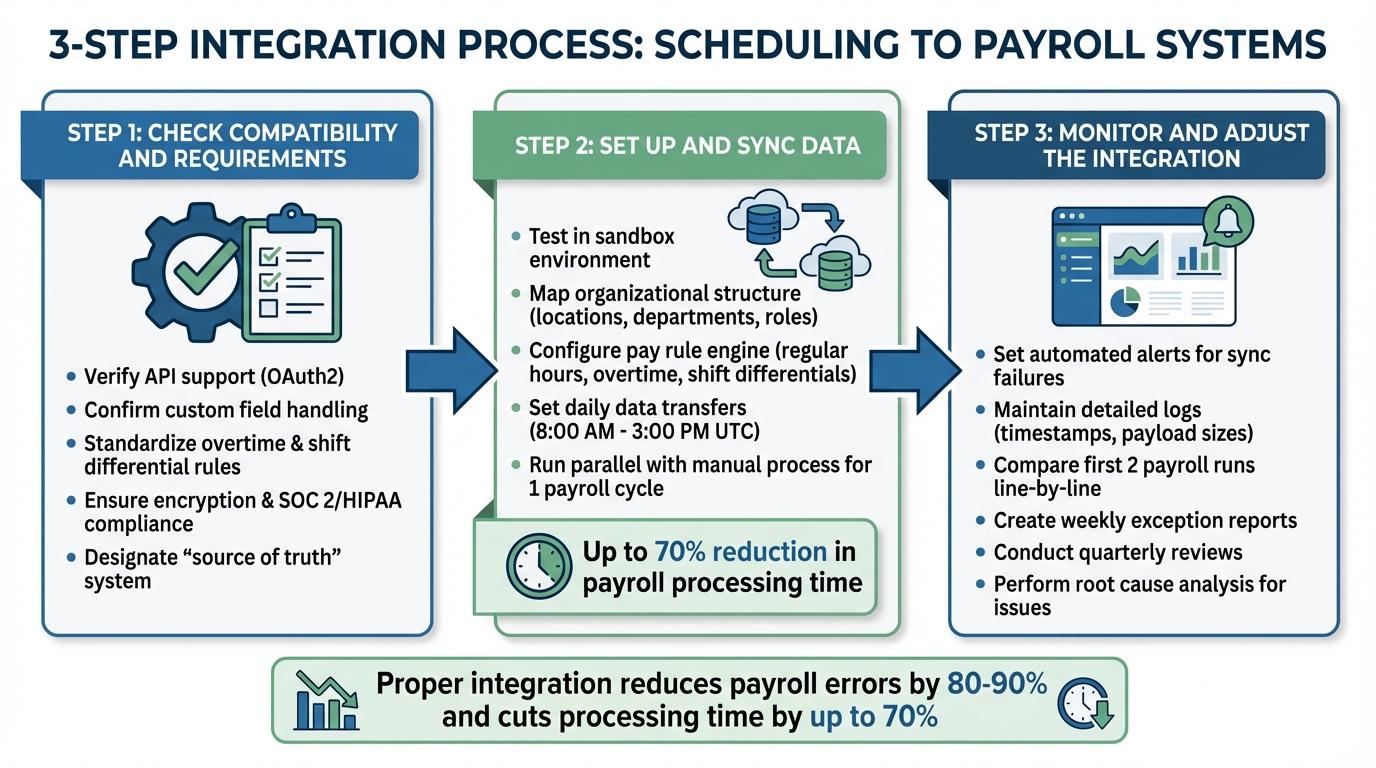
3-Step Process for Integrating Scheduling and Payroll Systems
Linking scheduling and payroll systems can save time, reduce errors, and simplify workforce management. Here’s a clear guide to help you integrate these systems effectively.
Step 1: Check Compatibility and Requirements
Start by ensuring your scheduling and payroll systems can securely connect. Look for features like API support (e.g., OAuth2) to enable automated data sharing using unique employee identifiers (UUIDs).
Next, confirm that both systems can handle custom fields, such as shift differentials or project-specific cost allocations. Standardize rules for overtime, rounding, and shift differentials ahead of time.
Security is critical. Make sure both platforms use encryption for data in transit and at rest and meet standards like SOC 2 or HIPAA, if applicable. Determine which system will act as the "source of truth" for employee records - this is often your HR system or payroll provider - to avoid conflicting updates during synchronization.
Once compatibility and data mapping are sorted, you’re ready to move on to data setup.
Step 2: Set Up and Sync Data
Begin by testing the integration in a sandbox environment. This helps ensure that data mapping, pay rule configurations, and UUID alignment are correct. Map your organizational structure - covering locations, departments, and roles - so data flows accurately between systems.
Configure the pay rule engine to automatically calculate payable hours from shift data. It should account for regular hours, overtime, double overtime, shift differentials, and unpaid meal breaks before sending data to payroll. Accurate time tracking ensures compliance with pay rules.
Set up daily data transfers to capture updates, such as between 8:00 AM and 3:00 PM UTC the day before payroll processing. Run the integrated system alongside your manual process for at least one payroll cycle to verify accuracy. A proper integration can cut payroll processing time by up to 70% and reduce payroll errors, which can cost businesses 2% to 8% of their annual payroll.
Step 3: Monitor and Adjust the Integration
Once the integration is live, regular monitoring is essential to maintain accuracy. Use automated alerts to catch synchronization failures immediately. Keep detailed logs of each integration job, including timestamps and payload sizes, to help with troubleshooting and audits.
For the first two live payroll runs, compare results line-by-line with accounting records to ensure everything is functioning as expected. Only sync manager-approved time punches to avoid errors.
Create weekly exception reports and conduct quarterly reviews to address discrepancies promptly and maintain system reliability. Monitor key metrics like error rates, processing time, and cost savings to evaluate the integration’s performance. If issues arise, perform a root cause analysis to fix the underlying problem - such as mismatched employee identifiers - instead of just correcting individual errors.
sbb-itb-d1a6c90
Benefits of Connecting Scheduling with Payroll Systems
Integrating scheduling and payroll systems offers clear advantages in improving accuracy, saving time and money, and ensuring compliance.
Better Accuracy and Fewer Errors
When scheduling and payroll systems work together, manual data entry - one of the biggest sources of payroll mistakes - becomes a thing of the past. Traditional payroll processes have an error rate of nearly 20%, with 72% of mistakes rooted in data input issues. On average, fixing a single payroll error costs $291. For a company with 1,000 employees, these errors can result in annual losses of $922,131.
Integrated systems can slash payroll errors by 80% to 90%. By creating a single, trusted source for work hours, overtime, and leave data, these systems ensure that approved time records flow directly into payroll. This allows managers to catch errors - like missed clock-outs - before payroll is finalized. The software also applies pay rules automatically, whether it’s calculating shift differentials, holiday pay, or overtime, and flags discrepancies between scheduled and actual hours for review.
These improvements in accuracy lead to measurable savings in both time and money.
Time and Cost Savings
By automating the connection between scheduling and payroll, businesses can cut payroll processing time by 30% to 70%. What used to take days can now be done in minutes. This seamless flow of data eliminates the need for manual re-entry and cleanup.
"Full-time payroll employees lose an average of 29 weeks per year fixing mistakes in traditional systems." – Ernst & Young
Automation doesn’t just speed things up - it drastically reduces the time spent on payroll tasks. Businesses can save up to 80% of the time typically devoted to payroll-related work. For instance, managing schedules for a team of 50 employees can drop from 20 hours per month to just 2 hours. This newfound efficiency allows payroll teams to focus on higher-value tasks instead of chasing down timesheets or correcting errors.
Financially, integration helps prevent costly losses. Nearly half of workers admit to occasionally padding their timesheets, and businesses relying on manual methods can lose up to 4% of their annual payroll costs to time theft. Technologies like biometrics and geofencing also eliminate practices like buddy punching, which costs U.S. employers $373 million annually.
Better Compliance and Reporting
Integrated systems play a key role in maintaining compliance with labor laws. They act as a safeguard, using rules-based engines to prevent employees from exceeding daily or weekly hour limits and automatically applying pay rules such as the FLSA "Regular Rate of Pay" or California's "7th Day" rule.
Cloud-based systems ensure your business stays up to date by automatically updating tax tables and labor law requirements in real time. This is critical because 80% of employers fail to properly track employee hours, and nearly 1 in 6 businesses face legal or regulatory issues due to payroll errors. Non-compliance can be expensive, with legal fees, settlements, and fines costing businesses up to $250,000 annually.
For reporting, integrated systems provide real-time insights into labor costs versus scheduled hours. They also maintain detailed, time-stamped audit trails of schedule changes, approvals, and adjustments. These records are essential for defending against wage and hour lawsuits and meeting FLSA requirements to retain payroll records for at least three years.
Using BizBot to Find Integration Tools
BizBot's Tool Directory
BizBot categorizes business administration tools into straightforward sections like HR management, accounting, payroll solutions, and more. This structure helps businesses quickly find tools that integrate scheduling and payroll systems. The focus is on tools that streamline processes by enabling a seamless flow of data - reducing the need for duplicate manual entries. When exploring the directory, look for features such as two-way integration to sync pay rate changes automatically, automated compliance updates to flag issues like overtime violations, and real-time data syncing to pull attendance logs directly into payroll calculations. Security is another critical factor - opt for tools with 256-bit SSL encryption and SOC 2 Type II compliance to safeguard sensitive employee information. This organized approach allows businesses to discover cost-effective solutions without compromising efficiency or security.
Tools for Small Businesses and Freelancers
BizBot also highlights affordable, user-friendly options tailored for small businesses and freelancers looking to improve their workflows on a budget. Many tools featured include "Free Forever" plans or low-cost entry points ideal for small teams. For example, ClockIt offers a free basic plan, with paid upgrades starting at just $2.99 per user per month. Similarly, Homebase, trusted by over 100,000 businesses, begins at $39 per month with an additional $6 per employee. In February 2026, Student Agencies shared how switching to Homebase saved them around $10,000 annually. HR Director Riley McGuire noted that payroll processing time dropped from an entire day to just 60–90 minutes. These tools not only reduce payroll errors but also free up valuable administrative time.
Conclusion
Linking automated scheduling software with payroll systems eliminates the need for error-prone manual data entry. This connection ensures worked hours are seamlessly converted into accurate paychecks, cutting down errors by as much as 80%. Considering that 53% of employees might leave after repeated payroll mistakes, precision in payroll becomes essential for retaining talent.
But the benefits go beyond just accuracy. These integrated systems handle overtime rules automatically, monitor compliance with labor laws, and offer real-time insights into labor costs. This allows managers to adjust schedules proactively, avoiding budget surprises. Additionally, automated compliance features help protect businesses from costly legal penalties.
For those ready to embrace this shift, BizBot provides a curated directory of scheduling and payroll tools tailored to different business needs. Whether you're a small team, freelancer, or a larger operation, the platform highlights tools that fit various budgets and requirements. Features like two-way data syncing, biometric verification, and mobile self-service options make it easier to find the right solution for your operations.
FAQs
What data should sync between scheduling and payroll?
Key details to keep in sync are employee hours worked, scheduled shifts, and actual clock-in and clock-out times. Keeping these aligned ensures wages are calculated correctly and compliance standards are met. By streamlining these processes, payroll becomes more efficient, and errors are minimized.
Which system should be the source of truth?
Integrated systems act as a reliable foundation for accurate and consistent payroll processing. By automatically syncing schedules and work hours, they help reduce errors and make the entire process more efficient. This seamless alignment not only cuts down on discrepancies but also simplifies workflows, saving time and effort.
How do you test an integration before going live?
To effectively test the integration between scheduling and payroll systems, focus on a few critical steps. Begin by verifying essential functions such as data transfer accuracy, pay calculations, and compliance checks using well-structured test cases. Simulate realistic scenarios to confirm that hours worked, deductions, and taxes are processed correctly. Incorporate automated testing tools to identify potential errors early and ensure smooth data flow between systems. Finally, carefully review the test results to spot any discrepancies or compliance issues before moving forward with live deployment.