ETL load testing ensures your data pipelines handle large volumes efficiently without errors, delays, or failures. Poor data quality can cost organizations millions annually, making thorough testing indispensable. Here's a quick rundown of the process:
- Set Goals: Define clear performance benchmarks like throughput, latency, and error thresholds.
- Prepare Test Scenarios: Simulate real-world conditions, including peak loads and edge cases.
- Create Realistic Test Data: Use production-like datasets, ensuring variability and masking sensitive data.
- Validate System Setup: Mirror production settings, check configurations, and run initial benchmarks.
During execution, establish performance baselines, test scalability, and monitor system resources. Post-testing, validate data accuracy, transformation logic, and recovery mechanisms. Use error logs and performance insights to fine-tune your ETL pipeline. Regular testing and monitoring help maintain data integrity and meet SLAs.
Key takeaway: A structured approach minimizes risks, ensures accuracy, and optimizes performance under heavy data loads.
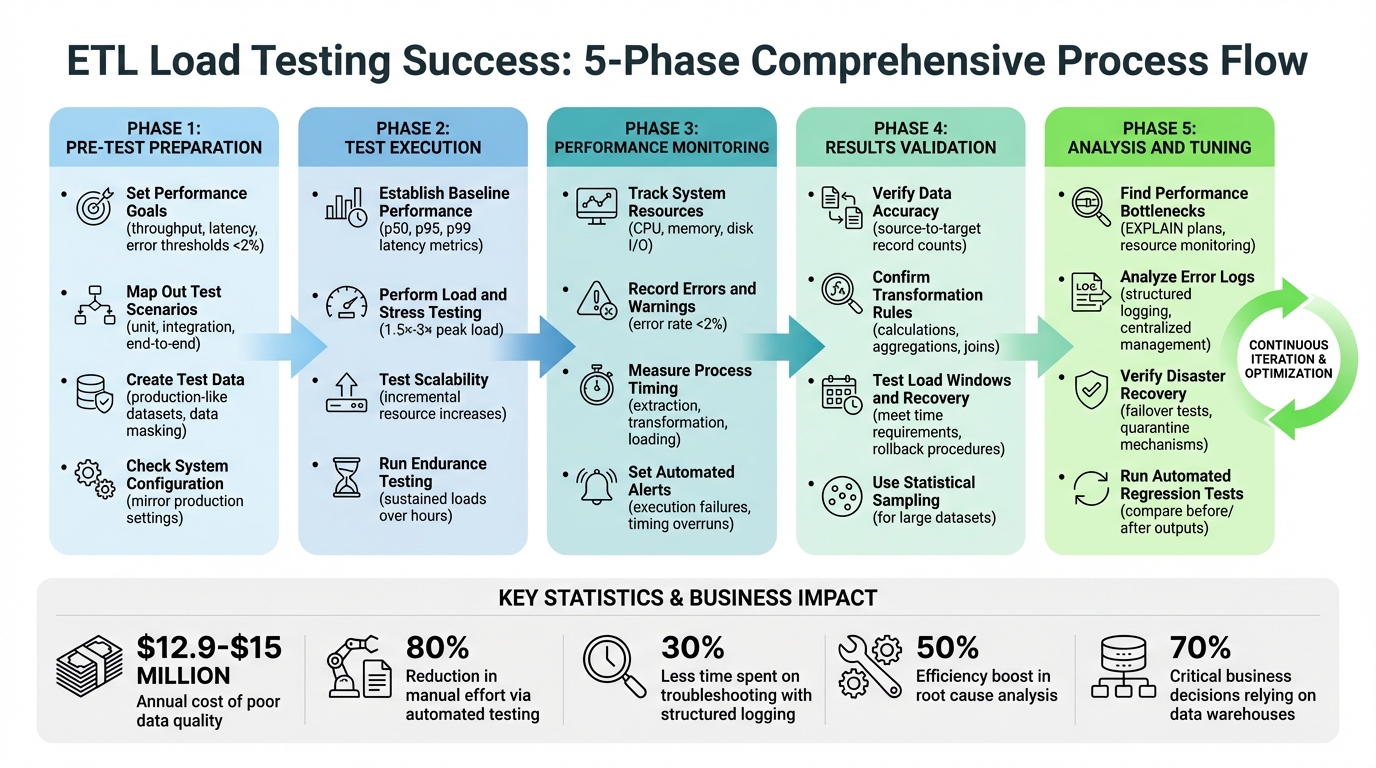
ETL Load Testing Checklist: 5-Phase Process from Preparation to Optimization
ETL testing End to End Process with Live Data | Flat File , Mapping Sheet, Test Case, Excel Validatn
sbb-itb-d1a6c90
Pre-Test Preparation Checklist
Getting ready for ETL load testing is just as important as the test itself. The groundwork you lay beforehand determines whether your results will provide real insights or just noise. Without clear objectives and a properly mirrored test environment, you risk running tests that fail to reflect actual conditions or deliver any useful feedback.
"If you neither know the test requirements, nor the desired outcome, then the performance testing is a waste of time." - LoadView
Set Performance Goals
Start by defining clear, measurable targets. These can include metrics like throughput (records or bytes processed per time unit), latency (per record or batch), and error thresholds. For example, industry guidelines recommend keeping error rates under 2% for transactions under normal load. Go beyond averages - use the 90th percentile response time to ensure 90% of transactions meet your performance goals, even if there are a few outliers. Don’t forget to align these targets with your Service Level Agreements (SLAs), particularly the "load window" - the timeframe for completing data loads into the target system.
Collaborate with application architects, developers, and business analysts to identify expected concurrent users and the total user base. If business requirements aren’t crystal clear, use data from existing Application Performance Monitoring (APM) tools or production logs to set benchmarks.
Map Out Test Scenarios
List all the scenarios your ETL system might encounter, covering various performance conditions. Review the entire data flow and design documents to map each transformation stage, data volume, and schema.
Prioritize high-risk scenarios that could affect accuracy, like handling peak data volumes, transforming sparse files, converting legacy data, or merging data from multiple sources. Break down your testing into categories: unit testing for individual transformations, integration testing for orchestration, and end-to-end testing for the full workflow. Don’t skip negative testing - push the system beyond typical usage to uncover its limits and identify potential failure points.
Make your test cases flexible by parameterizing them to easily adjust data volumes and file formats. Consider building tools to inject faults and measure how well the system recovers.
Create Test Data
Your test data should closely resemble what’s in your production environment. As ARDURA Consulting puts it:
"An empty database responds faster than one with 10 million rows. If production has 500,000 user accounts and 2 million orders, your test environment needs the same magnitude." - ARDURA Consulting
Use data sub-setting to create smaller, representative samples of production data while preserving its complexity. If your data includes sensitive information, apply robust masking techniques to protect it while maintaining important patterns and statistical properties. When production data isn’t available, generate synthetic data using algorithms that mimic real-world distributions.
Ensure data variability by including hundreds of unique inputs to avoid unrealistic cache hits and test different database query plans. Don’t forget to include edge cases, invalid data, and duplicates to test how the system handles errors and rejects problematic entries. Before creating test data, perform detailed profiling to understand the characteristics and distributions that need to be replicated.
Check System Configuration
Your ETL system settings and environment should mirror production as closely as possible. Double-check source connections, batch sizes (typically between 100 MB and 1 GB), and other configurations. To handle duplicate data during load tests, use ingestion mappings and idempotency strategies with identifiers like SourceId or SourceKey. Validate data movement by setting up checksums and matching record counts between the source, staging, and target tables.
Run initial benchmark tests with a predefined dataset to establish your acceptance criteria for pass/fail metrics before starting full-scale testing. This ensures you’re not just testing blindly but working with a stable and reliable environment. Once these steps are complete, you’ll be ready to dive into testing with confidence.
Test Execution Checklist
With all the groundwork laid, it's time to run structured tests to ensure your ETL processes can handle substantial data volumes, uncover bottlenecks, and identify areas for improvement. Start by establishing a performance baseline that reflects typical operating conditions.
Establish Baseline Performance
Before pushing your system to its limits, you need a clear understanding of how it performs under normal circumstances. Using your pre-test configurations, collect baseline metrics to set measurable success criteria. Focus on metrics like p50, p95, and p99 latency, throughput, and error rates. These metrics provide a well-rounded view - not just average performance but also how the system handles most transactions and even the slowest outliers.
Run ETL jobs with production-like data volumes, scaling up to 10× the usual row count. This ensures query optimizers behave realistically and don't rely on assumptions based on small or empty tables. Record the start and end times of each job to calculate total duration. Also, track source-to-target record counts to determine the processing rate (records per minute).
Exclude the first 5–8 minutes of the test run - this is when activities like JIT compilation, connection pool initialization, and caching occur. As Radview points out:
"A 10 ms response time might turn into 50 ms, and then into 100 ms - and nobody notices until users do." - Radview
Focus on the steady-state phase (typically 20–60 minutes) for accurate performance measurements. During this time, monitor metrics like CPU usage, memory consumption, disk I/O, and database connection pool activity. Use this data to define failure thresholds. For instance, if a job typically takes 10 minutes, flag it as failed if it suddenly takes 15 minutes.
Perform Load and Stress Testing
Once you've established a baseline, simulate peak loads to test how your system performs under high-traffic conditions. Load testing replicates scenarios where multiple data sources feed into your ETL pipeline simultaneously. Running concurrent ETL jobs can reveal errors that only surface when resources are heavily contested.
Stress testing takes this one step further by pushing the system to 1.5×–3× its peak load, helping you discover its breaking point. This type of testing identifies maximum capacity and potential failure points before they affect production. Include endurance testing - also known as soak testing - by running sustained loads over extended periods (several hours or more). This approach helps uncover issues like memory leaks or gradual performance degradation that shorter tests might miss.
Keep a close eye on reject files and error tables to ensure that records failing business rules are logged properly rather than being silently dropped.
Test Scalability
After testing load and stress responses, evaluate scalability to see if adding resources improves performance proportionally. Gradually increase CPU, memory, and I/O capacity to test how well your ETL processes scale. Measure throughput (data processed over time), latency (time to process individual records or batches), and resource utilization at each increment to pinpoint architectural limits.
| Testing Method | Objective | Key Focus Area |
|---|---|---|
| Benchmark | Establish a reference point | Normal operating conditions |
| Load | Test stability under peak load | Expected maximum data loads |
| Stress | Identify breaking points | Extreme conditions |
| Endurance | Spot long-term issues | Memory leaks, resource strain |
Fine-tune database configurations, hardware settings, and network parameters to create an optimal environment for handling rising data demands. For example, one scalability test for an e-commerce platform showed that increasing transactions from 100,000 to 1,000,000 doubled the average processing time per transaction. This highlighted the need to optimize transformation logic. Make sure to conduct end-to-end testing alongside scalability tests to verify data consistency from extraction to the final destination system.
Performance Monitoring Checklist
After structured tests, real-time monitoring becomes critical to ensure your system behaves as expected under pressure. Keeping an eye on system resources during load testing helps uncover bottlenecks. The key here is to track the right metrics at the right intervals, giving you a comprehensive view of your system's health.
Track System Resources
Start by monitoring CPU and memory usage to detect bottlenecks or memory leaks during extended or peak loads. Keep an eye on disk and database I/O - issues like slow reads or writes often emerge when multiple jobs compete for the same resources. Metrics like throughput (data processed per time unit) and latency (time per record or batch) are essential for understanding your system's capacity and identifying delays in specific ETL stages.
Aim to keep your error rate below 2% of total transactions to maintain data accuracy. Outlier metrics, such as the 90th percentile response time, offer insight into how most transactions are performing. Additionally, monitor queue statistics like queue length and wait times to flag operations (e.g., INSERT or COPY) that are taking too long.
Record Errors and Warnings
Log errors, exceptions, and alerts in real time by routing failed records to error tables or reject files. Missing records should trigger immediate analysis to prevent data loss. Be vigilant about truncation errors, which can occur when field sizes in the target database are too small - these errors often go unnoticed until data is permanently lost.
To avoid unnecessary rejections, validate schema compatibility early. Review data types, field lengths, and indexes against your mapping document. While automated logging is invaluable, supplement it with manual reviews to catch subtle data discrepancies or logic flaws that might slip through automation. As Expertia AI emphasizes:
"Documenting the testing process, results, and anomalies is vital for transparent communication with stakeholders and for future reference" - Expertia AI
Measure Process Timing
Tracking execution times for each ETL step - extraction, transformation, and loading - helps establish performance baselines and detect any future slowdowns. Poor data quality costs organizations over $15 million annually, and with 70% of critical business decisions relying on data warehouses, precision is non-negotiable. Automated data testing can cut manual effort by 80% while improving accuracy.
Set up automated alerts for execution failures or timing overruns, using tools like Slack or PagerDuty for immediate notifications. Run diagnostic queries to identify issues like unsorted statistics or storage delays, and focus validation on changed data (deltas) rather than full refreshes to sustain performance during high-speed data loads. These efforts lay the groundwork for verifying overall process results in the next phase.
Results Validation Checklist
After monitoring, it’s essential to validate that your data remains intact. Skipping thorough validation risks introducing corrupted data into production, which can be costly. In fact, organizations lose an average of $12.9 million annually due to poor data quality.
Verify Data Accuracy
Start with source-to-target validation by comparing the record counts between source and destination. Be sure to account for any expected rejections based on business filters. For example, if your source contains 100,000 records and your business rules reject 2,000, your target should have exactly 98,000. Automated scripts can help compare record counts and column values efficiently.
For large datasets where row-by-row comparisons are impractical, use statistical sampling or key-based sampling to confirm data integrity without checking every record. Another quick method for large tables is checksum validation, which allows for fast integrity checks without scanning the entire dataset. Don’t overlook field-level validation - make sure data types, lengths, and formats (like dates or currency symbols such as $) align with your mapping specifications. As Donal Tobin from Integrate.io puts it:
"Effective data validation in ETL testing verifies that data is correctly extracted from source systems, accurately transformed according to business rules, and properly loaded into target destinations without any loss or corruption." – Donal Tobin
Once accuracy is confirmed, move on to validating transformation logic to ensure it aligns with business requirements.
Confirm Transformation Rules
This step ensures that data elements adhere to defined business logic. Test calculations, aggregations, and joins against known cases to verify that the logic executes correctly. Use your source-to-target mapping documents to pinpoint expected transformations and confirm that outputs match these specifications. Watch out for data truncation - ensure database fields are large enough to store full values without cutting off characters, as this can lead to permanent corruption.
Run duplicate checks to verify that unique keys and primary keys remain intact throughout the transformation process. Analyze rejected records found in error tables or logs to identify whether issues stem from transformation logic errors or schema constraints. Use both positive tests (to confirm valid data passes) and negative tests (to ensure invalid data is flagged) to cover all scenarios. Marcus Newman, a Tech Leader, highlights why this is so important:
"Robust ETL testing is crucial to prevent defective data from entering the warehouse which gets amplified into downstream reporting and impacts revenue-critical decisions." – Marcus Newman
Test Load Windows and Recovery
Ensure your ETL process completes within the required time windows by comparing actual execution times against baseline benchmarks. Set up threshold-based alerts to flag instances where processing exceeds acceptable limits, avoiding delays caused by massive data volumes. Stress-test peak loads to identify bottlenecks early.
Check your recovery mechanisms by simulating faulty data or system errors. This helps confirm that rollback procedures restore the system to a consistent state without data corruption. Implement execution gates to pause downstream processing if validation fails. Define error rate thresholds - such as whether a 1% rejection rate triggers a warning or halts the process - based on your service-level agreements. Automated testing can cut manual effort by 80% while improving accuracy, making these validations manageable even under tight deadlines.
Analysis and Tuning Checklist
Fine-tuning your ETL pipeline involves identifying performance issues, analyzing errors, and ensuring robust disaster recovery. This phase builds on tested results to address root causes and improve overall efficiency.
Find Performance Bottlenecks
Start by pinpointing delays in extraction, transformation, and loading processes. Tools like EXPLAIN plans or query performance analyzers can help identify slow or resource-heavy queries. Monitor CPU, memory, and disk I/O during pipeline runs to detect resource constraints. In distributed systems, watch for data skew that could disrupt parallel processing. Additionally, measure network latency between the source, ETL server, and target systems to uncover throughput issues.
Once bottlenecks are clear, apply targeted solutions:
- Extraction: Use incremental change data capture and limit queries to necessary columns.
- Transformation: Simplify complex logic into smaller, parallel tasks and leverage in-memory processing.
- Loading: Replace row-by-row inserts with bulk operations and temporarily disable indexes or constraints during loading.
As Jim Kutz, a Data Analytics Expert, advises:
"If your pipeline is already optimized but still struggles with performance at higher data volumes, scaling infrastructure makes sense. If inefficiencies exist in queries, transformations, or orchestration, optimization should come first." – Jim Kutz
Analyze Error Logs
Logs are a treasure trove of insights. Review warnings, timestamps, and retries to uncover hidden performance issues. Adopting structured logging formats like JSON or XML can cut troubleshooting time significantly - up to 30%. Use log levels (e.g., ERROR, WARN, INFO, DEBUG) to filter irrelevant data, as nearly 65% of debugging effort is often wasted on unimportant entries. Centralized log management tools, like the ELK stack or AWS CloudWatch, can boost root cause analysis efficiency by up to 50%.
Set alerts for specific thresholds, such as more than five errors within five minutes or processing times exceeding two seconds per transaction. Check temporary artifacts (CSV/JSON files, staging tables) for issues like malformed data or partial writes that logs might miss. Use techniques like the "5 Whys" to drill down to the root cause, reducing recurrence by nearly 50%. Tejas Pundpal, a Software Engineer, emphasizes:
"A 'successful' run does not guarantee correct data." – Tejas Pundpal
Once errors are identified, focus on recovery strategies to protect data integrity.
Verify Disaster Recovery
Disaster recovery testing is critical to ensure your ETL pipeline can handle failures without losing data. Conduct failover tests to verify that processes restart seamlessly. Create utilities that inject faulty data or simulate system errors to stress-test your pipeline’s resilience. Simulate failures during peak loads to confirm recovery processes meet Service Level Agreements (SLAs). Use validation checks as "gates" to prevent bad data from propagating downstream.
For incremental loading pipelines, test reset logic to avoid missing data or creating duplicates when restarting. Implement quarantine mechanisms to isolate problematic data while allowing the pipeline to continue processing. Enable real-time alerts for anomalies like null values, statistical deviations, or row count mismatches during recovery. Finally, use automated regression tests to compare outputs before and after tuning, ensuring no new defects were introduced.
Conclusion
ETL load testing involves a thorough process that includes preparation, execution, monitoring, validation, and fine-tuning. It begins with understanding business needs and crafting test datasets that closely resemble real-world conditions. During execution, it’s essential to test both full refreshes and incremental loads while monitoring system performance under heavy loads to ensure service-level agreements are met. Validation should focus on data completeness, transformation accuracy, and metadata integrity to avoid costly mistakes.
This type of testing is not a one-and-done task - it’s an ongoing effort. Regularly assess performance bottlenecks and incorporate lessons learned from production environments to improve your testing framework. As Maxime Beauchemin, Creator of Airflow, aptly puts it:
"The value of being a data engineer is not in knowing all the tools, but in understanding how they fit together".
Automating checks, such as using checksums and validating data types, can save time, but human oversight remains essential for handling more complex logic.
FAQs
What ETL load testing metrics should I track?
When assessing ETL performance, certain metrics are crucial for understanding how well the system handles data and user demands. These include:
- Response time: This shows how quickly the system processes requests, offering insight into performance efficiency.
- Requests per second: This measures the system's ability to handle concurrent operations, reflecting its load capacity.
- User transactions: This tracks how effectively the system manages user interactions, ensuring functional accuracy.
Beyond these, it’s also important to monitor:
- Data extraction success: Ensures that data is pulled correctly from source systems.
- Transformation accuracy: Verifies that data transformations meet the expected criteria.
- Load completion status: Confirms that data is loaded successfully into the target system.
By keeping an eye on these metrics, you can validate both the performance and reliability of your ETL process under realistic data volumes and user activity.
How can I safely create production-like test data?
To create test data for ETL load testing that closely resembles production data, focus on replicating its structure, volume, and distribution while safeguarding sensitive information. Techniques like data masking or anonymization can replace confidential details with realistic placeholders. Another option is to generate synthetic data that mirrors the characteristics of production data.
It's crucial to ensure the test data maintains its integrity and realistic distribution. This approach not only supports accurate testing but also ensures compliance with data privacy regulations.
How can I validate ETL results without row-by-row checks?
You can confirm ETL results without resorting to tedious row-by-row checks by using aggregate or summary validations. This approach involves comparing metrics such as counts, sums, or averages between the source and target datasets. By focusing on these high-level metrics, you can efficiently ensure data consistency and accuracy without diving into individual rows.