Inventory risk dashboard software helps businesses manage stockouts, overstocking, and spoilage by turning inventory data into actionable insights. The right tool provides real-time data, automated alerts, and advanced analytics to reduce costs and improve efficiency. Here's a quick guide to what you should prioritize when selecting software:
- Real-Time Insights: Ensure the dashboard updates inventory, sales, and purchase orders live, with automated alerts for risks like low stock or delays.
- Customizable Views: Tailor dashboards for different roles, allowing each team member to focus on relevant metrics.
- AI and Predictive Analytics: Use tools that forecast demand, identify patterns, and provide actionable recommendations.
- Scalability and Integration: Choose software that grows with your business and integrates seamlessly with essential tools for small businesses like ERP or e-commerce platforms.
- Cost and ROI: Evaluate total costs, including licensing and training, and calculate the potential savings from reduced stockouts and holding costs.
A well-chosen dashboard saves time, reduces human error, and supports data-driven decisions. Test free trials to ensure the software fits your needs and involves your team in the evaluation process.
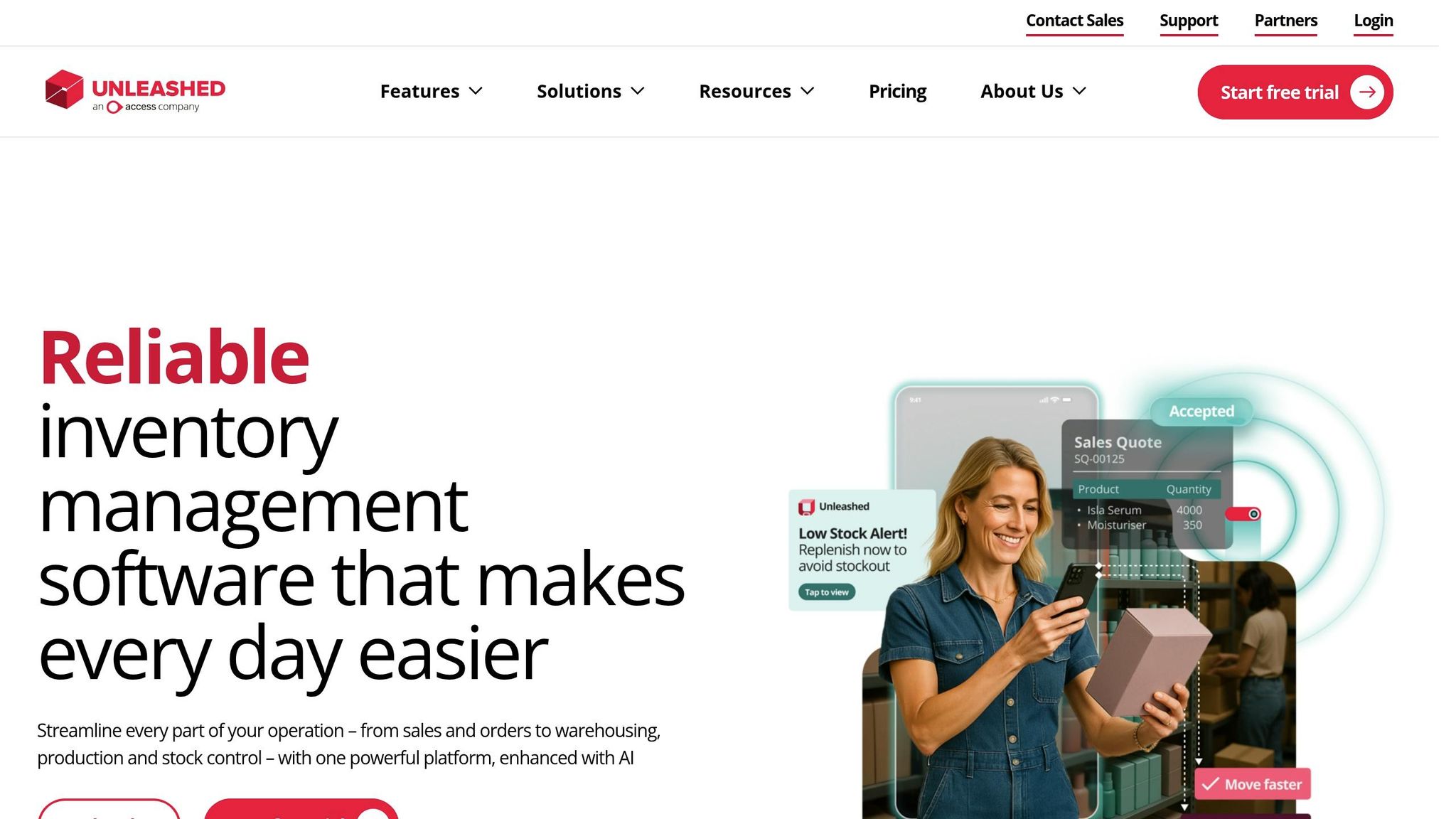
Inventory Analytics: Using Data Analytics Dashboards in Unleashed Inventory Management Software
sbb-itb-d1a6c90
Key Features to Look for in Inventory Risk Dashboard Software
When choosing inventory risk dashboard software, it's not just about flashy visuals. The best tools offer real-time insights, customizable layouts, and AI-driven analytics to help you turn raw data into actionable strategies.
Real-Time Data and Alerts
Effective risk management starts with up-to-the-minute information. Your dashboard should provide a centralized view of stock levels, sales, and purchase orders in real time, while also delivering automated alerts for potential issues like low inventory or delayed shipments.
"Staying on top of potential threats is no longer a task reserved for specialized risk managers, it's a critical function for any modern business leader."
– Spencer Lanoue, Product Builder
A well-designed dashboard includes risk heatmaps that visually rank threats based on their likelihood and impact. These color-coded grids make it easy to assess risks at a glance, with many systems assigning a numerical risk score by multiplying Likelihood (1–5) by Impact (1–5). Beyond just alerts, the ability to create custom views ensures each team member sees the data most relevant to their role.
Customizable Dashboards
Not everyone in your organization needs the same data. Customizable dashboards allow you to tailor views for different roles - executives might need high-level summaries, while warehouse managers require operational details. The flexibility to rearrange widgets and panels ensures users can focus on the metrics that matter most to them.
"The dashboard allows us to compare the information that we need at a quicker pace... Instead of having them run sales reports, you can just set it to where they push the button and see what the sales were for the day... It's a lot more convenient than having to run a report for each."
– Azure Sessums, General Manager, Tuxedo Distributors
No-code tools make it easy for non-technical users to build and adjust dashboards without IT support. Additionally, permission settings ensure sensitive data is accessible only to authorized personnel. This combination of customization and security ensures everyone can act on inventory risks quickly and effectively.
AI and Predictive Analytics
Customization is great, but AI and predictive analytics take dashboards to the next level. These features turn static reports into dynamic tools that anticipate future challenges. Predictive analytics can forecast demand shifts, helping you manage cash flow and reduce excess inventory before problems arise.
AI can also detect patterns that might go unnoticed, such as a sudden drop in stock levels paired with supplier delays. These systems not only identify anomalies but also explain their significance.
"AI doesn't just build charts, it analyzes the data to tell you what it means. It can surface trends, point out anomalies... and even help you forecast future demand."
– Bricks AI
Modern AI tools even allow natural language commands, making it easier to interact with data. For instance, you can type "show only high-impact risks" or "create a pie chart of inventory value by supplier" to customize your view. Some systems go a step further by generating written analyses of visualizations, explaining trends like a 15% rise in operational risks or pinpointing supply chain issues driving specific threats.
How to Choose the Right Software for Your Business
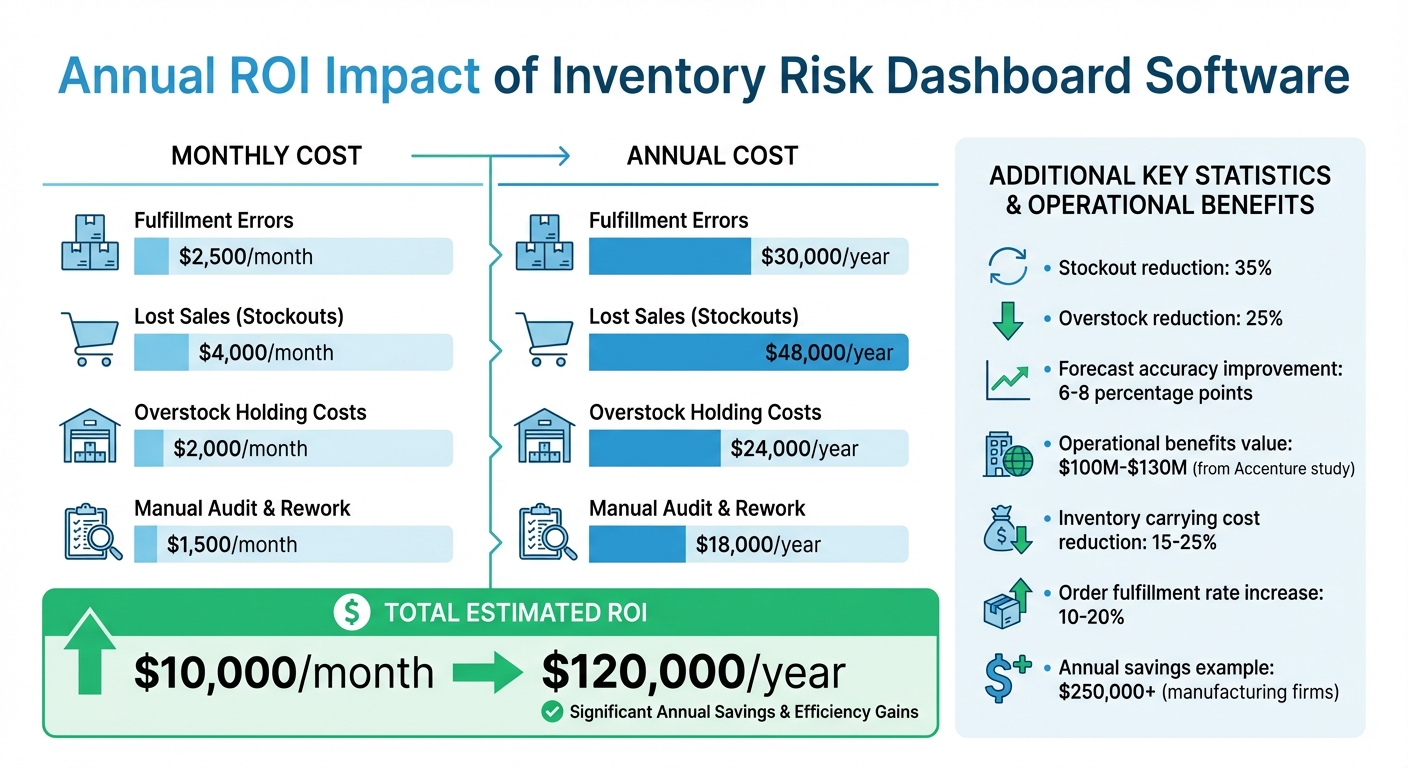
ROI Impact of Inventory Risk Dashboard Software: Annual Savings Breakdown
When choosing software, it’s essential to consider how well it matches your business's size, existing systems, and overall goals. A solution that works for a small startup may not be suitable for a growing business with multiple teams. To make the right choice, focus on scalability, integration, and overall costs. These factors ensure your software provides real-time insights and adapts to your operations seamlessly.
Scalability and Flexibility
Businesses grow, and your software needs to grow with you. Look for tools that can handle increased workloads and adapt to your evolving needs. Cloud-based or hybrid systems are a solid choice because they provide access from anywhere and can scale as transaction volumes increase. Software with open APIs is also crucial, as it allows easy integration with new systems like ERPs, POS platforms, or e-commerce tools when your tech stack expands.
As your team grows, role-based access controls become vital for maintaining security while providing tailored insights to different departments like finance or procurement. No-code or low-code platforms are especially helpful because they let non-technical staff quickly customize dashboards and workflows without needing expensive developers. If international growth is in your plans, make sure the software supports multi-currency and multilingual capabilities to manage global operations.
"Picking the wrong inventory management software is expensive. You'll burn budget, frustrate your team, and stall adoption. Picking the right one comes down to starting with clear, custom requirements."
– The Retail Exec
Integration with Existing Systems
Disconnected systems can slow everything down. Your software should integrate smoothly with your current tools, such as accounting software, ERP platforms, and e-commerce systems. Native connectors - prebuilt integrations for tools like Shopify, NetSuite, or QuickBooks - are particularly useful for minimizing setup time and avoiding technical headaches. Even minor delays, like a 15-minute sync lag, can lead to issues like overselling or stockouts. Involve your IT and operations teams to ensure the software fits technically and eliminates the need for manual data entry.
Real-world examples show the impact of strong integration. French retailer Camif boosted activity by 44% without increasing logistics staff by adopting AI-driven planning that worked across their systems. Similarly, in April 2025, Laverne Group in Saudi Arabia implemented Omniful’s integrated OMS and WMS in just three weeks. This cut delivery times in Riyadh from 4–6 days to just 2–3 hours and achieved perfect inventory accuracy.
Cost and Value Evaluation
Price alone doesn’t determine value. To get a clear picture, calculate the total cost of ownership (TCO), which includes licensing, per-user fees, implementation, training, and annual price increases. Sometimes, a slightly more expensive tool can deliver better returns if it saves time or improves efficiency. For instance, a $20/month higher cost might be worth it if it saves your team 10 hours per week.
To assess value, use the ROI formula: (Gain on Investment - Cost of Investment) / Cost of Investment. Inventory management software often reduces stockouts by 35% and overstock by 25%. In one Accenture study, companies that unified demand data improved forecast accuracy by 6–8 percentage points, leading to operational benefits worth $100M–$130M.
| Operational Area | Potential Monthly Savings | Annual Impact |
|---|---|---|
| Fulfillment Errors | $2,500 | $30,000 |
| Lost Sales (Stockouts) | $4,000 | $48,000 |
| Overstock Holding Costs | $2,000 | $24,000 |
| Manual Audit & Rework | $1,500 | $18,000 |
| Total Estimated ROI | $10,000 | $120,000 |
Take advantage of free trials to test key workflows and involve IT, finance, and operations teams to verify that the software meets your needs. Prioritize your requirements into "must-haves", "nice-to-haves", and "future needs" to avoid paying for unnecessary features upfront.
How BizBot Simplifies Your Search
Finding the perfect inventory risk dashboard software can feel like a daunting task. BizBot makes it easier by allowing you to directly compare essential operational factors like speed to value, automation features, data accuracy, and regulatory compliance - all in one place.
Instead of jumping between multiple websites, BizBot lets you evaluate tools side-by-side. You can compare deployment models, such as cloud-only platforms (e.g., Zoho Inventory, Katana) versus hybrid cloud/on-premise options (e.g., InvGate, ManageEngine). It also breaks down integration methods, like real-time synchronization versus periodic updates, and highlights advanced features like AI-driven predictive analytics alongside standard tracking capabilities. This setup aligns with the critical features mentioned earlier, such as providing real-time insights and leveraging AI analytics. The result? A more efficient and data-focused decision-making process.
BizBot goes a step further by showcasing tools that offer free trials, upfront pricing details, and user ratings. For example, InvGate Asset Management boasts a 4.7/5 rating on G2 and Gartner Peer Insights, while SafetyCulture holds a 4.6/5 score on Capterra, backed by over 3,000 reviews.
The platform also helps you find software tailored to your business size and industry. Whether you're a small distributor exploring solutions like Acctivate or a large enterprise considering Oracle NetSuite for advanced supply chain management, BizBot organizes options by operational model. It even identifies platforms that integrate smoothly with existing tools like QuickBooks, HubSpot, or various BI systems.
For those looking to create custom dashboards quickly, BizBot includes no-code solutions like Softr. By centralizing these resources, BizBot simplifies your search and brings you closer to achieving a more risk-optimized inventory strategy.
Steps to Evaluate and Implement Inventory Risk Dashboard Software
Assess Your Business Needs
Start by mapping out your workflows and identifying who will use the dashboard. For example, a warehouse manager focused on daily pick accuracy will need different tools than an executive analyzing quarterly supplier performance and capacity planning. Review your existing data infrastructure and list all connected systems, such as your ERP, Warehouse Management System (WMS), Transportation Management System (TMS), and supplier portals.
Standardize your data - like receipt dates, product names, SKU codes, and categories - to avoid errors in the dashboard. Conduct an ABC classification to segment products by their value contribution (e.g., A items = 80% of value, B = 15%, C = 5%). This helps prioritize which products need the most attention. Companies with advanced supply chain analytics have been able to cut inventory carrying costs by 15–25% and boost order fulfillment rates by 10–20%.
Determine how often your data should refresh. Operational metrics may require updates twice a day, while strategic metrics can be updated less frequently. Start with 3–5 key metrics, such as Inventory Turnover Ratio, Days of Supply, and Stockout Rate, to avoid overwhelming users with too much data.
Test Features with a Free Trial
Take advantage of free trials to test data integration and functionality. Ensure the software seamlessly connects with your existing sources, like Excel, SharePoint, or CRMs. Create a Risk Register with columns for Risk ID, Likelihood (1–5), Impact (1–5), and Mitigation Plans to test how risks are tracked and managed. Check if the system allows you to drill down from high-level summaries to detailed metrics.
Set thresholds for key risk indicators (KRIs) to trigger alerts for stockouts or aging inventory. If the tool is cloud-based, test real-time updates by changing a value in your source spreadsheet (e.g., Google Sheets) and confirming that the dashboard reflects the change immediately. Verify that the software calculates critical metrics like Inventory Turnover Ratio, Sell-through Rate, and Stockout Duration accurately. Also, ensure sensitive data is protected and accessible only to authorized users.
If the trial meets your needs, proceed to full implementation and train your team.
Implement and Train Your Team
Centralize inventory tracking within one system to eliminate data silos. Assign roles and responsibilities, ensuring someone is accountable for managing licenses. Configure the dashboard to update automatically when assets are transferred or reach maintenance thresholds, reducing the chance of human error.
Create role-specific dashboards so users see only the metrics relevant to their tasks, simplifying their experience and improving security. For instance, some manufacturing firms have saved over $250,000 annually by using inventory dashboards to replace manual processes and reduce headcount. Automate alerts - via email or push notifications - for critical events like low stock levels, potential stockouts, or warranty expirations.
Finally, invest in training. Use interactive demos, tutorial videos, and hands-on sessions to help your team fully understand and utilize the software's features effectively.
Conclusion
Having a dashboard that provides real-time insights is a game-changer for managing inventory risks effectively. When selecting inventory risk dashboard software, focus on four key factors: matching your current needs, ensuring it can grow with your business, integrating smoothly with your existing tools, and offering a cost structure that provides real value. As the StockPilot Editorial Team wisely notes, "A simple tool used consistently beats a powerful tool used sporadically".
To make the most of your investment, prioritize features that address your specific operational challenges. Tools like real-time stock alerts, customizable dashboards, and AI-powered predictive analytics can help tackle issues such as stockouts, high carrying costs, and inefficient order fulfillment. Spreadsheets often fall short when managing more than 100 SKUs or multiple sales channels, making dedicated software a smarter choice to avoid migration headaches later.
Integration is another critical consideration. Ensure your dashboard connects directly to your sales channels, accounting software, and shipping tools. This eliminates manual data entry and can save you over 5 hours each week.
The benefits of selecting the right software go beyond convenience. By focusing on overall operational impact instead of just monthly fees, you can address risks like stockouts and excess inventory more effectively. Robust inventory risk management tools empower decision-makers with the data they need to set realistic goals and adapt to market changes. A cautionary example is Kodak's 2012 bankruptcy, which stemmed partly from its failure to recalibrate market risk assessments despite substantial investments in digital photography.
For those seeking a streamlined selection process, BizBot offers a curated directory of business tools - including inventory management solutions tailored for freelancers, small businesses, and growing companies. With BizBot, you can skip the corporate jargon and sales pitches, exploring clear, transparent options with user-friendly interfaces that simplify your operations from the start. Their platform makes it easier to find solutions that align with your needs and deliver the capabilities essential for success.
FAQs
What inventory risks should I track first?
Managing inventory comes with its fair share of challenges, but some risks stand out: stockouts, overstocking, and inefficiencies. Keeping these in check is crucial for smooth operations.
To stay ahead, use dashboards to keep an eye on real-time stock levels, demand forecasts, and key performance indicators like Days on Hand and Inventory Turnover Ratio. These tools give you a clear picture of what's happening with your inventory at any moment.
Automated alerts can be a game-changer. They notify you when stock runs low and even suggest reorder quantities, helping you avoid the dreaded stockout. On the flip side, studying demand trends and recognizing seasonal patterns can help you avoid the pitfalls of overstocking.
If you're managing inventory across multiple locations, tracking it effectively can lead to smarter redistribution. This not only ensures availability where it's needed but also trims down shipping expenses. By addressing these risks head-on, you can keep your inventory streamlined and efficient.
How real-time does my inventory dashboard need to be?
Your inventory dashboard needs to reflect changes - like new orders or stock adjustments - instantly or at least very quickly. This ensures you have accurate data to make timely decisions. If real-time updates aren’t possible, aim for frequent and dependable updates instead. Keep in mind, though, that the dashboard’s usefulness hinges on how often your inventory system itself updates. If updates happen in batches or are delayed, it can limit the dashboard's value for making quick decisions.
What should I test during a free trial before buying?
During a free trial, focus on testing these critical aspects:
- Features and functionality: Check if the software offers what you need, like stock tracking or automated reorders.
- Ease of use: Is the interface user-friendly and intuitive?
- Performance: Evaluate how quickly it syncs data and handles tasks.
- Integration: Verify that it works seamlessly with your existing systems.
- Support: Assess the quality and availability of customer service.
- Trial limitations: Note the trial's duration, whether a credit card is required, and which features are accessible.
This approach helps ensure the software aligns with your needs before committing to a purchase.