The right OKR software can transform how your team sets, tracks, and achieves goals. Here's what you need to know:
- Start with your needs: Consider team size, structure, and specific challenges. Small teams prioritize simplicity, while enterprises need advanced features like role-based permissions and compliance.
- Core features to look for: Real-time dashboards, automated updates, and integrations with tools like Slack or Jira. These save time and connect daily tasks to big-picture goals.
- Budget wisely: Costs range from free to $50+ per user per month, often managed via subscription management software. Factor in setup, training, and scaling costs beyond just subscription fees.
- Test before you commit: Use trials or demos to ensure the tool fits your workflow. If it takes more than two minutes to update OKRs, it may not be the right fit.
- Security and scalability matter: Look for SOC 2 compliance, SSO, and seamless growth support for larger teams.
Quick Tip: Start with a manual OKR process (e.g., Google Sheets) to refine your approach before investing in software.
The best OKR tool is one your team will actually use. Focus on usability, integration, and alignment with your goals to make the right choice.
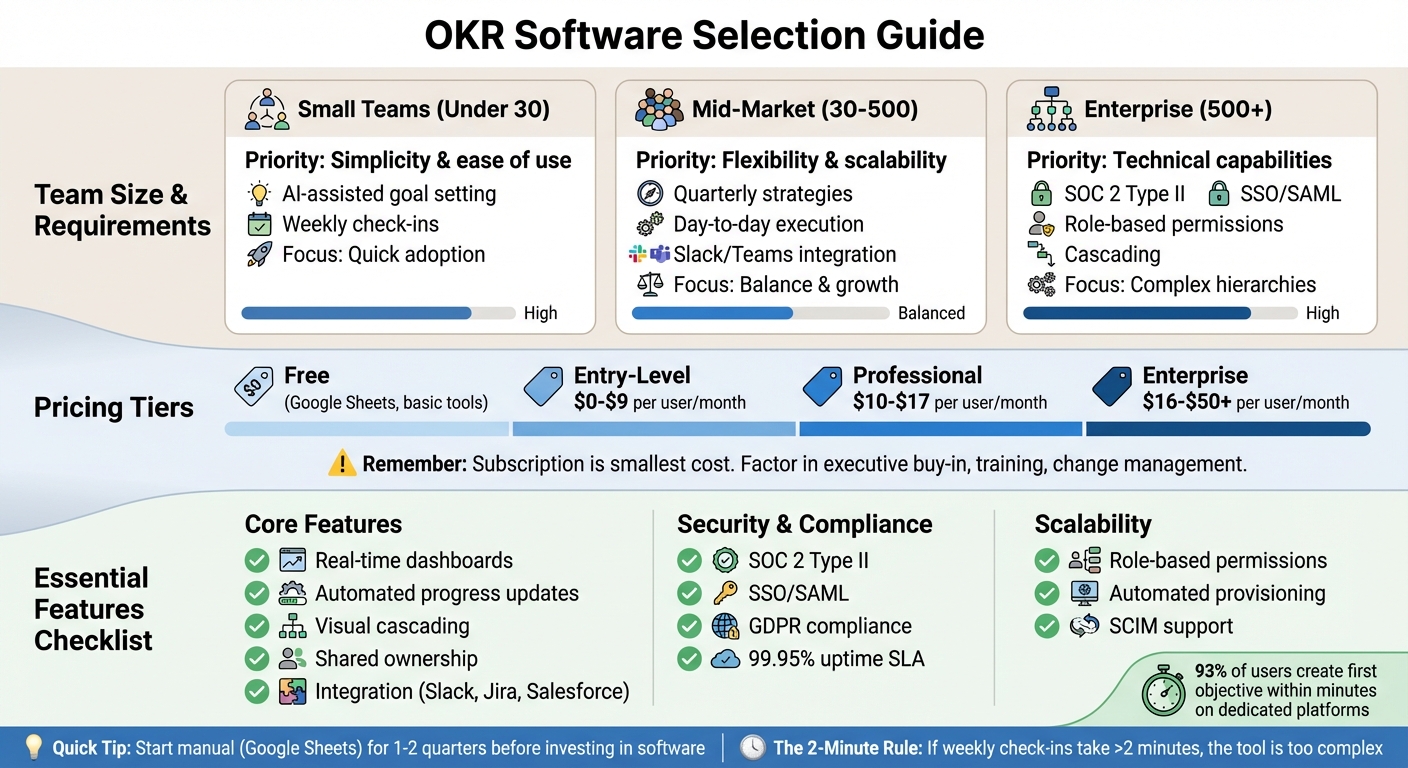
OKR Software Selection Guide: Team Size Requirements and Feature Comparison
Choosing the Best OKR Platform: Top Features Explained
sbb-itb-d1a6c90
Step 1: Determine Your Business Requirements
Before diving into OKR software options, it’s crucial to figure out what your organization actually needs. The right tool should seamlessly integrate into your workflow, addressing specific challenges without creating unnecessary complexity.
Consider Team Size and Structure
Your team size heavily influences the type of OKR software you’ll need. A small startup with 15 people will have very different requirements compared to a massive enterprise with thousands of employees.
- Small Teams (under 30 people): Prioritize simplicity and ease of use. Features like AI-assisted goal setting and straightforward weekly check-ins can help smaller teams stay focused without needing enterprise-level functionality. Quick adoption is key here.
- Mid-Market Companies (30–500 employees): These teams often need tools that can balance quarterly strategies with day-to-day execution. Look for software that’s flexible, scalable, and integrates with existing tools like Slack or Microsoft Teams. The ability to adapt as your company grows is critical.
- Enterprises (500+ employees): For larger organizations, technical capabilities are a must. Features like SOC 2 Type II compliance, SSO/SAML authentication, and detailed role-based permissions are essential to manage complex hierarchies. Additionally, hierarchical companies might need cascading features to track progress across levels, while flat organizations benefit from shared ownership tools. Implementation times can vary - from a couple of weeks for smaller teams to several months for large-scale rollouts.
Once you’ve considered your team’s size and structure, it’s time to focus on aligning daily efforts with your broader OKR goals.
Define Your OKR Goals
It’s important to clearly define what you want your OKRs to achieve. Many teams struggle with the “strategy-execution gap,” where the big-picture goals are clear, but the day-to-day priorities are murky.
This is where dedicated OKR platforms shine. Features like real-time dashboards, automated progress updates, and alignment trees help connect individual tasks to overarching objectives. These tools eliminate the need for manual tracking and ensure everyone knows how their work contributes to the bigger picture.
There’s also a strong connection between goal-setting and employee engagement. Research shows that employees are 3.6 times more engaged when they’re involved in setting their own goals. Teams with a shared purpose tend to maintain better focus and overall health.
Once your objectives are clear, the next step is determining how much you’re willing to invest in the OKR process.
Establish Your Budget
When planning your budget, think beyond just the subscription fees. As Mooncamp puts it:
"The subscription fee is the smallest part of the cost. The real price is everything around it: executive buy-in, workshops, training, change management."
Costs can vary significantly depending on your needs. For teams just starting out, free tools like Google Sheets may suffice. Entry-level plans typically range from $0 to $9 per user per month. For mid-sized companies, professional plans might cost $10 to $17 per user per month. Enterprise-level tools, on the other hand, can range from $16 to $50+ per user per month, with some requiring annual commitments or minimum user counts that push costs into the tens of thousands.
Keep an eye on per-user pricing, as this can make scaling more expensive over time. If your company is growing, it’s smart to project your headcount over the next five years to understand the long-term financial impact.
Ryan Panchadsaram, Co-founder of What Matters, offers this advice:
"Make sure you've mastered the basics; start with simple tools, fall in love with the OKR process, and ensure everyone is on board. It's too common for teams to adopt advanced tools too quickly and mistake the tool's limitations for the failure of the OKRs."
If your team hasn’t yet tried running OKRs manually for at least a quarter or two, it might be too soon to invest in high-end software.
Step 2: Review Core Features
When selecting OKR software, it’s essential to evaluate how well its features align with your team’s workflow. Some platforms are better suited for tracking long-term goals, while others focus on managing daily operations. The best choice depends on your team's needs and how you want to connect daily tasks to broader business objectives. Here's a closer look at the core features that help streamline OKR creation and monitoring.
OKR Creation and Management
A good OKR platform makes setting goals quick and intuitive. In fact, recent research shows that 93% of users on dedicated OKR platforms can create their first objective within minutes.
Look for tools that offer visual cascading to map out how individual, departmental, and company-wide goals interconnect. This feature ensures everyone understands how their work supports the bigger picture. For instance, if your CEO’s objective is to "Expand into three new markets", the sales team can link their OKRs to this goal by focusing on securing leads in those regions, while marketing teams can align their campaigns to support these efforts.
Shared ownership is another critical feature, especially for cross-functional teams. This allows multiple people or departments to collaborate on the same objective, enhancing teamwork. Additionally, templates and AI-powered suggestions can simplify the process. These tools help teams avoid common pitfalls, like setting activity-based goals (e.g., "make 10 customer calls") instead of focusing on outcomes (e.g., "increase customer satisfaction to 85%"). As Quantive aptly states:
"The ability to create depth without complication is the sign of a great OKR platform."
But creating OKRs is just the start. Tracking progress is equally essential.
Progress Tracking and Reporting
Monitoring progress should be straightforward, not a burden. The right platform provides real-time dashboards with features like progress bars, percentage completion, and color-coded indicators (e.g., "on track", "at risk", or "off track"). These tools help teams avoid the common trap of setting goals and then forgetting about them.
Automated check-ins can also make a big difference. By sending reminders through tools like Slack or Microsoft Teams, team members are prompted to update their progress regularly - often using a simple 1-10 confidence score to flag potential challenges early on.
For teams that rely heavily on data, integration with existing business banking and data tools is a must. Platforms that sync with systems like Jira, Salesforce, HubSpot, or Stripe can automatically update Key Results, reducing the need for manual input. For example, if a Key Result is "Close $500,000 in new sales", the software can pull real-time revenue data directly from your CRM.
Advanced analytics take tracking a step further. Features like exportable reports, trend analysis, and heatmaps can highlight areas where performance is lagging. As Loach puts it:
"If the OKR software doesn't help your team plan their week, it's just a fancy dashboard."
Step 3: Review User and Organization Management
As your team grows, keeping access to OKRs under control becomes essential. Without proper management, data accuracy and accountability can quickly fall apart. The right software should let you assign permissions based on actual job roles and adapt easily as the organization scales.
Role-Based Permissions
Most OKR platforms use three main permission levels: Org Admins (who have full system and billing access), Team Leads (who manage specific team cycles and members), and Team Members (who can view and update their assigned key results). This structure keeps the focus on relevant tasks for team members while giving leaders a broader view of the organization.
Assign roles strictly based on responsibilities. As Steven Macdonald, Founder of OKRs Tool, explains:
"Clear roles = clear accountability."
Some advanced platforms also offer hierarchical roles. For example, Department Heads can automatically inherit Team Lead permissions, simplifying the management process as the organization becomes more complex.
| Role | Org Settings Access | View All Teams | Update OKRs | Create Teams/Cycles |
|---|---|---|---|---|
| Org Admin | ✅ Yes | ✅ Yes | ✅ All | ✅ Yes |
| Team Lead | ❌ No | ❌ No | ✅ Their Teams | ✅ Yes |
| Team Member | ❌ No | ❌ No | ✅ Own KRs | ❌ No |
It’s a good idea to review user permissions quarterly to reflect any changes in team structure. Avoid granting admin rights too broadly - keeping roles well-defined helps protect data and prevents unauthorized OKR creation. For industries with strict compliance requirements, ensure the software supports Separation of Duties, so no single user can act as both the "Requester" and "Approver" for a goal.
These permission frameworks are crucial for maintaining scalable and secure user management as your organization grows.
Scalability for Growing Teams
Once your team surpasses 50 members, spreadsheets often become impractical. In fact, alignment across teams can drop by 36% when an organization grows to 100 employees. Your software should handle growth effortlessly without the need for a complete overhaul.
Look for platforms with features like SSO (Single Sign-On) and automated provisioning to simplify user management. Enterprise-grade tools often include SCIM, which automates onboarding and offboarding processes as your workforce evolves. This is especially important since manual performance tracking can consume up to 15 hours per manager each month.
Consider the pricing model carefully. Some platforms charge per user, typically between $8 and $15 per user, which can discourage adding new team members during periods of growth. Others offer flat-rate or lower per-user pricing tiers - around $2 to $4 per user - that scale more affordably. Make sure to test the platform’s full functionality during your trial.
Strong user and organization management ensures your OKR system can grow along with your team while supporting your strategic goals effectively.
Step 4: Check Integrations, Security, and Pricing
Once you've confirmed that your OKR software can scale with your team, the next step is to ensure it integrates smoothly with your existing tools, keeps your data secure, and aligns with your budget.
Integration with Existing Tools
Your OKR platform should seamlessly connect with the tools your team already uses daily. For example, integrations with Slack and Microsoft Teams allow users to update goals or receive reminders without leaving their workflow. When tools require separate logins or operate outside of your team's usual platforms, adoption rates can drop significantly.
For project management, look for compatibility with platforms like Jira, Asana, ClickUp, Trello, and Monday.com. These connections help link daily tasks to higher-level Key Results, making it clear how individual contributions support broader objectives. Advanced platforms also integrate with business tools such as Salesforce, HubSpot, Stripe, Zendesk, and Looker. These integrations can automatically update Key Results using real-time data, saving companies countless hours of manual data entry each quarter.
Make sure updates in tools like Slack or Jira automatically sync with the OKR platform - and vice versa. For custom workflows, support for Zapier can connect your OKR software to thousands of other apps. Once your tools are integrated, the next step is to ensure the platform meets robust security standards.
Data Security and Compliance
As your organization grows, protecting sensitive information becomes critical. Ensure the software encrypts data and supports Single Sign-On (SSO) with providers like Okta or Azure AD. SSO simplifies user management while enhancing security by integrating with your existing directory services.
Look for certifications like SOC 2 Type II, ISO 27001, and GDPR compliance to meet regulatory standards and build trust. Additional features to consider include audit trails for tracking user activity, infrastructure redundancy for disaster recovery, and regular penetration testing to identify vulnerabilities. High-quality platforms often guarantee uptime through Service Level Agreements (SLAs), with enterprise-ready providers typically offering at least 99.95% uptime.
Pricing Models
Once functionality and security are confirmed, evaluate how the pricing model fits your budget. The wrong pricing structure can limit adoption or strain resources. Flat-rate pricing and lower per-user fees (around $2–$4 per user per month) provide predictable scaling, while higher fees ($8–$15 per user per month) can become restrictive for larger teams. Some providers also impose minimum user requirements, like 10 seats, which can increase costs for smaller teams.
For instance, Loach charges $2.99 per user per month after the first five users, who are free. Alternatively, flat-rate models like SimpleOKR offer unlimited users for $49.99 per month, making budgeting straightforward and avoiding penalties for growth. Free tiers for 3–5 users are also a great way to test the platform with a small team before rolling it out company-wide.
Don't forget to factor in additional costs like deployment, training, and ongoing maintenance. Bundled solutions that combine OKRs with performance reviews can be more expensive (roughly $17 per user per month) compared to standalone tracking tools.
Lastly, prioritize platforms that automatically update Key Results from your data sources. Manual updates not only increase the workload but also reduce software adoption. The ideal tool should save time and drive organizational progress, rather than simply offering the lowest price tag.
Step 5: Compare Options and Decide
Now that you've evaluated the features of potential OKR software, it's time to move from analysis to action. This step focuses on comparing your options and making the best choice for your organization. With your requirements outlined, features assessed, and integrations reviewed, you're ready to make an informed decision.
Build a Feature Comparison Table
Start by creating a straightforward spreadsheet to compare the platforms you've shortlisted. Focus on key features such as hierarchical alignment, shared ownership, custom cadences, weekly planning views, and initiative tracking. Don’t forget to evaluate reporting tools like real-time dashboards, exportable reports, and heatmaps. Also, check whether the software integrates seamlessly with tools like Salesforce and Jira to automate metric updates, and ensure it meets security standards like GDPR compliance and SOC 2 Type II.
To simplify the decision-making process, try a pairwise comparison method. This involves directly comparing two options at a time, helping you weigh trade-offs and identify the best fit for your needs. This approach can help avoid getting overwhelmed by too many choices.
Test with a Trial or Demo
While feature lists and comparisons are helpful, nothing beats seeing the tool in action. A demo can highlight its capabilities, but a trial allows you to truly test its usability. Run a focused four-week trial with a small group of 5–10 contributors. Here's how to structure it:
- Week 1: Set up real OKRs to test the setup process and user interface.
- Week 2: Use the tool for daily workflows and test integrations with your existing systems.
- Weeks 3–4: Gather team feedback and measure engagement. Use the "two-minute rule" - if a weekly check-in takes longer than two minutes, the tool might be too cumbersome. Also, evaluate customer support by asking a technical question and noting the response time and quality.
Sandhna Chintoe, CEO of Cammio, shared her experience after adopting a more planning-focused tool in 2026:
"Before Loach our OKRs were collecting dust in Confluence. Now our team works weekly on our OKRs!"
Be cautious of tools with overly complex setups or rigid systems that require significant process changes. The right platform should feel intuitive and fit naturally into your team's workflow within a few days. These trials and demos will give you a clear sense of which option aligns best with your team's needs and future goals.
Conclusion
Choosing an OKR tool that aligns with your business goals is a game-changer. The right software shifts OKRs from being just another reporting tool to becoming a strategic guide that ties everyday tasks to big-picture goals like increasing revenue or improving customer retention. When your tool matches your needs, it avoids becoming "shelfware" - those overly complex tools that no one ends up using.
Before diving in, test your OKR process manually using something simple like Google Sheets for a quarter or two. This trial run helps fine-tune your approach. Once you're ready, look for tools that fit your team's workflow, whether that's weekly updates or quarterly reviews. A well-matched tool can speed up decision-making and cut down on unnecessary prioritization debates by 30–40%. But remember, these advantages only come to life if your team actually uses the software consistently.
Make sure your chosen tool includes essential features like cascading goals and automated data syncing, as these ensure scalability as your organization grows. Pay close attention to pricing models too. Per-user pricing might seem fine at first, but it can quickly become a budget issue as your team expands. Flat-rate pricing, on the other hand, keeps costs predictable. Watch out for hidden fees, such as extra charges for premium integrations or OKR coaching, which aren't always included in base pricing.
For extra help, platforms like BizBot can guide you through the selection process. They offer unbiased comparisons of management tools, highlighting must-haves like SOC 2 compliance and SSO integrations. Plus, they categorize tools by your organization’s stage - whether you're a startup, scaling team, or large enterprise - making it easier to find the right fit for now and the future.
Ultimately, your OKR software should feel natural within just a few days of use. It should act as a "single source of truth", where every team member can easily see and trust the objectives. If your weekly check-ins start taking more than two minutes, that's a sign the tool might be too complicated. Choose a solution that effortlessly integrates into your workflow to ensure it becomes a long-term asset.
FAQs
When should we move from spreadsheets to OKR software?
When your organization starts struggling to manage objectives and key results (OKRs) manually, it’s probably time to consider OKR software. Common signs include version control headaches, updates spread across multiple platforms, and declining visibility into progress. You might also notice a drop in alignment across teams or confusion due to fragmented ownership of goals.
As your team grows, spreadsheets can become more of a hindrance than a help. Dedicated OKR software simplifies goal management by improving clarity, collaboration, and accountability. This is especially valuable during periods of rapid growth when keeping everyone aligned becomes increasingly challenging.
Which integrations matter most for OKR tracking?
The best integrations for OKR tracking are the ones that fit naturally into your current workflow tools, deliver real-time progress updates, and offer strong reporting and analytics capabilities. These integrations help teams stay aligned and give you a clear view of progress, making it simpler to track and achieve your objectives.
What security features do enterprises need in OKR tools?
Enterprises need OKR tools that prioritize security to manage goals safely and effectively. Essential features include granular permissions to control access, SSO (Single Sign-On) integration for streamlined authentication, adherence to standards like GDPR, and robust data protection protocols. These features ensure sensitive information is handled securely while supporting the scalability of operations.