Cloud security workflow automation streamlines repetitive security tasks like alert handling, threat detection, and incident response across cloud environments. Instead of manually managing threats or updating configurations, automated systems handle these processes in real-time, improving accuracy and response speed. This approach is essential for dynamic cloud infrastructures, where resources like containers and serverless functions can appear and disappear in seconds.
Key Benefits:
- Improved Accuracy: Reduces human errors by applying consistent logic.
- Faster Response Times: Detects and mitigates threats within seconds.
- Cost Savings: Cuts operational costs by optimizing resources and reducing manual work.
- Simplified Compliance: Maintains audit-ready records and ensures adherence to regulations.
How It Works:
- Monitors cloud environments continuously.
- Detects issues and enriches alerts with context (e.g., severity, asset importance).
- Automates remediation actions like fixing misconfigurations or blocking threats.
- Integrates with tools like AWS Security Hub and Azure Sentinel for seamless operations.
Automation not only enhances security but also reduces workload, allowing teams to focus on critical decisions. Starting small - by automating high-frequency tasks - can deliver immediate results.
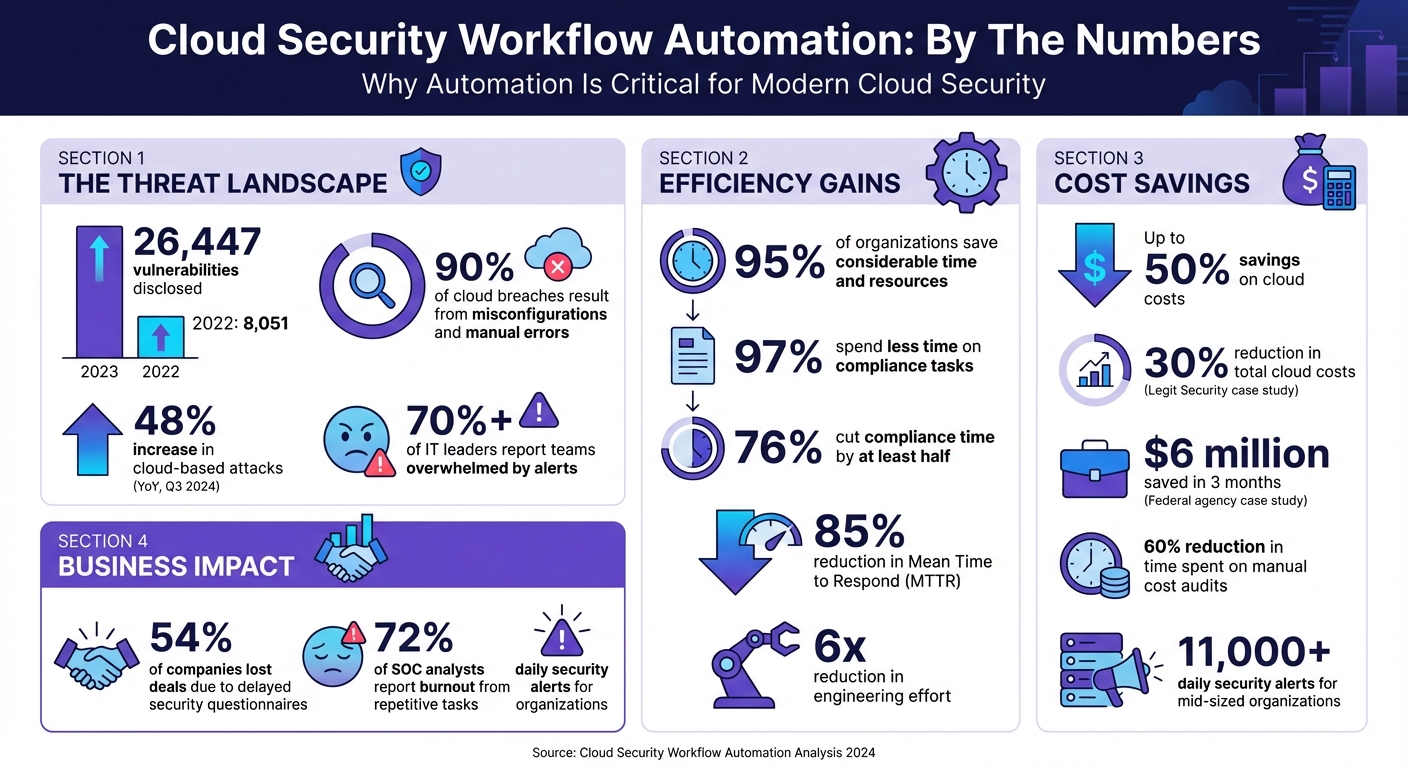
Cloud Security Workflow Automation: Key Benefits and Impact Statistics
AWS re:Invent 2025 - Automated cloud security remediation with agentic workflows (SEC217)
sbb-itb-d1a6c90
Benefits of Cloud Security Workflow Automation
Automating cloud security workflows brings several advantages, from reducing errors to cutting costs and improving overall security. It saves time while simplifying the challenges of managing complex cloud environments. Let’s break down some of the key benefits.
Better Accuracy and Fewer Human Errors
Relying on manual processes like spreadsheets, screenshots, and shared drives often leads to mistakes. Automation eliminates this risk by applying consistent logic and criteria every time, achieving a level of precision that manual reviews simply can’t match.
One major advantage is the ability to manage the overwhelming number of alerts. For example, with 26,447 vulnerabilities disclosed in 2023 - compared to just 8,051 the previous year - manually tracking them is no longer feasible. Automation steps in by filtering out irrelevant alerts, reducing the chances of burnout and critical oversights.
95% of organizations using security automation platforms report saving considerable time and resources. By automating security playbooks, companies ensure no critical steps are missed during incidents. Additionally, real-time evidence collection pulls accurate data directly from cloud services and identity providers, keeping documentation audit-ready at all times.
Faster Threat Detection and Response
Automated systems can detect and respond to threats in seconds, a significant improvement over the hours or days manual processes might take. This speed is crucial for minimizing damage, as it directly affects metrics like Mean Time to Detect (MTTD) and Mean Time to Respond (MTTR). Real-time monitoring constantly scans for anomalies, triggering predefined responses without waiting for human input. With cloud-based attacks increasing by 48% year-over-year as of Q3 2024, automated workflows can quickly isolate compromised resources, update firewall rules, and alert the appropriate teams - stopping attackers before they can cause widespread harm.
Lower Security Management Costs
Beyond speed and accuracy, automation also delivers significant cost savings. By reducing repetitive manual work and optimizing resource use, companies can save a substantial amount. For instance, Legit Security implemented no-code automation to manage its AWS infrastructure, achieving a 30% reduction in total cloud costs, a 35% cut in EBS expenses, and a 57% drop in backup storage costs between 2020 and 2024. The DevOps team also reduced time spent on manual cost audits by 60%.
"By using the OpenOps no-code automation engine and templates, we immediately resolved issues that saved over 30% of the bill and set guardrails to make sure they don't surface again." - Liav Caspi, Co-Founder & CTO, Legit Security
Another example comes from a federal science agency working with Nextonic Solutions. Within three months, the agency saved $6 million and cut its monthly AWS spend by 30% by rightsizing 40% of its compute workloads and reducing on-demand instance usage by 65%. These savings stem from automated processes like rightsizing, terminating idle instances, and avoiding over-provisioning - issues that typically account for 30% of wasted cloud spending.
Automation also reduces personnel costs. Time-consuming tasks like evidence collection, alert triage, and completing security questionnaires can be handled automatically, eliminating the need for additional high-salary specialists who might earn $100,000–$186,000 annually.
Better Compliance and Reporting
Automation not only speeds up threat detection but also simplifies compliance. Instead of scrambling to prepare for audits, automated systems maintain compliance evidence around the clock by pulling data from cloud services, identity providers, and HR tools. This continuous monitoring removes the need for error-prone manual processes like taking screenshots and managing spreadsheets.
97% of organizations using compliance automation platforms report spending less time on compliance tasks, with 76% cutting that time by at least half. Features like cross-framework control mapping allow a single security control to satisfy multiple regulatory requirements - such as GDPR, HIPAA, SOC 2, and PCI-DSS - eliminating redundant work when managing multi-framework compliance.
The business benefits go beyond efficiency. 54% of companies have lost deals because they couldn’t complete security questionnaires on time. Automation accelerates this process by pulling responses from existing knowledge bases, speeding up sales cycles. Centralized platforms also create immutable audit trails, tracking all compliance tasks and remediation actions. This transparency simplifies audits and ensures verifiable records are always available.
How Cloud Security Workflow Automation Works
Cloud security automation works by continuously monitoring your environment, spotting issues, and taking immediate action. Instead of relying on periodic audits, these systems operate in real time, comparing your setup against predefined security policies and industry standards.
The process kicks off with continuous discovery. Automated tools keep track of both long-term assets and temporary resources. This inventory feeds into detection engines that flag irregularities - like an S3 bucket becoming public, a logging service being disabled, or unusual login activity. Once a problem is identified, the system generates an event (via tools like Amazon EventBridge or Google Pub/Sub), which triggers a serverless function to fix the issue.
What sets this system apart is its contextual enrichment. Alerts are supplemented with details such as user permissions, asset importance, threat intelligence, and activity logs. This extra context helps prioritize risks based on both the severity of the issue (often measured using CVSS scores) and the business impact of the affected asset. For example, a medium-risk vulnerability on a production payment server can be elevated to a critical priority. The system also performs automated compliance checks to ensure assets consistently meet industry standards.
Automated Compliance Checks
Automated compliance checks improve accuracy and reduce the risk of human error, ensuring your environment adheres to security policies at all times. These checks use programmable rules, often called Policy-as-Code, to define the desired state of your environment. Tools like HashiCorp Sentinel and AWS Config Rules continuously evaluate resources against benchmarks such as CIS AWS Foundations, NIST 800‑53, PCI DSS, SOC 2, HIPAA, and GDPR. Unlike manual audits conducted quarterly or annually, these checks run nonstop, immediately flagging any misconfigurations.
For instance, if someone disables encryption or modifies a security group without authorization, automated systems detect the configuration drift and either flag it for review or roll back the change. Platforms like AWS Security Hub consolidate findings into a single dashboard, offering compliance scores and prioritizing risks. These systems also maintain an ongoing audit trail by capturing snapshots, logs, and evidence automatically - eliminating the need for manual record-keeping. As a result, compliance issues are addressed in real time rather than months later during an audit.
Threat Detection and Prioritization
Threat detection systems learn what "normal" behavior looks like for users and applications, enabling them to spot anomalies like unusual login attempts, unexpected data transfers, or suspicious API activity. Alerts from tools like SIEM platforms, endpoint detection systems, and native cloud logs are consolidated and standardized by automation platforms.
The prioritization engine then evaluates several factors - threat severity (using CVSS scores), the importance of the affected asset, and its potential business impact - to determine the order of response. AI-powered tools can significantly cut down analysis time, reducing a 15-20 minute task to just a few minutes.
These systems also correlate findings across compute, storage, and network layers to map out attack paths and identify root causes. This is crucial because over 70% of IT leaders report their teams are overwhelmed by alerts, which delays critical responses. Automated deduplication further reduces noise by merging related alerts, such as multiple failed login attempts from the same IP, into a single incident. This prevents alert fatigue while ensuring no major threats are missed.
Automatic Remediation Actions
When a threat is confirmed, automated remediation takes over with a three-step process: Monitor, Detect, and Respond. During the response phase, serverless functions execute specific API calls to resolve the issue without waiting for human intervention. Actions might include re-enabling disabled logging, enforcing encryption on storage buckets, rotating expired credentials, or closing open ports in security groups.
To avoid unintended consequences, organizations often use safety measures like "dry-run" modes (which log actions without executing them) or "human-in-the-loop" triggers, where high-impact fixes require manual approval. Tag-based exclusions - such as labeling a public bucket with "auto-remediation: excluded" - can also prevent automation from interfering with sensitive resources.
"Using [Tenable Cloud Security] automation allowed us to eliminate exhaustive manual processes and perform in minutes what would have taken two or three security people months to accomplish."
– Larry Viviano, Director of Information Security, IntelyCare
How to Implement Cloud Security Workflow Automation
To kick off cloud security automation, start by pinpointing repetitive, time-intensive tasks like patch management, vulnerability scanning, and compliance checks. Automating these processes not only reduces manual effort but also improves precision and ensures adherence to compliance standards. Prioritizing well-defined, high-frequency tasks can deliver immediate results.
Adopt a phased approach to automation. Instead of trying to automate everything at once, focus on the top five most common alert types, such as phishing triage, brute force attempts, or malware incidents. Organizations that follow this method have seen an 85% reduction in mean time to respond (MTTR). Begin by testing workflows in "observe mode", where actions are logged but not executed. This helps validate the logic and prevents unintended outcomes before going live.
The tools you choose play a critical role. Look for automation platforms that integrate smoothly with your cloud providers (like AWS, Azure, or Google Cloud) and existing DevOps setups. Ensure your security tools - firewalls, SIEM systems, endpoint detection - offer APIs for seamless orchestration. Without strong API support, connecting the components will be challenging. Convert manual incident response guides into digital playbooks that outline triggers, enrichment steps, decisions, and actions. For critical decisions, include checkpoints for human review to prevent errors. This step-by-step strategy aligns with earlier discussions on cloud security workflows and fits into your broader security framework.
Integrating with DevSecOps Pipelines
Embedding security checks directly into CI/CD pipelines ensures vulnerabilities are addressed before they reach production. This "shift-left" strategy incorporates tools like Static Application Security Testing (SAST) and Dynamic Application Security Testing (DAST) into development workflows, catching most issues caused by manual errors or misconfigurations. Automating these checks at the pipeline stage eliminates repetitive setup mistakes.
For example, in March 2026, security researcher Siddhant Rangra created a multi-phase DevSecOps lab using AWS and Azure. He integrated AWS CodeBuild and GitHub into a CI/CD pipeline that automatically scanned container images in Amazon Elastic Container Registry (ECR). During a simulated attack, a publicly exposed S3 bucket triggered Amazon GuardDuty, which used EventBridge to activate an AWS Lambda function that fixed the misconfiguration in seconds. This showcases how continuous validation can keep infrastructure secure without waiting for scheduled audits.
Using Infrastructure-as-Code (IaC) tools like Terraform or AWS CloudFormation can standardize deployments, enabling automated drift detection. If someone alters a security group or disables encryption, the system can flag or reverse the change immediately. For remediation actions, staged rollouts like canary or blue-green deployments allow you to test for issues before fully rolling out changes.
Using Policy-as-Code
Policy-as-Code (PaC) integrates governance directly into your infrastructure, enabling continuous monitoring instead of periodic reviews. Tools such as HashiCorp Sentinel, AWS Config, and Azure Policy let you define and enforce rules for your environment. These tools automatically detect violations - like disabled encryption or unauthorized security group changes - and can either alert your team or trigger automated fixes.
Start small by focusing on less complex, repetitive policies that are easy to codify. Use benchmarks like NIST or CIS to identify high-risk areas. Treat PaC like software: use version control, thorough testing, and centralized libraries for common rules. Organize controls by Organizational Units (OUs) to allow for exceptions, such as workloads that require public S3 buckets while enforcing strict rules elsewhere.
Integrate PaC early in the software development lifecycle, particularly when IaC templates are created. This prevents misconfigurations from being deployed in the first place. With 80% of enterprise cloud security incidents linked to misconfigurations or human error, addressing these issues at the code level significantly reduces risk.
Using SOAR Platforms
SOAR platforms take automation to the next level by connecting your security tools and automating multi-step responses. While SIEM systems focus on collecting and correlating logs to generate alerts, SOAR platforms enrich those alerts, automate triage, and execute containment measures in seconds rather than hours. This is crucial when mid-sized organizations face over 11,000 security alerts daily, and 72% of SOC analysts report burnout from repetitive tasks.
Check your tools for API compatibility to ensure smooth orchestration. Popular SOAR options include Microsoft Sentinel (approximately $1.50–$2.50 per GB/day), Splunk SOAR ($15,000–$30,000 annually), Palo Alto XSOAR ($20,000–$40,000 annually), and Tines (free community tier; paid plans start around $8,000 annually).
Develop digital playbooks for specific scenarios. For example, a phishing triage playbook might extract URLs from emails, query threat intelligence feeds, quarantine malicious messages, and notify users - all automatically. A brute force detection playbook could check IP reputations, block suspicious IPs at the firewall, and reset affected accounts. These automated workflows can save 15–60 minutes per incident. While automating containment actions like isolating compromised hosts or disabling API keys is beneficial, avoid automating actions like deleting hosts to preserve forensic evidence.
"SOAR is the force multiplier that makes enterprise-grade security response achievable on a realistic budget."
– CloudSwitched Team
Begin by automating the most frequent alert types and refine your workflows based on performance metrics like MTTR. This iterative process allows you to build capabilities gradually while seeing measurable improvements from the start.
Conclusion
Cloud security workflow automation offers real-time threat detection, continuous compliance, and cost savings - delivering around-the-clock protection that identifies misconfigurations and threats in milliseconds instead of hours or days. Considering that 90% of cloud breaches result from misconfigurations and manual errors, and with cloud attacks up by 48% year-over-year as of Q3 2024, automation has become a critical component of modern security strategies.
Beyond improving security, automation also boosts operational efficiency. Time spent manually triaging alerts can be redirected toward more strategic tasks. The results speak for themselves: organizations using automation platforms report that 97% improved their security posture, and 76% reduced compliance task time by at least half. These efficiencies can lead to up to 50% savings on cloud costs and reduce engineering effort by a factor of 6x.
"Cloud security automation is no longer optional in today's threat landscape." – Tines
To make the most of automation, focus on automating high-volume, repetitive tasks, allowing teams to concentrate on strategic decision-making. Start with a phased approach - use observe mode to test workflows before full deployment - and choose tools with robust APIs to ensure seamless integration. Automation is most effective when applied to clearly defined processes, leaving critical decisions in human hands.
Selecting the right automation platform is key to unlocking these benefits. For businesses ready to take this step, tools like BizBot can simplify the search for solutions. These platforms categorize business and management tools, helping you find options tailored to your cloud providers, security needs, and budget. Whether you're running a small business or managing an enterprise, adopting the right automation strategy - and the right tools - can deliver measurable gains in security, efficiency, and compliance from day one.
FAQs
What security tasks should I automate first in the cloud?
Automating tasks like alert triage and vulnerability management can save time and significantly speed up response efforts. Beyond these, consider automating processes such as threat detection, patch management, and access control. These steps ensure your security policies remain consistent and help you tackle risks efficiently, especially as your cloud environment expands.
How do I prevent auto-remediation from breaking production systems?
To minimize disruptions, consider implementing safeguards like shadow mode, which allows you to test automated actions in a controlled setting before full deployment. For critical decisions, include a human-in-the-loop approach to maintain oversight and ensure accountability. Prioritize automating workflows with significant impact, such as alert triage, and rigorously validate all automation processes before applying them to live systems. These strategies help prevent unintended consequences in production environments.
What metrics should I track to prove automation is working?
To gauge how well automation is working, focus on tracking key metrics like error reduction, productivity improvements, cost savings, scalability, and response times. These metrics offer clear, measurable ways to assess the impact and success of your automated workflows.