AI chatbots are transforming workplace productivity. They save time, simplify tasks, and integrate seamlessly into existing workflows. For example:
- Workers spend 30% of their day searching for information, but AI tools can cut this time significantly.
- Teams using chatbots report saving an average of 97 minutes per week and achieving up to 242% higher productivity.
- Real-world case studies show results like a 50% boost in sales prep efficiency and $6.4M in savings for large enterprises.
Key features driving these results include:
- Task delegation: Assign tasks directly within platforms like Slack or Teams.
- Real-time notifications: Stay informed without being overwhelmed by alerts.
- Integration and automation: Connect with tools like Salesforce, Jira, and Google Drive to streamline workflows.
Platforms like BizBot, Platform A, and Platform B each bring unique strengths to the table. Whether you're a small business or a large enterprise, these tools can reduce inefficiencies and deliver measurable results. Keep reading for a detailed breakdown of their features and performance metrics.
AI Tools for Productivity: 7 Agents That Save Hours | ClickUp
sbb-itb-d1a6c90
1. BizBot
BizBot combines business management tools with a smart chatbot to simplify operations. By using AI-driven automation, it allows teams to assign tasks, receive real-time updates, and integrate workflows - all within the communication platforms they already use.
Task Delegation
With BizBot, assigning tasks is as simple as tagging a teammate in Slack or Microsoft Teams. Once you @-mention someone, the bot tracks the task, asks for an estimated completion time, and sets up automated reminders. This eliminates the need to jump between multiple tools, making work smoother and more efficient.
"I liked being able to jot tasks down and have them get tracked without needing to go to a separate tool to track them".
BizBot supports task delegation at every level - between peers, from managers to team members, and even from team members to managers. Interestingly, a study showed that 83% of tasks assigned by subordinates to managers were reminders for pending tasks, compared to 47% for tasks moving downward. The bot also works with specialized sub-agents (like finance or support bots) to handle detailed tasks simultaneously. Combined with real-time updates, this feature ensures teams stay organized and on track.
Real-Time Notifications
BizBot has earned a 4.8/5.0 customer rating for its ability to deliver timely and effective notifications. Its system tailors reminders based on deadlines, reducing unnecessary alerts while keeping everyone informed. For sales and support teams, BizBot can qualify leads through conversations and then route them to the right person or CRM automatically.
For example, in July 2025, Results Grow implemented a BizBot chatbot to handle lead engagement and schedule appointments. This move generated over $134,000 in annual revenue. When issues require human intervention, BizBot ensures a smooth transition between AI and human agents, maintaining high communication standards.
Integration and Automation
Beyond its chat features, BizBot integrates seamlessly with major business systems like Trello, Jira, Salesforce, and Zendesk. It consolidates communication platforms such as Slack, Teams, and Facebook Workplace, streamlining data entry and keeping CRM records accurate. This means less time wasted switching between apps.
The advanced version can even search connected storage systems like Google Drive and OneDrive to find relevant files for tasks. On top of that, BizBot meets GDPR, HIPAA, and SOC 2 compliance standards, ensuring secure data handling. It can also be set up in complex environments within just a few days.
2. Platform A
Platform A uses its Agentforce system, a network of autonomous AI agents designed to handle tasks proactively. These agents can draft emails, summarize project updates, and compile reports. They also manage customer inquiries, monitor system logs, and automate workflows, delivering a seamless experience.
Task Delegation
At the core of Platform A's functionality is a top-level controller agent that assigns tasks to specialized sub-agents in areas like finance, support, and marketing. This bot-to-bot collaboration allows teams to tackle complex issues simultaneously, cutting down on manual handoffs. For example, AI agents can research potential clients and create detailed meeting briefs. According to Salesforce, inefficient, fragmented work processes can reduce team productivity by as much as 40%.
Real-Time Notifications
Platform A keeps users informed with real-time notifications. Automated reminders can be set using natural language commands. The platform integrates with tools like Salesforce, HubSpot, and Pipedrive, sending updates on deal stages, new leads, and pipeline risks directly to the workspace. IT teams benefit from constant log monitoring, receiving alerts for performance issues. Additionally, its AI-powered search and summary tools help users reclaim over 90 minutes each week.
Integration and Automation
With connections to more than 8,000 apps - including Google, Microsoft, Salesforce, and HubSpot - Platform A enables seamless, end-to-end workflows. For instance, it automatically creates tickets in tools like Zendesk, HelpDesk, and Jira when new messages arrive, ensuring no request slips through the cracks. The system also captures lead data from conversations and syncs it with CRMs like Salesforce and Pipedrive or email platforms like Mailchimp. One user reported generating over 2,000 leads in just one month, while another saw a 40% drop in support tickets after deploying the chatbot.
Next, let’s dive into how Platform B takes its own approach to boosting team productivity.
3. Platform B
Platform B brings custom AI agents into the mix, embedding them directly into workflows. These agents act as an extension of your team, automating specific business processes like handling customer requests or routing approvals. Instead of relying on rigid rules, the AI processes natural language commands to execute multi-step tasks across connected systems. For example, it can create support tickets or notify engineers based on incoming requests.
Task Delegation
The platform's Workflow Builder takes care of tasks like onboarding and reporting - no coding required. Meanwhile, its AI-powered Enterprise Search simplifies data retrieval by pulling information from messages, files, and apps like Salesforce and Google Drive. This unified approach to task automation boosts team productivity with the best business administration tools. The AI companion can also summarize discovery calls, identify next steps, and draft meeting briefs tailored to your voice and tone. A standout example: in early 2026, Salesforce deployed the rebuilt AI-powered Slackbot to its 42,000 employees. The result? A combined savings of 138,000 hours per week and $6.4 million in productivity gains.
Real-Time Notifications
Platform B excels at consolidating alerts from various sources, such as CRM updates (e.g., Salesforce, HubSpot), IT incidents (e.g., ServiceNow), and project management tools (e.g., Asana, ClickUp). Users can set up automated reminders using simple, natural language commands like, "Remind me to follow up with the client tomorrow", and link those reminders directly to conversations. The platform’s affinity awareness feature ranks notifications based on your relationships with colleagues and channels, ensuring the most relevant updates are prioritized.
Integration and Automation
With connections to over 8,000 apps and 30,000 actions, Platform B supports seamless workflows across multiple tools. AI agents can even delegate tasks to other agents, mimicking real teamwork dynamics. For instance, Learn It Live saw a 40% drop in support tickets after using an AI-powered chatbot integrated with Zapier Tables to handle repetitive customer inquiries.
These features highlight the platform's ability to streamline operations, setting a strong foundation for analyzing its strengths and limitations.
Pros and Cons
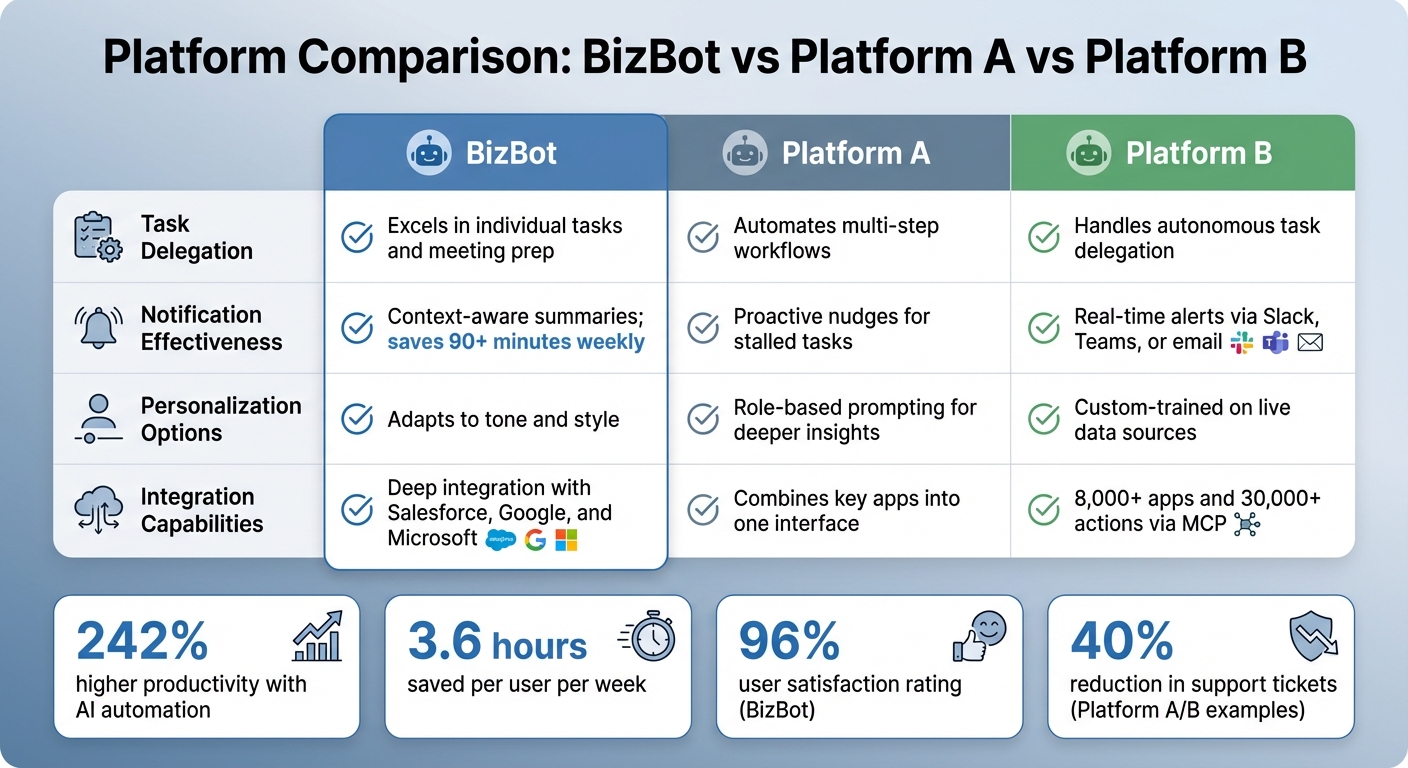
BizBot vs Platform A vs Platform B: Feature Comparison for Productivity Chatbots
Each platform offers distinct advantages and some limitations, depending on your team's needs and workflows. BizBot is ready to use right out of the box, leveraging workspace context from messages, files, and projects to summarize threads and draft content effectively. However, it operates in a reactive manner - you need to prompt it to take action, and it only accesses information you have permission to view. On the other hand, Platform A stands out with its autonomous decision-making and proactive nudges, such as identifying stalled deals before they escalate. That said, its complexity might require more effort during the initial setup. Platform B boasts the largest integration ecosystem, connecting with over 8,000 apps and enabling 30,000 actions. While this is impressive, it can feel overwhelming for smaller teams with simpler requirements.
AI agents now provide context-aware notifications tailored to daily workflows. For instance, BizBot earned a 96% user satisfaction rating within Salesforce by delivering synthesized insights instead of fragmented alerts. Teams using AI automations report saving an average of 3.6 hours per user per week and are 242% more likely to achieve high productivity levels. Platform B excels in centralized monitoring, offering real-time updates from CRMs like Salesforce and HubSpot, as well as project management tools such as Asana and ClickUp.
In terms of AI-driven customization, BizBot generates summaries tailored to the specific context of a channel and adapts to your tone and style. Platform A takes it a step further by enabling role-based prompting, letting users assign personas such as "RevOps strategist with 20 years of experience" to gain deeper insights. Meanwhile, Platform B allows for custom training on live knowledge sources like Notion or Google Drive, making it a powerful option for teams with diverse information repositories.
When it comes to integration, BizBot offers seamless connections with Salesforce, Google Workspace, and Microsoft 365. Platform A focuses on orchestrating complex, multi-system workflows through a single chat interface. Platform B, however, sets itself apart with its Model Context Protocol (MCP), enabling connections to more than 30,000 actions across 8,000 apps. For example, in 2024, Formula 1 used AI agents to manage its global fanbase of 750 million, cutting response times by 80% and achieving a 95% first-call resolution rate. This resulted in an 8% year-over-year increase in fan satisfaction.
Here's a quick comparison of the platforms:
| Feature | BizBot | Platform A | Platform B |
|---|---|---|---|
| Task Delegation | Excels in individual tasks and meeting prep | Automates multi-step workflows | Handles autonomous task delegation |
| Notification Effectiveness | Context-aware summaries; saves 90+ minutes weekly | Proactive nudges for stalled tasks | Real-time alerts via Slack, Teams, or email |
| Personalization Options | Adapts to tone and style | Role-based prompting for deeper insights | Custom-trained on live data sources |
| Integration Capabilities | Deep integration with Salesforce, Google, and Microsoft | Combines key apps into one interface | 8,000+ apps and 30,000+ actions via MCP |
Conclusion
Three standout productivity tools are context-aware search, thread summarization, and autonomous planning, which together enable seamless multi-step automation with minimal human input. For instance, context-aware search tackles a significant issue: nearly 47% of digital workers struggle to locate the information they need to perform their tasks effectively. Thread summarization, on the other hand, simplifies lengthy discussions, helping teams save over 90 minutes weekly. Meanwhile, autonomous planning allows AI to break down complex objectives and independently execute workflows, reducing manual effort.
For small businesses, simplicity and a quick return on investment are essential. Running a pilot program on high-volume, low-risk tasks - like lead capture or FAQ responses - can quickly showcase the benefits. Tools like pre-built connectors and no-code builders make automation accessible even for small teams without engineering expertise. A great example is Waiver Group’s AI assistant, Waiverlyn, launched in January 2026. Within just three weeks, consultations increased by 25%, and visitor engagement skyrocketed ninefold.
In contrast, large enterprises prioritize features like integration with legacy systems, strict security compliance (e.g., SOC 2, HIPAA, GDPR), and scalability across multiple departments. Agentic architectures that manage workflows across siloed systems offer maximum value. For example, VR Bank Südpfalz introduced an AI chatbot, AVA, in January 2026 to handle over 3,000 real estate loan applications annually. By integrating AVA with their CRM, the bank achieved a 56% containment rate and saved $530,000 overall - equating to $53 per conversation.
To ensure success, businesses should establish clear governance from the outset, defining when human approval is needed versus when agents can operate independently, particularly for sensitive tasks. Ongoing refinement based on performance data and team feedback is equally important. Teams that embrace AI automation are 242% more likely to excel in productivity, saving an average of 3.6 hours per user each week. These tools, combined with thoughtful governance, enable AI-driven chatbots to deliver measurable productivity gains for organizations of all sizes.
FAQs
Which tasks should we automate first with a chatbot?
Start by focusing on tasks that are repetitive, time-consuming, and follow clear rules - things like data entry, handling customer inquiries, scheduling, and report generation. These are perfect candidates for automation through chatbots. Why? Because they not only speed up processes but also cut down on mistakes and let your team concentrate on more strategic, high-value work.
For example, you can automate customer support, FAQ responses, or internal workflows like appointment scheduling or order tracking. Implementing automation in these areas can lead to immediate boosts in productivity and efficiency.
How do we prevent real-time notifications from becoming noise?
To keep real-time notifications from taking over your day, focus on making alerts urgent, actionable, and targeted - only flagging truly important updates. Use features like quiet hours, filters, or delays to manage when notifications arrive, helping cut down on constant interruptions. Keep the content of these alerts short, to the point, and easy to understand. Avoid cluttering them with unnecessary action buttons so the main purpose stays clear.
What security and compliance checks matter before connecting business apps?
Before linking business apps, it's crucial to check for strong authentication and authorization measures, end-to-end encryption, and clear data collection policies. Additionally, confirm that the apps comply with industry regulations such as HIPAA or GDPR to protect sensitive data effectively.