Digital Asset Management (DAM) systems simplify how teams manage files like images, videos, and documents. Without one, businesses waste up to 8.8 hours weekly searching for assets, leading to lost productivity. Choosing the right DAM vendor ensures better file organization, faster workflows, and improved compliance.
Here’s what to focus on when evaluating DAM platforms:
- Storage & Organization: Centralized libraries, AI tagging, version control, and duplicate detection.
- Search & Access: Advanced search tools, role-based access control, and external sharing options.
- Integration & Security: Compatibility with tools like Adobe and Salesforce, encryption, and compliance with GDPR or ISO 27001.
- Performance & Scalability: High uptime, fast bulk processing, and flexible pricing for growth.
The DAM market is projected to reach $16.18 billion by 2032, making it a key investment for modern businesses. Prioritize features that address your team's specific needs and test systems with real assets before committing.
5 Best Digital Asset Management Software in 2026 (AI-Powered DAM Tools)
sbb-itb-d1a6c90
Assess Your Current Needs and Goals
Before diving into vendor comparisons, take a moment to evaluate your current assets and access needs. Skipping this step can lead to costly mistakes - like paying for features you’ll never use or ending up with a system that can’t handle your workload.
Take Stock of Your Digital Assets
Start by documenting your digital assets. Most organizations juggle a variety of media, including branding materials (logos, fonts), images, videos (short and long-form), podcasts, audio clips, presentations, 3D content, and even user-generated materials. These files are often scattered across shared drives, local folders, emails, and basic cloud storage systems.
Conduct an asset audit to identify duplicates and ensure you have the right file formats. Common challenges include struggling to locate files quickly, dealing with multiple versions of the same asset across different systems, and relying on slow, manual processes to share content with external teams. These inefficiencies add up - on average, organizations without a DAM spend 5 hours each week on manual asset management tasks.
Determine your current "maturity stage." Are you simply looking to centralize files for easier searching, or do you need enterprise-level governance with integrated systems and audit trails? Understanding this will help you prioritize features when evaluating vendors.
Once you have a clear inventory of your assets, shift your focus to identifying who uses these resources and what their workflows look like.
Identify Workflow and User Access Requirements
Figure out who interacts with your assets and what they need to do. Internal users often include marketing teams, creative leads, brand managers, digital asset librarians, sales teams, IT (for security), legal and compliance teams (for rights management), and executives. External users might include agencies, partners, distributors, or clients.
Set permission levels to control access. For example:
- Admins: Manage metadata and system governance.
- Contributors: Upload and edit assets.
- Consumers: Locate and download approved content (e.g., sales teams or partners).
- Guest/External Users: Access limited content through brand portals.
Interview key departments to uncover their pain points. Are they using outdated materials? Where does content get stuck in the workflow - from creation to delivery? Mapping out these bottlenecks can reveal whether you need simple approval workflows or more advanced processes with automated notifications. This clarity will guide you toward a system that meets your specific needs.
DAM Vendor Features Checklist
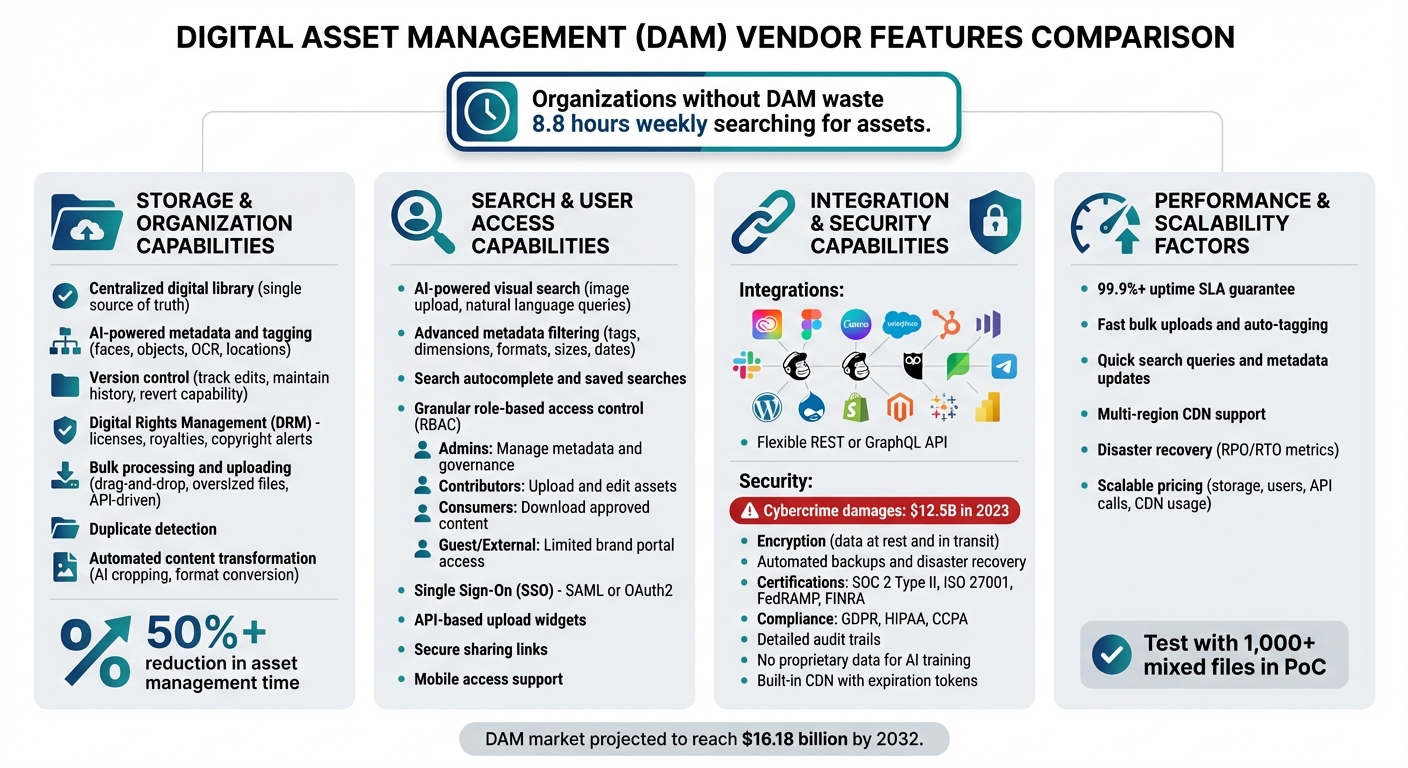
DAM Vendor Features Comparison: Key Capabilities Checklist
When you're narrowing down your options for a Digital Asset Management (DAM) system, it's crucial to focus on features that go beyond basic file storage. This checklist outlines the key capabilities that distinguish a true DAM platform. Use it to evaluate which solutions best align with your needs.
Storage and Organization Capabilities
A DAM system should centralize all your digital content - logos, videos, audio files, presentations, and more - into one accessible library, acting as a single source of truth for your team. Without this, assets often end up scattered across various locations, defeating the purpose of implementing a DAM in the first place.
Modern platforms often include AI-powered metadata and tagging, which can automatically identify faces, objects, text (via OCR), and even locations. This feature saves countless hours by eliminating the need to manually tag files. Equally important is version control, which tracks edits, maintains a clear history, and allows you to revert to previous versions when needed.
Another must-have is digital rights management (DRM). With DRM tools, you can manage licenses, royalties, and copyright issues while receiving alerts for expiring licenses. For teams handling large volumes of content, verify that the system supports bulk processing and uploading, including drag-and-drop functionality, handling oversized files, and API-driven operations like tagging or deleting assets. Duplicate detection is another lifesaver, helping to identify identical files and prevent outdated versions from causing confusion.
Efficiency gains can be significant. For example, companies often report cutting time spent managing creative assets by 50% or more. Features like automated content transformation, which uses AI to crop, convert formats, or generate multiple versions from a single template, play a big role in this improvement.
Once your assets are well-organized, the next step is ensuring they're easy to retrieve.
Search and User Access Capabilities
A solid DAM system makes finding assets quick and painless. Tools like AI-powered visual search allow users to find similar content by uploading an image or using natural language queries. Combine this with advanced metadata filtering, which enables searches based on tags, file dimensions, formats, sizes, or upload dates. Features such as search autocomplete and saved search options further reduce retrieval times.
To maintain control over your content, look for granular role-based access control (RBAC). This feature allows you to assign specific permissions based on user roles. For example, admins can manage metadata and governance, contributors can upload and edit assets, while sales teams or external partners can access only approved materials through brand portals. Single Sign-On (SSO) using SAML or OAuth2 ensures secure, streamlined authentication across your organization.
For external collaboration, API-based upload widgets and secure sharing links allow agencies or partners to interact with assets without needing full system credentials. Don't forget to check for mobile access, which is essential for remote teams.
"Finding an asset is as important as storing it." - ImageKit
Finally, ensure that your DAM integrates smoothly with your existing tools while maintaining high security standards.
Integration and Security Capabilities
A DAM system should seamlessly connect with your existing tools to support your workflows. Key integrations include creative platforms like Adobe Creative Cloud, Figma, and Canva, so designers can access assets without switching applications. For marketing and sales, look for connections to CRM systems (like Salesforce or HubSpot), marketing automation tools (Marketo, Mailchimp), and social media management platforms (Hootsuite, Sprout Social). Integration with CMS platforms (e.g., WordPress, Drupal) and e-commerce systems (Shopify, Magento) ensures consistent content distribution across channels.
If pre-built integrations aren't available for your specific tools, check whether the vendor provides a flexible REST or GraphQL API. This allows for custom connections to ERP systems or analytics platforms like Tableau and Power BI. Robust SDKs and webhooks are also important for streamlining workflows.
Security is paramount. In 2023, cybercrime in the U.S. accounted for over $12.5 billion in damages. To protect your assets, look for enterprise-grade features like encryption for data at rest and in transit, frequent automated backups, and disaster recovery plans. Certifications such as SOC 2 Type II, ISO 27001, FedRAMP, and FINRA indicate adherence to industry standards. If your organization handles sensitive data, compliance with GDPR, HIPAA, and CCPA is a must.
Other critical security features include detailed audit trails, which track every user action and asset change, aiding in compliance reporting. Additionally, confirm that the vendor does not use your proprietary data for training public AI models. For global operations, a built-in Content Delivery Network (CDN) can improve asset access and security through features like expiration tokens.
"Enterprise-grade data encryption is a critical feature in a DAM system... It should be one of the very first things you consider when evaluating new content management solutions." - Max Mabe, VP Product Marketing, Aprimo
Performance and Scalability Factors
When evaluating a Digital Asset Management (DAM) system, it's critical to consider performance and scalability to ensure your investment delivers long-term value. A good DAM should handle your current workload efficiently while being ready to scale as your organization grows. Performance metrics reveal how the system performs under stress, while scalability examines how well it adapts to increasing demands - whether that's more storage, users, or content - without driving up costs excessively.
Start by testing the system's ability to handle bulk uploads, auto-tagging, and generating multiple versions of assets quickly. Check how search queries and bulk metadata updates perform, especially as your asset library grows larger. For teams spread across different regions, measure upload and download speeds during peak hours to ensure remote users experience smooth performance.
Reliability and cost-efficiency under heavy usage are equally important. Look for vendors offering Service Level Agreements (SLAs) that guarantee high availability - ideally 99.9% uptime or better. Additionally, ask about disaster recovery capabilities, focusing on metrics like Recovery Point Objective (RPO) and Recovery Time Objective (RTO) to understand how quickly your data can be restored after an outage. Assess scalability costs by examining how expenses increase with additional storage, users, API calls, and content delivery network (CDN) usage.
To get a realistic sense of how the system performs, avoid relying solely on generic demos. Instead, conduct a scripted Proof of Concept (PoC) using your own assets. For example, require vendors to ingest over 1,000 mixed files and perform bulk metadata edits to test latency in a real-world scenario. Confirm that the vendor supports multi-CDN setups to ensure fast loading times for teams working in different locations. When calculating the total cost of ownership (TCO), include not only the subscription fee but also implementation costs, training, storage overages, and API integrations.
"The best DAM software is the one that passes your scripted PoC, integrates with your PIM/CMS stack, meets your security and compliance bar, and your teams actually adopt." – Frédéric Sanuy, Founder, Activo Consulting
Finally, organize all these metrics into a comparative format to help with your vendor evaluation.
Vendor Evaluation Comparison Table
| Vendor | Uptime SLA | Multi-Region Support | Pricing Model | Customer Support Levels |
|---|---|---|---|---|
| Adobe Experience Manager | Enterprise-grade | Global CDN / Multi-region | Subscription (High TCO) | Global Enterprise Support |
| Bynder | High Availability | Global CDN | Seat & Module based | Dedicated Success Managers |
| Canto | Strong Uptime | AWS-hosted / Global | Seat & Storage based | 24/5 Support + AI Bot |
| MediaValet | High (Azure-based) | Global (Microsoft Azure) | Unlimited Users | 24/7/365 Support |
| Cloudinary | High Availability | Multi-CDN | Usage-based (Transformations) | Technical/Developer Support |
| Brandfolder | High Availability | Multi-CDN | Tiered Subscription | Dedicated Support Teams |
| Aprimo | Enterprise-grade | Global / Local Compliance | Usage-based (Custom) | 24/7 Support / Dedicated Mgr |
Using BizBot for Vendor Research
Choosing the right Digital Asset Management (DAM) vendor can feel like a daunting task, especially since many platforms don’t provide trial options for hands-on evaluation. That’s where BizBot steps in, acting as a one-stop directory for exploring and comparing business tools, including a dedicated section for DAM vendors. This setup not only simplifies the search process but also makes it easier to compare costs upfront.
DAM pricing can range significantly - from around $150 per month to several thousand dollars. BizBot’s directory helps you navigate these variations by showcasing pricing structures clearly. It highlights vendors with straightforward, flexible pricing options instead of those relying solely on custom enterprise quotes. This transparency ensures you can align costs, features, and scalability with your goals for managing digital assets.
Beyond pricing clarity, BizBot includes subscription management tools to help you keep costs under control after implementing a DAM solution. With built-in expense tracking, you can monitor charges for features like user access, storage, and advanced AI tools, reducing the risk of exceeding your budget. The directory also allows you to filter vendors based on their target audience, helping you choose a solution that fits your business size and future needs. For instance, while an enterprise-focused platform might offer extensive features, it could be unnecessarily complex and expensive for a small marketing team. On the other hand, a tool designed for smaller businesses might lack the scalability required as your digital asset library expands.
Conclusion
When selecting a DAM (Digital Asset Management) vendor, focus on features that directly address your specific challenges. Tools like AI-powered search and auto-tagging can save hours typically spent searching for files, making them essential for efficiency. Look for platforms with strong version control and Digital Rights Management (DRM) to safeguard your brand and avoid legal risks tied to expired licenses. Integration with your existing martech stack - whether it’s Adobe Creative Cloud, your CMS, or an e-commerce platform - is equally critical for maintaining smooth workflows.
These features don’t just simplify processes; they deliver measurable productivity improvements. For instance, organizations using enterprise DAM tools report a 25% increase in creative team productivity within the first year. Others have cut the time spent managing assets by 50% or more. A standout example is LIV Golf, which achieved a 94% reduction in content delivery time - from 24 hours to just 2 hours - after adopting Bynder's DAM solution. On tournament days, they processed up to 30,000 images with an impressive 99.49% user adoption rate.
Security is another top priority. Choose vendors that meet stringent standards like SOC 2 Type II, GDPR, or ISO 27001 to protect against cyber threats, which caused over $12.5 billion in damages in 2023. Scalability is also key - your DAM platform should grow alongside your organization without requiring expensive migrations later.
To make the right choice, create a checklist of your must-have features, evaluate vendors consistently, request tailored demos, and run pilot programs with key users to refine workflows. A well-suited DAM platform doesn’t just support your current needs; it sets you up for long-term success.
With the DAM market projected to hit $16.18 billion by 2032, these systems are becoming indispensable for modern content operations. A careful evaluation ensures streamlined workflows, brand protection, and a strong return on investment through enhanced efficiency and quicker asset discovery.
FAQs
What’s the difference between a DAM and cloud storage?
A digital asset management (DAM) system and cloud storage may seem similar at first glance, but they cater to very different needs. Cloud storage platforms like Google Drive or Dropbox are designed for straightforward file storage and sharing, making them a good fit for small teams with basic requirements.
On the other hand, DAM systems go far beyond simple storage. They include advanced features like metadata tagging, version control, workflow automation, and brand governance. These tools are crucial for handling large volumes of digital assets, streamlining complex workflows, and ensuring enterprise-grade security and collaboration.
Which DAM integrations matter most for my team?
When it comes to digital asset management (DAM), some integrations can make a world of difference for your team. Key integrations to prioritize include creative tools, web CMS platforms, and project management software. These connections help simplify workflows, make assets easier to access, and encourage smoother collaboration on content. To get the most out of your DAM system, focus on tools that fit your team’s unique requirements and processes.
How do I estimate total DAM cost as we scale?
To figure out the cost of a DAM system as your needs grow, focus on a few key elements: the number of users, how much storage you'll need, and the features you require. Generally, more advanced tools, larger storage capacities, and a bigger user base will drive up costs. Also, factor in additional expenses like customization, onboarding, and ongoing support. Finally, take a close look at the pricing structure - whether it's monthly or yearly subscriptions, tiered plans, or flexible contracts - and make sure it fits both your budget and future growth plans.