Cloud storage scalability is the ability to handle growing data and user demands without losing performance. By 2025, half of the world’s data is expected to be stored in the cloud, driven by the rise of AI, IoT, and real-time analytics. Businesses are moving from traditional systems to cloud solutions, with 51% of enterprise IT spending shifting to public cloud services. Scalable storage not only supports growth but also helps reduce costs through consumption-based models, automated scaling, and intelligent tiering.
Key takeaways:
- Scalability Types: Vertical (adding resources to a server), Horizontal (adding more servers), and Hybrid (combining both).
- Performance Boosts: Elasticity, auto-scaling, and load balancing ensure systems handle traffic spikes.
- Cost Savings: Data tiering and lifecycle policies can cut storage costs by up to 70%.
- AI Integration: AI-driven forecasting and caching optimize resource management and reduce delays.
- Monitoring Tools: Platforms like Amazon CloudWatch and AWS Cost Explorer help track usage and control expenses.
For businesses, scalable cloud storage is not just about technology - it’s a practical way to manage growing workloads while staying efficient and cost-effective.
Cloud Scalability and Elasticity | Exclusive Lesson
sbb-itb-d1a6c90
Core Principles of Scalable Cloud Storage
Scalability in cloud storage hinges on a well-thought-out architecture and deployment strategy. Three fundamental principles help distinguish systems that can handle growing demands from those that falter under pressure. These principles lay the groundwork for the performance techniques discussed in the following sections.
Cloud-Native Design and Modularity
Modern scalable systems rely heavily on microservices and containers. By breaking down monolithic architectures into smaller, independent units using tools like Docker and Kubernetes, businesses can scale specific components as needed without disrupting the entire system. This design prioritizes statelessness, where services don’t rely on local session data. This flexibility allows instances to be added or removed seamlessly as demand fluctuates.
"By decomposing the system into well-defined, independent modules with clear interfaces, you can scale individual components to meet specific demands." – Google Cloud Architecture Center
Another critical aspect is loose coupling, where components interact with minimal dependencies. This approach ensures that resources can be allocated flexibly, enabling specific services to scale independently. Managed services like Cloud SQL and DynamoDB simplify this process by handling operational tasks like replication, backups, and scaling on behalf of the user. For AI-heavy workloads, managed caching solutions such as Anywhere Cache can deliver up to 2.5 TB/s in bandwidth with minimal latency. Similarly, advanced block storage like Hyperdisk ML supports concurrent access across up to 2,500 GKE nodes, further enhancing scalability for demanding tasks.
While modularity is essential, efficient data distribution plays an equally important role in managing large-scale workloads.
Data Partitioning and Sharding
Sharding is a technique that divides a data store into horizontal partitions, enabling systems to exceed the hardware limits of a single server’s CPU, memory, and disk I/O. This not only increases storage capacity but also improves performance by allowing parallel read and write operations across multiple nodes.
For instance, Amazon S3 supports up to 3,500 PUT/COPY/POST/DELETE requests and 5,500 GET/HEAD requests per partitioned prefix, with latencies typically ranging from 100 to 200 milliseconds. Selecting the right shard key is critical - using a stable attribute ensures that changes won’t trigger resource-intensive data migrations between shards. Additionally, avoiding sequential naming patterns like timestamps or incrementing IDs prevents "hotspots", where a single partition becomes overloaded. A better strategy is to use random hash prefixes in object names, which distribute the load more evenly.
Google Cloud Storage provides another example: buckets start with around 1,000 write requests and 5,000 read requests per second. To increase request rates beyond these limits, it's recommended to double the rate gradually over a 20-minute period, allowing the system to redistribute the load effectively.
Infrastructure-as-Code (IaC) Tools
To complement modular design and data partitioning, Infrastructure-as-Code (IaC) brings automation to the table, ensuring that scalable infrastructure can be consistently reproduced and easily managed. Tools like Terraform and AWS CloudFormation automate the provisioning and configuration of resources, replacing manual setups with code-driven processes. This ensures consistency and allows for rapid scaling of environments.
IaC integrates seamlessly with features like auto-scaling groups, load balancers, and scaling policies that adjust resources dynamically based on metrics like CPU usage. By storing IaC templates in version control, teams can create reproducible test environments and streamline CI/CD pipelines. Additionally, tools like CloudFormation can detect "drift" - differences between the desired infrastructure state and the actual running state - helping maintain scalability over time.
For stateless applications that rely on horizontal scaling, it’s best to configure external state stores, such as Redis, through IaC rather than storing session data on individual servers. This approach ensures that scaling remains consistent and efficient as workloads grow.
Performance Optimization Strategies
Once you've built a scalable architecture, the next step is to fine-tune your cloud storage for better performance. The goal here is to strike the right balance between speed, reliability, and cost - key factors that determine how effectively your system can handle both everyday operations and unexpected traffic surges.
Auto-Scaling and Load Balancing
Auto-scaling is all about adjusting capacity in real time, based on current demand. For instance, cloud providers redistribute workloads as storage buckets approach their I/O limits - typically around 1,000 writes and 5,000 reads per second. To avoid overwhelming the system, gradually increase request rates, such as doubling them every 20 minutes.
Load balancers, like AWS Elastic Load Balancing, complement auto-scaling by distributing incoming traffic evenly. This prevents individual instances from becoming bottlenecks. Techniques like byte-range fetches - where large files are downloaded in parts over multiple connections - can further boost throughput by maximizing the use of available bandwidth.
Different scaling strategies cater to varying workloads. Target-tracking scaling aims to maintain specific metrics, like keeping CPU utilization at 75%. Predictive scaling uses historical data and algorithms to prepare for future demand, reducing delays. Schedule-based scaling is ideal for planned events, while serverless architectures scale instantly to handle sudden traffic spikes. If scaling limits are hit - often indicated by HTTP 503 or 429 errors - implement an exponential backoff retry strategy to give the system time to recover and balance the load.
These strategies not only enhance performance but also set the stage for smarter cost management, which ties into data tiering and lifecycle policies.
Data Tiering and Lifecycle Policies
Data tiering is a cost-saving method that stores data based on how often it's accessed. Frequently used "hot" data goes on high-speed SSDs, while less active "warm" data uses standard storage. Rarely accessed "cold" data and archives are stored on lower-cost HDDs or archive tiers. This approach can cut storage costs by 30% to 70% when paired with automated lifecycle policies.
Lifecycle policies simplify this process by automatically moving data to cheaper tiers after a set period of inactivity - commonly 30, 90, or 180 days. For example, Zalando saved 37% annually by using Amazon S3 Intelligent-Tiering to shift data untouched for 30 days to an infrequent-access tier. Teespring reduced monthly storage costs by over 30% as their data scaled to a petabyte, while Pomelo projected 40% to 50% savings by leveraging Glacier storage classes.
Automated tiering tools like AWS S3 Intelligent-Tiering monitor access patterns and shift data between tiers without manual intervention. These tools can save up to 40% in the Infrequent Access tier and as much as 68% in the Archive Instant Access tier. Lifecycle policies also help clean up "ghost" data - such as old versions, orphaned delete markers, and incomplete uploads - which can account for 30% to 40% of total storage usage. To manage this, set rules to delete incomplete uploads after seven days, apply granular tags (e.g., {"retention": "30-days"}), and review retention settings every 90 days to keep them aligned with operational needs.
With storage costs optimized, AI can take resource management to the next level.
AI-Powered Demand Forecasting
Building on auto-scaling and tiering, AI-driven forecasting ensures consistent performance by predicting resource needs based on historical usage and patterns. This proactive approach eliminates the delays common with reactive scaling.
For example, automated prefix caching in serving frameworks can predict high-cost processes, like handling large language model (LLM) prompts, and pre-warm caches for faster startup times. AI-powered tiering systems dynamically adjust data placement between high-performance and low-cost tiers, often cutting operational costs by around 25%. Predictive analysis can also identify "hotspots" - files or objects receiving disproportionate traffic - allowing for smarter caching strategies. AI-optimized tiering has been shown to improve analytical query performance on cold data by up to 2.7× and reduce retrieval delays from 96 ms to 62 ms in global setups.
Native tools can further refine performance. For instance, setting optimal SSD-backed cache sizes with built-in recommenders or using hierarchical namespaces in data-intensive AI operations can deliver up to eight times more initial queries per second compared to flat bucket structures. Enabling metadata prefetching during the mount process also reduces overhead during high-concurrency events.
The shift from reactive scaling to AI-driven pre-provisioning is reshaping cloud storage management. Services like AWS S3 Intelligent-Tiering charge a small monthly fee for monitoring and automation but eliminate retrieval charges during data transitions. Similarly, Google Cloud's Anywhere Cache adjusts cache size and bandwidth dynamically, optimizing both performance and cost.
Monitoring, Cost Management, and Best Practices
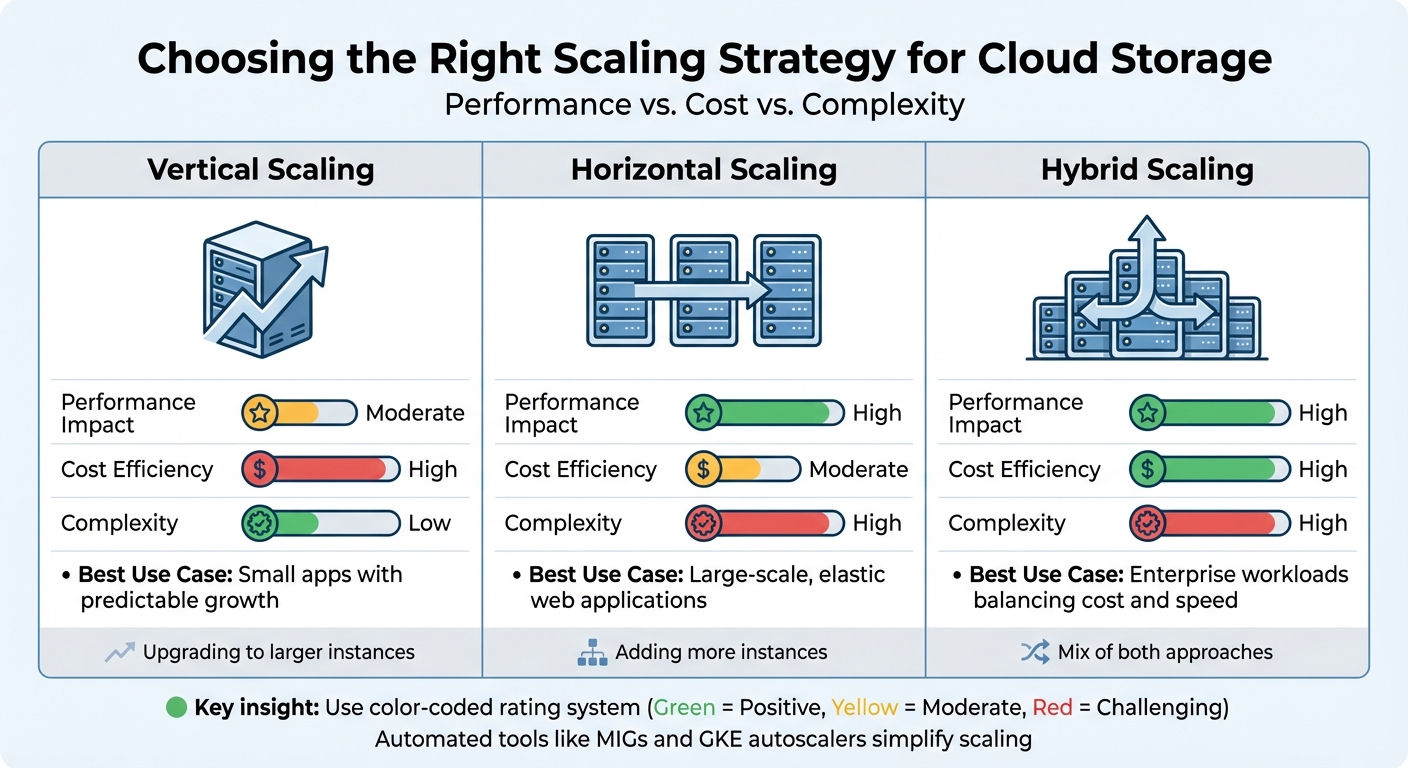
Cloud Storage Scaling Approaches: Performance, Cost & Complexity Comparison
Keeping cloud storage costs under control requires both vigilant monitoring and smart management. With public cloud spending expected to surpass $1 trillion by 2026, analysts estimate that 45–55% of this spending could be optimized. The challenge isn't just keeping tabs on resource usage - it's also about understanding why resources are being consumed and whether you're paying for capacity you don’t actually use.
Real-Time Monitoring Tools
Amazon CloudWatch provides near real-time metrics for Amazon S3, updated every minute. While daily storage metrics are free, request metrics come with additional charges. With data retention spanning 15 months, CloudWatch offers historical insights that can help identify trends and anomalies. You can also set up alarms using metric math or anomaly detection to trigger automated actions when something seems off. This helps ensure smooth auto-scaling and avoids surprises.
Amazon S3 Storage Lens gives you a bird’s-eye view of your storage usage and activity trends through an interactive dashboard [37,39]. The free version offers summary metrics, while the advanced tier dives deeper, with prefix-level insights across up to 50 levels. It even integrates with CloudWatch, making it easier to spot inefficiencies like buckets missing lifecycle rules for incomplete uploads - a common culprit for unnecessary expenses. Similarly, Google Cloud Monitoring tracks request rates and bandwidth usage for each bucket. Its Storage Intelligence feature uses AI to identify unused resources or inefficient storage classes, with a 30-day trial to get you started [42,43].
AWS Cost Explorer is another valuable tool, analyzing spending patterns and anomalies over a 13-month period. For instance, aligning instance provisioning with actual workload demands - by monitoring vCPU, memory, and network usage over a 2–4 week period - can ensure peaks stay under 80% of a new instance's capacity. This kind of "right-sizing" can dramatically reduce costs. BetterCloud’s CTO Jamie Tischart highlighted how adopting Ternary FinOps helped them slash cloud infrastructure costs from 17% of non-GAAP revenue to just 8%.
"Our cloud infrastructure costs were 17% of non-GAAP revenue. We reduced that down to 8% of non-GAAP revenue with Ternary."
– Jamie Tischart, CTO, BetterCloud
Comparing Scaling Approaches
Once you’ve got monitoring under control, choosing the right scaling approach can further improve both performance and cost efficiency. Scaling strategies generally fall into three categories:
- Vertical scaling: Upgrading to larger instances. This approach is simpler and delivers moderate performance improvements, but it comes with higher upfront costs.
- Horizontal scaling: Adding more instances. While this can boost performance significantly, it requires more orchestration and is better suited for elastic, large-scale applications.
- Hybrid scaling: A mix of both. This approach balances cost and performance, making it ideal for enterprise workloads.
| Scaling Approach | Performance Impact | Cost Efficiency | Complexity | Best Use Case |
|---|---|---|---|---|
| Vertical | Moderate | High | Low | Small apps with predictable growth |
| Horizontal | High | Moderate | High | Large-scale, elastic web applications |
| Hybrid | High | High | High | Enterprise workloads balancing cost and speed |
Automated tools like Compute Engine managed instance groups (MIGs) and GKE autoscalers simplify scaling by dynamically adjusting resources based on real-time metrics. For latency-sensitive tasks, hedged requests can minimize delays by retrying faster. It’s also a good idea to monitor Google Cloud’s quotas and limits to avoid performance bottlenecks during scaling.
Cost Optimization with Subscription Management
Monitoring and scaling are just part of the equation - cost optimization requires proactive management. Studies show that 60–80% of stored data is accessed only in the first 30 days, yet much of it stays in expensive "hot" storage tiers. For example, moving 50 TB of rarely accessed data from hot to cold storage could save over $11,000 annually.
Tagging data by project, department, or environment ensures accountability and proper cost tracking. Simple steps like setting lifecycle rules to delete incomplete uploads after seven days or scheduling non-production shutdowns during off-hours can cut resource costs by 65–75% [45,50,52]. Auditing and removing unattached EBS volumes, outdated snapshots, and abandoned instances can also eliminate hidden expenses.
BizBot’s subscription management feature takes cost tracking further by consolidating visibility across accounting, management, and cloud platforms. This unified view makes it easier to spot redundant subscriptions and ensures you're only paying for what you actually use. Given that only 30% of organizations have a clear understanding of their cloud expenses, tools like this are invaluable [48,49].
Preparing for Future Workloads
AI-Driven and Global Workloads
AI workloads demand a unique approach to storage. One effective method is to separate AI model artifacts from application code by storing them in centralized object storage rather than embedding them in container images. This setup allows multiple environments - like GKE, Cloud Run, and Vertex AI - to access the same versioned models without creating duplicates.
"Scalable AI starts with storage: treat the model artifact as a first-class citizen, with its own lifecycle, independent of the application code." – Karl Weinmeister, Director of Developer Relations, Google Cloud
For high-performance AI training, parallel file systems like Managed Lustre are a game-changer. They deliver sub-millisecond latency and can stream data at speeds of up to 1 TB/s, far surpassing the tens-of-milliseconds response times of standard object storage. When serving AI models globally, multi-layered caching systems - combining RAM disks for model weights and SSD-backed zonal caches - can achieve up to 2.5 TB/s in bandwidth. For inference tasks, hierarchical namespaces support up to 40,000 initial read requests per second, ensuring scalability for demanding workloads.
Future-Proofing with Managed Services
Managed services simplify operations by reducing manual effort. For example, Amazon S3 offers unmatched durability with 11 nines (99.999999999%) and virtually unlimited scalability, making it ideal for data lakes and unstructured data. For relational workloads requiring ACID compliance, tools like Amazon Aurora and RDS handle scaling through read replicas and horizontal sharding automatically.
The AWS Well-Architected Framework highlights the importance of choosing storage solutions tailored to specific data needs instead of forcing a one-size-fits-all approach. Features like S3 Lifecycle and Google Cloud's Autoclass automate transitions between storage tiers - Standard, Nearline, Coldline, and Archive - based on usage patterns. This ensures cost-efficiency as datasets grow. By leveraging these managed services, businesses can scale seamlessly while keeping costs under control.
Using BizBot for Expense Optimization
As infrastructures scale, managing costs becomes essential. BizBot's subscription management feature provides centralized visibility across your entire stack, from accounting software to cloud platforms. This eliminates redundant subscriptions and ensures expenses grow proportionally. This is particularly critical, as studies show over 90% of businesses exceed planned cloud budgets, with up to 35% of cloud spend wasted due to poor oversight.
BizBot also offers digital CFO services, fostering collaboration between Finance and Engineering teams. This alignment helps evaluate scaling decisions based on business value and ROI. By linking cloud costs to metrics like cost per transaction or cost per user, BizBot enables businesses to measure the profitability of workloads, even as they scale unpredictably.
Conclusion
Cloud storage scalability plays a crucial role in powering AI pipelines, real-time analytics, and global operations. The rapid growth of the market highlights how scalable architectures have become a necessity for staying competitive.
This guide has explored key principles like cloud-native design, data partitioning, auto-scaling, and intelligent tiering - tools that help organizations manage the challenges of exponential data growth. Unlike traditional on-premises systems, cloud solutions offer the flexibility to scale horizontally and distribute workloads across the globe. They can also adapt automatically to sudden spikes in demand. These features not only enhance performance but also deliver cost efficiencies.
"Selecting the right object storage partner is an architectural decision, not just an IT procurement choice." – DigitalOcean
By implementing strategies like automated tiering and caching, businesses can significantly reduce costs. In fact, with 45–55% of cloud storage spending identified as an area for optimization, the financial savings can be considerable. These practices, combined with the principles outlined in this guide, equip companies to handle future challenges and ensure their operations remain resilient in a constantly evolving cloud environment.
To succeed, businesses should embrace a scalable mindset. This includes leveraging Infrastructure as Code (IaC) for quick deployments, utilizing real-time monitoring, and managing subscriptions efficiently with tools like BizBot. With public cloud spending projected to near $1 trillion by 2026, those who align their storage strategies with their growth goals will be well-positioned to thrive.
FAQs
How do I choose between vertical, horizontal, and hybrid scaling?
When deciding between vertical, horizontal, and hybrid scaling, it’s essential to weigh factors like workload demands, performance goals, budget constraints, and infrastructure adaptability.
- Vertical scaling boosts the resources of a single server, making it a good option for predictable growth or temporary needs. Think of it as upgrading your current machine - adding more CPU, RAM, or storage to handle increased demand.
- Horizontal scaling, on the other hand, involves adding more servers to share the workload. This approach is excellent for managing variable or unpredictable traffic and provides better fault tolerance since tasks are distributed across multiple machines.
- Hybrid scaling blends the two strategies, aiming to strike a balance between cost and performance. It’s particularly useful when you need to address both short-term spikes and long-term scalability.
Your choice should align with your workload patterns and budget. For instance, if your traffic is steady and predictable, vertical scaling might suffice. But if your workload fluctuates or requires high availability, horizontal or hybrid scaling could be more effective.
What’s the best way to avoid storage hotspots and throttling?
To maintain smooth performance and prevent bottlenecks in cloud storage systems, it's essential to manage request rates and access distribution effectively. Key practices include:
- Auto-scaling request capacity: Automatically adjust capacity to handle fluctuating demand.
- Using parallelization with prefixes: Distribute requests across multiple prefixes to avoid overloading specific partitions.
- Applying caching strategies: Reduce repeated requests by caching frequently accessed data, balancing the load more efficiently.
These approaches help avoid storage hotspots and throttling, ensuring your system runs without interruptions.
Which metrics should I monitor to control cloud storage costs?
To keep cloud storage costs under control, it's essential to watch a few critical metrics. These include request rates, bandwidth usage, storage class transitions, incomplete multipart uploads, noncurrent versions, and access patterns. By staying on top of these factors, you can pinpoint inefficiencies and make adjustments to manage expenses more efficiently.