
Cloud storage scalability is the ability to handle growing data and user demands without losing performance. Back in 2022, Gartner forecast that by 2025, 51% of IT spending in four segments – application software, infrastructure software, business process services and system infrastructure – would have shifted from traditional solutions to the public cloud, up from 41% at the time. That forecast is now historical, and it only ever covered those four categories rather than all IT spending; for a current figure, see Gartner’s spending forecast further down this page, which put worldwide public cloud end-user spending at about $824.8 billion in 2025 and expected it to pass a trillion dollars before the end of the decade. Scalable storage supports that shift and can reduce costs through consumption-based models, automated scaling, and intelligent tiering.
Key takeaways:
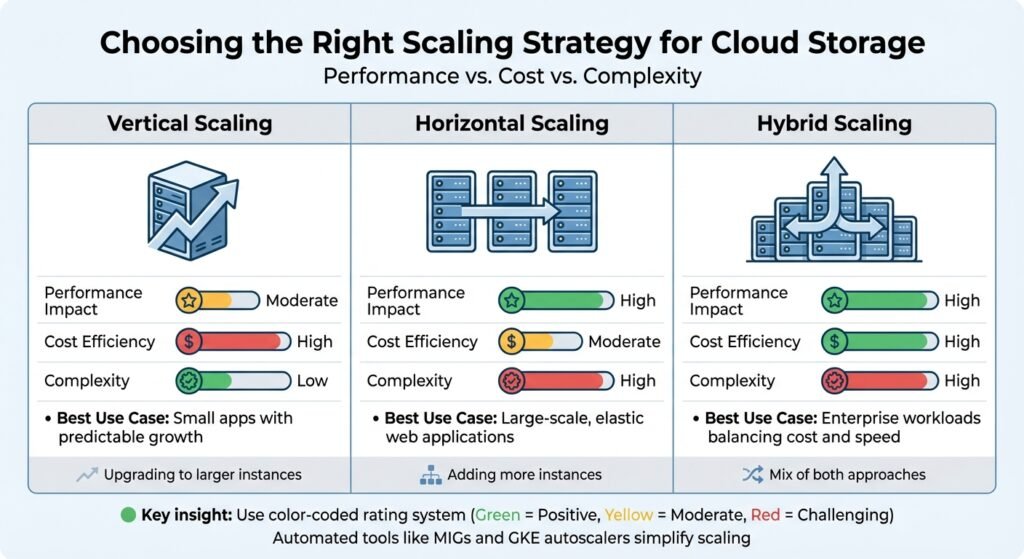
- Scalability Types: Vertical (adding resources to a server), Horizontal (adding more servers), and Hybrid (combining both).
- Performance Boosts: Elasticity, auto-scaling, and load balancing ensure systems handle traffic spikes.
- Cost Savings: Automated tiering is where most of the money is. AWS puts the saving at up to 40% in the Infrequent Access tier and up to 68% in Archive Instant Access.
- AI Integration: Forecasting and caching can pre-warm resources instead of reacting after the fact.
- Monitoring Tools: Platforms like Amazon CloudWatch and AWS Cost Explorer help track usage and control expenses.
For businesses, scalable cloud storage is not just about technology – it’s a practical way to manage growing workloads while staying efficient and cost-effective.
Core Principles of Scalable Cloud Storage
Scalability in cloud storage hinges on a well-thought-out architecture and deployment strategy. Three fundamental principles help distinguish systems that can handle growing demands from those that falter under pressure. These principles lay the groundwork for the performance techniques discussed in the following sections.
Cloud-Native Design and Modularity
Modern scalable systems rely heavily on microservices and containers. By breaking down monolithic architectures into smaller, independent units using tools like Docker and Kubernetes, businesses can scale specific components as needed without disrupting the entire system. This design prioritizes statelessness, where services don’t rely on local session data. Instances can then be added or removed as demand fluctuates.
Google Cloud’s Well-Architected Framework makes the same point plainly: modular components and clear interfaces let you scale individual components as needed, instead of scaling the entire application.
Another critical aspect is loose coupling, where components interact with minimal dependencies. Managed services like Cloud SQL and DynamoDB simplify this by handling replication, backups, and scaling on your behalf. Vendors publish throughput numbers for their AI-oriented caching and block storage products; treat those as best-case marketing figures and test against your own workload before budgeting around them.
While modularity is essential, efficient data distribution plays an equally important role in managing large-scale workloads.
Data Partitioning and Sharding
Sharding is a technique that divides a data store into horizontal partitions, enabling systems to exceed the hardware limits of a single server’s CPU, memory, and disk I/O. This not only increases storage capacity but also improves performance by allowing parallel read and write operations across multiple nodes.
For instance, Amazon S3 documents a rate of 3,500 PUT/COPY/POST/DELETE and 5,500 GET/HEAD requests per second per partitioned prefix, with typical first-byte latency of 100 to 200 milliseconds. Selecting the right shard key is critical – using a stable attribute ensures that changes won’t trigger resource-intensive data migrations between shards. Additionally, avoiding sequential naming patterns like timestamps or incrementing IDs prevents “hotspots”, where a single partition becomes overloaded. A better strategy is to use random hash prefixes in object names, which distribute the load more evenly.
Google Cloud Storage publishes its own starting point: roughly 1,000 object write requests and 5,000 object read requests per second, with the advice to increase load no faster than doubling the rate over a period of 20 minutes so the system can redistribute it.
Infrastructure-as-Code (IaC) Tools
To complement modular design and data partitioning, Infrastructure-as-Code (IaC) brings automation to the table, ensuring that scalable infrastructure can be consistently reproduced and easily managed. Tools like Terraform and AWS CloudFormation automate the provisioning and configuration of resources, replacing manual setups with code-driven processes. This ensures consistency and allows for rapid scaling of environments.
IaC works alongside auto-scaling groups, load balancers, and scaling policies that adjust resources dynamically based on metrics like CPU usage. By storing IaC templates in version control, teams can create reproducible test environments and streamline CI/CD pipelines. Additionally, tools like CloudFormation can detect “drift” – differences between the desired infrastructure state and the actual running state – helping maintain scalability over time.
For stateless applications that rely on horizontal scaling, it’s best to configure external state stores, such as Redis, through IaC rather than storing session data on individual servers. This approach ensures that scaling remains consistent and efficient as workloads grow.
Performance Optimization Strategies
Once you’ve built a scalable architecture, the next step is to fine-tune your cloud storage for better performance. The goal here is to strike the right balance between speed, reliability, and cost – key factors that determine how effectively your system can handle both everyday operations and unexpected traffic surges.
Auto-Scaling and Load Balancing
Auto-scaling is all about adjusting capacity in real time, based on current demand. Cloud providers redistribute workloads as storage buckets approach their I/O limits – on Google Cloud Storage, the documented starting point of about 1,000 writes and 5,000 reads per second, ramped no faster than a doubling every 20 minutes.
Load balancers, like AWS Elastic Load Balancing, complement auto-scaling by distributing incoming traffic evenly. This prevents individual instances from becoming bottlenecks. Techniques like byte-range fetches – where large files are downloaded in parts over multiple connections – can further boost throughput by maximizing the use of available bandwidth.
Different scaling strategies cater to varying workloads. Target-tracking scaling aims to maintain a specific metric, such as CPU utilization. Predictive scaling uses historical data to prepare for future demand, reducing delays. Schedule-based scaling is ideal for planned events, while serverless architectures scale quickly to handle sudden traffic spikes. If scaling limits are hit – often indicated by HTTP 503 or 429 errors – implement an exponential backoff retry strategy to give the system time to recover and balance the load.
These strategies not only enhance performance but also set the stage for smarter cost management, which ties into data tiering and lifecycle policies.
Data Tiering and Lifecycle Policies
Data tiering is a cost-saving method that stores data based on how often it’s accessed. Frequently used “hot” data goes on high-speed SSDs, while less active “warm” data uses standard storage. Rarely accessed “cold” data and archives are stored on lower-cost HDDs or archive tiers.
Lifecycle policies simplify this process by automatically moving data to cheaper tiers after a set period of inactivity – commonly 30, 90, or 180 days. AWS publishes named customer results for S3 Intelligent-Tiering: Zalando reports 37% annual savings and Teespring more than 30% monthly savings. Read those as vendor-supplied numbers from customers with particular access patterns, not as a rate you should expect.
The tier pricing itself is public and easier to reason about. AWS puts S3 Intelligent-Tiering at up to 40% cheaper in the Infrequent Access tier and up to 68% in Archive Instant Access, with the tool moving objects automatically as access patterns change. Lifecycle policies also clean up “ghost” data – old versions, orphaned delete markers, and incomplete uploads. To manage this, set rules to delete incomplete uploads after seven days, apply granular tags (e.g., {"retention": "30-days"}), and review retention settings every 90 days.
An earlier version of this article quoted a third customer saving and several percentage ranges for tiering and ghost-data overhead. We could not source them, so they are gone. The mechanism matters more than the numbers anyway: you save money in proportion to how much of your data is genuinely cold, and that fraction is something only your own access logs can tell you.
AI-Powered Demand Forecasting
Forecasting aims to predict resource needs from historical usage rather than reacting after latency has already risen. That is the whole idea, and it is a sound one.
Automated prefix caching in serving frameworks can pre-warm caches for expensive processes, like handling large language model prompts, cutting startup times. Predictive analysis can also identify “hotspots” – files or objects receiving disproportionate traffic – allowing for smarter caching strategies.
Structural choices help too. Google documents that buckets with hierarchical namespace enabled offer up to 8 times higher initial QPS limits for reading and writing objects than buckets without it. Enabling metadata prefetching at mount time also reduces overhead during high-concurrency events.
Be sceptical of vendor claims about how much AI-driven tiering saves. AWS S3 Intelligent-Tiering charges a small monthly monitoring fee and does not charge for retrieval when it moves objects between the frequent, infrequent and archive-instant tiers; that is a documented pricing fact you can check. Modelled savings percentages are not.
Monitoring, Cost Management, and Best Practices
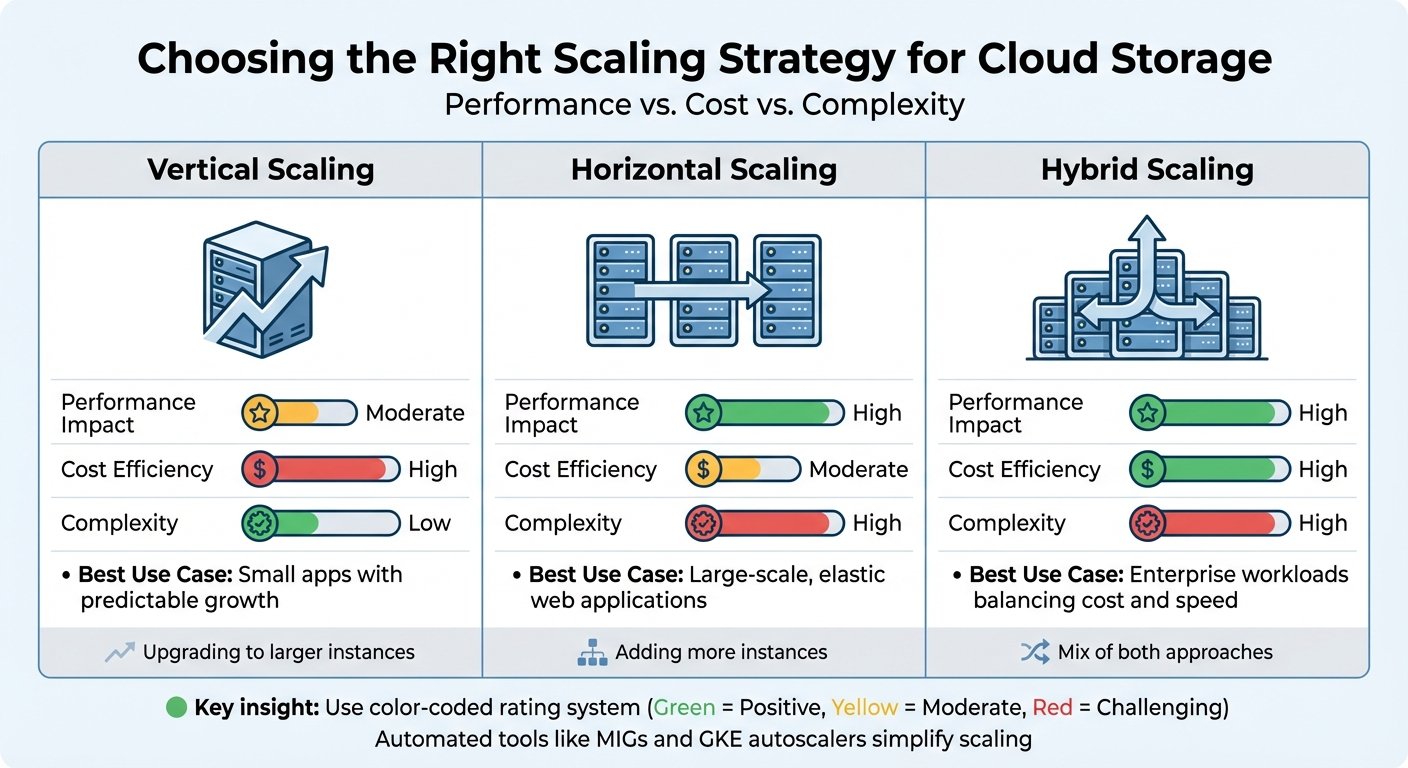
Cloud Storage Scaling Approaches: Performance, Cost & Complexity Comparison
Keeping cloud storage costs under control requires both vigilant monitoring and smart management. Gartner’s 2024 forecast put worldwide public cloud end-user spending at $675.4 billion in 2024, rising to about $824.8 billion in 2025, with analyst Sid Nag saying the firm expects spending to “eclipse the one trillion dollar mark before the end of this decade”. The challenge isn’t just keeping tabs on resource usage – it’s also about understanding why resources are being consumed and whether you’re paying for capacity you don’t actually use.
Real-Time Monitoring Tools
Amazon CloudWatch provides near real-time metrics for Amazon S3, updated every minute. Daily storage metrics are free; request metrics cost extra. With data retention spanning 15 months, CloudWatch offers historical insights that help identify trends and anomalies. You can also set up alarms using metric math or anomaly detection to trigger automated actions when something seems off.
Amazon S3 Storage Lens gives you a view of storage usage and activity trends through a dashboard. The free version offers summary metrics; the advanced tier adds prefix-level insights. It integrates with CloudWatch, making it easier to spot inefficiencies like buckets missing lifecycle rules for incomplete uploads – a common cause of unnecessary expense. Google Cloud Monitoring tracks request rates and bandwidth usage per bucket, and its Storage Intelligence feature flags unused resources and inefficient storage classes.
AWS Cost Explorer analyses spending patterns and anomalies over a 13-month period. Right-sizing – watching vCPU, memory, and network usage over a few weeks and provisioning so that peaks sit comfortably below an instance’s capacity – is where most of the easy savings are.
This section previously carried a named customer testimonial about cutting cloud infrastructure costs from 17% to 8% of non-GAAP revenue. We could not find it at the vendor, in a press release, or anywhere other than this site, so we removed it. A quote we cannot trace is worth nothing to you.
Comparing Scaling Approaches
Once you’ve got monitoring under control, choosing the right scaling approach can further improve both performance and cost efficiency. Scaling strategies generally fall into three categories:
- Vertical scaling: Upgrading to larger instances. This approach is simpler and delivers moderate performance improvements, but it comes with higher upfront costs.
- Horizontal scaling: Adding more instances. While this can boost performance significantly, it requires more orchestration and is better suited for elastic, large-scale applications.
- Hybrid scaling: A mix of both. This approach balances cost and performance, making it ideal for enterprise workloads.
| Scaling Approach | Performance Impact | Cost Efficiency | Complexity | Best Use Case |
|---|---|---|---|---|
| Vertical | Moderate | High | Low | Small apps with predictable growth |
| Horizontal | High | Moderate | High | Large-scale, elastic web applications |
| Hybrid | High | High | High | Enterprise workloads balancing cost and speed |
Automated tools like Compute Engine managed instance groups (MIGs) and GKE autoscalers simplify scaling by dynamically adjusting resources based on real-time metrics. For latency-sensitive tasks, hedged requests can minimize delays by retrying faster. It’s also a good idea to monitor Google Cloud’s quotas and limits to avoid performance bottlenecks during scaling.
Cost Optimization with Subscription Management
Monitoring and scaling are just part of the equation – cost optimization requires proactive management. Most organisations keep far more data in hot storage than they read, and the only way to know how much is to look at your own access logs before writing a lifecycle rule.
Tagging data by project, department, or environment ensures accountability and proper cost tracking. Simple steps like setting lifecycle rules to delete incomplete uploads after seven days, or shutting down non-production environments outside working hours, remove cost you were never getting value from. Auditing and removing unattached EBS volumes, outdated snapshots, and abandoned instances eliminates hidden expenses. We have dropped the percentage savings that used to appear here; they had no source, and the real figure depends entirely on how much idle capacity you are carrying.
BizBot’s subscription management feature consolidates visibility across accounting, management, and cloud platforms. That makes redundant subscriptions easier to spot. It will not tell you whether a given cloud workload is worth its bill – nothing outside your own engineering team will.
Preparing for Future Workloads
AI-Driven and Global Workloads
AI workloads demand a unique approach to storage. One effective method is to separate AI model artifacts from application code by storing them in centralized object storage rather than embedding them in container images. This setup allows multiple environments – like GKE, Cloud Run, and Vertex AI – to access the same versioned models without creating duplicates.
“The most important step toward a scalable ML serving architecture is to treat the model artifact as a first-class citizen, with its own lifecycle, independent of the application code.” – Karl Weinmeister, Director, Developer Relations, Google Cloud, in Scalable AI starts with storage
For high-performance AI training, parallel file systems like Managed Lustre offer far lower latency than standard object storage. Vendors quote headline throughput figures for these products; check the current documentation for your region and instance type rather than trusting a number in an article, including this one. The same applies to multi-layered caching for global model serving.
Future-Proofing with Managed Services
Managed services simplify operations by reducing manual effort. Amazon S3 is designed for 11 nines (99.999999999%) of durability and effectively unlimited scale, which makes it a reasonable default for data lakes and unstructured data. For relational workloads requiring ACID compliance, tools like Amazon Aurora and RDS handle scaling through read replicas and sharding.
The AWS Well-Architected Framework highlights the importance of choosing storage solutions tailored to specific data needs instead of forcing a one-size-fits-all approach. Features like S3 Lifecycle and Google Cloud’s Autoclass automate transitions between storage tiers – Standard, Nearline, Coldline, and Archive – based on usage patterns.
Using BizBot for Expense Optimization
As infrastructures scale, managing costs becomes essential. BizBot’s subscription management feature provides centralized visibility across your stack, from accounting software to cloud platforms. That helps you find subscriptions nobody uses any more.
BizBot also offers digital CFO services, which mainly means getting Finance and Engineering into the same conversation about scaling decisions. Linking cloud costs to metrics like cost per transaction or cost per user is the useful part; the tooling is secondary. If your engineering team already tracks unit economics, you do not need this.
Conclusion
Cloud storage scalability plays a crucial role in powering AI pipelines, real-time analytics, and global operations. Scalable architectures have stopped being a differentiator and become table stakes.
This guide has covered cloud-native design, data partitioning, auto-scaling, and intelligent tiering – the tools that help organizations manage data growth. Unlike traditional on-premises systems, cloud solutions can scale horizontally, distribute workloads geographically, and adapt to sudden spikes in demand.
“Selecting the right object storage partner is an architectural decision, not just an IT procurement choice.” – DigitalOcean
Automated tiering and caching do cut costs, and the tier pricing above tells you roughly how much per gigabyte moved. What nobody can tell you from outside is how much of your data is cold. Measure that first.
To succeed, businesses should embrace a scalable mindset: Infrastructure as Code for quick deployments, real-time monitoring, and disciplined subscription management. With public cloud spending on track to pass a trillion dollars before 2030 on Gartner’s own numbers, aligning storage strategy with growth plans is worth the effort.
FAQs
How do I choose between vertical, horizontal, and hybrid scaling?
When deciding between vertical, horizontal, and hybrid scaling, it’s essential to weigh factors like workload demands, performance goals, budget constraints, and infrastructure adaptability.
- Vertical scaling boosts the resources of a single server, making it a good option for predictable growth or temporary needs. Think of it as upgrading your current machine – adding more CPU, RAM, or storage to handle increased demand.
- Horizontal scaling, on the other hand, involves adding more servers to share the workload. This approach is excellent for managing variable or unpredictable traffic and provides better fault tolerance since tasks are distributed across multiple machines.
- Hybrid scaling blends the two strategies, aiming to strike a balance between cost and performance. It’s particularly useful when you need to address both short-term spikes and long-term scalability.
Your choice should align with your workload patterns and budget. For instance, if your traffic is steady and predictable, vertical scaling might suffice. But if your workload fluctuates or requires high availability, horizontal or hybrid scaling could be more effective.
What’s the best way to avoid storage hotspots and throttling?
To maintain smooth performance and prevent bottlenecks in cloud storage systems, it’s essential to manage request rates and access distribution effectively. Key practices include:
- Auto-scaling request capacity: Automatically adjust capacity to handle fluctuating demand.
- Using parallelization with prefixes: Distribute requests across multiple prefixes to avoid overloading specific partitions.
- Applying caching strategies: Reduce repeated requests by caching frequently accessed data, balancing the load more efficiently.
These approaches help avoid storage hotspots and throttling, ensuring your system runs without interruptions.
Which metrics should I monitor to control cloud storage costs?
To keep cloud storage costs under control, it’s essential to watch a few critical metrics. These include request rates, bandwidth usage, storage class transitions, incomplete multipart uploads, noncurrent versions, and access patterns. By staying on top of these factors, you can pinpoint inefficiencies and make adjustments to manage expenses more efficiently.
More on this topic
Browse all 39 articles on IT, Cloud & Integrations, or jump straight to our buying guide: Best Collaboration Tools for Small Teams.