Social media integration with your CRM transforms how businesses understand and interact with customers. By connecting platforms like Instagram, LinkedIn, Facebook, and X (formerly Twitter) to your CRM, you centralize all interactions - comments, messages, and mentions - into one system. This integration provides real-time insights into customer sentiment, behavior, and preferences, which cannot be captured through traditional channels like emails or phone calls.
Key benefits include:
- Building complete customer profiles by combining transactional data with social interactions.
- Improving marketing efforts with targeted campaigns and efficient tools based on customer activity on social platforms.
- Faster, more efficient customer service by managing all interactions from a single hub.
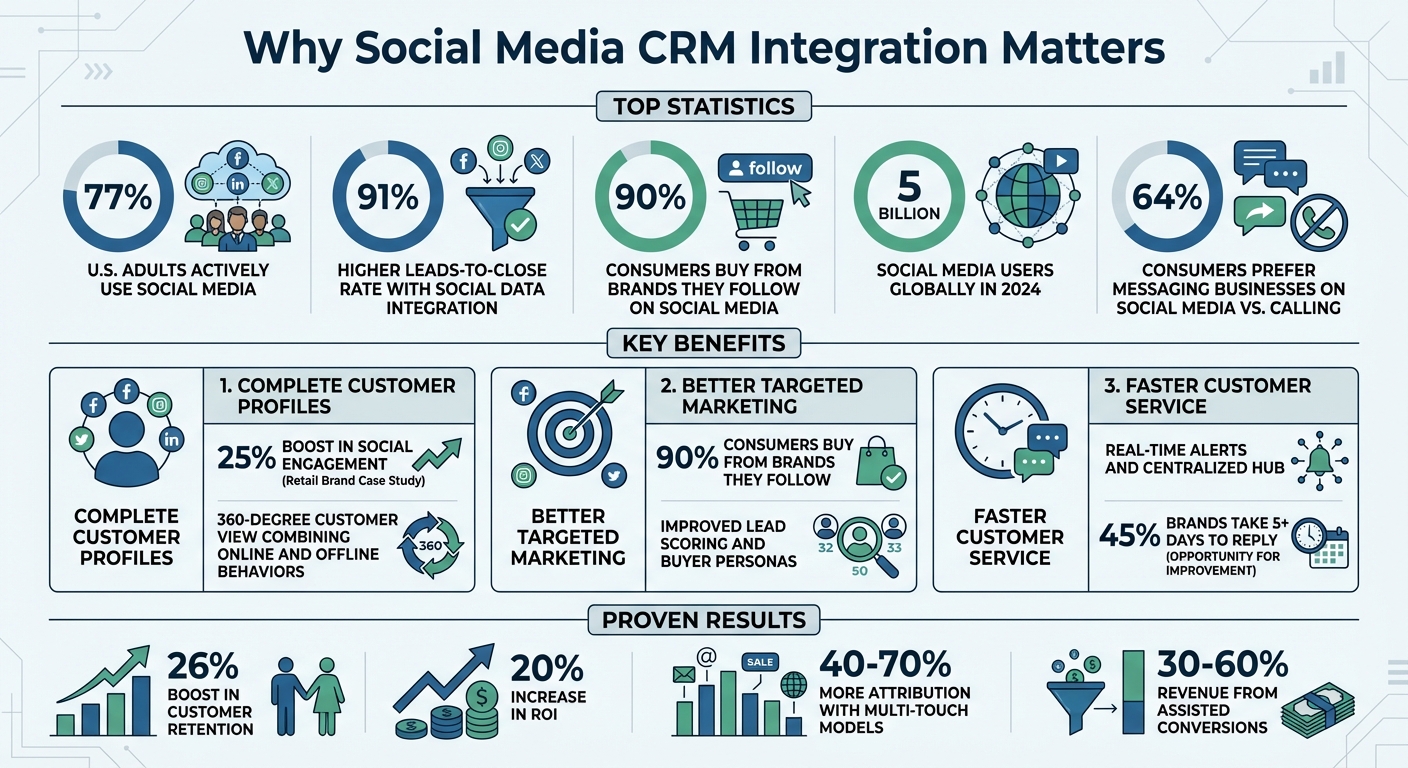
With 77% of U.S. adults actively using social media and businesses reporting a 91% higher leads-to-close rate when integrating social data, this approach is essential for improving customer engagement and driving better outcomes.
Social Media CRM Integration Benefits and Statistics
Top 5 Reasons to Integrate Your CRM with Social Media
sbb-itb-d1a6c90
Main Benefits of Connecting Social Media to Your CRM
Linking your social media platforms with your CRM brings a range of benefits that help you better understand customers, fine-tune marketing strategies, and speed up service responses.
Complete Customer Profiles
While traditional CRM systems excel at tracking transactions, they often miss the emotional and behavioral side of customer interactions. Social media integration bridges this gap by capturing insights like customer preferences, motivations, and sentiments. By combining transactional data with social signals - such as likes, shares, comments, and direct messages - you get a more complete picture of your customers. For instance, a global retail brand saw a 25% boost in social engagement within just six months after integrating social listening into its CRM system.
This enriched dataset also offers details that standard forms often miss, like demographic trends or professional affiliations. Plus, it helps in spotting brand advocates and influencers who can amplify your reach.
"Social media is often our best data entry point due to the high usage of these platforms by users".
The result? A 360-degree customer view that connects online interactions with offline behaviors.
Better Targeted Marketing Campaigns
Social media data takes audience segmentation to the next level by focusing on actual online behavior. This helps create more accurate buyer personas and improves lead scoring by ranking prospects based on their engagement. Did you know that 90% of consumers buy from brands they follow on social media?. Understanding which platforms drive the most valuable leads - whether it’s LinkedIn for professionals or Instagram for visual storytelling - ensures your marketing dollars are well spent.
When you sync social media conversion events with your CRM, it sharpens your lead scoring and even predicts future buying patterns. Beyond just improving targeting, this integration also simplifies customer service processes, ensuring a seamless experience for your audience.
Faster Customer Service Response
By integrating social media into your CRM, you create a centralized hub where all customer interactions - comments, mentions, and direct messages - are managed in one place. This setup allows support agents to access a customer’s history across platforms, eliminating the need for customers to repeat their concerns. Real-time alerts from social listening tools ensure that negative feedback or urgent issues are addressed quickly. Additionally, sentiment analysis can uncover recurring problems before they escalate.
With this seamless flow of information, your support team can respond faster, aided by automated ticket creation and instant alerts, ultimately improving customer satisfaction.
How to Set Up Social Media Integration in Your CRM
Learn how to connect your social platforms to your CRM, step by step, starting with the right tools.
Choose Compatible CRM and Social Platforms
First, make sure your CRM supports the social platforms your audience uses most. For instance, HubSpot provides native integrations with Facebook, Instagram, LinkedIn, and X, offering features like syncing lead ads and scheduling posts. Similarly, Salesforce includes Social Studio, which enables listening, engagement, and publishing across major platforms. If you're using platforms like TikTok or YouTube that lack direct CRM integration, middleware tools like Zapier can bridge the gap.
Your choice of CRM should align with your business goals. For example, B2B companies may prioritize LinkedIn integration, while businesses handling high customer service volumes might benefit from WhatsApp Business API support. Start small by focusing on one or two platforms where your audience is most engaged, rather than overloading your resources by connecting everything at once.
"A solid social media CRM is not just a checkbox that says 'connect Instagram.' It has to turn social conversations into governed work." - saascrmreview.com
Once you've chosen your platforms, the next step is setting up tools to monitor and respond to social interactions in real time.
Set Up Social Listening Tools
To capture real-time interactions, use APIs to create a seamless data flow between your social platforms and CRM. This ensures customer profiles update automatically as new data comes in. Decide what types of interactions matter most - such as mentions of your brand, product feedback, complaints, or service inquiries - to avoid being overwhelmed with unnecessary data.
Automated workflows can make this process even more efficient. For example, a negative mention on X can trigger a high-priority support ticket, while a product inquiry on Instagram might notify your sales team. Tools like Hootsuite or Sprout Social integrate with CRMs like HubSpot or Salesforce to ensure these workflows function in real time. To manage customer expectations, configure auto-replies on platforms like Instagram or set "Away" statuses on Facebook while your CRM logs the interaction.
With these workflows in place, you’ll be ready to analyze and act on the data using your CRM.
Review and Use Social Data
Once your platforms are connected and listening tools are running, use your CRM dashboard to review the incoming data. Group contacts based on their preferred platforms and engagement habits to tailor your marketing efforts. For example, LinkedIn users might appreciate professional content, while Instagram followers may respond better to visually engaging product demos.
Train your team to interpret and use these insights effectively. With over 5 billion social media users globally in 2024 and 64% of consumers preferring to message businesses on social media instead of calling, making the most of this data is crucial. Keep an eye on critical metrics like response times - 45% of brands take more than five days to reply to Facebook messages. Use lead scoring tools to prioritize prospects based on their social media activity and engagement with your brand.
Tracking Results: Better Insights and Return on Investment
With your CRM now powered by integrated data, you can clearly see how social interactions influence business outcomes. Monitoring the right metrics helps determine if your efforts are delivering results and highlights areas where adjustments might be needed.
Important Metrics to Monitor
Keep an eye on customer service metrics, such as average response time and ticket resolution time for issues originating from social channels. These metrics directly impact customer satisfaction and can pinpoint inefficiencies in your processes. For sales teams, focus on lead conversion rates - the percentage of social leads that turn into real opportunities - as well as lead-to-close rates, average deal size, and deal velocity for leads sourced through social media.
When it comes to engagement, prioritize metrics like click-through rates that lead to meaningful CRM actions over vanity metrics like follower counts. Additionally, track retention rates over 6–12 months for customers acquired via social channels to assess the long-term value of your social media efforts. Tools like AI-driven sentiment analysis can provide insight into customer satisfaction and brand perception. Another valuable metric is Influencer Impact, which measures the number and quality of leads generated by social media advocates.
Calculating ROI Using CRM Reports
Once you’ve gathered these metrics, it’s time to calculate their financial impact. Use the formula: (Revenue from social − Total social cost) ÷ Total social cost × 100. Be sure to account for all costs, including ad spend, labor (staff time and agency fees), content creation expenses, software subscriptions, and training. UTM tracking data integrated into your CRM can help link social media touchpoints to closed-won deals, giving you a clearer picture of revenue attribution.
Move beyond last-click attribution models by also tracking assisted conversions, where social media played a role in the buyer's journey but wasn’t the final touchpoint. Assisted conversions often make up 30–60% of social media’s actual contribution to revenue. Conduct a 90-day cohort analysis of acquired customers to see how many had at least one social interaction before closing; this can reveal 40–70% more attribution compared to last-click models.
"You don't know what your ROI is until you've laid out the goals you are tracking towards." - Eileen Kwok, Social & Influencer Marketing Strategist, Hootsuite
For B2B companies with longer sales cycles, consider measuring ROI through metrics like pipeline influence and deal velocity, which better reflect the impact of social media on complex sales processes. Use your CRM to calculate Customer Acquisition Cost (CAC) by channel, comparing the cost-effectiveness of social-sourced leads to other channels, such as PPC or email. Don’t forget to factor in efficiency gains, like reduced time spent on manual data entry or quicker resolution of public complaints, when calculating ROI.
Conclusion
Linking social media with your CRM unlocks deeper customer insights and boosts engagement. Instead of relying solely on purchase history or support interactions, incorporating social media allows you to tap into real-time sentiment, behavioral trends, and your audience's genuine voice across platforms where they’re already active. This comprehensive view connects customer behavior with intent, empowering your teams to craft personalized experiences that build loyalty and drive revenue.
The numbers speak for themselves: businesses that integrate social media, email, and phone channels see a 91% higher leads-to-close rate compared to those using disconnected systems. Additionally, companies leveraging social data report a 26% boost in customer retention and a 20% increase in ROI. These results come from quicker response times, proactive engagement, and identifying key prospects and brand advocates faster than competitors. Such metrics highlight the importance of a well-thought-out integration strategy.
However, successful integration requires meticulous planning. Ensure compliance with privacy regulations like GDPR and CCPA to protect both your customers and your reputation. Select platforms that align with your business needs, define clear performance metrics, and unify your sales, marketing, and support teams under one cohesive system.
This shift toward proactive engagement marks a significant transformation in customer relationship management. Moving away from reactive, transaction-based methods to proactive, relationship-driven strategies is now critical. With tools like AI-powered sentiment analysis, omnichannel consistency, and predictive analytics becoming the norm, integrating social data today positions your business to anticipate customer needs rather than merely react to them. Act now to stay ahead of the competition.
FAQs
What social data should I sync into my CRM first?
To get started, connect your social media platforms to your CRM to sync interactions like comments, messages, and engagement metrics. These insights offer a closer look at customer behavior, making it easier to respond quickly and foster stronger connections. By focusing on this data, you ensure your CRM tracks important customer interactions, giving you a clearer picture of their needs and preferences.
How do I connect social activity to revenue in my CRM reports?
To tie social media activity to revenue in your CRM reports, start by integrating your social media platforms with your CRM. This allows you to track customer interactions like comments, messages, and other engagements. By doing this, you can connect social engagement to specific stages of the customer journey and key sales milestones.
Make use of revenue attribution tools to measure how your social campaigns directly influence sales. Regularly review your CRM reports to spot patterns and trends. This will help you refine your social strategies and align them with revenue growth goals.
How can I integrate social media with my CRM while staying GDPR/CCPA compliant?
To connect social media with your CRM while adhering to GDPR and CCPA regulations, prioritize safeguarding user privacy. Make sure to anonymize or pseudonymize data whenever possible. Always obtain clear and explicit consent from users, and ensure you're following the terms of service for each social media platform. Tools like customer data platforms (CDPs) can help centralize and manage data efficiently. Regularly evaluate your processes and be upfront about how you collect, store, and use user data to remain compliant.