AI-powered communication tools are transforming how businesses execute strategies. Here's what you need to know:
- The Problem: Executives spend over half their day managing emails and calendars, while employees lose 4 hours weekly switching between apps. This inefficiency leads to missed details and confusion.
- The Solution: AI tools integrate data from emails, chats, and business systems into a unified view, automating tasks like summarizing messages, updating plans, and tracking progress. This boosts productivity, saves time, and ensures alignment across teams.
- Key Features:
- Business Benefits:
- Teams save 2–10 hours weekly, focusing on impactful work.
- Companies reduce costs by 5–20% and see ROI within months.
- AI ensures consistent and accurate messaging using approved data sources.
Master AI for Client Communication (3 Tools That Change Everything)
sbb-itb-d1a6c90
Key Features of AI Strategy Communication Tools
Modern AI platforms are designed to tackle communication challenges and keep strategic initiatives running smoothly. By understanding what these tools bring to the table, businesses can identify the features that best align with their goals. Let’s break down how these tools simplify everyday communications.
Automation of Routine Communication Tasks
AI takes over repetitive tasks, freeing up time for more critical work. Tools like Slack AI, Zoom AI Companion, and Otter.ai handle tasks such as summarizing lengthy email threads and channel conversations into actionable points, transcribing meetings with speaker identification, and pinpointing key discussion highlights. For team members who miss a meeting, these features mean catching up takes minutes, not hours.
AI writing assistants, including Grammarly Business and ChatGPT, help draft polished emails, reports, and messages. They also adjust tone and clarity to match your company’s preferred style. For customer-facing roles, tools like Emitrr automate phone tasks such as call routing, appointment scheduling, and even missed-call-to-text responses, ensuring prospects stay engaged around the clock. By handling these routine tasks, AI allows teams to focus on strategic priorities instead of administrative details.
Real-Time Insights and Analytics
Beyond automation, AI platforms offer real-time insights that drive smarter decisions. These tools monitor sentiment in comments, reactions, and surveys, helping organizations understand workforce morale. This is crucial, especially since 38% of managers report feeling overwhelmed by too much information. Sentiment tracking cuts through the noise, highlighting what truly needs attention.
Predictive modeling further enhances communication by identifying the best message formats and timing. Narrative mapping ensures that key themes - like innovation or sustainability - are consistently communicated and understood across all channels. Meanwhile, conversation intelligence tools analyze sales calls and customer interactions, giving leaders performance insights without requiring them to attend every meeting. These features transform communication teams from simple message broadcasters into creators of targeted, role-specific content tailored to location and context.
Customizable Communication Frameworks
AI tools are flexible, adapting to fit your organization’s unique structure instead of forcing a rigid approach. For example, businesses can design custom AI SMS or voice agents with specific names, roles, and functions that align with their needs. These agents integrate seamlessly with internal knowledge bases, website links, and historical communication data to deliver accurate, context-rich responses.
Modern platforms continuously improve their understanding of context and refine their response capabilities over time. They also ensure brand voice consistency by training AI to match your company’s tone across all communication channels. This means messages feel like they come from your team, not a generic bot. Additionally, omnichannel integration allows businesses to manage SMS, email, phone, and chat through a single AI-powered interface. This creates a unified communication experience that aligns with your company’s workflow and priorities. By tailoring communication to your organization, these tools reinforce brand identity and support strategic goals effectively.
Benefits of Using AI for Strategy Communication
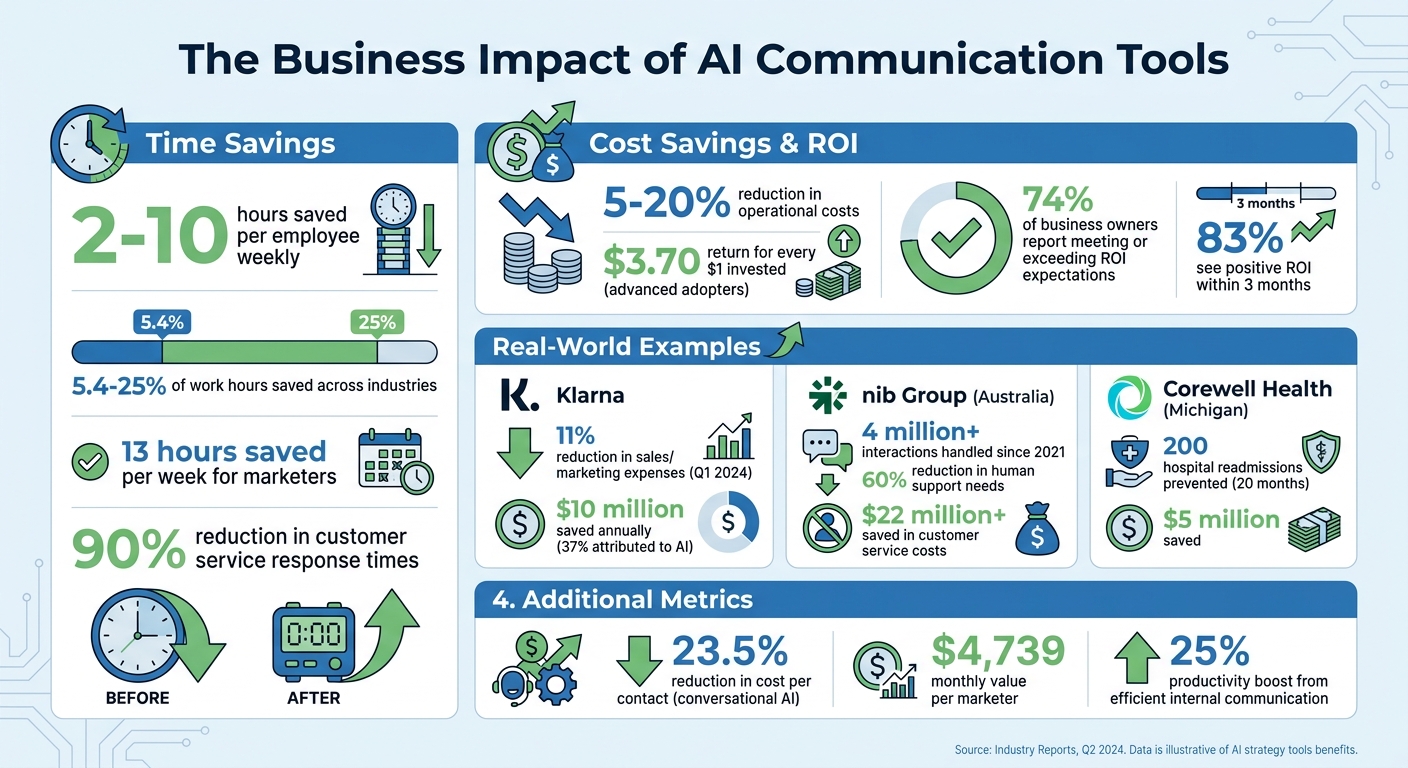
AI Communication Tools ROI and Time Savings Statistics
Once you grasp the potential of AI communication tools, the next question is straightforward: how can they benefit your business? The perks extend far beyond speeding up emails. These tools are transforming teamwork, budget allocation, and the consistent delivery of strategic messages across entire organizations.
Better Team Collaboration
AI eliminates the bottlenecks that often slow teams down. By analyzing past messages, shared documents, and project timelines, these tools ensure conversations stay aligned with your strategic goals. If someone joins a project midway, automated summaries can distill lengthy discussions into the key decisions and action points, saving them from sifting through endless message threads. Smart prioritization highlights urgent updates based on context, sender importance, and relevance, helping teams focus on what truly matters instead of getting lost in routine noise.
Another game-changer? AI transforms your communication history into a searchable knowledge base. With semantic search, past strategic decisions are instantly accessible, reducing the risk of duplicating effort. Automated workflows also streamline handoffs between departments, breaking down silos and keeping teams - whether in marketing, engineering, or sales - aligned during execution. Together, these features not only boost productivity but also sharpen the clarity and impact of your strategic messaging.
Time and Cost Savings
On top of improving collaboration, AI delivers measurable time and cost efficiencies. By automating routine tasks, AI frees up 2–10 hours per employee every week, allowing them to focus on high-value strategic initiatives. Across industries, employees using AI tools report saving 5.4–25% of their work hours. For marketers, the numbers are even more striking - an average of 13 hours saved per week, which translates to approximately $4,739 in monthly value per person.
The financial impact is undeniable. Enterprises leveraging AI are cutting operational costs by 5–20%, with advanced adopters seeing a $3.70 return for every dollar invested. Real-world examples illustrate these benefits vividly. Klarna, for instance, reduced its sales and marketing expenses by 11% in Q1 2024 while scaling its output, attributing 37% of these savings - about $10 million annually - to AI. Similarly, Australia's nib Group deployed a virtual assistant, "nibby", which has handled over 4 million interactions since 2021, reducing human support needs by 60% and saving more than $22 million in customer service costs. Corewell Health in Michigan used predictive analytics to prevent 200 hospital readmissions over 20 months, saving $5 million. AI-powered customer service tools have also slashed response times by 90%, while conversational AI has cut the cost per contact by 23.5%.
Improved Accuracy and Consistency
AI doesn’t just save time and money - it ensures your strategic messages are accurate and consistent. These tools standardize communications using company-approved content, maintaining a uniform tone and ensuring accuracy in strategy updates. Retrieval-Augmented Generation (RAG) technology, for example, pulls information directly from internal, approved sources like wikis and knowledge bases. This ensures responses are grounded in verified data rather than generic AI outputs.
"RAG-based AI chatbots retrieve and generate answers from company-approved sources, providing more relevant information than generic AI tools. They also standardize processes, supporting policy compliance and reducing errors." - Slack
AI tools also act as a centralized "source of truth", enabling employees to access accurate information instantly without waiting on replies from other departments. Tools like Grammarly Business, which boasts a 4.7/5 rating on Capterra, are specifically recognized for enhancing content quality and team consistency. This level of precision matters - 74% of business owners report that AI tools meet or exceed their ROI expectations.
Implementing AI Strategy Communication Tools in Your Business
Successfully rolling out AI tools involves identifying communication challenges, choosing AI-native solutions, and ensuring your team embraces the change.
Assessing Your Communication Needs
Start by pinpointing where communication is breaking down. Look at inbox volume, response times, and the time spent in meetings. Research shows that businesses with efficient internal communication see a 25% boost in productivity.
Talk to team leaders to uncover specific bottlenecks. For example, IT might be swamped with ticket requests, finance could be bogged down by lengthy invoice processes, or important updates might be getting lost in a sea of emails. These insights will help you determine where AI can make the biggest difference. Define your goals early - whether you need a tool to answer common questions, summarize meetings, or track progress - and decide whether it will serve employees, customers, or both.
Before committing to a tool, ask yourself these critical questions: What problem are you solving? How will it affect your bottom line? What risks are involved? Is it practical to implement? Does it align with your company culture? Is your data ready for AI? Answering these questions upfront can save you from costly mistakes and set you up for success.
Once you've identified your communication gaps, it’s time to choose the best AI tool to address them.
Selecting the Right Tools
Choose tools that align with your business goals and are built with AI at their core. Research shows that AI-native platforms are three times more likely to improve productivity because they adapt and learn from your team’s communication patterns. Look for tools that combine multiple features - like summarizing, drafting, and prioritizing - to simplify processes and increase adoption.
Integration is another crucial factor. Make sure the tool connects seamlessly with your existing systems, such as CRMs, ticketing platforms, or knowledge bases, and that it complies with your privacy and security requirements. Most business-grade AI tools are affordable, with prices ranging from $5 to $20 per user each month. For example, Microsoft Teams starts at $5 per user/month, Slack Pro at $8 per user/month, and Otter.ai ranges from $8.33 to $20 per user/month.
If you’re still exploring options, BizBot (https://bizbot.com) offers a directory of business tools to help you compare platforms and find one that fits your needs.
Start small by targeting one process where even a slight improvement can make a noticeable difference - whether that’s reducing ticket response times or improving team morale. Set measurable goals early, like cutting support response times by 25% or hitting a specific customer satisfaction score. When success metrics are clearly defined, 83% of organizations see a positive return on investment within just three months.
Once you’ve chosen a tool, the next step is ensuring your team is ready to use it effectively.
Training Teams and Ensuring Adoption
Getting your team on board is critical. Address common concerns, such as fears of job loss - 75% of employees worry that AI might replace their roles. Highlight how AI is meant to enhance their work, not replace them. As Harvard Research notes:
A single AI-enabled employee can outperform an entire team without AI.
The focus should be on empowering your team to work smarter, not harder. Strong communication tools are vital for executing your strategy effectively.
Begin with a phased training approach. Start with a pilot program, gather feedback, and expand from there. Customize training to each department’s needs - show sales teams how AI can draft proposals, HR teams how it answers policy questions, and IT teams how it can manage ticket backlogs. On launch day, provide a simple list of 1–3 tasks employees can try right away to build confidence.
Identify early adopters to act as internal champions. Set up weekly "AI Office Hours" where team members can get real-time help, and integrate AI discussions into regular meetings. Quarterly showcases can highlight successes and encourage ongoing learning. For employees who remain hesitant, one-on-one coaching can help them see the tool’s value in action.
Finally, monitor adoption through frequent feedback sessions instead of relying on annual surveys. Only 17% of employees currently feel they’ve received adequate AI training, and 73% are unclear about their company’s AI strategy. Close these gaps by actively listening to your team and adjusting your approach to meet their needs.
Conclusion
Key Takeaways
By 2026, AI strategy communication tools will no longer be optional - they’ll be essential for staying competitive. Consider this: 78% of business owners plan to increase their AI budgets, with 74% already seeing these tools meet or exceed their ROI expectations. High-performing companies using AI are achieving profit margins 5 to 10 percentage points above their industry averages.
This shift from traditional business software to AI-driven platforms represents a major transformation in how work gets done. These modern tools don’t just automate tasks - they learn, adapt, and handle entire workflows with minimal human input. But as OCM Solution points out:
AI success isn't just about the technology, it's about how clearly and consistently you communicate it.
In fact, successful AI integration is said to be 20% about the technology itself and 80% about the strategy behind it. This underscores the ongoing need for human oversight and direction.
AI performs best when paired with human involvement. While it excels at scaling operations and managing repetitive tasks, humans are still indispensable for handling brand nuances, complex exceptions, and emotional intelligence. The aim isn’t to replace people but to enhance their capabilities. Notably, 96% of AI users report that the technology helps them tackle tasks outside their core skill set.
Next Steps for Your Business
With these insights in mind, now is the time to act. Start small by focusing on a single, high-impact use case where even modest improvements can deliver measurable results. Lucas Correia, CEO & Founder of BizAI GPT, offers sound advice:
The most expensive tool is the one you stop using. Prioritize adoption ease and clear ROI over a checklist of fancy features.
If you're ready to explore AI communication tools, check out BizBot (https://bizbot.com), a directory of business administration tools tailored to your needs. Remember, the real risk lies in treating AI as a one-off project instead of embedding it into your business’s core operations. Take the first step toward revolutionizing how your business communicates and executes its strategy.
FAQs
How do I pick the best first AI communication use case?
To make the most of AI, start by targeting areas where it can simplify communication and save time. Think about tasks that are repetitive, prone to errors, or take up too much of your day. For instance, managing emails or handling customer messages are prime examples.
Consider use cases that tackle specific challenges while aligning with your goals. For example:
- Automating Replies: AI can craft quick, accurate responses to common inquiries, reducing response times.
- Scheduling Assistance: AI tools can handle meeting bookings or calendar management, eliminating back-and-forth emails.
- Boosting Personalization: AI can tailor messages based on recipient data, making interactions more engaging and relevant.
The key is to focus on areas that not only save time but also enhance the quality of your communication.
What data do these tools need to work well?
AI communication tools rely on historical communication data - like past emails, chat logs, and meeting transcripts - to grasp context and tailor their responses effectively. They also tap into calendar details to assist with scheduling and use task management information to generate actionable items. Given the sensitive nature of business information, security and privacy play a central role, making strong data protection measures absolutely essential for handling this data safely.
How can I roll this out without hurting trust or adoption?
To introduce AI tools effectively and maintain trust, prioritize clear, transparent, and role-specific communication. Create a detailed plan to deliver timely updates tailored to the needs of executives, managers, and end-users. Engaging stakeholders early and providing continuous support helps minimize resistance. Be sure to clearly outline the purpose, advantages, and potential effects of the tools to foster trust and promote widespread adoption within the organization.