Managing cloud application access is a critical part of modern business security. Here's what you need to know:
- Access Control Basics: Starts with authentication (verifying identity) and authorization (defining permissions).
- Zero Trust Model: Every request is verified, focusing on identity instead of network location.
- Key Tools and Practices: Identity and Access Management (IAM), Role-Based Access Control (RBAC), and the Principle of Least Privilege.
- Challenges: Issues like fragmented systems, over-permissioned roles, and static credentials can weaken security.
- Solutions: Use centralized identity providers, enforce MFA, automate permissions, and regularly audit access.
For small business administration, start with simple role-based permissions, secure admin accounts, and use tools like IAM Access Analyzer to refine policies. Access control isn’t just about safety - it also streamlines workflows and keeps your team productive.
Best Practices for How to Manage All Your Access from the Cloud
sbb-itb-d1a6c90
Core Components of Access Control
A secure access control system depends on three main components to safeguard your data and ensure smooth operations.
Identity and Access Management (IAM)
IAM plays a critical role in verifying identities and enforcing permissions. In cloud environments, identity has become the cornerstone of security. As the Microsoft Azure Well-Architected Framework puts it:
Identity is always the primary perimeter.
IAM covers both human and machine identities. A centralized identity provider - like Microsoft Entra ID or AWS IAM Identity Center - is key for consistent access management across all cloud applications. By replacing long-term credentials with temporary ones, you significantly lower security risks. Once centralized identity management is in place, role-based access control can streamline permission assignments even further.
Role-Based Access Control (RBAC)
RBAC makes managing permissions easier by assigning access rights to roles instead of individual users. For example, instead of configuring permissions for every employee, you can create roles like "Accountant", "Sales Manager", or "HR Coordinator", each with predefined access levels. When someone joins your team, assigning them the appropriate role automatically provides the necessary permissions. This method scales well as your business grows and simplifies both onboarding and offboarding processes.
That said, avoid overcomplicating your setup with too many specialized roles - this "role explosion" can lead to administrative headaches. Focus on defining roles based on core job functions rather than trying to cover every unique scenario. Pairing RBAC with the principle of least privilege helps minimize unnecessary access.
The Principle of Least Privilege
This principle ensures users have access only to the resources they need to perform their tasks. As the AWS Well-Architected Framework explains:
The principle of least privilege states that identities should only be permitted to perform the smallest set of actions necessary to fulfill a specific task. This balances usability, efficiency, and security.
Start with a default deny policy, where users have no permissions unless explicitly granted. Tools like IAM Access Analyzer can help by offering over 100 policy checks and actionable recommendations for crafting secure policies. To refine permissions, review logs from services like CloudTrail to see what actions users actually perform, and adjust access accordingly.
Regular maintenance is crucial. Conduct quarterly access reviews to identify and remove permissions no longer needed. This prevents "privilege creep", where users gradually accumulate unnecessary access over time. For small businesses juggling multiple cloud tools, this approach is especially important to maintain security and control.
Setting Up Cloud Application Access Control
Once you’ve got a handle on the core components, it’s time to put them into action. Setting up access control requires careful planning, selecting the right tools, and thorough testing to ensure everything runs securely. The first step? Defining your access requirements.
Assessing Your Business Needs
Start by taking stock of all identities - both human and machine - to determine access requirements. Differentiating between these identity types is crucial for effective Role-Based Access Control (RBAC) and following the principle of least privilege. Make a list of your workload assets and identify two key access patterns:
- Outside-in access: When users or external components access your workload.
- Inside-out access: When your applications connect to databases or third-party APIs.
By understanding these patterns, you can establish trust boundaries, treating each component as its own security zone. This way, a breach in one area won’t automatically compromise another.
To simplify permissions, group users by their roles and responsibilities. Instead of configuring permissions for every individual, create standard profiles like "Accountant", "Sales Manager", or "HR Coordinator." This approach keeps security management straightforward as your team grows. Also, classify identities based on whether they need access to the data plane (e.g., databases) or the control plane (e.g., administrative tools), as these require different levels of permissions.
Plan for the entire identity lifecycle right from the start. Set up clear processes for granting access when employees join, updating permissions when roles change, and revoking access when employees leave. Don’t forget to create at least one "break-glass" or emergency access account that bypasses strict policies - this can save you from accidental lockouts during configuration issues.
Choosing the Right Tools and Platforms
Your tools should treat identity as the core of your security perimeter, especially in a world of remote work and BYOD (Bring Your Own Device). Centralized identity management solutions like Microsoft Entra ID or AWS IAM Identity Center can act as the single source of truth for all accounts. Integrating both on-premises and cloud directories can also reduce risks caused by configuration errors or human mistakes.
Make sure your tools support phishing-resistant multi-factor authentication (MFA) methods, such as FIDO2 security keys, passkeys, or Windows Hello for Business. With major providers like Azure enforcing mandatory MFA by October 1, 2025, implementing it now can block more than 99% of account compromise attempts. Enable Single Sign-On (SSO) across all your SaaS apps to reduce the chances of weak or reused passwords while easing user access.
Choose platforms with strong automation and auditing features. For instance, AWS IAM Access Analyzer offers over 100 policy checks with actionable recommendations, helping you fine-tune your security policies. Comprehensive logging tools like Cloud Audit Logs allow you to track changes and spot unused permissions. Ensure your tools support both RBAC for role-based permissions and Attribute-Based Access Control (ABAC) for scaling permissions using tags - this flexibility is key as your business evolves.
Conditional access features are another must-have. These allow you to make access decisions based on factors like user location, device health, or the sensitivity of the application. Finally, manage access through groups rather than individual accounts. This simplifies administration as your team grows or changes.
With the right tools in place, the next step is implementing these decisions through well-defined policies.
Implementing and Testing Access Policies
Start with a default-deny policy and assign minimal, group-based permissions to make onboarding and offboarding smoother. Use organization-level guardrails like AWS Service Control Policies to enforce maximum permission boundaries across all accounts, adding an extra layer of protection.
Test your policies with automated tools, enforce MFA for critical accounts, and regularly review permissions to prevent privilege creep. Policy simulators can help you preview changes to ensure that updates don’t accidentally grant or block access. Tools like AWS IAM Access Analyzer can even generate detailed policies based on real-world usage, helping you refine access controls based on actual activity.
Consider implementing time-bound access that automatically expires or adjusts based on specific conditions, such as the time of day or IP address. Regularly review "last accessed" data to identify and remove unused users, roles, or permissions. Also, audit policy-denied events in your logs to catch potential security violations or misconfigurations that might block legitimate work.
Keep in mind that permissions assigned to parent resources are inherited by child resources. For example, administrative rights at a higher level can grant broader access than intended. To limit exposure, create separate service accounts for different application components - this ensures that a breach in one area doesn’t compromise your entire system.
| Practice | Method | Advantage |
|---|---|---|
| Least Privilege | Use tools like IAM Access Analyzer | Reduces unnecessary access and minimizes risks |
| Temporary Access | Implement short-term credentials | Limits exposure from long-term credentials |
| Policy Validation | Run automated checks for errors | Prevents security gaps and configuration issues |
| Guardrails | Apply Service Control Policies | Enforces consistent security across accounts |
| Access Certification | Periodically review user permissions | Identifies outdated accounts and ensures compliance |
Advanced Access Control Management Strategies
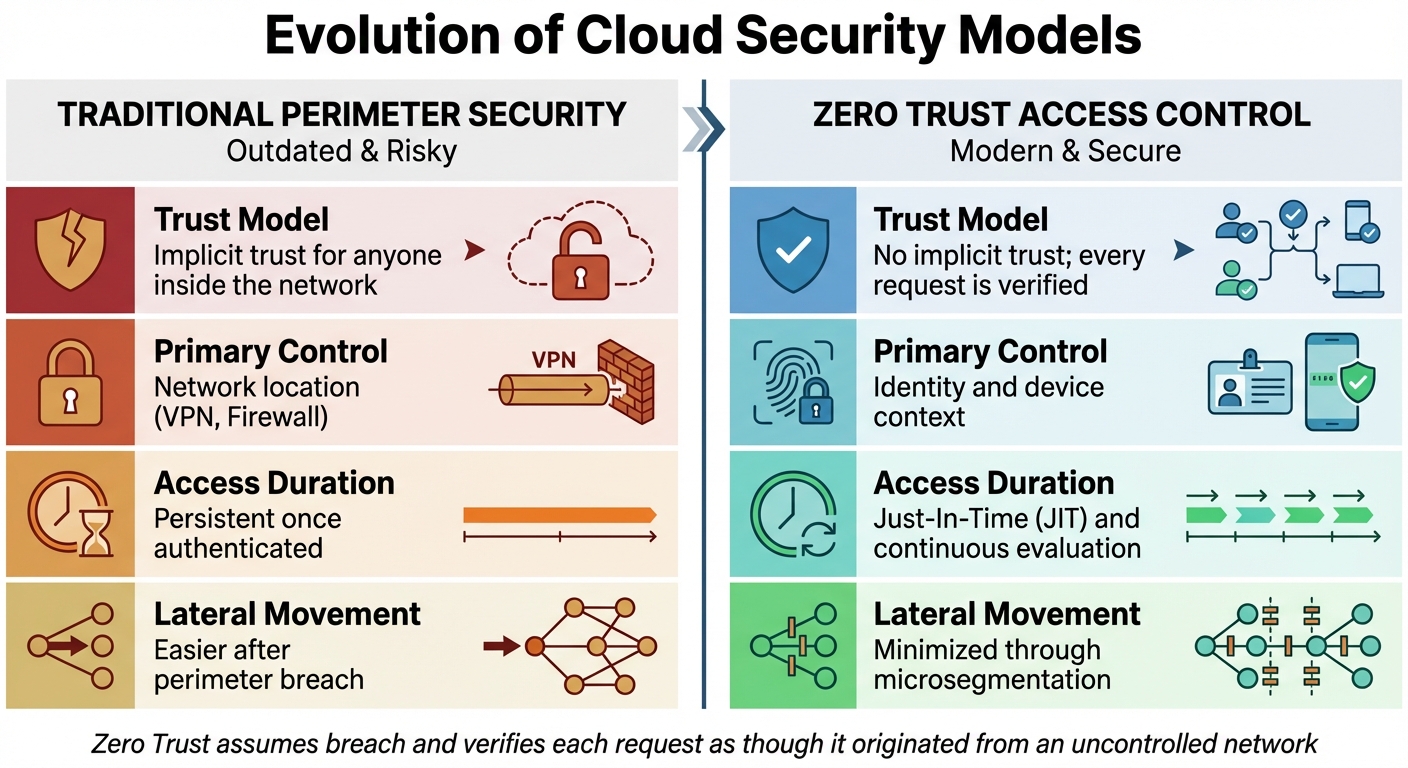
Traditional Perimeter Security vs Zero Trust Access Control Model
Once you've got your IAM, RBAC, and least privilege policies in place, it's time to take things further. Advanced strategies and business administration tools can cut down on manual work while boosting security. These methods help defend against threats, meet compliance needs, and simplify permission management.
Integrating Zero Trust Security Principles
Zero Trust takes a completely different approach to security. Instead of assuming users or devices inside your network are safe, it treats everyone and everything as potentially untrustworthy - no matter where they connect from. As Microsoft explains:
Zero Trust is a security strategy that assumes breach and verifies each request as though it originated from an uncontrolled network.
This approach is necessary today because the old perimeter-based security model doesn't hold up anymore. With 80% of employees using unsanctioned "Shadow IT" apps and organizations managing around 1,000 applications on average, identity becomes the key security control, not network location.
Every access request should be verified based on identity, location, device health, and context. Techniques like Just-In-Time (JIT) access ensure permissions are granted only when needed for specific tasks, while Just-Enough-Access (JEA) limits users to the bare minimum permissions required. Continuous Access Evaluation (CAE) takes it a step further by revoking access immediately if an account is disabled or flagged as high risk, instead of waiting for tokens to expire.
To get started with Zero Trust, consider using Identity-Aware Proxies (IAP) to secure web apps and virtual machines, shifting the focus from network-based security to user identity and context. Tools for analyzing traffic logs can help identify unsanctioned Shadow IT apps. Additionally, custom remediation messages can guide users when access is denied, reducing support requests.
| Feature | Traditional Perimeter Security | Zero Trust Access Control |
|---|---|---|
| Trust Model | Implicit trust for anyone inside the network. | No implicit trust; every request is verified. |
| Primary Control | Network location (VPN, Firewall). | Identity and device context. |
| Access Duration | Persistent once authenticated. | Just-In-Time (JIT) and continuous evaluation. |
| Lateral Movement | Easier after perimeter breach. | Minimized through microsegmentation. |
Organizations are also phasing out older "Basic authentication" protocols, replacing them with modern standards like OpenID Connect and OAuth2. Passwordless FIDO2 devices are becoming more common to align with Zero Trust principles. However, always keep an emergency "break-glass" account exempt from strict policies to avoid accidental lockouts.
Once these Zero Trust measures are in place, monitoring activity becomes the next essential step.
Monitoring and Auditing Access Logs
Keeping track of who accesses what - and when - is critical for spotting unusual activity before it becomes a problem. Log monitoring also helps ensure compliance with regulations requiring detailed audit trails.
Centralize your logs by consolidating data from all services and applications into one system - whether that's a SIEM, BigQuery, or Splunk. This makes it easier to analyze patterns and respond quickly to security events. Enable multi-region logging and activate "Data Access" logs for sensitive resources, even if they’re off by default to save costs.
When reviewing logs, focus on the "Four Ws": who performed the action, what the action was, where it happened, and when it occurred. Set up automated alerts for high-priority events like policy denials, security group changes, or unauthorized API calls.
To protect your logs, store them in dedicated, restricted buckets with Customer-Managed Encryption Keys (CMEK). Use strict IAM permissions so only authorized personnel can access sensitive audit data.
Regular audits are also essential. After personnel changes or new software deployments, review credential reports to spot inactive users or unused access keys. IAM Policy Simulators can help ensure new access policies don’t accidentally grant too many permissions.
| Audit Log Type | Purpose | Typical Cost |
|---|---|---|
| Admin Activity | Tracks API calls that modify configurations. | No Charge |
| Data Access | Logs actions like creating or reading data. | Chargeable |
| System Event | Records automated system actions (e.g., scaling). | No Charge |
| Policy Denied | Tracks access denied due to security policies. | Chargeable |
Most cloud providers let you customize how long to retain logs, ranging from 1 day to 10 years, so you can balance compliance needs with storage costs. Admin Activity logs are always enabled by default, providing a permanent record of configuration changes.
Automating these processes can further reduce risks and cut down on administrative work.
Automating Access Control Management
As your team grows, manually managing permissions can become overwhelming. Automation tools can simplify onboarding, offboarding, and updates - saving time and reducing errors.
Using the SCIM (System for Cross-domain Identity Management) protocol, you can automate identity lifecycle management. SCIM synchronizes user and group info from your identity provider to cloud apps in real-time, automatically granting or revoking access as employees join or leave. This is especially important given that credential stuffing attacks can cost large organizations over $2 million annually and often go undetected for nearly a year.
Just-In-Time (JIT) access and dynamic credentials further reduce risks by eliminating standing privileges. Tools like HashiCorp Vault and AWS Security Token Service (STS) generate temporary credentials that expire automatically. For admin roles, Privileged Identity Management (PIM) ensures elevated access is only activated when needed and requires conditions like MFA or automated approval.
Machine learning tools like Google Cloud IAM Recommender and AWS IAM Access Analyzer analyze usage patterns to identify and remove unnecessary permissions, ensuring least privilege is maintained as your environment evolves.
Infrastructure as Code (IaC) tools like Terraform can automatically integrate new infrastructure resources into your access systems, cutting down manual work. Group-based policies simplify scaling by assigning users to groups with predefined roles, rather than managing individual permissions.
Conditional access engines, like Microsoft Entra Conditional Access and Google Access Context Manager, use real-time signals - device posture, location, user risk - to automate decisions or trigger additional steps like MFA. Entitlement management systems can bundle permissions into "access packages" for specific roles or projects, streamlining requests and approvals.
The push toward a Zero Standing Privilege (ZSP) model is clear: no long-term credentials are stored, and access is granted only temporarily, as needed. As NIST 800-207 explains:
Zero trust architecture is an end-to-end approach to enterprise resource and data security encompassing identity (person and nonperson entities), credentials, access management, operations, endpoints, hosting environments, and the interconnecting infrastructure.
Integrate automation tools with logging systems like Cloud Audit Logs or Azure Monitor to ensure every automated decision leaves a traceable record for compliance and analysis.
Conclusion
By leveraging proven Identity and Access Management (IAM) and Role-Based Access Control (RBAC) strategies, you can maintain a secure and adaptable access control system that grows alongside your organization.
When managing access to cloud applications, simplicity is key at the start, with scalability as the ultimate goal. Begin by implementing the Principle of Least Privilege - grant users only the access they need, nothing more. Centralize identity management with a single identity provider and enforce Multi-Factor Authentication (MFA) across all accounts, especially for root and administrative roles. Instead of assigning permissions to individuals, use group-based access, which simplifies management as your team evolves. As the AWS Cloud Adoption Framework emphasizes:
Adopt the principle of least privilege - This is a process of continuous improvement. Start simple and iterate.
Additionally, prioritize using temporary credentials to reduce exposure to risks.
Key Takeaways for Small Businesses
For small businesses, here are the core actions to focus on:
- Start with broad roles: Begin with two or three job-function-based roles and refine them as your business grows. This avoids "role sprawl" and makes administration easier.
- Secure your root account: Use strong, unique passwords and hardware MFA for root accounts, reserving them for critical tasks only.
- Audit regularly: Review "last accessed" timestamps to identify and remove unused users, roles, and permissions. This keeps your environment secure and efficient.
Automating provisioning through SCIM can streamline onboarding and offboarding by syncing user identities between your identity provider and cloud applications. For smoother user experiences, configure custom remediation messages to explain access denials and reduce support tickets. Start with managed policies for standard roles, and as your business matures, create custom policies tailored to your needs. As the AWS Cloud Adoption Framework advises:
Guardrails, not gates - Design controls to minimize friction... Use centralized, blocking, manual workflows only when there is no safe alternative. Strive for self-service.
Access control isn’t a one-and-done task - it requires ongoing attention. Schedule regular reviews to eliminate "permission creep", where users accumulate unnecessary privileges over time. Use policy validation tools to identify security gaps before deploying new rules, and regularly rotate any long-term credentials if they’re unavoidable. Treat each application component as its own trust boundary and maintain clear visibility into access patterns to build a security framework that scales with your business.
FAQs
What’s the fastest way to start least-privilege access in the cloud?
To put least-privilege access into action quickly, focus on granting users only the permissions required to perform their specific tasks. Avoid assigning overly broad roles, such as administrator or root, which could expose unnecessary access. Instead, create detailed IAM policies that clearly define actions allowed on particular resources, and assign these policies to users or systems.
Begin with a zero-permissions baseline, then gradually add only what’s essential for the task. Make it a habit to regularly review permissions and remove any that are no longer in use. This approach not only reduces security risks but also aligns with best practices for maintaining a secure cloud environment.
When should I use RBAC vs ABAC for permissions?
For environments where roles and permissions are clearly defined and don't change often, RBAC (Role-Based Access Control) is a solid choice. It simplifies management by assigning permissions based on predefined roles, making it easier to maintain in stable setups.
On the other hand, ABAC (Attribute-Based Access Control) is better suited for situations requiring more detailed and dynamic permission handling. It uses attributes like user details, resource types, or environmental factors to determine access, making it ideal for sensitive tasks or rapidly evolving conditions.
If your needs are more complex, combining the simplicity of RBAC with the flexibility of ABAC can provide a balanced solution. This hybrid approach lets you handle both straightforward and intricate access requirements effectively.
How can I audit and remove unused access without disrupting apps?
To clean up unused access without causing issues for your applications, leverage tools like AWS IAM Access Analyzer and last accessed data. Start by reviewing the findings for inactive roles, users, and permissions. Be sure to check recent activity logs to confirm that removing these won’t interfere with your apps. Then, gradually refine permissions based on the recommendations provided. Once you’ve verified that certain credentials are no longer needed, deactivate or delete them. Always follow best practices to ensure services remain uninterrupted during this process.