Managing digital files in manufacturing can be overwhelming. From CAD drawings to marketing materials, scattered storage leads to wasted time, errors, and compliance risks. A Digital Asset Management (DAM) system solves this by centralizing files, ensuring easy access, version control, and regulatory compliance.
Key Takeaways:
- What is DAM? A system to store, organize, and retrieve digital assets using metadata and AI tagging.
- Why it matters: Prevents delays, ensures up-to-date files, and supports global operations.
- Benefits: Faster file searches, improved teamwork, and compliance tracking.
- Features to look for: Support for technical file formats, AI tagging, and integration with ERP, PIM, and CAD tools.
- Implementation tips: Map existing issues, create a structured system, train teams, and track performance.
DAM systems are essential for manufacturers to save time, reduce risks, and streamline processes across teams and locations.
Digital Asset Management (DAM) Implementation 101: Getting Started
sbb-itb-d1a6c90
Benefits of DAM for Manufacturing
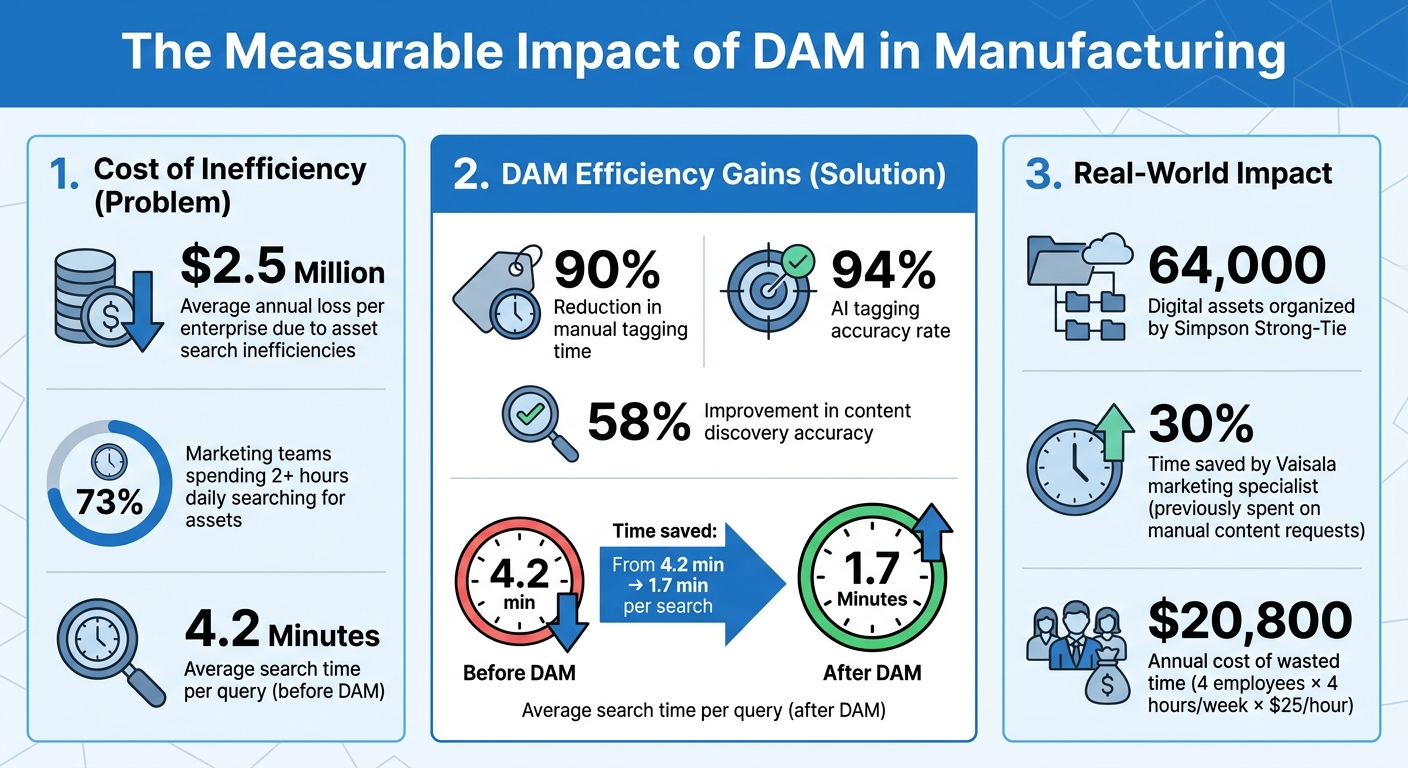
DAM System Impact on Manufacturing Efficiency: Key Statistics
When manufacturers adopt a Digital Asset Management (DAM) system, the impact is both immediate and measurable. Teams no longer waste hours hunting for files, collaboration becomes smoother across departments, and compliance seamlessly integrates into daily workflows.
Faster File Search and Retrieval
Did you know the average enterprise loses a staggering $2.5 million annually due to inefficiencies in asset searches? On top of that, 73% of marketing teams spend over two hours daily just searching for assets. By centralizing assets and using metadata with AI-powered tagging, manufacturers can drastically cut down on manual cataloging - reducing tagging time by up to 90%, all while maintaining 94% accuracy. Advanced tools like vector and semantic search take it a step further, improving content discovery accuracy by 58% and slashing average search times from 4.2 minutes to just 1.7 minutes per query. This streamlined process doesn’t just save time - it also fosters better collaboration across teams.
Better Team Collaboration
Manufacturing thrives on teamwork, with departments like engineering, marketing, sales, and product development needing to work in sync. A DAM system makes this easier by offering role-based access to a shared asset hub. Take Simpson Strong-Tie as an example: they integrated their DAM system with Adobe Creative Cloud, their Hybris PIM, and the Modus sales-enablement tool. This setup allowed designers to focus on creative tasks while ensuring product illustrations automatically updated across their print catalog, website, and sales materials.
"Image requests that used to take days to fulfill (especially across time zones) have also been eliminated. Now, everyone can find the exact asset they need, when they need it."
- Nate Holmes, Sr. Manager, Product Marketing, Acquia
Compliance Management and Risk Reduction
Manufacturers operate under strict regulatory demands, where outdated specifications or safety documents can lead to production errors, legal issues, or failed audits. DAM systems tackle this with automated version control, archiving older files while ensuring only the latest approved versions are in use. Detailed audit trails track every change, supporting regulatory compliance and internal accountability. Beyond regulations, features like granular permissions and digital rights management protect proprietary designs and patents. Additionally, centralized systems for managing CO2 documentation and eco-certifications simplify both internal monitoring and external compliance efforts.
Required Features for Manufacturing DAM Systems
Not all DAM systems are equipped to meet the unique challenges of manufacturing. The right system needs to manage everything from CAD drawings and 3D models to compliance documentation and marketing materials - all while working seamlessly with the tools your teams rely on.
Support for Technical File Formats
Manufacturing workflows involve a wide range of specialized file types that go beyond standard images and PDFs. A robust DAM system must handle CAD and engineering formats (like DWG, DWF), 3D modeling files (such as STL, OBJ, FBX, GLB, BLEND), technical documents (PDF, DOC/DOCX, XLS/XLSX), electronics files (PCB layouts, circuit diagrams, source code), high-resolution imagery (TIFF, RAW, PSD, AI, SVG), and video formats (MP4, AVI, MOV).
For example, in September 2023, Simpson Strong-Tie successfully organized 64,000 digital assets using Acquia DAM (Widen). Their assets ranged from product illustrations to logos. By integrating this DAM with Adobe Creative Cloud, Hybris (PIM), and Modus (sales enablement), the company eliminated manual file requests. Updates to product imagery were automatically reflected across all digital platforms, ensuring designers and sales teams had immediate access to the most current materials.
AI-Powered Tagging and Search
Tagging thousands of technical assets manually is not only tedious but also prone to mistakes. AI-powered tools like Smart Tags simplify this process by automatically identifying and categorizing content within images and videos, saving significant time. AI visual search takes this a step further, enabling users to locate assets based on visual features instead of text-based keywords - a game-changer for finding specific parts or components. Facial recognition can even identify individuals in training videos or corporate photos.
Major manufacturing brands, including Sony Europe, Mitsubishi Electric, and Thermos, use these AI capabilities to streamline asset management and retrieval. Pairing AI with custom metadata fields - such as part numbers or product lines - creates a search experience tailored to manufacturing needs. One manufacturer noted that adopting a centralized platform allowed them to double their content output compared to the previous year. These advanced tagging tools also pave the way for seamless integration with existing manufacturing software.
Integration with Manufacturing Software
When a DAM system operates in isolation, it can lead to inefficient data silos. Integration with ERP systems, PIM platforms, and CAD software ensures that engineering, production, and sales teams access the same up-to-date information. For instance, when design changes occur during production, an integrated system can automatically update the ERP or CAD files. This real-time synchronization reflects changes in manufacturing processes and financial reporting, reducing manual input and minimizing errors.
"Integrating CAD and production processes is critical to achieving the agility and responsiveness you need to meet the dynamic requirements of your demanding customer base."
- Abas
With this level of integration, all stakeholders - from engineers to global distributors - can work with consistent, up-to-date assets. This not only speeds up decision-making but also reduces friction across the entire manufacturing process.
How to Implement DAM in Manufacturing
Implementing a Digital Asset Management (DAM) system can revolutionize how your organization handles digital assets. A planned approach ensures you tackle existing challenges, build a flexible system, and get your teams involved from the start.
Identify Current Asset Management Problems
Begin by mapping out all the locations where your digital assets are stored. Many manufacturers discover their files scattered across local drives, cloud storage, email attachments, and outdated servers. For example, Salla Ahola, a Marketing Communications Specialist at Vaisala, revealed that before using a DAM, she spent 30% of her time responding to manual content requests. To set a foundation, document every platform where assets are stored using business administration tools and identify files that are outdated, duplicated, or slowing down workflows.
Involve key stakeholders from engineering, product, legal, IT, and sales teams to uncover specific challenges each department faces. Marketing teams, for instance, might struggle to preview CAD files without specialized tools, while compliance teams may lack proper audit trails for regulatory documents. Use these insights to set clear goals - whether that’s reducing search time, improving version control, or enabling self-service access for global distributors. With this information, you can create a structured system and establish governance rules.
Create a File Organization System and Governance Rules
Once you’ve identified the issues, the next step is to create an organized system for managing your files. Start by building a metadata framework before migrating any files. Instead of relying on rigid folder structures, use smart tagging based on attributes like product line, SKU, region, language, or document type. This approach ensures assets are easily searchable, no matter where they’re stored. Implement role-based access controls so each department - engineering, marketing, or external resellers - has access to only the files they need.
"A DAM isn't just another storage platform. It's a way to bring structure, consistency, and automation to how digital assets are managed across the organization."
- Linda Nygård, Head of Growth, QBank
Set up approval workflows for sensitive content and integrate the DAM with systems like ERP, PIM, and e-commerce platforms to maintain consistency across your supply chain. Plan your data migration carefully by checking file integrity and ensuring format compatibility to avoid issues when transferring existing repositories.
Deploy, Train, and Drive Adoption
Roll out the DAM system in phases, starting with high-impact areas like product content or external distribution. For instance, in December 2019, Volvo Trucks North America introduced Digizuite DAM to resolve delays in preparing e-commerce images, which were affecting spare parts sales. By integrating the DAM with their CMS, they automated processes like image resizing and watermarking. This not only sped up their sales cycle but also gave dealers 24/7 access to updated marketing assets.
Appoint "DAM Champions" in each department to oversee adoption and fine-tune the system for team-specific needs. Enable self-service portals so distributors can access assets directly, eliminating delays. Use embed codes to ensure that updating an asset in the DAM automatically refreshes it across all linked platforms. Finally, monitor usage metrics early on to identify which departments might need extra training or workflow adjustments.
Measuring and Improving DAM Performance
Once your DAM system is operational, tracking the right metrics ensures you get the most out of your investment by using efficient tools. A good starting point is measuring asset search and retrieval efficiency - how quickly can users locate specific technical files or marketing materials? Systems with advanced indexing can deliver results quickly, even when managing enormous libraries. Another critical metric is user adoption and engagement. By monitoring login frequency and active user counts, you can confirm whether the system has become an integral part of daily workflows.
These numbers can reveal key insights into how assets are being used. For example, tracking frequently downloaded files can help you understand what’s most valuable to your team. Regularly reassessing metadata accuracy is also essential for maintaining efficient retrieval and consistent branding. Additionally, keeping an eye on upload and download speeds, especially for large manufacturing files, helps ensure the system performs as expected.
Quantitative data becomes even more powerful when paired with qualitative insights.
"Data-driven decisions are one of the key DAM success factors and should be leveraged to maximize your DAM investment."
- Nate Holmes, Sr. Manager, Product Marketing, Acquia
Gathering user feedback through surveys, interviews, and focus groups can highlight usability issues or pain points. Analyzing "null searches" (searches that return no results) can uncover gaps in metadata or taxonomy. Tools like Google Analytics, combined with DAM data, can show where users encounter roadblocks, such as repeatedly toggling between the dashboard and search results. Consider this: if four employees each lose four hours weekly at $25 per hour, that’s $20,800 annually - a cost a DAM system can help eliminate.
Use these insights to drive meaningful changes. Adjust metadata to align with user behavior. For example, if users frequently search using terms outside your official taxonomy, update the metadata to reflect their language. Ask users to select an "intended use" during downloads (e.g., social media, technical manuals, or sales decks) to identify which assets best meet specific needs. To ensure consistent improvement, document user feedback, assign responsibilities for updates, and set clear timelines for implementing changes. Finally, close the loop by sharing updates with users - letting them know their input led to tangible improvements fosters trust and encourages continued engagement.
Conclusion
Digital Asset Management (DAM) offers manufacturers a practical way to organize and manage technical files, product images, compliance documents, and marketing materials. By centralizing these assets, teams can quickly locate the files they need without wasting time digging through scattered folders. This streamlined approach not only reduces errors but also ensures that everyone works with the most up-to-date, approved versions of files.
Manufacturers who adopt DAM systems often see noticeable efficiency improvements. Centralized asset libraries free up creative teams to focus on their work, while global content distribution becomes more seamless. Additionally, DAM systems help maintain compliance, protect intellectual property, and uphold brand consistency. Features like role-based access controls and audit trails ensure secure management of certifications and safety documentation.
"A DAM isn't just another storage platform. It's a way to bring structure, consistency, and automation to how digital assets are managed across the organization."
- Linda Nygård, Head of Growth, QBank
FAQs
How do I choose a DAM that works with CAD and 3D files?
When selecting a Digital Asset Management (DAM) system for CAD and 3D files, focus on platforms that handle a wide range of CAD and 3D file formats. Look for features like robust metadata management, version control, and seamless integration with your design tools. It’s essential to ensure the DAM supports your specific file types while simplifying tasks like managing, editing, and securing your 3D assets. Opt for solutions specifically designed to handle the complexities of CAD and 3D workflows to keep your processes running smoothly.
What metadata should we standardize before migrating assets?
Before transferring assets to a DAM system, it's crucial to standardize metadata. Start by establishing a clear taxonomy and schema to organize your data effectively. Use consistent naming conventions to avoid confusion and ensure metadata structures are cleaned up and streamlined. This approach not only keeps the system organized but also ensures compatibility and supports the long-term preservation of your digital assets.
How can we prove DAM ROI in dollars after launch?
Proving the return on investment (ROI) of a Digital Asset Management (DAM) system in dollars means focusing on measurable benefits like cost savings, time efficiencies, and revenue growth. Look at metrics such as lower asset management expenses, quicker go-to-market timelines, and more efficient workflows. By using concrete, quantifiable data, you can clearly showcase the financial impact and make a solid case for how DAM adds value to your organization.