HR audit automation is changing how companies manage compliance. It replaces manual, error-prone processes like spreadsheets and file reviews with HR management solutions that monitor HR workflows in real time. This shift helps businesses avoid costly compliance issues, save time, and improve accuracy.
Key takeaways:
- Why it matters: Compliance failures can lead to lawsuits, fines, or reputational damage. For example, the U.S. EEOC recovered $700 million in 2024 for workplace discrimination cases.
- How it works: Automated systems track and flag issues like expired permits, missing forms, or policy gaps as they occur.
- Benefits: Reduced errors, time savings, and better compliance management.
- Features to look for: Centralized document storage, automated alerts, integration with existing HR systems, and strong data security.
Switching to automation turns audits into a continuous process, helping HR teams focus on more impactful work while staying ahead of compliance risks.
HR Consultant: Build, Audit, and Optimize HR Systems
sbb-itb-d1a6c90
Key Benefits of Automating HR Audits
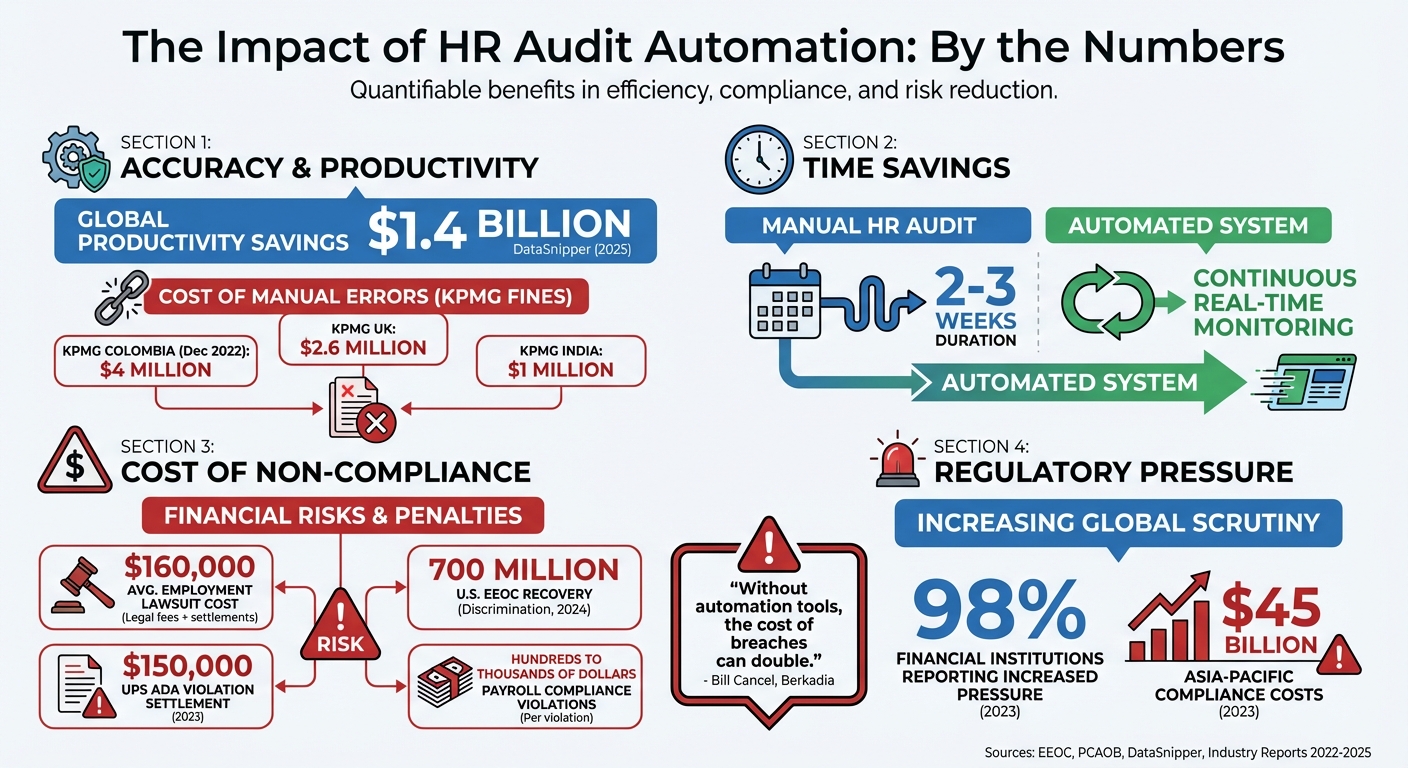
HR Audit Automation Benefits: Key Statistics and Cost Savings
Switching from manual processes to automated HR audits brings noticeable improvements in accuracy, efficiency, and risk management. These changes can redefine how HR teams manage their daily workflows.
Improved Accuracy and Reduced Errors
Manual HR tasks often come with a higher chance of errors. Whether it’s re-entering data from spreadsheets or tracking compliance deadlines via email, mistakes can creep in. Automation minimizes these risks by offering a single source of truth - a centralized system where all compliance documents are stored with strict version control.
AI-powered audit tools can process large datasets with exceptional precision, spotting patterns and anomalies that human reviewers might overlook. For instance, DataSnipper reported generating $1.4 billion in productivity savings globally in 2025 through automated auditing tools. Some advanced systems even use geolocation data to assign labor law jurisdictions, replacing outdated and less reliable methods like zip code-based assignments.
The risks of manual processes are evident in recent regulatory actions. In December 2022, the Public Company Accounting Oversight Board (PCAOB) fined KPMG Colombia $4 million for improper manual alterations to audit documentation. Similarly, KPMG UK and KPMG India faced fines of $2.6 million and $1 million, respectively, for quality control failures during the same period. These incidents underline how automation can reduce such risks, ensuring both accuracy and compliance while saving time and money.
Significant Time and Cost Savings
Automation doesn’t just improve accuracy - it also saves time and money. Tasks like tracking I-9 forms, monitoring license expirations, sending reminders for policy acknowledgments, and compiling government reports (such as EEO-1, FMLA, and OSHA filings) can all be handled automatically.
The time savings are striking. Manual HR audits often take 2–3 weeks. Automated systems, on the other hand, continuously monitor compliance, turning audits into an ongoing process. With real-time dashboards, HR teams gain instant insights into compliance gaps without the need for manual data gathering.
The financial savings are equally compelling. Employment-related lawsuits average $160,000 in legal fees and settlements, while payroll compliance violations can lead to fines ranging from hundreds to thousands of dollars per violation. By catching issues early, automation helps avoid costly lawsuits and penalties.
Enhanced Compliance and Risk Management
Automated tools shift compliance efforts from reactive to proactive. Instead of waiting for annual reviews to uncover problems, these systems flag issues like expired work permits, missing I-9 forms, or unsigned policy acknowledgments as they occur.
For example, in 2023, United Parcel Service (UPS) was ordered to pay $150,000 to an employee with diabetes after failing to provide reasonable accommodations under the Americans with Disabilities Act (ADA). This case highlights how manual processes can fail to catch critical compliance gaps. Automation ensures such issues are flagged early, reducing the likelihood of costly legal battles or penalties.
Centralized platforms also maintain detailed audit trails, recording who accessed information and what changes were made - key features during external regulatory audits. Bill Cancel, Vice President of Information Security at Berkadia, shared:
"For programs that don't use a solution like AuditBoard to develop a mature qualitative and quantitative risk program, the cost of a breach is often double."
As new regulations emerge - such as pay transparency laws, AI-related rules, and updated safety standards - automated systems can adapt to these changes seamlessly. They ensure compliance with federal, state, and local laws by automatically integrating legislative updates into audit protocols, eliminating the need for manual adjustments.
These advantages lay the groundwork for selecting the best automation tools, which will be discussed in the next section.
Core Features of HR Audit Automation Tools
When selecting an HR audit automation tool, it’s important to focus on features that not only protect your business but also simplify compliance processes. The best tools share key capabilities that help HR teams manage risk and documentation more effectively.
Automated Workflows and Audit Logs
Automated workflows allow you to tailor audit processes to your organization’s specific compliance needs - whether you’re handling ISO 27001 standards, SOC 2 requirements, or state-specific labor laws. By replacing spreadsheets and email trails, these systems centralize controls, policies, and procedures, making compliance management far more efficient.
Audit logs provide a level of transparency that manual methods simply can’t achieve. These logs track every instance of data access, changes made, and the timing of those actions. This detailed record becomes a critical asset during external audits or legal reviews. Jonathon Hawes, Head of Internal Controls at IVC Evidensia, highlighted this advantage:
"What AuditBoard allowed us to do is bring everything into one place. We now have a system not only from a control documentation standpoint that documents what our controls are... but also tracking that through to issues - they become significantly easier now."
Version control features ensure that auditors always work with the most up-to-date documents. As policies evolve - whether due to legislative changes or internal updates - the system keeps a complete history of revisions. This is essential for proving compliance during specific periods or demonstrating how your company has adapted to new regulations.
Real-time dashboards replace outdated annual reporting models with continuous monitoring. Instead of spending weeks compiling audit data, HR teams can quickly spot compliance gaps or address upcoming deadlines, such as work permit renewals or missing I-9 forms. These tools streamline processes, making compliance management more seamless and proactive.
Data Privacy and Security
HR systems store highly sensitive information, including Social Security numbers, medical records, salary details, and performance evaluations. Role-based access control (RBAC) ensures that only authorized personnel can view or manage this data, limiting access to what each role requires.
Strong encryption and secure centralized storage protect personally identifiable information (PII) and help organizations meet data privacy standards like GDPR. This is particularly important as compliance costs soar, with expenses in the Asia-Pacific region alone reaching $45 billion in 2023. Additionally, with 98% of financial institutions reporting increased regulatory pressure in 2023, robust data security has become a non-negotiable priority.
Comprehensive audit trails further strengthen security. In the event of a breach or an unauthorized access allegation, these logs provide detailed records of who accessed what information and when. This transparency can mean the difference between a quick resolution and a prolonged investigation.
Integration with Existing HR Systems
A good HR audit tool integrates seamlessly with your existing HRIS, payroll, and applicant tracking systems, eliminating data silos that often lead to compliance blind spots. By connecting directly to your system of record, these tools automatically pull critical evidence - like I-9 forms, training records, or payroll data - without requiring manual input.
This level of integration frees HR teams to focus on more impactful tasks. Rhoanne Therese Jamelo, HR Generalist at ScaleForge, shared her experience:
"Whenever we need to gather employee data, we can pull the information directly from Omni and get any metric we require. It's as simple as that."
APIs ensure that data across systems stays updated in real time, maintaining accurate records for work permits, offboarding, and more.
Integrated systems are also built for scalability. As your company grows or new regulations emerge - like AI governance rules or enhanced pay transparency laws - you can easily add compliance modules without disrupting your existing workflows. By working seamlessly with your current HR infrastructure, these tools help ensure a smooth setup and ongoing compliance.
How to Set Up HR Audit Automation
To make the most of HR automation, you’ll want to follow a few essential steps. A proper setup ensures you achieve the accuracy and compliance benefits discussed earlier.
Assess Current HR Processes
Start by mapping out your current workflows to identify areas prone to delays or errors. Pay close attention to high-risk tasks like payroll tax deposits, I-9 documentation, or safety records - mistakes here can lead to penalties.
Evaluate each HR function on a scale of 1 to 5 to highlight weak spots. If a function scores under 40 points, this signals critical risks that need immediate action, particularly in areas like legal compliance or data security. Watch for warning signs like missing employee records, outdated personal details, inconsistent file organization, or manual processes that bypass your policies.
Instead of waiting for an annual review, consider quarterly "mini-audits" for high-risk areas. This proactive approach helps you catch inefficiencies early and makes the transition to automation much smoother. Addressing these gaps promptly can also save your company from costly legal troubles.
Select the Right Automation Tool
Choose a platform designed to tackle your most pressing compliance issues while integrating seamlessly with your existing HRIS and payroll systems. Look for features like automated evidence collection, tools for I-9 compliance, real-time dashboards, centralized document storage with version control, and ongoing monitoring rather than one-time reviews.
Get your IT team involved early to ensure the tool aligns with your technical, security, and governance needs. Vendors can also review your specific requirements to confirm the platform includes all the necessary features.
If you’re unsure where to start, BizBot offers a helpful directory of HR automation tools. This resource lets you compare options and find a solution that matches your operational needs and budget.
Configure, Test, and Train
Once you’ve chosen your tool, focus on implementation. Configure workflows and set up automated alerts for expiring permits or certifications to avoid compliance issues.
Begin with a pilot program in one department to fine-tune the system before rolling it out company-wide. This trial phase allows you to refine settings and address any hiccups.
Training is also crucial. Make sure your HR team knows how to handle daily tasks, generate reports, and troubleshoot issues. As Lisa Hughes, Internal Audit Manager at TriNet, puts it:
"If there's something that has to be done, it won't get lost in a spreadsheet or an email".
Transitioning from manual processes to automated systems requires a shift in mindset. Your team needs to understand and trust the new system to fully embrace its potential.
Best Practices for HR Audit Automation
Stay Updated on Regulatory Changes
Employment laws are constantly evolving, and staying informed is non-negotiable. In 2024, the U.S. Equal Employment Opportunity Commission recovered nearly $700 million for over 21,000 workplace discrimination victims. Additionally, around 40% of small and mid-sized businesses faced litigation that same year. These numbers highlight why keeping your automation tools aligned with current regulations is critical.
Ensure your system complies with federal, state, and local laws, including the FLSA, ADA, and FMLA. As your workforce grows, regulatory requirements change. For instance, when your team reaches 15 employees, compliance with Title VII and ADA becomes mandatory. At 50 employees, FMLA leave requirements and ACA health insurance mandates come into play. Shifting from annual compliance reviews to continuous, "always-on" monitoring can help catch potential blind spots before they turn into costly legal issues. This approach not only reduces risks but also strengthens your overall HR strategy.
Use Automation Insights for HR Strategy
Automation doesn't just save time - it provides valuable data that can reshape your HR strategy. Use audit insights to identify recurring issues like inefficient approval processes or time-tracking errors that may be slowing down your HR operations. By addressing these problems, HR can move from being a cost center to becoming a strategic contributor.
Dive into trends in headcount, attrition, and compensation history to fine-tune your hiring and retention strategies. Use clear data visualizations to present these findings to leadership, showing how HR initiatives directly impact business outcomes. As Lisa Hughes, Internal Audit Manager at TriNet, puts it:
"The internal audit group needs to be accountable to our business goals. My team and I are committed to actively following up on our recommendations and findings."
Benchmark your metrics against industry standards to ensure competitive compensation and benefits that attract top talent. Additionally, track demographic data in real time to evaluate progress on diversity, equity, and inclusion goals. Incorporating these insights into your HR processes drives continuous improvement and aligns compliance with broader organizational objectives.
Review and Refine Automation Workflows Regularly
To maintain accuracy and efficiency, schedule quarterly mini-audits for high-risk areas like payroll and I-9 documentation. Identifying errors early can prevent them from escalating into major compliance issues.
Regularly review your automated workflows to ensure they align with the latest employment laws and eliminate inefficiencies. Use your platform's remediation tracking system to assign responsibility and deadlines for addressing compliance gaps. Include input from legal, finance, and IT teams during these reviews to ensure workflows support both regulatory requirements and business goals. Features like detailed audit logs and version control provide the foundation for this ongoing monitoring. Lastly, assess whether managers and employees are actively using the systems. If adoption rates are low, it might be time to simplify workflows or invest in better training.
Conclusion
Automating HR audits simplifies compliance, reduces risks, and improves decision-making. By transitioning from periodic reviews to continuous, "always-on" monitoring, businesses can catch potential problems early - before they turn into expensive legal challenges.
The right automation tool acts as a central hub, eliminating data silos, streamlining evidence collection, and offering real-time insights into areas like turnover rates, compensation patterns, and DEI (Diversity, Equity, and Inclusion) metrics. This shift allows HR teams to move beyond routine administrative work and focus on strategies that contribute to business growth.
For automation to truly deliver, it’s essential to choose tools that integrate smoothly with your current systems and align with your compliance needs. Start by standardizing HR processes and information systems to avoid magnifying inefficiencies, and give priority to high-risk areas such as payroll, tax compliance, and I-9 documentation, where errors can lead to steep penalties.
Success doesn’t stop at implementation. Regularly conduct quarterly mini-audits, adjust workflows as regulations evolve, and involve key stakeholders from legal, finance, and IT to ensure your automation strategy aligns with broader business objectives. Use the data generated by your system to benchmark against industry standards and make well-informed decisions about hiring, retention, and compensation. Consistent audits and updates, as discussed earlier, are essential for long-term success.
When implemented thoughtfully, HR audit automation not only mitigates compliance risks but also elevates HR into a strategic role that drives measurable value across your organization.
FAQs
What compliance risks can HR audit automation help address?
HR audit automation empowers businesses to tackle compliance challenges effectively. It addresses key concerns like violations of federal and state employment laws, payroll tax and benefits compliance errors, and employee misclassification. Additionally, it ensures policies and employee handbooks are regularly updated, enhances record-keeping practices, and helps organizations comply with ADA and leave regulations.
By simplifying these critical processes, automation reduces the risk of expensive lawsuits, government fines, and operational setbacks, allowing companies to stay compliant with greater ease and assurance.
How can automated HR audit tools work with my current HR systems?
Automated HR audit tools work effortlessly with your current HR systems, like HRIS platforms, payroll software, and document management tools. By pulling data from various sources into one organized, audit-ready hub, they cut down on manual work and improve accuracy.
These tools often rely on API-based middleware to connect systems, ensuring real-time data updates. For instance, any changes in employee status, certifications, or payroll details are automatically synced across all integrated platforms. This creates a paperless audit trail, simplifies compliance reporting, and enables automated alerts for critical deadlines, such as certification renewals or policy updates.
For businesses in the U.S., platforms like BizBot make things even easier. They provide a curated list of HR automation tools that integrate smoothly with widely used HR systems, helping companies streamline audits, save time, and stay compliant - all without complicated custom setups.
How can a company effectively automate its HR audits?
To automate HR audits successfully, start by setting clear goals and pinpointing the compliance areas you need to focus on - think payroll, employee benefits, and hiring practices. This step helps you determine which data and policies require regular review.
Next, select an automation tool that works seamlessly with your current HR systems, like payroll software or document repositories. This integration is key to simplifying data collection and analysis, making the entire process more efficient.
Once you have the right tool, map out your existing HR workflows. Configure automated processes to align with these workflows, covering tasks like verifying employee records and checking for policy compliance. Before rolling it out fully, run a pilot audit to test the system. Use this trial phase to fine-tune the settings and ensure everything runs smoothly.
After implementation, schedule audits on a regular basis, incorporating real-time monitoring and alerts to catch issues early. Share the findings with HR leadership to address any concerns promptly. With updated workflows and consistent monitoring, you’ll transform audits from a reactive task into a proactive, ongoing process that boosts both compliance and efficiency.