Struggling to organize scattered information across your business? Knowledge mapping can help. It’s a visual system that organizes and connects your organization’s information - whether stored in databases, documents, or employees’ minds. Think of it as a map that shows where to find critical knowledge and how it all connects.
Why It Matters:
- Saves Time: Employees spend 20% of their time searching for information. A knowledge map reduces this significantly.
- Improves Decision-Making: Visualizing knowledge gaps and resources helps leaders make informed choices.
- Supports Onboarding: New hires can quickly find resources and identify experts.
- Prevents Knowledge Loss: Maps ensure expertise doesn’t disappear when employees leave.
Key Benefits:
- Faster access to information
- Better collaboration across teams
- Retention of expertise
- Reduced inefficiencies caused by "digital sprawl"
How to Start:
- Define your goals (e.g., streamline onboarding or improve knowledge sharing).
- Involve subject matter experts to ensure accuracy.
- Use tools like Lucidchart, Miro, or Notion to create and maintain maps.
- Keep maps updated as your organization evolves.
With data creation expected to hit 394 zettabytes by 2028, knowledge mapping isn’t just helpful - it’s necessary for staying competitive.
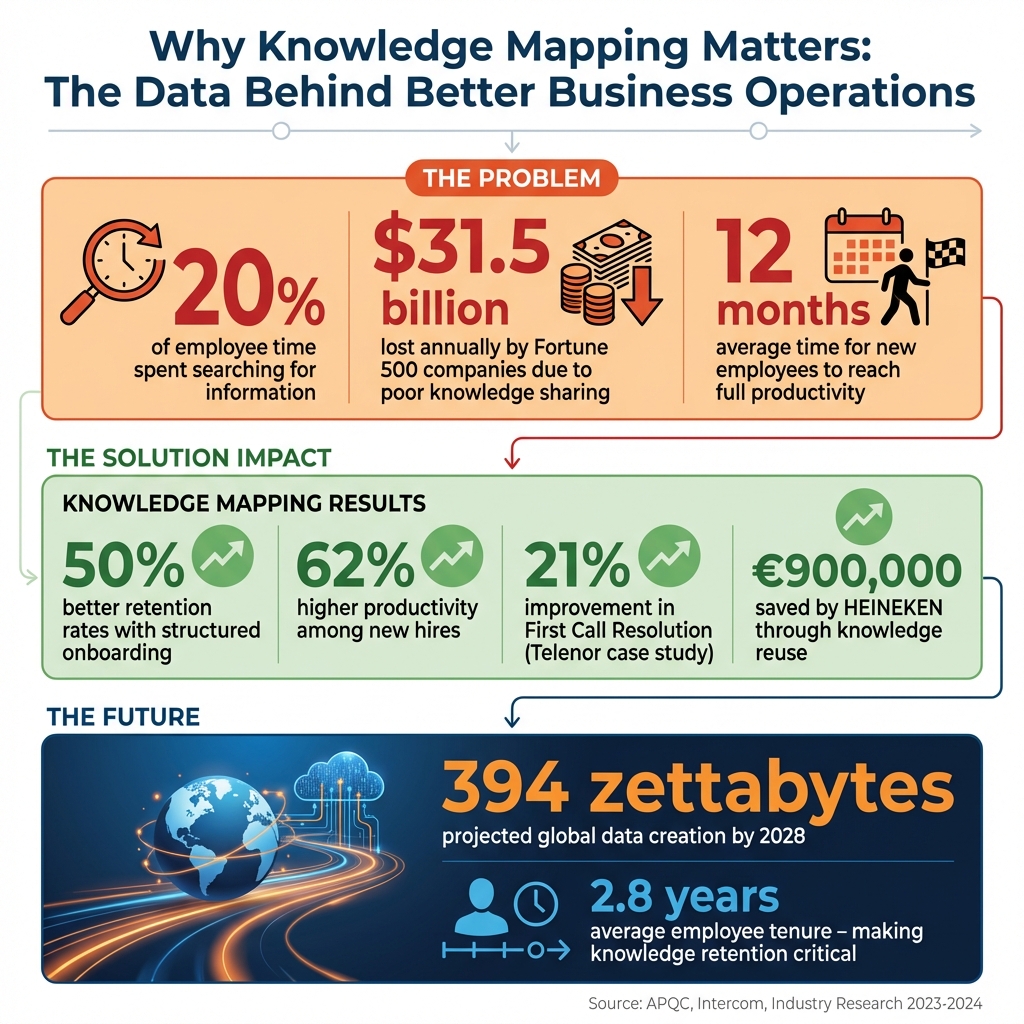
Knowledge Mapping Benefits: Key Statistics and ROI Impact
Basic Concepts - Knowledge Base Structure Mapping | With #Confluence and #lucidchart
sbb-itb-d1a6c90
Main Benefits of Knowledge Mapping
Once you've put a knowledge mapping system in place, the benefits go far beyond just keeping things organized. It directly influences how your business administration and information systems operate, make decisions, and adapt over time.
Better Decision-Making
Knowledge maps serve as a visual inventory of intellectual resources, pinpointing where expertise exists and where there are critical gaps before any major decisions are made. Instead of wading through scattered data on various platforms, decision-makers can see the big picture at a glance.
This setup cuts down on information overload by structuring data into interconnected nodes, making it easier for teams to process complex information and reach faster conclusions. By identifying "knowledge islands" or "bottlenecks", organizations can reduce risks tied to employee turnover or process failures.
"Knowledge maps help you better understand knowledge-related risks and opportunities - and have a proven track-record for results."
– Lynda Braksiek, Principal Research Lead, APQC
These maps also enhance strategic planning by showing how departments, market trends, and competitors interconnect. Leaders can move away from assumptions or incomplete data and instead rely on well-documented, standardized methodologies across the company. This clear visualization fosters smoother collaboration across teams as well.
Better Collaboration
Knowledge maps break down silos by offering visibility across departments. When teams like sales and marketing can access shared insights that were once isolated, collaboration becomes more natural and productive.
By linking topics to specific experts, maps save time otherwise wasted searching through scattered sources. They provide a common framework that gives teams a shared starting point for brainstorming or tackling complex challenges. This transparency shows how one department's knowledge needs connect to another, helping to streamline handoffs and standardize workflows. For new hires, these maps simplify their understanding of the organization and help them quickly identify key knowledge holders, speeding up their integration into team efforts.
By keeping knowledge maps updated and unified, organizations not only improve teamwork but also safeguard critical information for the long term.
Knowledge Retention and Access
One of the most important benefits of knowledge mapping is its role in preventing the loss of expertise when experienced employees leave. Maps flag at-risk knowledge held by employees nearing retirement or resignation, allowing for structured knowledge transfer before it's too late.
This becomes crucial when bridging the gap between documented resources (like manuals and reports) and the "know-how" or intuition stored in employees' minds. Knowledge maps ensure that expertise held by just a few individuals is made accessible to the broader organization.
Employees also save time searching for information since the map acts as a visual guide to the right source. Instead of hunting through emails, Slack messages, or cloud drives, they can find what they need in minutes. Additionally, maps highlight missing information or departmental silos that block the flow of knowledge, helping organizations address these issues head-on.
How Businesses Use Knowledge Mapping
Knowledge mapping isn't just a concept - it’s a practical tool that solves real challenges for businesses. It accelerates onboarding for new hires, enhances customer service, and supports company-wide learning by making information more accessible and organized.
Onboarding and Training
Did you know it can take up to 12 months for new employees to hit full productivity? Knowledge mapping can speed this up by breaking down training into manageable steps like "Day 1 Essentials", "First Week Fundamentals", and "First Month Deep Dives" [18, 19]. This approach creates a clear learning path, making it easier for new hires to grasp both basic and advanced concepts.
And the payoff is huge. Companies with structured onboarding programs see 50% better retention rates and 62% higher productivity among new hires. Considering that the average cost per hire climbed to $4,700 in 2023 - a 14% jump since 2019 - better onboarding isn’t just smart; it’s cost-effective.
Knowledge mapping also helps preserve "tribal knowledge" - the unwritten expertise of seasoned employees. By linking new hires to subject matter experts and key resources, companies reduce the reliance on managers while empowering employees to find answers independently. This reduces time-to-productivity and lightens the workload for supervisors [18, 19, 20].
"Effective onboarding isn't just about transferring information - it's about empowering new team members to find answers, make connections, and contribute value as quickly as possible."
– Sarah Mooney, Ariglad
Beyond onboarding, competency maps offer a way to identify skill gaps and align training to specific needs. This structured foundation doesn’t just help new hires - it lays the groundwork for improving processes across the organization.
Customer Service Processes
Knowledge mapping also shines in customer service, where speed and consistency are critical. Agents often spend hours each week just looking for the right information - about 1.8 hours daily, or a full day each week. By pinpointing where knowledge lives - whether in documents, databases, or employees’ expertise - knowledge mapping makes finding answers faster and easier [6, 26].
A great example is Telenor, which saw a 21% improvement in its First Call Resolution rate after implementing knowledge management tools. Tools like decision trees and flowcharts standardize how agents handle complex queries, making their work more efficient and consistent [3, 10]. These maps also support AI tools like chatbots, enabling them to provide instant, accurate responses without human intervention. In fact, nearly 50% of customer support teams are expected to use AI by 2024.
"AI is only as good as the knowledge and content that it has access to."
– Intercom
To make the most of knowledge mapping, start with high-volume or complex support issues. Use reports from AI agents to identify gaps, and involve frontline staff to document the expertise that isn’t captured in manuals [3, 6, 23].
Organizational Learning
On a larger scale, knowledge mapping drives learning across the entire company. By visualizing how information flows between departments, teams can break down silos and collaborate more effectively [2, 6]. This transparency helps employees tap into collective knowledge, sparking new ideas and solutions [2, 28]. It also highlights where undocumented knowledge exists, so companies can turn it into formal resources [3, 27].
The benefits of engaged and informed teams are clear: 43% lower turnover, 81% less absenteeism, 64% fewer safety incidents, and 18% higher productivity. With companies spending an average of $954 per learner in 2023, knowledge mapping ensures those investments are focused where they’ll have the most impact. By identifying skill gaps and connecting employees with the right resources and mentors, organizations can create a culture of continuous learning.
How to Create Knowledge Maps
Creating a knowledge map can be straightforward if you approach it step by step. Start by setting clear goals, involving the right people, and choosing tools that fit seamlessly into your workflow.
Set Objectives and Identify Stakeholders
Begin with a clear purpose. Are you aiming to streamline onboarding, reduce the time spent searching for information, or pinpoint skill gaps? A well-defined goal ensures your map stays focused and easy to manage.
Next, bring in the experts - subject matter experts (SMEs) and frontline managers. They’re the ones with the know-how, both documented and unwritten, that will shape your map. Including them early not only improves accuracy but also encourages buy-in, increasing the chances your team will actually use the map.
Keep the scope manageable. Instead of tackling everything at once, focus on a specific area, like a department or process. You can always expand later as needed.
Once your objectives and stakeholders are set, it’s time to choose the right tools for the job.
Choose the Right Mapping Tools
The tools you select will depend on your team’s needs and the type of knowledge you’re mapping. For hands-on planning, diagramming tools like Microsoft Visio, Lucidchart, or Miro work well. If automation is a priority, platforms like Microsoft Viva Topics or Guru can help. Internal knowledge bases such as Notion and Confluence are excellent for storing, sharing, and updating maps in real time.
Integration matters too. Pick tools that connect easily with platforms your team already uses - like Slack, Microsoft Teams, Google Drive, or Salesforce. This ensures that knowledge stays accessible within your team’s daily workflow. If you’re unsure where to start, directories like BizBot can help you compare features and find the best fit.
Before committing to a tool, test it. Let a small group of team members try it out to confirm it’s easy to use and meets your needs.
Build and Refine Your Maps
With tools in hand, create a draft based on your objectives and stakeholder input. Start by listing key concepts, processes, and resources, and show how they connect. Highlight dependencies, information flows, and who holds critical knowledge.
Keep it straightforward. Use consistent language and avoid clutter - focus on showing where information lives. Add visual elements like colors, shapes, or icons to emphasize important tasks, resources, or potential risks. For more complex topics, consider a master map with links to detailed sub-maps.
Before finalizing, validate the map with the people who’ll use it. Gather feedback, make adjustments, and assign someone to keep the map updated over time.
"Knowledge mapping is reported as a strategic necessity for organizations dealing with large-scale, complex or fast-changing information."
– Omni24
Think of your knowledge map as a living document. It should grow and adapt alongside your organization, reflecting new processes, insights, and expertise as they emerge.
Conclusion
Knowledge mapping has the power to reshape how businesses operate by turning scattered information into a powerful resource. Consider this: employees spend about 20% of their time searching for information, and Fortune 500 companies collectively lose an estimated $31.5 billion every year due to poor knowledge-sharing practices. Clearly, mapping isn’t just about tidying up data - it’s about safeguarding expertise, speeding up decision-making, and avoiding costly errors.
The numbers speak for themselves. HEINEKEN managed to save over €900,000 (around $1.0 million) by simply reusing existing research rather than duplicating efforts. Shell, after rolling out a mapping-focused system, saw adoption of their knowledge platform triple within just a year. These examples aren’t just outliers - they’re evidence that, when done right, knowledge mapping generates real, measurable results.
The secret lies in treating your knowledge map as a dynamic tool, not a one-and-done project. To make it work, assign clear ownership, schedule regular updates, and integrate these maps into the tools your team already uses. Start small by focusing on high-impact processes, involve key subject matter experts, and gradually expand as you see the benefits unfold.
This forward-thinking strategy can give your business a lasting edge. With global data creation projected to hit 394 zettabytes by 2028, companies that embrace knowledge mapping today will set themselves apart. They’ll onboard new hires faster, innovate more efficiently, and retain the expertise that fuels their competitiveness - even as the average employee stays just 2.8 years with a company.
FAQs
What’s the difference between a knowledge map and a knowledge base?
A knowledge map is a visual representation that illustrates where knowledge resides within an organization and how different pieces are interconnected. It helps users quickly locate and understand the flow of information.
In contrast, a knowledge base is a structured repository of articles and information. Its purpose is to provide fast, straightforward answers and act as a centralized resource for sharing and accessing organizational knowledge.
How do I choose what to map first in my organization?
To begin, identify your organization’s most important knowledge assets. These could include core processes, specialized expertise, or key content that your team relies on regularly. Starting here helps prioritize high-value information, ensuring it’s captured efficiently without overwhelming the process. Pay close attention to areas where knowledge gaps or silos exist. Addressing these can enhance teamwork and streamline operations. Once the critical assets are well-documented, you can gradually broaden the scope to include less essential information, creating a knowledge map that fits your organization’s unique needs.
How do I keep a knowledge map accurate as processes change?
To keep your knowledge map accurate as processes change, it’s essential to combine proactive strategies with reliable tools. Start by scheduling regular reviews - a quarterly check-in works well - to keep content fresh and aligned with the latest updates. Assign clear ownership for each section of the map; this creates accountability and ensures someone is always responsible for maintaining accuracy.
Leverage change detection tools like versioning systems to catch updates in real-time. These tools can flag shifts in processes, helping you stay ahead of inconsistencies. Pairing these automated systems with manual validation adds an extra layer of reliability, ensuring the map remains a trustworthy resource, even in fast-moving environments. Together, these steps help your knowledge map stay relevant and up-to-date.