Workplace from Meta is shutting down. The platform entered read-only mode in September 2025 and will be permanently deleted by May 31, 2026. If you're using Workplace, it's time to plan your migration. Slack and Microsoft Teams are popular alternatives, with Slack offering extensive integrations, real-time collaboration, and strong automation tools.
Businesses transitioning from Workplace can also improve communication and productivity by using the right document collaboration tools.
Key differences between Workplace and Slack include:
- Interface: Workplace mimics Facebook's layout, while Slack organizes communication via channels.
- Features: Slack excels in integrations (4,600+ apps), global search, and workflow automation. Workplace focuses on tools like News Feed, Live Video, and Knowledge Library.
- Pricing: Slack starts at $7.25/user/month, while Workplace was $4/user/month before phasing out.
For Workplace users, migrating to Slack is a logical next step. Slack's features, like Canvas and Huddles, can replicate many Workplace functionalities while offering more advanced tools for collaboration.
Quick Comparison
| Feature | Workplace from Meta | Slack |
|---|---|---|
| Interface | Facebook-style News Feed | Channel-based messaging |
| File Storage | Unlimited (100MB/file) | 5GB+ (1GB/file) |
| Integrations | ~100 apps | 4,600+ apps |
| Live Communication | Workplace Live (interactive video) | Huddles (small audio/video calls) |
| Knowledge Tools | Knowledge Library | Canvas + global search |
| Pricing | $4/user/month (phasing out in 2026) | $7.25+/user/month |
If you're still on Workplace, start migrating now to ensure uninterrupted communication.
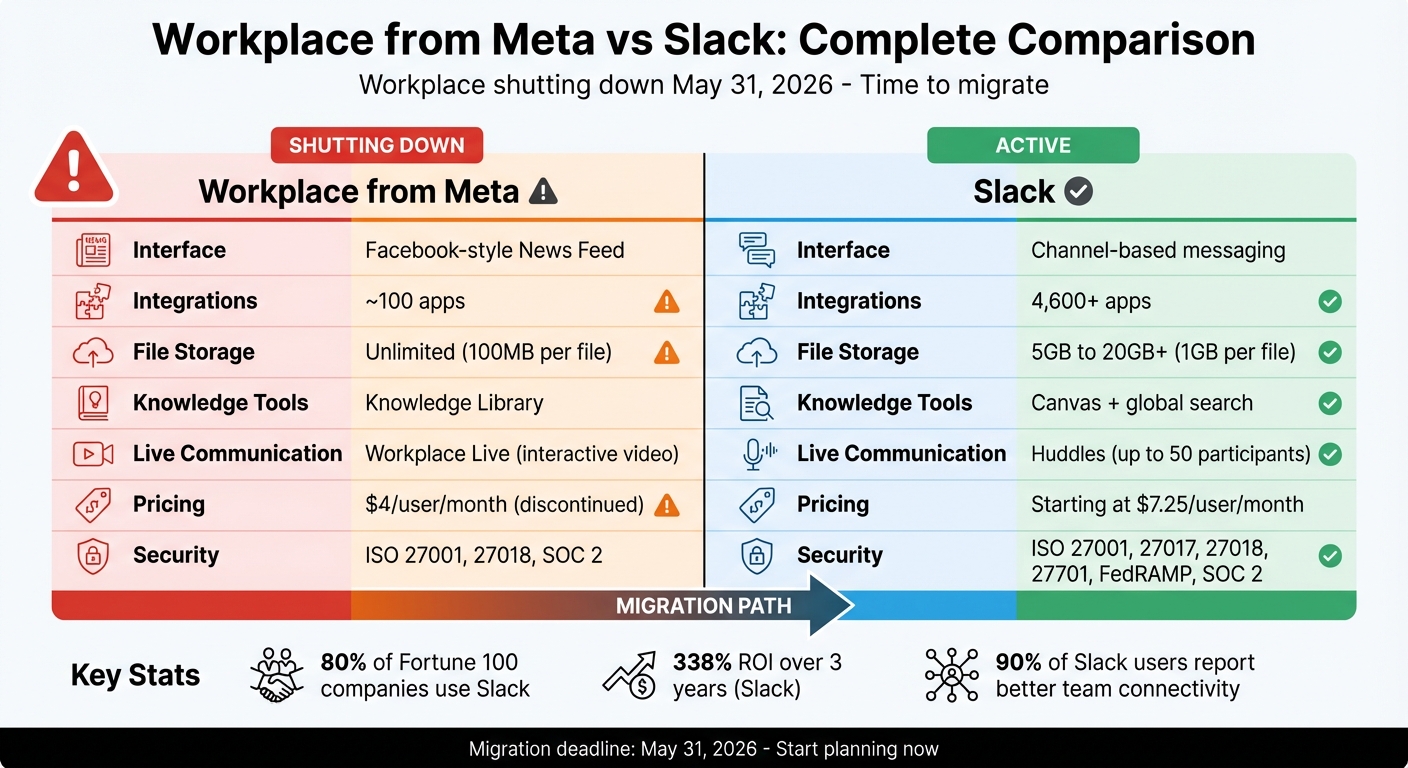
Workplace from Meta vs Slack: Feature and Pricing Comparison Chart
Slack Alternatives: Choosing the right team chat on the market

Feature Comparison
Workplace from Meta mirrors Facebook's familiar layout, featuring a News Feed, Groups, and user profiles for internal communication. On the other hand, Slack is built around channels - dedicated chat spaces where teams can collaborate on specific projects or topics in real time. Here's a closer look at how their features set them apart.
Workplace's AI-powered News Feed curates updates, leadership posts, and team content into a single, dynamic stream. Slack, in contrast, uses announcement channels and an activity feed to highlight mentions and direct messages, but it lacks a unified feed like Workplace.
For live communication, Workplace includes native Live Video for events like town halls or Q&A sessions, complete with interactive features like live reactions. Slack offers Huddles, which are quick audio or video calls designed for smaller teams. Larger events on Slack typically require third-party tools.
When it comes to knowledge management, Workplace includes a Knowledge Library - a static intranet for storing HR policies and other resources. Slack counters with Canvas, a collaborative digital whiteboard, alongside a robust search feature that scans across messages and files. Many users find Workplace's built-in tools helpful for keeping information accessible.
File sharing is another area where the platforms differ. Workplace offers unlimited storage on paid plans but limits individual files to 100MB (or 25MB in Chat) and lacks a centralized file hub. Slack, meanwhile, provides 5GB of storage on its free plan, with paid plans offering 20GB+ per user. It allows files up to 1GB and includes an "All Files" section for easy file management. The table below summarizes these distinctions.
Feature Comparison Table
| Feature | Workplace from Meta | Slack |
|---|---|---|
| Primary Interface | Social media (Facebook-style) | Channel-based messaging |
| News Feed | AI-driven personalized feed | Activity feed (mentions only) |
| Groups/Channels | Open, Closed, or Secret Groups | Public or Private Channels |
| Live Broadcasting | Workplace Live (with Q&A/Polls) | Huddles (up to 50 participants) |
| Knowledge Base | Knowledge Library (static intranet) | Canvas + contextual search |
| Messaging | Workplace Chat (separate app) | Integrated chat and threads |
| File Storage | Unlimited (100MB per file) | 5GB to 20GB+ (1GB per file) |
| File Management | No centralized hub | "All Files" section |
| Integrations | ~100+ tools | 2,000+ tools |
| External Collaboration | Multi-company groups | Slack Connect (shared channels) |
Pricing and Plans
Workplace from Meta has entered read-only mode as of September 2025 and is no longer accepting new subscriptions. The platform is set to shut down on May 31, 2026. Until August 31, 2025, existing customers can continue using the Core plan at $4 per user per month, with optional add-ons available for an additional $2 per user per month.
On the other hand, Slack provides a variety of pricing tiers that cater to teams of all sizes. Here’s a breakdown:
- Free Plan: Includes 90 days of searchable message history, up to 10 app integrations, and 1:1 huddles - all at no cost.
- Pro Plan: Priced at $7.25 per user per month when billed annually ($8.75 if billed monthly), this plan offers unlimited message history, unrestricted integrations, and group huddles for up to 50 participants.
- Business+ Plan: Costs $15 per user per month with annual billing ($18 monthly). It includes advanced AI features like AI-powered search and daily recaps, along with SAML SSO and SCIM provisioning.
- Enterprise+ Plan: Tailored for larger organizations, this tier offers custom pricing and supports unlimited workspaces as well as enterprise-grade security.
Slack also stands out with its Fair Billing Policy, which ensures you only pay for members active within a 28-day period. Inactive users are credited back with prorated adjustments. Additionally, new teams may qualify for temporary discounts, and annual billing offers savings of 17–20% per user.
For organizations seeking tangible value, paid Slack plans boast an impressive 338% return on investment over three years, according to risk-adjusted data. Business+ and Enterprise+ subscribers enjoy 24/7 priority support with a guaranteed 4-hour first response time. Slack also extends special discount pricing to non-profits and educational institutions, which can be arranged by contacting the company directly.
These pricing options provide flexibility, making it easier for organizations to align their communication tools with their budgets while ensuring robust support and features.
sbb-itb-d1a6c90
Pros and Cons
When choosing a communication platform, it’s important to look beyond just features and pricing. Evaluating each option’s strengths and limitations helps ensure the platform aligns with your team’s workflows, collaboration style, and long-term needs. Teams can further improve how they communicate and coordinate by learning how to automate business processes effectively, especially as workflows become more complex.
Workplace from Meta offers a user-friendly interface reminiscent of Facebook, making it easy for teams to adapt quickly. However, the platform is on borrowed time - it entered a read-only mode on September 1, 2025, and will be permanently deleted by May 31, 2026. Other downsides include a relatively small integration library (only about 60 tools), basic search functions that require searching within individual conversations, and the need for separate apps to handle different tasks.
Slack, on the other hand, shines with its chat-first design and real-time collaboration features. It boasts a vast integration library and advanced search capabilities that span all conversations and file contents. Its no-code Workflow Builder adds powerful automation options. Slack’s impact is evident, with nearly 80% of Fortune 100 companies using it, and 90% of users reporting better team connectivity. For example, McLeod Cranes drastically reduced their job booking time - from days to under a minute - using Slack. On the flip side, Slack’s active workspaces can result in notification overload, and its pricing starts higher at $7.25 per user per month compared to Workplace’s $4.
Pros and Cons Table
| Platform | Pros | Cons |
|---|---|---|
| Workplace from Meta | • Easy-to-use Facebook-style interface • Great for asynchronous communication and company-wide announcements • Unlimited file storage on paid plans • Lower cost at $4 per user per month |
• Shutting down on May 31, 2026 • Limited to about 60 integrations • Basic search limited to conversations • Requires separate apps for different functions |
| Slack | • Extensive integration library with over 2,600 apps • Advanced global search across conversations and files • Workflow Builder for automation • Real-time collaboration with Huddles and Channels • Trusted by 80% of Fortune 100 companies |
• Higher starting price of $7.25 per user per month • Can lead to notification overload • Interface may feel cluttered in larger organizations • Limited file storage compared to Workplace |
Ease of Use, Integrations, and Security
Workplace from Meta takes a familiar route by adopting a Facebook-like interface, complete with a News Feed, Groups, and an overall social media vibe. This design minimizes training time for teams already acquainted with Meta’s consumer platforms. As one verified TrustRadius user mentioned:
Workplace is a product born from a social networking company making it friendlier. It feels more familiar, easy to use and it can be less formal and more relatable.
That said, the mobile experience can feel clunky since it requires two separate apps: one for the main Workplace platform and another for Workplace Chat. Plus, its search functionality is limited to individual threads, which can be a hassle.
On the other hand, Slack consolidates everything into a single app. Its channel-based navigation system organizes workflows neatly, with a sidebar for public and private channels, direct messages, and threads. While there’s a small learning curve, the system is highly customizable - users can even tweak sidebar themes and colors. Trayan T., Founder and CEO, shared:
Slack is a robust communication tool. What I appreciate most is its intuitive interface and seamless integration with various third-party apps....
Slack also excels in search functionality. Its universal search indexes all messages, including content within shared files, making it much easier to find what you need.
When it comes to integrations, the difference is stark. Slack offers a staggering 4,600+ third-party integrations, supporting tools like Google Drive, Trello, Zoom, and Salesforce. In contrast, Workplace supports around 67 integrations. Slack’s extensive ecosystem allows for streamlined workflows, with features like "Actions" enabling users to create and complete tasks (e.g., in Jira or Asana) directly from a chat. Workplace, however, often requires separate apps to achieve similar functionality. Both platforms provide APIs and webhooks for custom integrations, but Slack stands out for its technical flexibility and depth.
On the security front, both platforms take data protection seriously. They encrypt data both in transit and at rest, offer Single Sign-On (SSO) and multi-factor authentication (MFA), and meet SOC 2 compliance standards. Slack goes a step further, holding certifications such as ISO 27001, 27017, 27018, 27701, and even FedRAMP authorization for U.S. public sector use. Workplace, while maintaining ISO 27001 and 27018 certifications, ensures that work accounts are separate from personal Facebook accounts, preventing content overlap. Slack also includes native data loss prevention and region-specific data residency options, while Workplace leverages its Graph API for governance. Both integrate with Cloud Access Security Brokers and eDiscovery tools to expand security capabilities.
For organizations currently using Workplace, planning a migration might be worth considering. Slack’s Canvas and Atlas features can replicate key Workplace functionalities like knowledge-sharing and employee directories, making the transition smoother.
Which Platform Should You Choose?
Workplace from Meta is shutting down. As of September 1, 2025, the platform entered read-only mode, and it will officially go offline on May 31, 2026. If you're still using Workplace, it's crucial to start migrating your data now to avoid losing access to it. Meta has already stopped accepting new sign-ups, and current users can only export their data - no new content can be created.
With this closure on the horizon, it's time to consider a platform that ensures long-term reliability and seamless collaboration. For teams looking to migrate or new users seeking a dependable option, Slack stands out as a strong choice. It offers real-time communication, integrates with over 2,600 third-party apps, and provides advanced workflow automation tools like Workflow Builder and Lists.
Workplace had its strengths, particularly in social broadcasting and top-down communication. It was a favorite among frontline and deskless workers thanks to its Facebook-inspired interface. Features like the News Feed and Live Video made company-wide updates feel engaging and approachable. With Workplace's closure, Meta has recommended Workvivo by Zoom as a migration option for organizations that want to maintain a social-first communication style.
Slack offers tools that can ease the transition for Workplace users. Its Canvas feature mirrors some of Workplace's functionality, while Huddles and Clips provide informal audio/video connections and help maintain leadership visibility.
If you're still using Workplace, now is the time to act. Shift your new projects to Slack for its stability, extensive integrations, and enterprise-grade support. Begin your migration planning immediately to ensure a smooth transition and safeguard your data before Workplace shuts down in 2026.
As teams transition from Workplace to Slack or other platforms, it’s also important to consider how communication ties into broader workflows and project coordination. Migrating platforms is not just about messaging but also about ensuring your team can manage tasks, track progress, and stay aligned across multiple initiatives. Teams navigating this shift can benefit from exploring the best tools for managing multiple projects, especially when scaling collaboration across departments.
FAQs
What features make Slack a strong alternative to Workplace from Meta?
Slack is a standout option for teams searching for an alternative to Workplace from Meta, thanks to its real-time messaging, editable conversations, and well-organized channel system. It lets users edit or delete messages, react to posts, and keep discussions on track with topic-specific channels and direct messaging. This setup ensures team communication remains clear, structured, and easy to search.
But Slack isn’t just about chat. It brings together collaboration tools like file sharing, voice and video calls, and clip sharing - all within one platform. This eliminates the hassle of jumping between multiple apps. Plus, its AI-driven search makes finding past conversations and files quick and easy, turning those into actionable takeaways.
Another major strength is Slack’s broad range of third-party integrations and built-in automation tools, like workflows and bots, which help simplify repetitive tasks. With enterprise-level security and admin controls, Slack offers a secure, efficient, and focused collaboration space - perfect for teams wanting something more purposeful than Workplace's social network-inspired setup.
How do the integration features of Slack compare to Workplace from Meta?
Slack stands out with its extensive selection of integrations, offering access to over 2,000 third-party apps through its App Directory. This allows teams to effortlessly incorporate tools for project management, CRM, analytics, DevOps, and more into their daily workflows, creating a highly connected and efficient environment.
On the other hand, Workplace from Meta takes a more focused approach, prioritizing integrations with Meta-owned services and select key partners like Microsoft 365 and Google Workspace. While this works well for teams already invested in these platforms, Slack's broader integration options make it a stronger choice for those aiming to streamline a diverse array of tools into one central hub.
How can I migrate from Workplace by Meta to Slack before it shuts down?
If you're planning to move from Workplace by Meta to Slack, third-party migration services can make the switch easier. These services take care of essential tasks like transferring your data, setting up your new workspace, and onboarding your team.
The first step is to connect with a migration service provider experienced in Workplace-to-Slack transitions. They’ll walk you through the process, ensuring everything runs smoothly. While the exact technical steps can differ, their support team will be there to guide you, helping to make the transition straightforward and hassle-free.