Managing BYOD (Bring Your Own Device) environments is challenging but essential. With employees using personal devices for work, security risks like data breaches, malware, and unauthorized access are on the rise. The right tools can mitigate these risks by enabling remote data wipes, compliance monitoring, and secure access while respecting employee privacy.
Here’s a quick overview of the top tools for BYOD incident management:
- N-able RMM: Offers remote monitoring, fast threat detection, and compliance checks across multiple platforms.
- JumpCloud: Combines device and identity management for streamlined security enforcement.
- Venn Blue Border: Creates a secure workspace on personal devices, separating work and personal data.
- Microsoft Intune: Integrates with Microsoft 365 for flexible data removal and robust compliance monitoring.
- EDR Tools: Advanced threat detection using AI and machine learning for proactive security.
- Citrix Endpoint Management: Provides detailed control over corporate data and supports multiple operating systems.
- BizBot: A directory of tools to enhance security and manage compliance across platforms.
Quick Comparison:
| Tool | Key Strengths | Platforms Supported |
|---|---|---|
| N-able RMM | Remote wipe, compliance monitoring | Windows, macOS, Linux, iOS, Android |
| JumpCloud | Unified device and identity management | Windows, macOS, iOS, Android |
| Venn Blue Border | Secure workspace isolation | Windows, macOS |
| Microsoft Intune | Flexible data removal, compliance checks | Windows, macOS, iOS, Android, ChromeOS |
| EDR Tools | AI-driven threat detection | Windows, macOS, iOS, Android |
| Citrix Endpoint Management | Multi-OS management, secure app wipe | Windows, macOS, iOS, Android |
| BizBot | Directory for security solutions | Varies by selected tool |
Why it matters: Following BYOD policy best practices helps save costs while managing increased risks. These tools help IT teams secure sensitive data, ensure compliance, and respond quickly to incidents - all while balancing employee privacy. Choose a solution based on your organization's needs, device diversity, and security priorities.
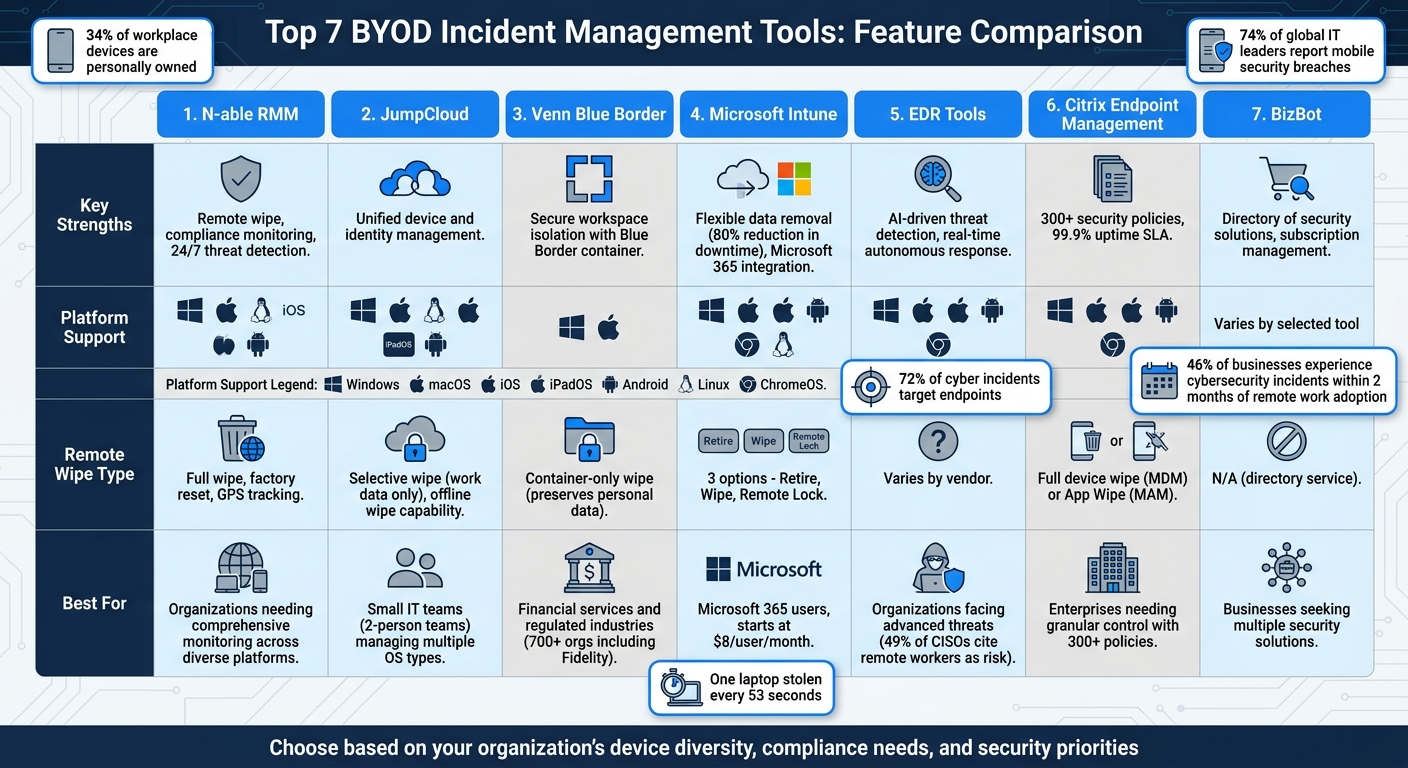
BYOD Incident Management Tools Comparison: Features and Platform Support
1. N-able RMM
N-able RMM is a remote monitoring and management platform designed to secure a wide range of BYOD devices. It provides around-the-clock monitoring for devices running Windows, macOS, Linux, iOS, and Android - all managed from a single, web-based console. Features like remote wipe, compliance monitoring, and fast threat detection set it apart.
Remote Wipe Capabilities
When a device is lost or stolen, N-able RMM allows administrators to act quickly. From the centralized console, they can remotely delete data or perform a factory reset to safeguard sensitive corporate information. Additional controls include locking screens, resetting passwords, and disabling cameras remotely. The platform also includes GPS tracking, offering both real-time and historical location data to help recover devices before resorting to a full wipe.
Compliance Monitoring
N-able RMM helps organizations stay compliant by automatically scanning devices for vulnerabilities. Its Security Expert Agent identifies unpatched CVEs, while the Asset Expert Agent flags unencrypted devices and alerts administrators when devices have been offline for over 30 days. This approach can improve asset management efficiency by up to 53%. The platform also monitors data usage on registered devices and enforces corporate policies by blocking certain types of applications.
Threat Detection Speed
The platform's Endpoint Detection and Response (EDR) leverages machine learning and a signatureless approach to quickly counter new threats. Proactive alerts via SMS or email notify IT teams when security metrics dip below acceptable levels, prompting immediate action. Integration with tools like OnPage ensures that critical alerts bypass silent modes on technician devices, guaranteeing swift responses to urgent issues. Additionally, the system's automatic rollback feature helps recover from attacks quickly, reducing downtime and preventing data loss.
sbb-itb-d1a6c90
2. JumpCloud
JumpCloud is a platform designed to unify endpoint management, helping IT teams handle BYOD (Bring Your Own Device) security incidents across Windows, macOS, Linux, iOS, iPadOS, and Android devices - all from a single console. By integrating device management with identity and access management, it streamlines the enforcement of security policies by implementing efficient tools that reduce complexity.
"We were using Jamf, but it was only covering a partial part of all of our endpoints. We needed something that would enable us to manage all these solutions in one place. We only have two people in IT, so we needed something that would help us administer all the endpoints in an efficient way" – Ivan Skowronski, Information Security Officer at KONUX
This all-in-one approach simplifies managing security policies across platforms and complements other BYOD management tools effectively.
Multi-Platform Support
JumpCloud ensures consistent management of diverse device fleets using system agents and MDM protocols. IT teams can enforce cross-OS security policies seamlessly, whether employees are using personal or corporate-owned devices. This is especially important since 34% of devices in workplaces today are personally owned, and 74% of global enterprise IT leaders have reported data breaches tied to mobile security issues. By linking devices to user identities, JumpCloud enables role-based access controls that adapt based on the user's identity rather than just the device itself.
Remote Wipe Capabilities
In the event of a lost or compromised BYOD device, administrators can remotely lock or wipe it - even if the device is offline. For personal devices, the platform offers selective wipe functionality, which removes only work-related profiles and corporate data while leaving personal content, like photos and apps, intact. This approach not only safeguards company data but also helps maintain employee trust. Considering that one laptop is stolen every 53 seconds and 33% of cyberattacks on SMEs involve stolen or compromised devices, this feature is crucial.
Compliance Monitoring
JumpCloud includes tools for auditing, logging, and compliance reporting, helping organizations stay aligned with regulatory requirements. IT teams can enforce patches and configurations across all operating systems from a single interface, while Conditional Access policies ensure that devices meet security standards before accessing sensitive resources like email or CRM systems. Additionally, the platform keeps corporate data separate from personal files, addressing a key concern - 62% of organizations have not adequately secured information on employees' mobile devices.
3. Venn Blue Border
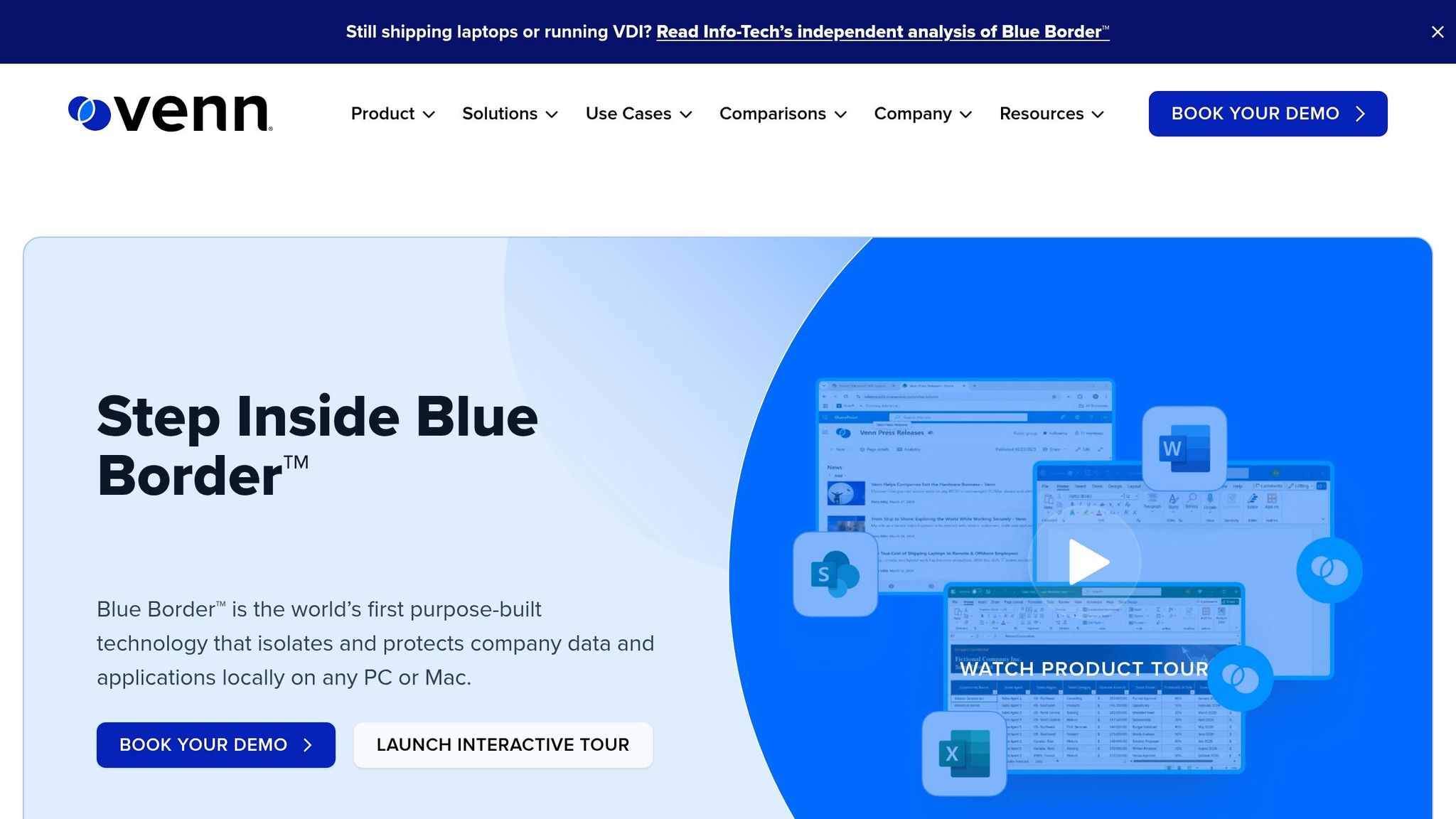
Venn Blue Border handles BYOD incidents by creating a secure, isolated workspace on employee PCs and Macs. Instead of managing the entire device, it places work applications within a virtual container, outlined by a distinct blue border. This setup keeps corporate data separate from personal files, allowing IT teams to enforce strict security measures without infringing on employee privacy.
Over 700 organizations, including major financial firms using specialized bank tools like Fidelity, Guardian, and Voya, trust Venn to meet regulatory requirements. This trust is especially critical, as 72% of cyber incidents target endpoints.
"Venn is one of my favorite products to come in to the market. I think it will change things and drive the sun-setting of VDI, so to say, to start moving to this newer, more modern world of working from BYOD devices."
- Frank McGovern, Chief Security Architect, StoneX
These endorsements highlight Venn’s unique approach and its key features for managing incidents effectively.
Remote Wipe Capabilities
Venn offers a smart solution for lost devices or employee offboarding. Administrators can instantly revoke access to the secure enclave without affecting the rest of the device. Unlike traditional full-device wipes that could erase personal photos or files, Venn’s method only removes access to corporate data within the Blue Border container. Work-related information remains encrypted and inaccessible, while personal content is left untouched. This approach simplifies offboarding, especially for contractors and remote workers.
Compliance Monitoring
Venn delivers robust compliance tools, offering detailed audit logs and real-time monitoring of how sensitive data is accessed. It complies with stringent regulatory standards like SOC 2 Type II, HIPAA, SEC, FINRA, NAIC, NYS DFS, Mass 201 CMR 17.00, CMMC, and PCI. IT teams can enforce Data Loss Prevention (DLP) policies by restricting clipboard transfers, file downloads, and screen captures within work apps, while personal applications remain unaffected.
"If you're struggling with Security, Venn would be the first partner I would look to because Venn already achieves your SOC 2, Type 2."
- Chris Cole, Owner and CEO, SecureEVAs
Multi-Platform Support
The lightweight Blue Border agent works seamlessly on both Windows PCs and macOS devices, making it easier for IT teams to manage a variety of hardware. Applications run directly on the user’s device, avoiding the delays commonly associated with virtual desktop infrastructure (VDI). This ensures that even resource-intensive applications - like CAD tools or video editing software - perform smoothly on employee-owned devices.
4. Microsoft Intune
Microsoft Intune provides a robust solution for managing devices in BYOD (Bring Your Own Device) environments, seamlessly integrating with the Microsoft 365 ecosystem. Businesses using Intune have seen impressive results, including an 80% drop in endpoint security update downtime and a 75% reduction in device failure troubleshooting. This cloud-based platform supports a wide range of operating systems - Windows, macOS, iOS/iPadOS, Android, Linux, and Chrome OS - all managed through a unified console. Its standout features include flexible remote data removal options, thorough compliance monitoring, and support for multiple platforms.
Remote Wipe Capabilities
Intune offers three distinct methods for removing data from devices, catering to various scenarios:
- Retire: This option removes only company-related data, apps, and settings, while leaving personal files like photos untouched. It’s ideal for offboarding employees in BYOD setups.
- Wipe: A full factory reset that erases all data on a device, making it suitable for lost or stolen devices.
- Remote Lock: Temporarily blocks access to both personal and company data, useful when a device is misplaced but expected to be recovered.
Here’s a quick breakdown of these options:
| Action | Impact on Personal Data | Impact on Company Data | Primary BYOD Use Case |
|---|---|---|---|
| Retire | Remains intact | Removed | Employee offboarding or unenrollment |
| Wipe | Erased (Factory Reset) | Erased | Lost or stolen device |
| Remote Lock | Access blocked | Access blocked | Temporary loss of device control |
Administrators can act on up to 100 devices simultaneously, streamlining device management.
Compliance Monitoring
Intune ensures that devices meet strict security standards by enforcing platform-specific policies, such as requiring minimum OS versions, strong password protocols, and encryption. Devices that fall short of these standards are automatically restricted from accessing corporate resources. Intune’s compliance features are backed by certifications like GDPR, ISO 27001, HIPAA, and SOC 2 Type 2.
"Intune allows us to apply security policies automatically and vigorously, eliminating the time and effort required for configuration …."
- Mr. Satoshi Fukazawa, Manager of End User Services Division, Digital Systems Platform, Fujitsu Limited
Multi-Platform Support
Intune’s Mobile Application Management lets organizations secure corporate data within apps like Outlook, Teams, and SharePoint, even without enrolling the entire device. This approach ensures data protection without intruding on personal content. Pricing begins at $8.00 per user/month for Intune Plan 1, with additional options available through Microsoft 365 Business Premium at $18.79 per user/month.
5. Endpoint Detection and Response (EDR) Tools
EDR tools play a key role in strengthening BYOD (Bring Your Own Device) security, particularly against evolving threats that traditional systems might overlook. These tools continuously monitor devices, identifying threats that go beyond the capabilities of standard antivirus software. In environments where BYOD is common - and where 49% of CISOs recognize hybrid and remote workers as major security risks - EDR serves as an essential second layer of defense. By leveraging behavioral analysis and machine learning, EDR tools establish patterns of normal activity, allowing them to detect anomalies such as fileless malware, ransomware, and credential theft.
Threat Detection Speed
EDR tools utilize AI to quickly spot attack patterns, cutting through the noise of false alerts and enabling targeted responses. For example, Hexnode XDR connects security signals across endpoints, providing a clearer picture of an attack and allowing teams to act with precision. Advanced query engines also enable security teams to search up to seven days of endpoint data, uncovering hidden threats before they escalate. This is particularly important when you consider that 74% of data breaches involve human factors like social engineering or stolen credentials. The financial impact can be staggering, as seen in the MGM data breach, which cost an estimated $100 million.
"An 'AI-first approach' to cybersecurity places artificial intelligence at the foundation of threat detection, analysis, and response - rather than layering it on as an afterthought." - Lookout
This rapid detection capability also aligns seamlessly with compliance protocols, bolstering incident response efforts.
Compliance Monitoring
EDR tools go beyond threat detection by ensuring compliance. They maintain immutable logs, verify encryption, check patch levels, and confirm the absence of malware before allowing access to corporate resources. If a device becomes non-compliant, EDR can automatically isolate it to prevent the spread of threats. This automated functionality is critical, especially when 46% of businesses report experiencing a cybersecurity incident within two months of adopting remote work policies. Additionally, these tools provide comprehensive audit trails, supporting regulatory frameworks like SOC 2, GDPR, and HIPAA.
Multi-Platform Support
EDR tools also stand out for their ability to support multiple platforms. Leading solutions offer unified visibility across major operating systems such as Windows, macOS, Linux, Android, iOS, and ChromeOS - all accessible from a single console. Some, like Ivanti Neurons, even extend support to niche platforms, including Fedora, Debian, and IoT devices. Hexnode, a Leader in the 2026 Gartner Magic Quadrant for Endpoint Management Tools, provides broad coverage while significantly reducing deployment time - cutting setup from 20 minutes to just 10 minutes per device. Pricing options vary: Hexnode offers a 14-day free trial with no credit card required, while Ivanti customizes plans based on client needs.
6. Citrix Endpoint Management
Citrix Endpoint Management offers detailed control over corporate data while respecting employee privacy. It supports a wide range of operating systems - including Android (with Samsung Knox), iOS, macOS, iPadOS, Windows 10/11, and Chrome devices - through a single management interface. With over 300 security policies and a 99.9% uptime SLA, it ensures dependable management for diverse device ecosystems.
Remote Wipe Capabilities
This platform provides two types of remote wipe options. A full device wipe, available via Mobile Device Management (MDM), restores a device to factory settings, making it suitable for lost or stolen company-owned devices. For BYOD setups, the selective "App Wipe" through Mobile Application Management (MAM) only removes managed apps and their encrypted data, leaving personal content like photos and apps untouched. Citrix uses MDX container technology to keep corporate data separate. Admins can trigger remote wipes manually or automatically in cases of non-compliance, such as jailbreak detection or connectivity issues. The "Active Poll Period" policy lets admins control how often devices check in for security commands, balancing quick responses to threats with battery efficiency. These targeted wipe options work seamlessly with the platform's compliance features.
Compliance Monitoring
The platform includes customizable triggers to lock, wipe, or notify devices that violate compliance rules. It uses Device Health Attestation to ensure a device's integrity before granting access and provides OS Update Management tools to enforce or block updates, helping to guard against vulnerabilities. Context-aware security adjusts access based on device status, while Android Enterprise work profiles separate corporate and personal data clearly.
Multi-Platform Support
Citrix Endpoint Management simplifies incident response across multiple operating systems by applying unified policies tailored to each platform’s capabilities. Both Android and iOS support MDM and MAM modes with selective wipe functionality, while macOS and Windows 10/11 are primarily managed through MDM. The solution also integrates with Mobile Threat Defense vendors like Check Point, Lookout, Wandera, and Zimperium to improve threat detection and automate responses to malware or phishing threats. Additionally, all Citrix products must migrate to the cloud-based Licensing Activation Service (LAS) by April 15, 2026, to avoid service interruptions.
7. BizBot
BizBot serves as a versatile directory designed to simplify business operations. While it’s not solely focused on BYOD incident management, it provides organizations with access to a wide array of security solutions and other essential tools. This makes it a valuable complement to the specialized incident management platforms mentioned earlier, broadening the scope of available security resources.
Tools for Compliance Monitoring
Effective compliance monitoring is a key aspect of managing BYOD incidents. BizBot’s directory includes tools that automate compliance tracking, helping businesses stay on top of policy enforcement, patch updates, and user activity across personal devices. Some of these tools are built to align with established security benchmarks, such as CIS standards, which is particularly useful for companies without dedicated IT teams.
Cross-Platform Security Solutions
One of the standout features of BizBot is its focus on tools that work across multiple operating systems. Many of the solutions listed are compatible with Windows, macOS, Linux, ChromeOS, iOS, and Android. This flexibility allows organizations to implement uniform security policies across diverse BYOD environments while ensuring ease of use, making incident response smoother and more effective.
Managing Subscriptions with Ease
In addition to connecting businesses with security and compliance tools, BizBot includes subscription management features. These help organizations keep track of costs related to endpoint protection and incident response. As BYOD programs grow, this functionality becomes increasingly important for managing budgets efficiently.
Feature Comparison
Selecting the right BYOD incident management tool means finding one that aligns with your security priorities and works seamlessly across your devices. Below is a breakdown of key features for the platforms discussed in this article. (Keep in mind that some feature specifics may require consulting vendor documentation for full details.)
| Tool | Remote Wipe Capabilities | Compliance Monitoring | Threat Detection Speed | Multi-Platform Support |
|---|---|---|---|---|
| N-able RMM | External storage wipe on Android and eSIM erasure on iOS | N/A | N/A | Windows, macOS, iOS, Android |
| JumpCloud | N/A | N/A | N/A | Windows, macOS, iOS, Android |
| Venn Blue Border | N/A | N/A | N/A | Windows, macOS, iOS, Android |
| Microsoft Intune | Protected Wipe for Windows and Powerwash for ChromeOS | N/A | N/A | Windows, macOS, iOS, Android, ChromeOS |
| EDR Tools (SentinelOne) | N/A | N/A | Real-time autonomous detection | Windows, macOS, iOS, Android |
| Citrix Endpoint Management | N/A | N/A | N/A | Windows, macOS, iOS, Android |
| BizBot | Not applicable | Not applicable | Not applicable | Dependent on the selected solution |
This table highlights the core capabilities of each tool, but the details reveal their unique strengths. For example, Microsoft Intune is a strong option for users within the Microsoft 365 ecosystem, offering features like Protected Wipe for Windows and Powerwash for ChromeOS. Meanwhile, SentinelOne stands out with its real-time, autonomous threat detection capabilities, ideal for proactive security measures.
With the increasing reliance on mobile devices - over 80% of small business owners use them for work - multi-platform compatibility is critical. A unified dashboard can simplify incident response, minimizing tool sprawl and enabling IT teams to manage devices more efficiently throughout their lifecycle . In fact, organizations using AI-powered incident management tools have reported a 17.8% average reduction in Mean Time To Resolution, with some seeing improvements as high as 70%.
When choosing a tool, focus on cross-platform support to avoid leaving security gaps in your BYOD environment. Whether your priority is advanced threat detection, seamless integration, or cost-effective solutions for smaller teams, the right tool will depend on your specific needs and goals.
Conclusion
Picking the right BYOD incident management tool goes beyond checking off a list - it’s about safeguarding your business while keeping operations running smoothly. With nearly half (46%) of businesses experiencing a cybersecurity incident within just two months of adopting remote work, having an effective tool in place ensures you can balance security needs with employee privacy. It also helps automate compliance checks and enables quick action if a device is lost or compromised.
Start by evaluating your team’s specific needs, including device platforms, compliance requirements, and the scale of your remote workforce. A thorough understanding of your environment will help you choose a tool that addresses both security concerns and usability.
Focus on tools that offer containerization to separate work data from personal data. This approach, highlighted in our tool comparisons, protects sensitive company information while respecting employee privacy. It also allows for selective data wipes, removing only corporate information when necessary.
Additionally, look for tools with automated response features. These can isolate compromised devices or enforce security updates immediately, reducing the risk of costly breaches. Considering it takes an average of 194 days to identify a breach globally, automation is an essential safeguard.
FAQs
What’s the best way to protect company data on personal devices without invading privacy?
To safeguard company data on personal devices while maintaining employee privacy, Mobile Device Management (MDM) tools are a smart solution. These tools help enforce security measures like encryption, password requirements, and app usage restrictions.
One standout feature is containerization, which keeps work and personal data separate. This ensures that sensitive business information remains protected while personal files remain untouched.
Additionally, clear and transparent policies, combined with remote troubleshooting tools, strengthen security without eroding employee trust or compromising their privacy.
When should IT use a full wipe vs a selective wipe in a BYOD incident?
When a device is lost, stolen, or compromised, a full wipe ensures that all data is securely erased, protecting sensitive information. On the other hand, a selective wipe is ideal for situations where only corporate data or apps need to be removed, leaving personal data intact. The choice depends on the circumstances and the balance between safeguarding critical information and minimizing inconvenience for the user.
How do I choose between MDM, MAM, containerization, and EDR for BYOD security?
Choosing the right approach - MDM, MAM, containerization, or EDR - comes down to your organization's specific security needs and management goals:
- MDM (Mobile Device Management): Offers complete control over devices, enabling features like policy enforcement, remote wiping, and encryption for comprehensive security.
- MAM (Mobile Application Management): Focuses on securing individual apps, providing a balance between protecting sensitive data and maintaining user flexibility.
- Containerization: Keeps corporate data separate from personal data, ensuring privacy while granting secure access to business resources.
- EDR (Endpoint Detection and Response): Prioritizes identifying threats and managing incidents, making it ideal for organizations focused on proactive threat mitigation.
Your choice should align with what matters most to your organization - whether it's controlling devices, securing specific apps, safeguarding privacy, or addressing potential threats.