Multilingual survey tools are now essential for businesses operating globally. With 95% of people speaking a first language other than English and 75% not fluent in English, relying on single-language feedback is no longer practical. Poor-quality data costs companies millions annually. Modern platforms simplify multilingual surveys with automated translations, browser language detection, and support for Right-to-Left (RTL) scripts like Arabic.
Here are the top 7 tools for multilingual surveys in 2026:
- SurveyLab: Supports all languages, AI translations, and multilingual reports. Starts at $49/month.
- SurveyMonkey: Covers 57 languages, global panels, and integrations with 200+ apps. Paid plans start at $30/month.
- Typeform: Offers conversational surveys in 27+ languages. Multilingual features start at $129/month.
- Qualtrics: Handles 78 languages with advanced analytics. Pricing starts around $120/user/month.
- Zoho Survey: Supports 140+ languages, including RTL. Paid plans start at $9/month.
- QuestionPro: Covers 125 languages with Excel-based translations. Paid plans start at $99/month.
- SurveySparrow: Supports 130+ languages with auto-detection. Multilingual plans start at $39/month.
Quick Comparison:
| Tool | Languages Supported | Starting Price (USD/month) | Key Integrations | Best For |
|---|---|---|---|---|
| SurveyLab | All languages | $49 | Salesforce, HubSpot, Zendesk | Small to medium businesses |
| SurveyMonkey | 57+ | $30–$39 | 200+ apps (e.g., Slack, Mailchimp) | All business sizes |
| Typeform | 27+ | $129 | HubSpot, Slack, Google Analytics | Startups, marketers |
| Qualtrics | 78+ | ~$120/user | Salesforce, Tableau, Power BI | Large enterprises |
| Zoho Survey | 140+ | $9 | Zoho CRM, Zoho Analytics | SMBs, Zoho users |
| QuestionPro | 125+ | $99 | Salesforce, Microsoft Dynamics | Enterprises, academics |
| SurveySparrow | 130+ | $39 | 2,000+ apps (e.g., Slack, WhatsApp) | SMBs, CX teams |
These tools simplify global feedback collection, consolidate multilingual responses, and integrate with CRMs for actionable insights. Choose based on your budget, language needs, and existing tools.
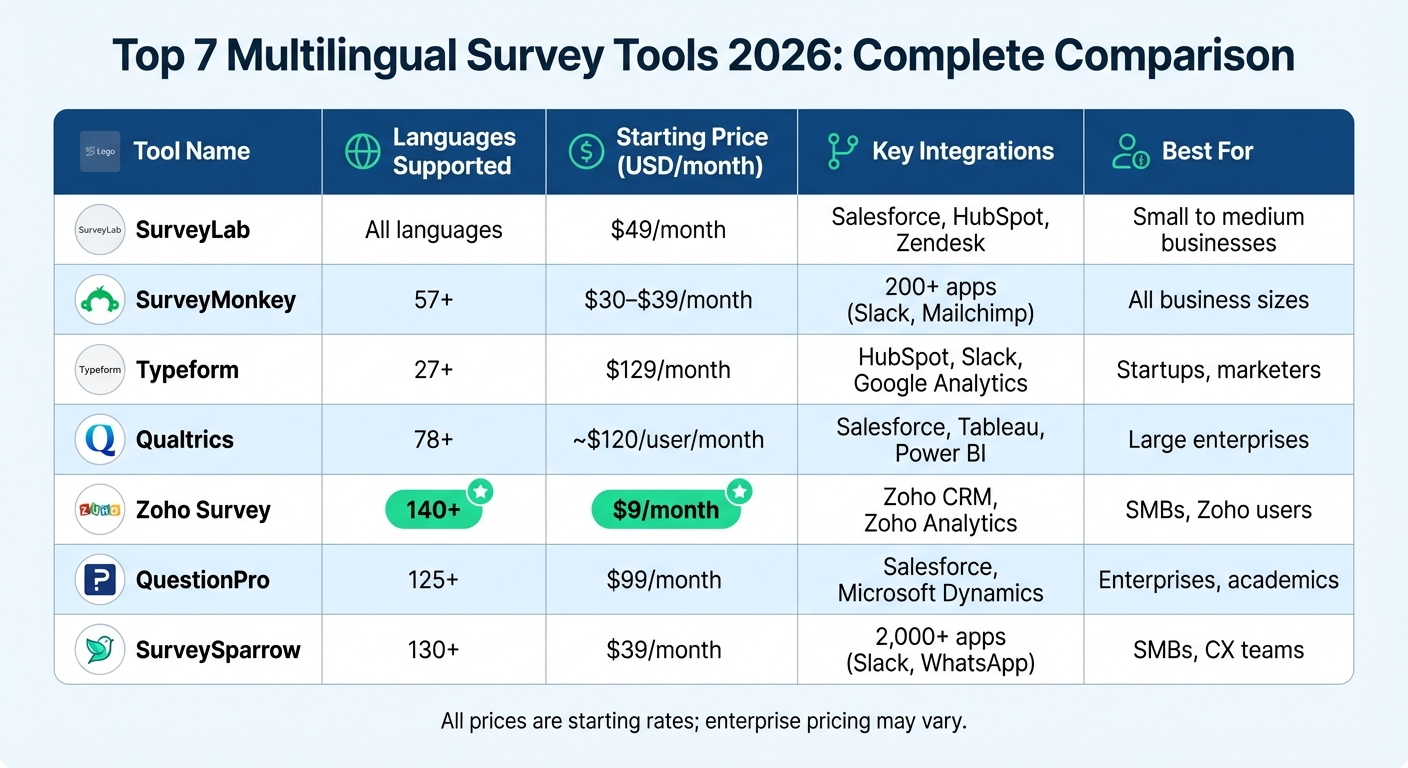
Multilingual Survey Tools Comparison: Features, Pricing & Language Support 2026
1. SurveyLab
Multilingual Capabilities
SurveyLab works seamlessly with all languages, including complex right-to-left scripts like Hebrew and Arabic. It automatically detects the user's browser language and adjusts the interface accordingly. The platform's AI-driven translation tool can translate entire surveys instantly, but a manual review is still a good idea to ensure accuracy. On top of that, SurveyLab creates multilingual reports automatically, letting you view and analyze results in the same languages used during data collection.
Pricing
SurveyLab's paid plans begin at $49 per month and come with a 14-day free trial. The Starter plan allows for one multilingual survey, the Advanced plan includes two, and the Professional and Enterprise tiers offer unlimited multilingual surveys. AI translation features are only available in the Professional and Enterprise plans, but Enterprise users can also opt for human translation services.
Integrations
SurveyLab offers direct integrations with popular tools like Salesforce, Intercom, Zendesk, LiveChat, Google Analytics, HubSpot, and Zapier. Through Zapier, users can connect with over 2,000 additional apps, including Slack, Trello, Google Sheets, and Gmail, making it highly versatile.
Suitability
With over 15 years of experience and 85,000 registered users, SurveyLab caters to a wide range of businesses, from solo professionals to large multinational corporations. The platform has powered 7,439,380 online surveys and boasts an impressive 99.997% uptime. It's especially effective for companies that need mobile-friendly surveys across diverse channels like PCs, tablets, smartphones, SMS, and QR codes. SurveyLab has received glowing reviews, earning a 4.9/5 rating on Capterra (based on 60+ reviews) and a 4.4/5 rating on G2 (from 15+ reviews). Up next, let's take a closer look at SurveyMonkey and its multilingual features.
sbb-itb-d1a6c90
2. SurveyMonkey
Multilingual Capabilities
SurveyMonkey supports 57 languages as of 2026, making it a strong choice for teams working across different regions. While the platform automatically translates default elements like navigation buttons, help text, and error messages, users need to handle translations for survey-specific content like titles, questions, and answer options themselves. The process is straightforward: add your desired languages, download the files, translate them, and then reupload. For languages like Arabic, Hebrew, and Persian, SurveyMonkey even supports Right-to-Left (RTL) text orientation. Importantly, all responses - regardless of language - are consolidated into a single dataset, simplifying analysis and reporting.
Pricing
SurveyMonkey’s free Basic plan allows unlimited surveys but limits you to 10 questions and 25 responses per survey. Paid plans, including Individual, Team (starting with 3 "Full Access" seats), and custom-priced Enterprise options, offer unlimited questions and higher response thresholds. Be aware of overage fees, which are $0.15 per additional response. The Enterprise plan also includes advanced security features like SSO and HIPAA compliance. It’s worth noting that multilingual survey capabilities are only available on paid plans.
Integrations
SurveyMonkey integrates with over 200 apps natively, including popular tools like Slack, HubSpot, Mailchimp, Microsoft Teams, and Google Drive. Through Zapier, users gain access to over 7,000 additional app connections. Enterprise users also benefit from advanced integrations with platforms like Salesforce, Marketo, Microsoft Power BI, and Tableau. These integrations enable automation, such as triggering detractor alerts in Salesforce when a customer provides a low NPS score, allowing teams to act quickly.
Suitability
With over 260,000 organizations relying on it worldwide, SurveyMonkey is a fit for businesses of all sizes. The platform connects users to a global audience panel of more than 335 million people across 130+ countries. In 2026, Greyhound reported a dramatic improvement after adopting SurveyMonkey: their NPS response rate soared to 94%, and their NPS score climbed nearly 15 points within a few months. Matt Schoolfield, Greyhound’s Senior Manager of Commercial Analytics and Voice of the Customer, shared:
"Within a few months, our NPS was up almost 15 points. SurveyMonkey changed the way that data was getting into people's hands and it changed what they were able to do with it."
SurveyMonkey is especially effective for companies that require strong CRM integration and need to manage large volumes of multilingual feedback. Up next, discover how Typeform approaches multilingual surveys.
3. Typeform
Multilingual Capabilities
Typeform supports more than 27 languages, including Arabic, Simplified and Traditional Chinese, Dutch, English, French, German (both formal and informal), Italian, Japanese, Korean, Portuguese, Russian, and Spanish. With this feature, you can create a single form that adjusts to multiple languages, so there’s no need to build separate versions. You have two options for translation: "Translate with AI" or a manual method where you download a CSV template, input your translations, and upload it back into the system. The AI translation is most effective for shorter forms with fewer than 200 words and 10–20 questions.
The platform automatically detects the respondent's browser language and adjusts accordingly. Alternatively, users can manually choose their language using a banner. If you want to lock the form to a specific language - like for a localized landing page - you can add a typeform-lang parameter to the URL (e.g., ?typeform-lang=es for Spanish). To avoid language mismatches, finalize the primary text before adding translations. For close-ended questions, responses are saved in the form’s main language, while open-ended responses remain in the language used by the respondent.
Pricing
Typeform’s Basic plan starts at $39 per month if billed monthly or $25 per month when billed annually. However, to access multilingual capabilities, you’ll need to upgrade to the Business plan, which costs $129 per month (billed monthly) or $91 per month (billed annually). Other tiers include the Talent plan at $169 per month (monthly) or $119 per month (annually) and the Growth Pro plan at $379 per month (monthly) or $266 per month (annually). Enterprise-level pricing is customized based on your needs. Multilingual features are available only with the Business, Talent, Growth Pro, or Enterprise plans.
Integrations
Typeform integrates seamlessly with major CRM platforms like HubSpot, Pipedrive, and Salesforce, as well as marketing tools such as Mailchimp, Google Analytics, Google Tag Manager, and Meta (Facebook) Pixel. Additionally, through Zapier, you can connect with over 500 other tools. These integrations allow for automated processes like lead scoring, routing, and follow-ups. Data synchronizes in real-time between Typeform and your other business tools, eliminating the need for manual data entry. Becca Ravenna, Senior Director of Corporate Sales and Partnerships at Barry's, highlighted its scalability:
"We just hosted a virtual event for 60,000 people using Typeform for the bookings."
Suitability
Typeform is a trusted solution for 95% of the Fortune 500 and is particularly well-suited for mid-sized businesses and enterprises that value sleek branding and interactive user experiences. It’s commonly used for NPS surveys, market research, and employee feedback. Chase Clark, Senior UX Researcher at Calm, shared:
"With Typeform, we realized that we could get more surveys out and we wouldn't be limited in the same ways as we were with other survey companies."
According to Typeform, 96% of customers report an improved brand experience after switching, and users collect 3.5 times more data with the help of its AI-assisted form-building tools. Up next: a look at Qualtrics and its enterprise-level multilingual capabilities.
4. Qualtrics
Multilingual Capabilities
Qualtrics offers support for 78 standard languages for survey distribution, along with unlimited custom language options for specific dialects. Its interface is available in 21 languages, making it accessible to users worldwide. Surveys can be translated manually, through machine translation using Google Translate or Amazon Translate APIs, or via professional paid translation services.
What’s convenient is that all translations are housed within a single survey. This ensures that all respondent data flows into one unified dataset, simplifying analysis. The platform can automatically detect a participant’s language through their browser settings or allow users to set the language via contact lists or URL parameters (e.g., adding ?Q_Language=FR for French). Additionally, the system tracks the language each respondent used in a field called Q_Language, which makes filtering and reporting by language straightforward.
Charles Frankievich, Senior Director of Consumer Insights and Action at Shake Shack, highlighted this capability:
"The Qualtrics platform allows for quick, scalable analysis that can be easily shared across our organization to make fast decisions and support the intuition that has underpinned our success to date."
These multilingual tools are a key part of what makes Qualtrics a powerful choice for global feedback management.
Pricing
Qualtrics doesn’t publicly disclose its pricing, but reports suggest that Core XM plans start at approximately $120 per user per month, while Strategic Research plans are priced at around $420 per month. For enterprise users, pricing is typically tied to interaction metrics, such as the number of survey responses or video feedback minutes.
For those testing the waters, there’s a free plan that includes 3 surveys, 30 questions, and up to 500 responses. Additionally, advanced features can be explored through a 30-day trial. While basic machine translation via Google Translate API is included, professional translation services come at an extra cost.
Integrations
Qualtrics integrates smoothly with leading business administration tools for CRM and analytics such as Salesforce, Zendesk, Tableau, and Microsoft Power BI. These integrations make it easy to automate workflows and set up email triggers, cutting down on manual effort. The platform also supports a variety of distribution channels, including SMS, social media, and offline apps. It can even consolidate data from sources like online reviews, calls, chats, and social media mentions into one centralized hub.
Suitability
Designed for enterprises with extensive feedback needs, Qualtrics is trusted by over 20,000 brands and facilitates more than 1.3 billion surveys annually. It’s particularly well-suited for larger organizations managing customer or employee feedback across multiple channels. Its advanced AI-driven analytics and complex logic capabilities make it a standout choice for businesses handling high-volume, intricate feedback systems. With a 49.77% market share in the employee engagement software space, Qualtrics is used by over 81,000 companies worldwide, solidifying its reputation as a leader in the field.
5. Zoho Survey
Multilingual Capabilities
Zoho Survey supports over 140 languages, making it one of the most flexible tools for multilingual surveys. Its built-in translation tools allow you to translate an entire survey with just a few clicks, saving you from the hassle of manual translation. Respondents can choose their preferred language at the start of the survey, and you can even switch the primary language while the survey is live and gathering responses.
The platform also handles complex character sets and right-to-left (RTL) scripts effortlessly, including languages like Arabic, Hebrew, Persian, Dari, Pashto, and Urdu. Katie Tucker, Customer Insight Specialist at Product Jungle, noted the platform's precision in managing diverse language translations. These features are available at competitive pricing, making it a strong option for multilingual surveys.
Pricing
Zoho Survey starts at $9 per month if billed monthly, or $7.42 per month with an annual plan. Multilingual features are included in all paid plans at no additional cost. There’s also a free plan that lets you create up to 3 surveys with 10 questions each - great for testing the platform. For more advanced needs, higher-tier plans range from $25 to $75 per month (annual billing), while the Enterprise plan is priced at $109 per month for monthly billing.
Integrations
Zoho Survey integrates seamlessly with Zoho CRM, ensuring survey responses are synced directly with customer records for better data management. It also connects with third-party tools like Zendesk, Eventbrite, and Shopify, making it easier to manage email invitations and target specific audiences. For deeper data analysis, it integrates with Zoho Analytics, allowing users to go beyond basic survey metrics. Michael Fauscette, Founder & Chief Analyst at Arion Research, shared his thoughts on this feature:
"The platform's integration with Zoho Analytics takes data analysis to the next level, allowing for basic analysis within the survey tool and more complex data manipulation."
These integrations make Zoho Survey a versatile choice for businesses looking to streamline their data workflows.
Suitability
Zoho Survey caters to businesses of all sizes, from small startups to large enterprises. It’s ideal for various use cases, including customer satisfaction (CSAT), Net Promoter Score (NPS) tracking, employee engagement, and market research. Companies already using Zoho products will find it particularly beneficial, thanks to the seamless integration across the Zoho ecosystem. With a 4.6/5 rating on major review platforms and over 30 question types to choose from, it’s a user-friendly option for multilingual surveys without a steep learning curve. Its strong language support and integration capabilities make it a solid pick for businesses aiming to reach a global audience while keeping operations smooth.
6. QuestionPro
Multilingual Capabilities
QuestionPro makes it easy to create surveys in over 125 languages. Its interface supports toggling between 8 key languages, including English, Portuguese, Arabic, Spanish, German, Mandarin, French, and Russian. The platform offers a built-in translation editor and automatic language translation through Google Translate. Additionally, users can import and export translations using Excel (.xlsx) templates. For complex surveys, you can download an Excel file containing your questions and answer choices, add translations directly into the file, and then reupload it to the platform.
Right-to-Left (RTL) languages like Arabic and Hebrew are handled effortlessly. The system adjusts layouts, buttons, and text entry boxes to align with RTL formatting. Respondents can choose their preferred language through a screener question at the survey's beginning or use a toggle switch available on every page. For email distributions, uploading a contact list with a designated language column ensures that invitations and surveys are automatically displayed in the recipient's language.
Pricing
QuestionPro offers a free Essentials plan, which includes basic features and supports up to 200 responses per survey. The Advanced plan, priced at $99 per month (billed annually), includes multilingual surveys, the ability to import translations via Excel, and up to 25,000 responses annually. The Team Edition costs $83 per user per month (billed annually) with a minimum of 5 users. This plan includes auto-translation features and allows up to 100,000 responses per year. For larger organizations, the Research Suite provides custom pricing and advanced qualitative tools. Multilingual features are included in all paid plans at no extra cost.
Integrations
QuestionPro integrates seamlessly with popular CRM platforms like Salesforce, Microsoft Dynamics, HubSpot, Copper CRM, and Freshsales CRM. It also connects with marketing automation tools such as Marketo and HubSpot, and analysis platforms like Tableau, Power BI, Google Sheets, and NVivo. These integrations simplify the process of syncing survey responses with customer records and enable more efficient data analysis and compare banking tools to optimize your financial workflows.
Suitability
Whether you're an individual researcher or part of a large enterprise, QuestionPro has a solution. With over 10 million users worldwide, it supports market research, customer experience initiatives, employee engagement surveys, and academic studies. The platform boasts strong ratings, including 4.8/5 on Software Advice and 4.6/5 on G2. Users appreciate its extensive library of 350+ survey templates, enterprise-ready multilingual tools, and seamless CRM integrations. It also meets key compliance standards like ISO 27001:2022, GDPR, CCPA, HIPAA, and SOC 2, ensuring data security.
Next, let's take a closer look at SurveySparrow's multilingual capabilities.
7. SurveySparrow
Multilingual Capabilities
SurveySparrow offers support for over 130 languages, making it a solid choice for businesses with a global audience. It includes one-click translations powered by Google Translate, alongside a Translation Editor for manually refining questions, buttons, and hints.
The platform automatically detects the browser's language settings but also provides a dropdown menu for manual language selection. For added flexibility, survey questions can be exported to Excel for translation and re-uploaded via CSV. It also accommodates right-to-left (RTL) languages like Arabic and Hebrew, ensuring all responses are neatly organized in a centralized dashboard.
Pricing
SurveySparrow's Basic plan costs $19/month (billed annually) but does not include multilingual features. These become available with the Starter plan at $39/month (annual billing). The Business plan, priced at $79/month, includes advanced question types and custom branding. For organizations needing more, the Enterprise plan offers custom pricing, auto-translation for over 130 languages, and dedicated account management. There are no additional fees for adding languages, but you can purchase add-ons like extra user access for $49/user/month or higher response limits.
Integrations
SurveySparrow connects with over 2,000 apps, including popular CRM systems like Salesforce, HubSpot, Zendesk, and Intercom. It also integrates with marketing tools such as Mailchimp and ActiveCampaign, as well as collaboration platforms like Slack and Microsoft Teams. The platform allows users to import contact lists and set up workflows to automate tasks like creating support tickets or updating CRM records.
Suitability
With over 4,000 customers in 149+ countries, SurveySparrow caters to a variety of needs, including Customer Satisfaction (CSAT) surveys, Net Promoter Score (NPS) tracking, 360-degree employee reviews, and offline data collection. Its conversational survey design reportedly achieves a 40% higher response rate compared to traditional forms. With an overall user rating of 4.5/5, many appreciate its ability to bridge language gaps and support global engagement.
Check out the next section for a detailed feature and pricing comparison of these multilingual survey tools.
Explore the power of Multilingual Surveys - QuestionPro Webinar
Feature and Price Comparison
Here’s a breakdown of how seven multilingual survey tools measure up in terms of language options, pricing, integrations, and the types of businesses they best serve:
| Tool | Languages Supported | Starting Price (USD/month) | Key Integrations | Best For |
|---|---|---|---|---|
| SurveyLab | Multiple languages with branching logic | $49 | CRM systems, marketing tools | Small to medium businesses |
| SurveyMonkey | 60+ languages; global panel of 335M respondents | $30–$39 | 200+ apps (e.g., Salesforce, Mailchimp, Microsoft) | All business sizes |
| Typeform | Conversational design in multiple languages | $32–$39 | 300+ apps (e.g., HubSpot, Slack, Google Sheets) | Startups, marketers, UX researchers |
| Qualtrics | Advanced multilingual distribution (SMS, social) | ~$120/user | Enterprise workflows, predictive analytics | Large enterprises, academic institutions |
| Zoho Survey | 26 languages, RTL support, 250+ templates | $45 | Native Zoho CRM and Zoho Suite | SMBs to enterprises (especially Zoho users) |
| QuestionPro | 95+ languages with built-in RTL support | Free (basic); $99 (advanced) | Salesforce, Microsoft, collaboration tools | Enterprise and academic research teams |
| SurveySparrow | 130+ languages with auto-detection of browser language | $39 (multilingual starts here) | 2,000+ apps (e.g., Zapier, Slack, Microsoft Teams, WhatsApp) | SMBs, customer experience teams |
Each tool offers distinct advantages for businesses with diverse needs. For example, SurveyMonkey provides access to a massive global panel of over 335 million respondents across 130+ countries. QuestionPro supports 95+ languages and includes right-to-left (RTL) functionality for languages like Arabic and Hebrew. Meanwhile, SurveySparrow takes multilingual capabilities further with translation into 130+ languages and automatic detection of respondents’ browser language.
In terms of pricing, options vary widely. QuestionPro offers a free basic plan, while SurveyLab provides a budget-friendly entry point. Mid-tier tools like SurveyMonkey and Typeform balance affordability with robust features. On the higher end, Qualtrics caters to enterprises with advanced tools, starting at approximately $120 per user per month.
When it comes to integrations, the range is impressive. SurveySparrow connects with over 2,000 apps, enabling omnichannel distribution through platforms like WhatsApp, SMS, and Slack. Typeform focuses on a design-first approach with 300+ integrations, enhancing user engagement. For businesses already using Zoho products, Zoho Survey offers seamless integration with its native CRM and suite of tools, simplifying data management.
A standout feature across all these tools is their ability to consolidate multilingual responses into a single dashboard. This allows users to filter and analyze data by language without needing to switch views. For global businesses tracking customer sentiment or managing international employee surveys, this ensures all feedback remains centralized and easy to interpret, no matter how many languages are involved.
Conclusion
Accurate global feedback is essential for modern businesses. Picking the right multilingual survey tool comes down to three key factors: your budget, the languages your customers use, and how well the tool fits into your workflow. For instance, if most of your non-English customers speak Spanish and French, you likely don’t need a tool that supports dozens of other languages.
Smaller businesses working with tight budgets can explore free trials from platforms like SurveyLab, Zoho Survey, or QuestionPro. Their AI-powered translation tools can help you save on professional translation costs without compromising speed.
For mid-sized companies, options like SurveyMonkey and Typeform strike a balance between price and functionality, offering smooth integrations and easy-to-use interfaces. If your business already uses Zoho products, Zoho Survey is a natural fit, while SurveySparrow impresses with features like automatic browser language detection and seamless app integrations.
Enterprise-level organizations with more intricate global research needs might consider Qualtrics, which starts at approximately $120 per user per month. Its advanced analytics, predictive insights, and multi-channel SMS distribution are designed to handle complex data collection and analysis, helping avoid costly errors in research.
Each platform, from SurveyLab to SurveySparrow, caters to specific business sizes and language needs. Before finalizing your choice, check for RTL (right-to-left) language support if targeting Middle Eastern markets, ensure all responses consolidate into a unified dashboard, and confirm smooth CRM integration. Free trials are a great way to test translation quality - AI translations are fast, but manual tweaks often ensure better accuracy for both technical and cultural nuances.
FAQs
How can I ensure AI translations are accurate?
For precise translations using AI, consider a hybrid approach: combine the efficiency of AI tools with the expertise of human review, especially for content that requires careful attention to detail or carries significant importance. Choose platforms tailored to your specific needs to maintain both accuracy and proper formatting.
To minimize mistakes, include proper nouns and key terms directly in your prompts. This helps the AI better understand and process the content. Finally, make it a habit to regularly review and edit AI-generated translations. This step ensures that the context and subtle nuances of the original text are fully preserved.
Do these tools support RTL languages like Arabic?
Yes, many multilingual survey tools are designed to accommodate RTL (right-to-left) languages like Arabic, Hebrew, and Persian. Well-known platforms such as SurveyLab, Sprig, SurveyJS, and SurveyMonkey offer features like Unicode support, automatic language detection, and right-to-left text alignment, ensuring smooth functionality for users working with these languages.
Should I prioritize price, languages, or integrations?
When choosing a multilingual survey tool in 2026, the language features should be your top consideration. Tools with capabilities like seamless translations and automatic language detection are essential for collecting accurate data from diverse audiences. While pricing is also a factor - especially for smaller businesses - many platforms provide budget-friendly plans without compromising on multilingual functionality. Integrations can enhance the tool's utility, but they are more of a bonus than a substitute for strong language support, which remains the key priority.