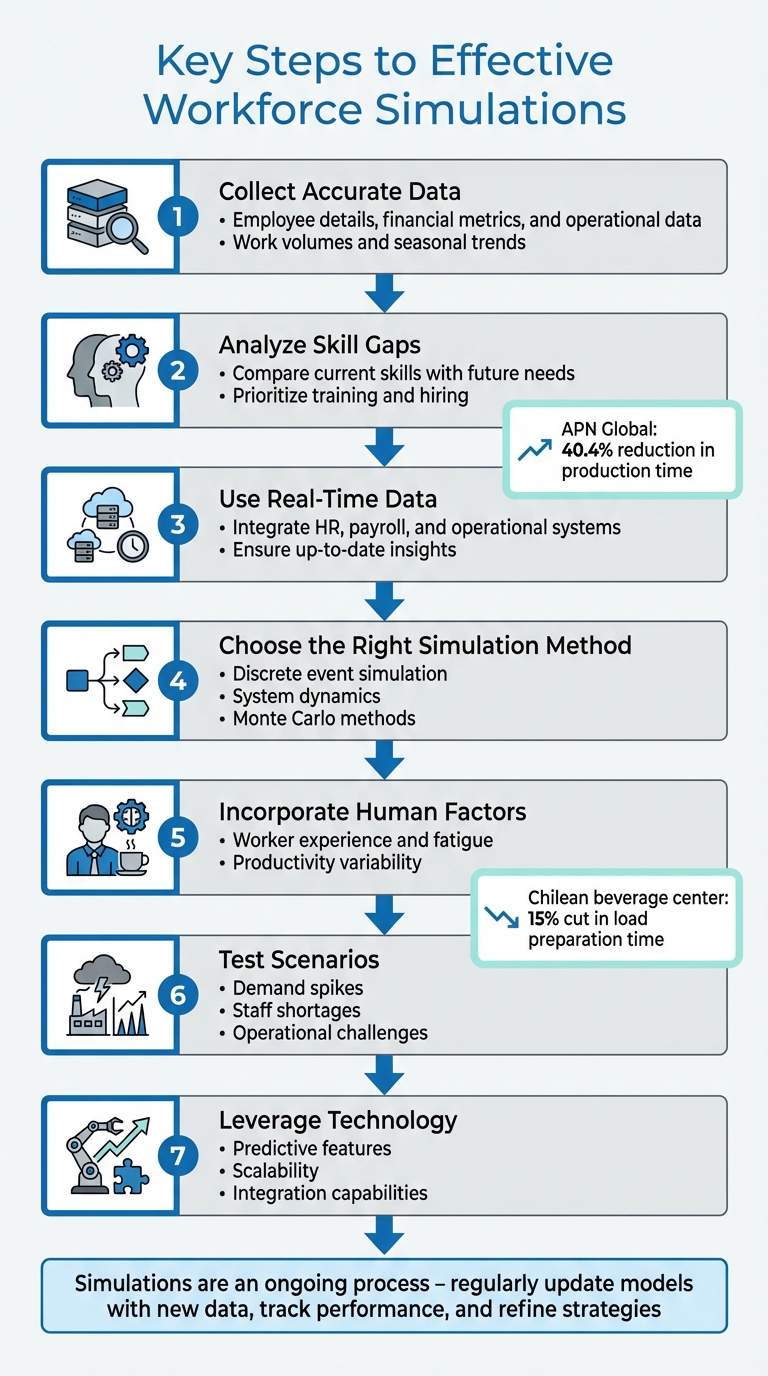
Workforce allocation simulation helps businesses test staffing strategies without disrupting operations. With labor shortages on the rise, companies can use simulations to identify inefficiencies, predict staffing needs, and improve productivity. For example, APN Global reduced production time by 40.4% using flexible workforce allocation, while a beverage center in Chile cut load preparation time by 15%.
Key Steps to Effective Workforce Simulations:
- Collect Accurate Data: Gather employee details, financial metrics, and operational data like work volumes and seasonal trends.
- Analyze Skill Gaps: Compare current skills with future needs to prioritize training and hiring.
- Use Real-Time Data: Integrate HR, payroll, and operational systems for up-to-date insights.
- Choose the Right Simulation Method: Options include discrete event simulation, system dynamics, or Monte Carlo methods.
- Incorporate Human Factors: Account for worker experience, fatigue, and variability in productivity.
- Test Scenarios: Simulate different conditions like demand spikes or staff shortages to prepare for challenges.
- Leverage Technology: Use tools with predictive features, scalability, and integration capabilities to streamline the process.
Simulations are an ongoing process. Regularly update models with new data, track performance, and refine strategies to make better staffing decisions and reduce costs.
7 Key Steps for Effective Workforce Allocation Simulation
Efficient Workforce Allocation in Manufacturing Operations Using AnyLogic Simulation
sbb-itb-d1a6c90
Preparing for Workforce Simulations
When it comes to workforce simulations, accurate data is non-negotiable. Without solid information, your models risk producing unreliable results, which can lead to poor staffing decisions. The starting point for effective workforce planning is collecting the right data and understanding your organization's current state. This foundation helps identify workforce gaps and ensures that simulation parameters align with actual organizational needs.
Collecting Workforce and Operations Data
Begin by defining your Minimum Viable Dataset (MVD). This should include essential employee information such as IDs, roles, locations, salaries, work schedules, and leave records. Add financial details like total compensation, cost centers, and budget limits, as well as capacity metrics such as project hours, utilization rates, and absenteeism. Operational data is equally important - historical work volumes, service demands, project pipelines, and seasonal trends all help forecast staffing needs.
For new hires, consider using entry-level rates, grade midpoints, or market percentiles to simulate costs more effectively.
"People are the largest controllable expense for most firms; aligning talent to demand directly affects revenue, margin and delivery risk." - MiHCM
A glaring issue: only 34% of leaders feel their organizations are well-prepared to handle workforce risks over the next three years. To avoid missteps, audit your internal systems - HRIS, ATS, and Payroll - and ensure consistent definitions. For instance, clarify whether you're tracking "FTE" (full-time equivalent) versus "headcount", as inconsistent metrics can cause confusion.
Once you’ve gathered your data, the next step is to analyze skill gaps and align them with future business needs.
Analyzing Workforce Capability Gaps
With your baseline data in place, compare your workforce's current skills to future requirements. This gap analysis should align with specific business goals, such as adopting new technologies or driving digital transformation. Map both technical and soft skills - like leadership and communication - against industry benchmarks.
The numbers tell a concerning story: 76% of U.S. employers struggle to fill roles due to a lack of skilled talent, and 79% of CEOs worry that skill gaps could hinder business growth. Even more alarming, over 50% of employees will need significant reskilling or upskilling by 2025.
To get a clear picture, combine multiple assessment methods. Use self-assessments, manager evaluations, performance reviews, and AI-driven benchmarks. Prioritize gaps by severity - whether they represent immediate shortages, future needs, or outdated skills. This allows simulations to focus on areas with the highest risk. Organizations that take workforce planning seriously are 1.5 times more likely to achieve their goals compared to those that don’t.
Connecting Real-Time Data Sources
Keeping your simulation models up-to-date requires live data feeds. Start by integrating your HRIS and Payroll systems for core employee and cost data. Then, layer in time and attendance systems to track overtime and actual hours worked.
Operational systems are just as critical. CRM and workforce management (WFM) platforms can provide real-time updates on call volumes, transactions, or project milestones, enabling responsive adjustments during shifts. Your Applicant Tracking System (ATS) should supply data on open requisitions, candidate pipelines, and offer acceptance rates to fine-tune supply-side forecasts.
"Data brings precision, visibility, and accountability to your strategic workforce plan. Without it, your decisions are just based on assumptions." - Ashish Sinha, EMEA Practice Lead for People Analytics, Korn Ferry
Right now, only 18% of CHROs say their organizations consistently use data analytics to guide workforce decisions, and 74% admit their analytics capabilities are limited to basic or descriptive levels. Automating data ingestion can drastically reduce the time it takes to gain insights and prevent forecasts from becoming outdated. For example, set up workflows that trigger actions - like opening a new job requisition - when simulations predict a headcount shortfall of more than 10%.
Creating and Improving Simulation Models
When it comes to workforce allocation, your simulation model should blend accurate data with practical insights. The goal is to create models that reflect real-world workforce dynamics. The effectiveness of your simulation hinges on selecting the right method, factoring in human behavior, and using efficient tools to test various scenarios before putting them into action.
Picking the Right Simulation Method
The method you choose should address the specific problem you're tackling. Here are three common approaches:
- Discrete Event Simulation (DES): Ideal for time-sensitive processes like order processing, customer queues, or task sequencing.
- System Dynamics: Best for understanding complex feedback loops and long-term effects, such as how delays in hiring impact production over time.
- Monte Carlo Simulations: Excellent for risk analysis, using random sampling to model uncertainties like demand fluctuations, transportation times, or inventory levels.
For instance, a manufacturing company used simulation modeling to identify bottlenecks, leading to a 20% reduction in production downtime and a 15% boost in throughput. Start with simple feedback loops and gradually add complexity as your results align with actual data.
Combining Data with Human Factors
Relying solely on numbers isn’t enough. A model must reflect how people actually work, not just how they’re expected to. Worker expertise plays a significant role. A study conducted at a beverage distribution center in Chile from October 2016 to September 2017 analyzed productivity among workers with varying experience levels. Beginners (0–3 months) produced 1,500 boxes, while seasoned workers (7+ months) produced 2,700 boxes.
Fatigue is another crucial variable. The same study found that productivity dropped by 10%, 20%, and 30% when workers completed one, two, or three consecutive night shifts, respectively. Incorporating these factors into your model using probability distributions rather than fixed values helps capture real-world variability. Testing different conditions further refines the model, making it more reliable for decision-making.
Creating Multiple Scenarios
Once your model accounts for human factors, it’s time to simulate different conditions to prepare for a range of operational challenges. Whether it’s an economic downturn, seasonal demand spikes, unexpected staff turnover, or launching a new product, testing multiple scenarios is key. Define rules for each scenario, such as expected growth (e.g., new hires by department) or reduction plans (e.g., layoffs by group).
Scenario analysis allows you to weigh trade-offs before implementation. For example, a major food service franchisee used simulation to optimize staffing and layout, resulting in a 4.5% reduction in product dispatch times. Sensitivity analysis can reveal which factors - like demand changes or training schedules - have the greatest impact on your outcomes. This helps you focus your resources where they’ll make the biggest difference.
Using Technology for Workforce Simulations
When supported by advanced technology, simulation models can provide clear, actionable insights. The right tools can turn workforce planning into a precise, data-driven process rather than a series of educated guesses. However, with countless options available, picking the wrong software could mean wasting money on tools that either go unused or fail to deliver the insights you need.
Selecting Tools with Predictive Features
Look for platforms that combine data from HRIS, ATS, and engagement systems to predict workforce needs and identify potential risks like employee turnover. Predictive headcount modeling is particularly useful, as it allows you to anticipate staffing needs before they become critical. Similarly, skills intelligence powered by AI can analyze roles, projects, and learning histories to identify skill gaps that might arise in the future.
Companies that optimize their talent investments can generate 300% more revenue per employee. To achieve this, your chosen tool should support various simulation methods, such as agent-based modeling, discrete event simulation, and system dynamics. These methods help capture real-world employee behaviors and interactions. Additionally, scenario modeling is crucial for testing different constraints - whether it's a hiring freeze, geographic workforce shifts, or pay adjustments. This feature ensures that your labor plans align with business goals while staying within budget.
Prioritizing Scalability and Remote Access
A cloud-based infrastructure is a must. Your simulation tool should allow managers to access workforce models securely from anywhere, with features like global data facilities and disaster recovery systems. For larger organizations, specialized tools designed to handle massive datasets are essential. For example, platforms like Agentnoon can manage organizational charts with up to 500,000 employees while maintaining quick load times.
Mobile integration is another key feature, enabling remote managers to make real-time updates to schedules and communicate effectively. As your business grows, your tool should scale automatically, avoiding the need for manual upgrades or performance issues. Seamless integration with your existing systems further enhances efficiency by eliminating data silos and streamlining operations.
Connecting Simulation Tools with Existing Systems
Integration is the linchpin that determines whether your simulation tool becomes a reliable decision-making asset or just another isolated system. A unified employee identifier across HRIS, ATS, and payroll systems can ensure consistent data connections. Tools with API-first designs and secure "write-back" capabilities allow for automatic data updates and maintain audit trails.
"Workforce planning breaks down when forecasts are static, data is siloed, and action depends on manual follow-through." - Ameya Deshmukh, Everworker
Before choosing a platform, confirm it includes pre-built connectors for commonly used systems like Workday, SAP, Oracle, and ADP. Start with a minimum viable dataset that includes key details like employee ID, hire and termination dates, role codes, location, salary, and manager ID to ensure smooth initial integration. Automating data collection from internal systems, such as time and attendance records, can provide a clearer picture of hours worked and overtime. For sensitive actions, such as salary changes or terminations, implement human-in-the-loop controls to ensure that any updates to core systems require manual approval.
Running Simulations and Making Improvements
Once your simulation tools are set up and ready to go, the next step is turning all that raw data into practical staffing decisions. This process helps improve productivity while keeping costs in check using the best business administration tools. It’s an ongoing cycle - test, measure, refine, and repeat.
Testing Different Staffing Plans
Start by creating clear staffing rules for hiring and terminations - these will serve as the backbone of your simulations. From there, design "what-if" scenarios to explore different possibilities, like how to handle peak demand, adjust staffing levels, or respond to changes in employee behavior. Research shows that tweaking contract types and staffing levels can lead to measurable improvements in meeting operational goals.
To ensure your results are statistically sound, run multiple simulations using varied random number streams. Factor in real-world elements like worker experience and fatigue for added reliability. Validate your model by comparing its outcomes to historical data to confirm it aligns with reality.
Once you’ve tested various staffing strategies, the focus shifts to tracking performance and refining your approach further.
Tracking Performance Indicators
Use automated reporting tools to keep an eye on key metrics like labor costs, employee productivity, and retention rates. Real-time cost visibility is particularly useful - compare projected wage costs from simulated schedules with actual timesheet data to spot areas of overspending and fine-tune future models. Simulations can also highlight hourly staffing gaps, giving you a clearer picture of utilization.
Centralize all relevant data - time clock records, scheduling systems, pay rates, job titles - into one cloud-based system. This ensures you’re working from a single, reliable source of truth. For multi-period simulations, update employee-specific details like job roles and personnel data regularly to keep your model accurate and complete. Also, double-check simulation outputs for zero-value annual rates and run currency conversion processes beforehand to avoid financial errors.
Feeding this performance data back into your simulation allows you to refine your models to better reflect actual outcomes.
Updating Models with New Information
Once you’ve tracked performance, use those insights to refine your model. Start with a straightforward approach and add complexity as new data becomes available. Perform sensitivity analysis to test how much changes in input data affect results. If small tweaks to a parameter have a big impact, make sure that data point is updated frequently and precisely. Compare your model’s "as-is" results with real-world performance over a representative period, such as 30 days, to identify and explain any major gaps.
Before updating your model, clean up the data by removing invalid entries - like machine downtime accidentally logged during off-shift hours. Involve operational staff in reviewing the model to ensure its logic matches on-the-ground processes, which might differ from formal diagrams. Keep a living document that records all assumptions and data sources so the model remains transparent and easy to update or share with others. Finally, stress-test the model under extreme conditions, such as high demand or system failures, and compare its recovery behavior to past incidents for fine-tuning.
Conclusion and Key Takeaways
The practices shared above offer a solid foundation for effective workforce allocation simulation. This process isn’t just about crunching numbers - it’s about making smarter staffing decisions that can directly influence your business outcomes. It all begins with setting clear goals and understanding who benefits from the results, whether it’s executives aiming to cut costs, HR teams focused on improving employee retention, or managers working to enhance reliability. Achieving success depends on aligning your efforts with these stakeholder objectives. This approach creates a pathway for continually improving staffing strategies to meet operational needs.
Refining your models should be an ongoing process. Use incremental data updates to improve accuracy. Start by cleaning your input data - removing invalid entries is a must. Sensitivity analysis can help identify which factors have the greatest impact, allowing you to prioritize your data collection efforts on those critical elements.
One of the most valuable aspects of workforce simulation is scenario testing. Experimenting with different scenarios has consistently shown measurable operational benefits. For example, healthcare organizations have managed to cut patient waiting times by 25% through simulation-based staffing adjustments.
Validation is key to ensuring your model aligns with reality. Compare your simulation’s "as-is" results with historical data to confirm its accuracy. When presenting your findings, go beyond raw numbers - show stakeholders how these insights translate into real operational improvements.
FAQs
What data do I need to start a workforce simulation?
To kick off a workforce simulation, you’ll need to collect essential data about your workforce, including details on workforce groups, rules for growth or reduction, and model identifiers for different scenarios. Beyond gathering data, it’s crucial to evaluate your current workforce capabilities, predict future requirements, and conduct a gap analysis to identify areas needing attention.
Here’s the key information you’ll need:
- Workforce groups: Break down your workforce into relevant categories or segments.
- Growth/reduction assumptions: Define the rules and conditions under which the workforce may expand or shrink.
- Model identifiers: Assign clear labels to differentiate between various simulation scenarios.
This initial groundwork ensures you have the tools to create reliable and actionable workforce simulations.
Which simulation method should I use for my staffing problem?
When tackling staffing challenges, discrete-event simulation (DES) often proves to be the go-to method. This approach focuses on modeling specific activities, resource usage, and queues, making it easier to assess how staffing levels influence performance metrics like costs and capacity. What sets DES apart is its ability to simulate various scenarios, allowing you to test and refine strategies before implementation. While the right method depends on your specific goals, DES is particularly well-suited for detailed, process-oriented staffing analysis.
How do I validate simulation results before acting on them?
To ensure simulation results are trustworthy, it's important to follow a clear process. Begin by examining the model's assumptions. Use established theories, observational data, and empirical evidence to verify that the assumptions hold up. Next, compare the model's input-output relationships with actual systems to see how accurately it mirrors reality. Formal validation is the final step, where you confirm that the model's behavior matches real-world data and expectations. This step is crucial for confirming the model's reliability before using its outputs for decision-making.