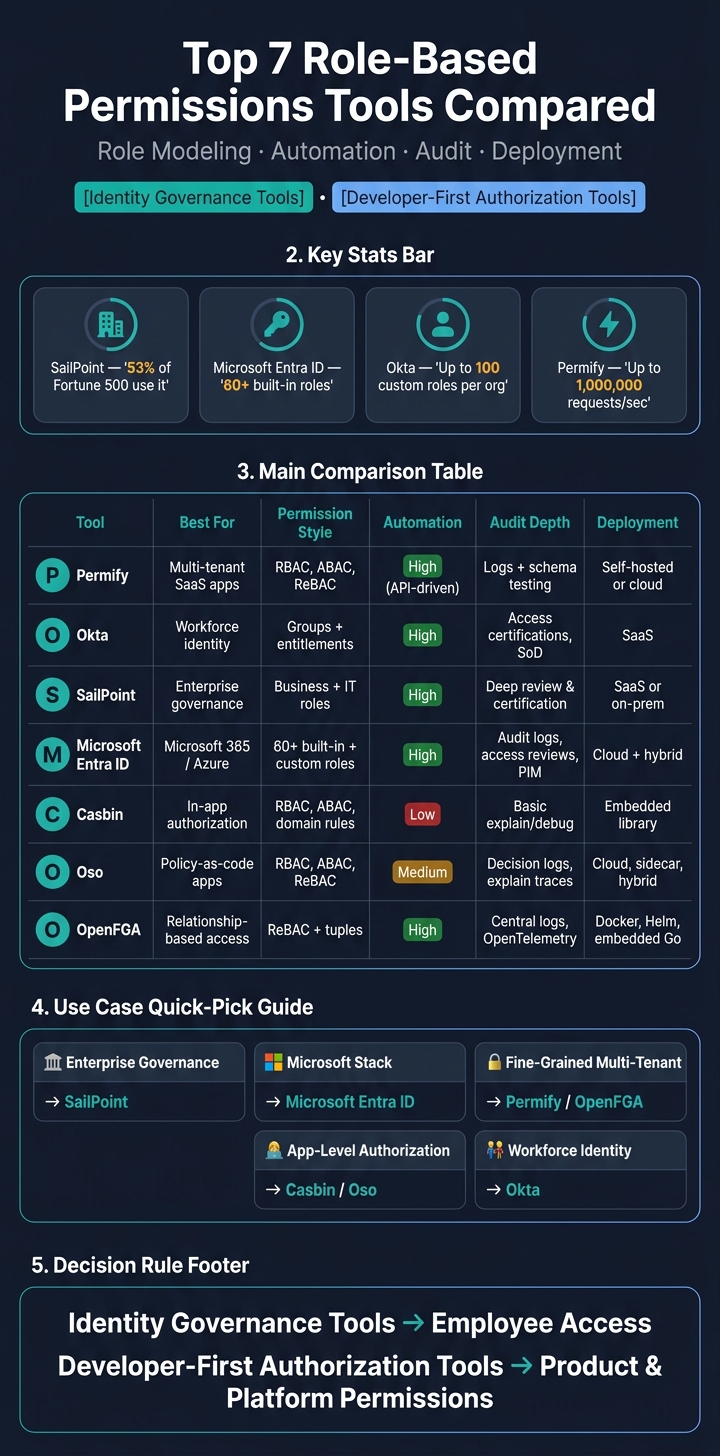
If you need role-based permissions, the short answer is this: pick an identity tool for workforce access, and pick a policy engine for app access.
I’d narrow the list like this:
- Permify for fine-grained, multi-tenant app permissions
- Okta for workforce identity and lifecycle flows
- SailPoint for large-company governance and access reviews
- Microsoft Entra ID for Microsoft 365 and Azure-heavy teams
- Casbin for embedded, code-level authorization
- Oso for policy-as-code with app data filtering
- OpenFGA for relationship-based access at scale
The article compares these tools on four things that matter most:
- Role modeling: flat RBAC vs. resource-level rules
- Automation: provisioning, deprovisioning, and JIT access
- Audit: logs, access reviews, and SoD checks
- Deployment: SaaS, self-hosted, APIs, and SDKs
A few numbers stand out right away:
- SailPoint is used by 53% of the Fortune 500
- Microsoft Entra ID includes 60+ built-in roles
- Okta supports up to 100 custom roles per org
- Permify says it can handle up to 1,000,000 requests per second
If I were choosing fast, I’d use one simple rule:
identity governance tools fit employee access, while developer-first authorization tools fit product and platform permissions.
Top 7 Role-Based Permissions Tools Compared
Role-Based Access Control (RBAC) Explained: How It Works and Why It Matters for Security
sbb-itb-d1a6c90
Quick Comparison
| Tool | Best for | Permission style | Automation | Audit depth | Deployment |
|---|---|---|---|---|---|
| Permify | Multi-tenant SaaS apps | RBAC, ABAC, ReBAC | API-driven | Logs, schema testing | Self-hosted or cloud |
| Okta | Workforce identity | Groups, entitlements, custom admin roles | High | Access certifications, SoD | SaaS |
| SailPoint | Enterprise governance | Business roles + IT roles | High | Deep review and certification tools | SaaS or on-prem |
| Microsoft Entra ID | Microsoft shops | Built-in/custom roles, access packages | High | Audit logs, access reviews, PIM | Cloud + hybrid |
| Casbin | In-app authorization | RBAC, ABAC, domain-based rules | Low | Basic explain/debug tools | Embedded library |
| Oso | Policy-as-code apps | RBAC, ABAC, ReBAC | Medium | Decision logs, explain traces | Cloud, sidecar, hybrid |
| OpenFGA | Relationship-based app access | ReBAC and tuples | High | Central logs, OpenTelemetry | Docker, Helm, embedded Go |
So if you’re trying to cut access sprawl, reduce manual role changes, and keep cleaner audit records, this list gives you the main options without forcing you through every product page first.
What to Look for in a Role-Based Permissions Tool
Before you compare tools, zero in on four things: modeling, automation, auditability, and integrations.
Role and Policy Modeling
Start with how the tool handles roles and policies. You want support for both built-in and custom roles, plus scoping at the tenant, department, or resource level. That matters because access often needs to be narrow, not all-or-nothing.
It also helps when a tool supports hierarchical inheritance, where permissions flow from parent resources to child resources. And if your setup is more nuanced, relationship-based access (ReBAC) can be a big help. That model links access to a person’s relationship with a resource, like owner, approver, or reviewer.
A simple rule of thumb: start with built-in roles, then clone them for edge cases. That usually cuts down on gaps and keeps role setup from getting messy.
"Static RBAC models have numerous drawbacks, including role explosion, huge role maintenance and access review effort, tendency for over-provisioning and so on." - Evolveum Docs
Provisioning and Lifecycle Automation
Manual provisioning falls apart fast as teams grow. If someone gets promoted, changes departments, or leaves the company, their access should change on its own.
That’s where attribute-based dynamic assignment comes in. Permissions are linked to employee data like department or location. When those fields change in your HR system, access updates too. This supports the joiner-mover-leaver cycle and helps stop the slow drift toward extra permissions that no one meant to leave in place.
It’s also smart to check for Just-in-Time (JIT) access. This gives elevated access for a limited window, then removes it when that window ends.
Audit Trails and Access Reviews
Audit logs are useful, but they’re only part of the picture. Better tools also include periodic access certifications, Segregation of Duties (SoD) conflict detection, and real-time audit logs that show the difference between assigned access and access that was actually used.
For big companies, log streaming can make a huge difference. If the tool can send logs to a central workspace for large-scale querying, your security and compliance teams will have a much easier time working through audits and investigations.
Integrations and Deployment Options
A permissions tool should fit into your stack without turning into a side project. Look for SCIM support for identity sync, solid APIs or SDKs for app-level work, and fit with your identity provider (IdP), whether that’s Active Directory, Okta, or another IdP.
Deployment choice matters too. SaaS tools are usually faster to get up and running. Self-hosted tools give you more control over data residency and custom setup. Neither option wins by default. The right choice depends on your compliance needs and how much engineering time you can spare.
| Feature Category | What to Look For |
|---|---|
| Modeling | Built-in and custom roles, object-level scoping, hierarchical inheritance |
| Automation | SCIM provisioning, attribute-based dynamic assignment, JIT access |
| Compliance | SoD conflict checking, access certifications, detailed audit logs |
| Deployment | API/SDK availability, SaaS vs. self-hosted, IdP compatibility |
Use these criteria to compare the seven tools below.
1. Permify
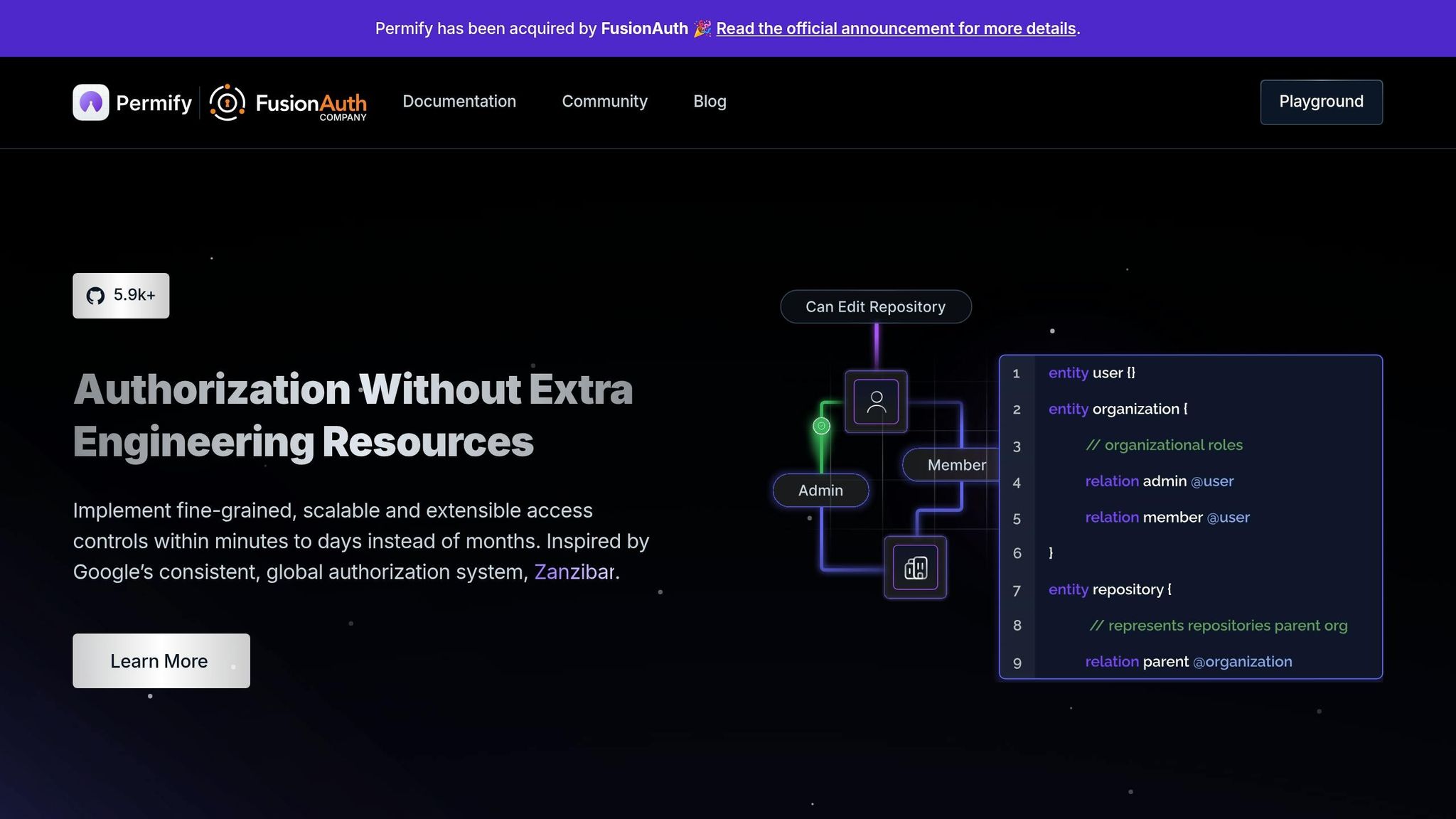
Permify is an open-source authorization service inspired by Google Zanzibar, the system behind permissions across YouTube, Google Drive, and Google Cloud. Instead of scattering permission logic across apps and services, it puts authorization in one dedicated place.
Role and Policy Modeling
Permify uses a domain-specific language (DSL) to define entities like users, teams, and organizations, plus relations such as owner, admin, and member and the actions tied to each one. Its schema supports RBAC, ABAC, and ReBAC in the same model.
Where it stands out is fine-grained permission control across nested teams, projects, and resources. Say you have an organization admin. With Permify, that person can inherit edit rights across child teams and projects without someone manually assigning access at every layer. That can save a lot of admin work, especially as business information systems grow. Permify says it can cut the number of roles to manage by up to 90%.
That makes it a good fit when flat roles start to fall apart and you need access rules at the resource level.
Audit Controls
Permify logs access history, which helps teams track who got access and why. Schema Staging lets teams test policy changes in QA before pushing them live. On top of that, the graph view and Playground make permission rules easier to inspect and check.
Deployment Fit
Permify can run locally with Docker under the AGPL-3.0 license, or through Permify Cloud, its fully managed cloud hosting option. The tradeoff is pretty simple: self-host if you want more control, or use the managed service if you want to move faster. Permify is designed to handle up to 1 million requests per second.
"Permify enables us to implement fine-grained access controls in our system and centrally understand and govern the authorization." - Hongxiang Liu, Staff Software Engineer, sennder
Next is Okta, which handles permissions through identity governance rather than application-level authorization.
2. Okta

Okta pulls identity data like department, title, and location into one place. That data then drives group rules, entitlement assignments, and lifecycle automation.
Role and Policy Modeling
Okta uses a three-layer permission model.
- Groups map broad business roles
- Resource Collections cover access to entitlements across multiple apps
- Entitlement Bundles group permissions inside a single app
Custom admin roles are built by combining a Principal, Role, and Resource Set into a Binding. Okta supports up to 100 custom roles and 10,000 resource sets per org. Each resource set can include up to 1,000 resources.
That setup works well when access needs to follow employee data instead of depending on manual admin changes.
Provisioning and Lifecycle Automation
Universal Directory acts as the source of truth. It uses HR attributes such as job title, department, and location to automate provisioning and deprovisioning across connected systems.
The payoff can be pretty direct. News Corp saved 2 hours per employee during onboarding.
Audit Trails and Access Reviews
Okta Identity Governance (OIG) supports compliance with Access Certifications for scheduled or event-triggered access reviews. During reviews, the Governance Analyzer shows usage-based recommendations using usage history, past decisions, and Separation of Duties (SoD) rule conflicts.
Workday used OIG to save about $1 million in costs tied to access certification and audit preparation. Root Insurance cut more than 100 hours per year from its certification campaigns.
Some of these features sit behind an added subscription. Access Certifications and the User Entitlements report require Okta Identity Governance.
For deeper identity governance and access reviews, SailPoint is next.
3. SailPoint
SailPoint is built for enterprise identity governance. It’s used by 53% of the Fortune 500 and has processed more than 117 million certification decisions. It’s a fit for teams that need role cleanup, access reviews, and lifecycle control at enterprise scale.
Role and Policy Modeling
SailPoint uses a two-tier role model. Business Roles map to job functions like "AP Clerk", while IT Roles group the technical entitlements behind the scenes. That split makes access reviews easier for business users because they can review job-based access instead of digging through raw system permissions.
Dynamic Access Roles help cut down role sprawl by using context like department, location, and job title to handle variations automatically.
SailPoint also includes Role Discovery, Role Insights, and Activity Insights. These tools help admins spot outliers and tighten roles to least privilege based on recent usage patterns.
That role setup then feeds into automated provisioning and access removal.
Provisioning and Lifecycle Automation
SailPoint connects to HR systems like Workday and SAP SuccessFactors to provision birthright access and remove stale entitlements when roles change. Role Access Removal Propagation has to be enabled in system settings for old entitlements to be removed automatically.
It also governs contractors, bots, APIs, and AI agents in the same framework.
Audit Trails and Access Reviews
SailPoint offers Manager, Role Membership, and Role Composition Certifications. Its AI layer helps cut reviewer fatigue by flagging anomalies and suggesting removals based on peer patterns. Organizations see a 2x increase in access revocations when SailPoint's AI recommends removal.
Detailed audit records support SOX, HIPAA, and GDPR reporting.
Integrations and Deployment Options
SailPoint offers two deployment paths depending on your infrastructure needs:
| Identity Security Cloud | IdentityIQ | |
|---|---|---|
| Type | Multi-tenant SaaS | On-premises or private cloud |
| Best for | AI-driven, cloud-first governance | Highly customizable enterprise environments |
| Compliance | Continuous AI-driven certifications | Scheduled manager and targeted certifications |
Next is Microsoft Entra ID for organizations already centered on Microsoft identity tools.
4. Microsoft Entra ID
Microsoft Entra ID is a strong choice for teams already working in Azure or Microsoft 365. It sits underneath Microsoft 365 and handles admin access across Teams, SharePoint, and Exchange.
Role and Policy Modeling
Entra ID RBAC is based on three main parts: a Security Principal (user, group, or service principal), a Role Definition (a set of permissions), and a Scope (where those permissions apply). That scope can cover the full tenant for company-wide access, narrow down to an Administrative Unit for a team or region, or apply to a single resource like an app registration, enterprise app, or group.
Out of the box, Entra ID comes with more than 60 built-in roles with fixed permission sets. If those don't quite fit, you can create custom roles, but that requires a Microsoft Entra ID P1 license. For business-side role setup, Entitlement Management lets you bundle groups, apps, and SharePoint sites into Access Packages. Those bundles can map to jobs like "Sales Representative" and give people a simpler way to request the access they need.
Provisioning and Lifecycle Automation
Lifecycle Workflows use HR signals to automate onboarding, role changes, and offboarding. That can mean setting up temporary access for a new hire or removing access when someone's employment status changes.
Privileged Identity Management (PIM) adds just-in-time access. Instead of leaving high-level permissions on all the time, users turn on elevated roles only when needed and only for a set period. Microsoft recommends keeping Global Administrator assignments under five and highly privileged roles under 10.
Audit Trails and Access Reviews
Entra ID separates Audit Logs and Sign-in Logs. Audit Logs track config changes, while Sign-in Logs track access events. Access Reviews can run on a repeating schedule, which helps cut down on stale access over time. They also include AI-powered suggestions to flag peer outliers during review.
Integrations and Deployment Options
Entra ID works in hybrid setups through Microsoft Entra Connect, which syncs on-premises Active Directory identities to the cloud. It also supports modern standards like SCIM and OIDC, plus older protocols like LDAP. For teams building their own apps, Microsoft provides SDKs for ASP.NET Core, Angular, and Node.js.
On pricing, built-in roles are free. Features like PIM, Access Reviews, and Entitlement Management require Entra ID P2 or Entra ID Governance.
If you need app-level authorization instead of identity governance, the next tools move away from directory control and toward developer-first policy engines.
5. Casbin
Casbin is an embeddable open-source authorization library with native support for Go, Java, Node.js, Python, PHP, Rust, C++, and .NET. So if your team wants authorization logic inside the app instead of in a separate admin console, Casbin fits that setup well.
Role and Policy Modeling
Casbin uses the PERM model - Policy, Effect, Request, and Matchers - with policy logic defined in a .conf file. That setup makes model changes much easier. For example, you can move from RBAC to ABAC without changing application code.
Its RBAC support includes role inheritance. The built-in role manager defaults to a maximum hierarchy depth of 10 levels, though you can change that. Casbin also supports RBAC with domains or tenants, RESTful path matching, ABAC rules like resource.Owner, and 11+ models, including ACL, RBAC, ABAC, and OrBAC.
Integrations and Deployment Options
Casbin supports authorization for Envoy and includes an Admission Webhook for Kubernetes. Watchers keep policy state in sync across nodes. It also offers 100+ SQL and NoSQL database adapters.
One thing to be clear on: Casbin handles authorization only. It does not handle authentication, user accounts, or credentials. Also, because users and roles are plain strings, it's smart to prefix role names, such as role::, to avoid collisions.
Visibility and Debugging
Casbin includes an Explain() API that returns a human-readable explanation for authorization decisions. That matters when you're trying to figure out why access was allowed or denied instead of staring at policy files and guessing.
For inherited permissions, GetImplicitPermissionsForUser() shows what a user can access through the full role hierarchy, not just direct assignments.
OpenFGA takes a similar developer-first approach, but with graph-based permission modeling.
6. Oso
Oso is a developer-first authorization platform built around Polar, a policy language for keeping access rules in one place. That makes it a strong choice for teams that want policy control close to the codebase.
Role and Policy Modeling
Oso supports RBAC, ABAC, and ReBAC in one framework. So you can handle simple roles like Admin and Member, add attribute-based checks such as not is_archived(document), and define relationships where permissions flow from a parent Organization to a child Repository.
It also goes beyond basic allow/deny checks. Oso's list method can filter database records so users only see what they're allowed to access. That matters in business applications, where the goal isn't just deciding can this user open this item? but also making sure they never see items they shouldn't. Because policies live in version-controlled .polar files, teams can track changes to access logic over time.
Audit Trails and Access Reviews
Oso can log authorization decisions, which gives teams a record of who tried to do what and when. If something looks off, that history makes it easier to trace the request instead of guessing.
The Oso Cloud Workbench also adds visual debugging with an "Explain" view and evaluation traces that show why a request was allowed or denied. In practice, that can save a lot of back-and-forth when a rule behaves in a way the team didn't expect.
Integrations and Deployment Options
Oso supports managed cloud deployment, a local sidecar for offline authorization, and a hybrid VPC fallback. It also integrates with existing PostgreSQL schemas, so authorization decisions can use live application data without migration or duplication.
Oso Cloud is built for low-latency, high-scale authorization. For teams that want graph-based authorization with a similar developer focus, the next tool takes a different path.
7. OpenFGA
OpenFGA is an open-source authorization engine based on ideas from Google's Zanzibar paper. It's also a Cloud Native Computing Foundation (CNCF) incubating project. OpenFGA handles permissions as relationships between users and resources, which makes it a good fit for teams that need fine-grained, resource-level access control inside custom apps. It is not aimed at broad identity governance.
Role and Policy Modeling
Like other developer-first tools, OpenFGA keeps authorization logic close to the app. Instead of putting users into flat roles, it uses relationship tuples - simple statements like "Alice is an owner of document-42." In practice, roles become relations inside each type definition. A type can define relations such as owner and viewer, then connect those relations to actions.
OpenFGA also supports inherited access from parent resources.
OpenFGA gives teams three ways to model permissions, depending on how much control they need:
| Approach | Best For | Complexity | Flexibility |
|---|---|---|---|
| Relations as Roles | Static, predefined roles | Low | Low |
| Simple User-Defined Roles | Custom roles at the organization level | Medium | Medium |
| Role Assignments | Instance-specific role assignments (e.g., different admins per project) | High | High |
If your permissions don't change much, start with Relations as Roles. It's the simplest setup and the fastest to evaluate.
Provisioning and Lifecycle Automation
Use the Write API to add or remove relationship tuples. When you add or remove a tuple, access updates right away across the system.
For fine-grained permissions, it's better to define them as implied relations in the model, such as can_edit: owner, instead of managing each permission tuple one by one. That way, a single model change can update access everywhere. It's a cleaner setup and saves a lot of manual work.
Audit Trails and Deployment Options
OpenFGA centralizes authorization decisions and audit logs. It also includes native OpenTelemetry support.
You can run OpenFGA in a few different ways:
- With Docker
- With Helm
- As an embedded Go library
Docker and Helm fit most production teams. The embedded Go option makes sense when you want authorization built straight into the service.
For teams that manage infra as code, OpenFGA also works with Terraform and GitHub Actions for model management. SDKs are available for Node.js, Go, .NET, Python, and Java. There's also a visual Playground, which helps a lot when you want to test models before shipping.
Use the table below to compare OpenFGA's model, deployment options, and fit against the other tools.
Quick Comparison Table
This summary turns the feature-by-feature review into a efficient tools to help you decide. Instead of reading every detail again, you can scan the table and spot which tool lines up with your setup.
| Tool | Tool Type | Best Fit | Role & Policy Granularity | Automation Support | Audit & Compliance Strength | Ideal Environment |
|---|---|---|---|---|---|---|
| Permify | Authorization service | Fine-grained SaaS and platform teams | High: API-driven policy-as-code | High: Policy-as-code, API-driven | Strong: Audit logs | Cloud-native, microservices |
| Okta | Identity and access platform | Workforce identity & SSO | Moderate: Directory-based groups | High: SCIM, identity lifecycle | Strong: Enterprise-grade audit trails | Enterprise SaaS / workforce |
| SailPoint | IGA | Enterprise identity governance | High: Governance and SoD workflows | High: Provisioning & access reviews | Very Strong: Formal certifications & compliance | Regulated enterprises |
| Microsoft Entra ID | Cloud identity and governance | Microsoft-centric environments | High: 60+ built-in roles, custom roles | High: Lifecycle automation, PIM | Strong: Access reviews, governance add-on | Azure / Microsoft 365 |
| Casbin | Open-source library | Embedded app authorization | High: Multi-model (RBAC, ABAC) | Low: Manual / code-based | Basic: Minimal built-in logging | Embedded in custom apps |
| Oso | Policy engine | Policy-as-code for custom apps | High: Polar DSL, resource-specific | Medium: Developer-centric, CI/CD-friendly | Moderate: Policy versioning | Custom applications |
| OpenFGA | Authorization service | Relationship-based access control | High: ReBAC, relationship tuples | High: API-driven, Terraform/GitHub Actions | Strong: Centralized decision logs | High-scale platforms |
Use this table to narrow the list, then match each option to your deployment model and use case.
Best Fit by Use Case
Use the table above to line up each tool with the job it handles best.
Enterprise Identity Governance
For enterprise identity governance, SailPoint is the strongest fit. Its access certifications, role cleanup, and SoD controls make it a solid choice for compliance-heavy teams.
Microsoft-Centric Cloud Environments
For Microsoft 365, Azure, and hybrid environments, Microsoft Entra ID is the natural fit. It plugs directly into Microsoft identity and infrastructure, including just-in-time privileged access.
If your team doesn’t live inside the Microsoft stack, the other options will likely make more sense.
Developer-First Authorization for Custom Applications
When you need authorization built into application code, Casbin is the best fit.
Fine-Grained Permissions for Multi-Tenant SaaS and Platform Teams
For multi-tenant SaaS and platform teams that need fine-grained, relationship-based permissions, Permify is the best fit.
Conclusion
After looking at modeling, automation, and audit depth, the right choice mostly comes down to fit.
Start with your main use case. Go with Okta or Microsoft Entra ID if you need centralized identity management. Pick SailPoint if governance is the top priority. Use Casbin or Oso for app-level authorization. And if you need fine-grained permissions, Permify or OpenFGA make more sense.
A short set of questions can narrow the list fast:
- What is your role model?
- How often do you review access?
- What stack do you already use?
Features matter, but maintenance over time matters just as much. Put extra weight on automated access reviews, clean identity provider integration, and centralized audit logs that can't be altered. That matters even more in regulated fields like finance and healthcare.
The safest move is usually the narrowest tool that solves today's access needs and still leaves room for your permissions model to grow.
FAQs
How do I choose between identity governance and app authorization?
Choose based on scope.
Identity governance handles the full user identity lifecycle. That includes provisioning, separation of duties, and access reviews across systems. It works best for organizations with complex access rules or strict compliance needs.
App authorization stays focused on application- or API-level access. It deals with fine-grained permissions and policy enforcement inside specific services. It’s the better choice when you need detailed, app-specific access control.
Which tool is best for fine-grained, multi-tenant permissions?
Cerbos is a strong fit for fine-grained, multi-tenant permissions.
It gives you tenant-specific authorization, so each tenant can have its own access rules without forcing you into a one-size-fits-all setup.
It also supports dynamic policy management. That means you can change permission rules as needs shift, instead of hard-coding them and dealing with a mess later.
For teams handling multiple tenants, Cerbos keeps those permission models organized. And with real-time updates, changes to access rules can take effect right away, which matters when you need tight control over detailed permissions.
When should I use RBAC instead of ReBAC or ABAC?
Use RBAC when job functions stay the same, roles are clear, and access needs are simple. It fits internal platforms, enterprise B2B systems, and structured organizations where permissions map cleanly to roles and don’t shift often.
Choose ReBAC or ABAC when access needs more detail, depends on context, or relies on relationships instead of fixed roles.