Bad tracking can cost you sales twice: once in missed data, and again in bad decisions. If your cart, checkout, payment system, and analytics tools do not use the same event structure, revenue reports can be off, attribution models can get messy, and your team can end up working from different numbers.
Here’s the short version of what I’d focus on:
- Set goals before setup. Define KPIs like conversion rate, AOV, cart abandonment, and refund-adjusted revenue first.
- Lock one event schema. Keep event names and fields the same across tools, especially for
view_item,add_to_cart,begin_checkout,add_payment_info,purchase, andrefund. - Use hybrid tracking for sales data. Browser tracking is easier to launch, but server-side helps reduce data loss and duplicate purchases.
- Test in staging before release. Check coupons, retries, refunds, and back-button flows, not just the happy path.
- Reconcile revenue every week. A 5%–10% gap can be normal. Above 15% often points to setup problems.
- Track refunds and net revenue clearly. If returns are common and refund events are missing, revenue will look too high.
- Protect speed and privacy. Too many scripts can hurt checkout, and consent rules need to be built into tagging.
- Assign one owner. If nobody owns the tracking spec, broken events can sit for weeks.
One stat stands out: about 70% of GA4 setups for direct-to-consumer brands have at least one major error. That’s why the best approach is not more tools. It’s clean event design, regular checks, and clear ownership.
If I had to boil the article down to one point, it would be this: plan first, track with one schema, validate revenue often, and keep one person accountable.
Data Driven E commerce Strategies: How to use analytics to boost conversion
sbb-itb-d1a6c90
Do the Planning Work Before Connecting Any Tools
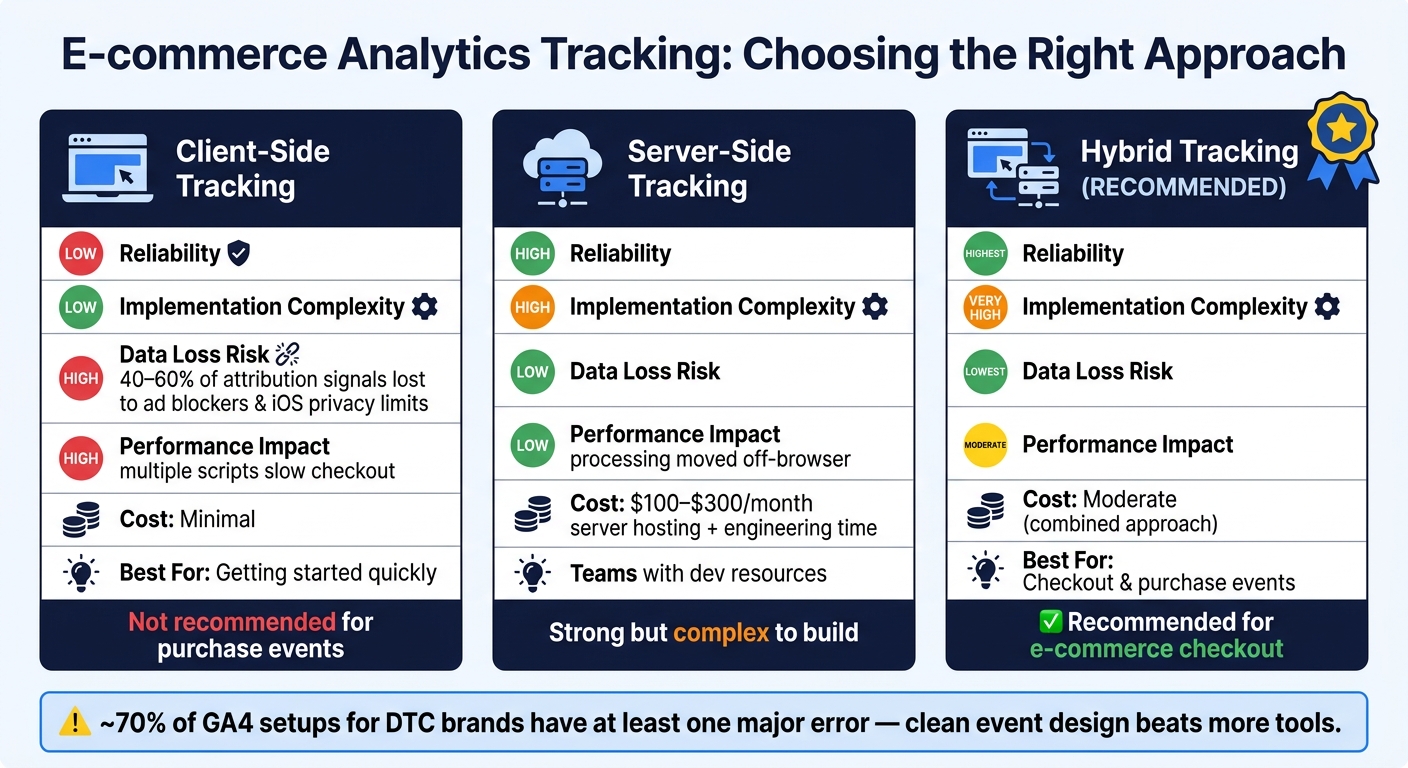
Client-Side vs Server-Side vs Hybrid E-commerce Tracking: Which Is Right for You?
Start with the business questions your data needs to answer. Then build the schema around those answers.
Define Your Goals, KPIs, and Event Schema First
Pick the business questions your analytics setup needs to answer. That decision shapes everything that comes next. For most e-commerce teams, the core KPIs are conversion rate, average order value (AOV), and cart abandonment. More advanced teams also watch refund-adjusted revenue and LTV:CAC ratio.
Once you know what you want to measure, map it to a standard event schema. In GA4, the core funnel includes five events: view_item, add_to_cart, begin_checkout, add_payment_info, and purchase. Each one needs an items array with item_id, item_name, price, quantity, and item_category. The purchase event also needs a unique transaction_id, value, currency, tax, and shipping.
A small formatting mistake here can snowball. Send prices as numbers, use uppercase ISO 4217 currency codes like USD, and keep those values the same across events. If you don't, revenue can be underreported by 20% to 30%.
Those definitions will point you toward the right tracking setup for your stack.
Client-Side, Server-Side, or Hybrid Tracking: How to Choose
Your setup choice affects how much data you end up with. Client-side tracking is the easiest way to get started, but it's also the easiest to break. Ad blockers and iOS privacy limits can wipe out 40% to 60% of attribution signals.
Server-side tracking avoids most browser-level limits, but it comes with more work. You'll need server hosting - usually $100 to $300 per month - plus extra engineering time. Hybrid tracking uses both methods: client-side for behavior signals and server-side for purchase data. That gives you the best coverage, but the build is more involved.
| Approach | Reliability | Implementation Complexity | Data Loss Risk | Performance Impact |
|---|---|---|---|---|
| Client-Side | Low | Low | High | High (multiple scripts slow checkout) |
| Server-Side | High | High | Low | Low (moves processing off-browser) |
| Hybrid | Highest | Very High | Lowest | Moderate |
For checkout and purchase events, use hybrid tracking.
And don't ship it blind. Test the setup in staging before launch.
Test Changes in Staging and Document Everything
Test every analytics change in staging, especially on product, cart, and checkout pages. Use GA4 DebugView or GTM Preview mode to walk through the full funnel and make sure every parameter is filled in the right way.
Don't stop at the clean, happy path. Test coupons, payment retries, and back-button behavior too. That's usually where tracking starts to wobble.
At the same time, keep a current tracking spec. This should list every event definition, each required parameter, and the release date. It helps stop messy naming problems like add_to_cart in one place and AddToCart in another.
"The best e-commerce tracking setup isn't the most comprehensive one - it's the one that actually works reliably and gives your team data they trust enough to act on." - KISSmetrics
Once testing is done, lock the spec before you scale reporting.
Track the Full E-commerce Funnel with Consistent Data
Once your tracking spec is locked and tested, The next step is simple in theory and messy in practice: make sure every event across the funnel carries the right data every single time by using efficient business tools. The goal is one shared schema across every tool, so your funnel data lines up cleanly. From here on, consistency is the whole game: same fields, same names, same totals everywhere.
What Each Event Payload Should Include, from Product View to Purchase
Use the same base item fields on every event. Then add the purchase-specific fields where they belong. On purchase, include transaction_id, tax, shipping, coupon, and items[].discount. On refund, include transaction_id and the refunded items.
Names matter just as much as fields. If one system sends add_to_cart and another sends AddToCart, you’ve got schema drift. Now you’re looking at two reports for the same action with different names, and the numbers won’t line up.
How to Track Revenue, Refunds, Taxes, and Promotions Correctly
After the event schema is set, clean up the money fields that feed reporting. Define revenue one time and stick with that definition everywhere. Gross revenue includes the full order total. Net revenue excludes tax, shipping, and refunds. Both are fine, but every dashboard needs to say which one it shows.
Refunds need to be tracked too. If you skip refunds, revenue looks higher than it should. In high-return categories like fashion, missing the refund event means your analytics will keep overstating earned revenue. The safest move is to fire it server-side when a refund is confirmed in your backend. For partial refunds, include the items array so you can see which products came back, not just the total dollar amount.
A simple weekly reconciliation helps catch drift before it turns into a bigger reporting problem. Compare analytics data against your store and payment data, then dig into any variance that keeps showing up.
Connecting User Identity Across Devices and Channels
Once revenue data lines up, the next job is tying the journey back to one user identity. Shoppers bounce between devices, sessions, and channels all the time. They might browse on mobile, click an email on a laptop, and buy later through a paid ad. If those touchpoints stay disconnected, attribution starts falling apart before you even try to improve it.
For lean teams, the most practical move is to choose one identifier that exists across your systems and use it as the main merge key. In most cases, that’s the email address. Hash it before sending it anywhere so you don’t expose personally identifiable information.
For logged-in users, GA4's User-ID feature can stitch sessions from different devices into one journey. You should also use one shared event_id for browser and server events - usually the order ID - to stop duplicate purchases from showing up. Pair that with steady UTM tagging and a hashed email-based identity.
Keep Data Accurate, Sites Fast, and Tracking Governed Over Time
Launch is just the beginning. As your site, team, and tools change, tracking can drift without anyone noticing. Once the funnel is instrumented, governance is what keeps the data trustworthy.
Validate Events and Check Revenue Parity Regularly
After launch, run full-funnel test orders on every release. Then compare analytics revenue with platform data each week. Automated audits help spot missing tags, broken parameters, and duplicate events before they turn into a bigger mess.
A variance of 5–10% between analytics and platform data is normal. Ad blockers and tracking gaps can hide part of the picture. But once variance goes past 15%, that usually signals a serious implementation issue, not normal noise.
The table below shows the core checks that help keep data quality from slowly drifting off course:
| Check | What to Validate | Review Frequency | Owner |
|---|---|---|---|
| Revenue Parity | Compare transaction IDs, total revenue, and tax/shipping totals between platform and analytics | Weekly | Analytics Lead / Finance |
| Event Schema | Ensure event names (e.g., purchase) and parameters (e.g., items array) match the tracking spec |
Per Release | Developer / QA |
| Duplicate Detection | Check for multiple purchase events with the same transaction ID |
Weekly | QA Specialist |
| Refund Accuracy | Ensure refund events are captured and subtracted from net revenue totals | Weekly | Operations / Finance |
On top of those weekly checks, schedule a full audit every quarter and after every major site release. That gives you a chance to catch regressions early, before small issues stack up.
Limit Tracking Impact on Checkout Speed and Reduce Privacy Risk
Accurate tracking doesn't help much if checkout gets slow. Desktop checkout completion rates average 57.49%, while mobile drops to 27.96%. That's a big gap. To keep checkout responsive, consolidate checkout tags and move purchase events off the browser where possible.
Also, don't run GTM and direct gtag.js scripts at the same time. That setup adds script weight and can trigger double-counting. Pick one tagging path and cut anything that doesn't support a clear business decision.
Privacy needs the same kind of discipline. Keep collection tight and only gather data you actually use. Hash identifiers like emails and phone numbers before they leave your environment. And use a CMP with Consent Mode v2 so tags fire only after consent. For U.S. audiences, that's especially important in states with active privacy laws, including California's CCPA.
Assign Ownership and Keep Your Tracking Spec Up to Date
Tracking usually doesn't fail during launch. It fails in the handoff after launch, when everyone assumes someone else is watching it. When analytics becomes "everyone's job", broken events can sit there for weeks.
Clear ownership fixes that. A marketing lead should own the measurement plan and KPI definitions. A developer should own the data layer implementation. A QA specialist should validate each release.
Your tracking spec is the document that keeps all of this from falling apart. It should list every event, the required properties for each one, an example payload, and the rules for retiring an event. Put it under version control, assign one owner, and update it before every checkout change.
Put Integrated Analytics to Work and Key Takeaways
Using Funnel Data to Improve Conversions and Operations
Once tracking is accurate, the next move is simple: use the data to improve conversions and day-to-day operations. Integrated analytics should help teams make faster calls, not just produce nicer dashboards.
A good place to start is funnel reporting. Break reports down by device, traffic source, and landing page so you can spot where people drop off. If mobile users leave in large numbers at the payment step, that often points to form friction or UI problems, not weak traffic quality. Global cart abandonment rates usually fall between 65% and 80%. That means even a small fix at the right step can have a direct impact on revenue.
The same data can also guide inventory, finance, and merchandising. Retailers that reach unified commerce through integration report 23% higher inventory turnover and 1.5x higher customer lifetime value. True Classic is a good example. The company brought together more than 40 disconnected tools into one data ecosystem with the Saras Pulse platform and saved the team over 1,000 analyst hours per year by removing manual reconciliation.
None of that happens by accident. It comes from the same habits every time: clean events, regular checks, and clear ownership.
Conclusion: The Practices That Matter Most
The biggest gains usually come from a handful of habits, not from buying one more tool. Define your measurement plan before connecting anything. Keep event names and revenue logic consistent across the funnel. Pick a tracking setup that matches your size. Check data on a regular schedule. And make ownership clear so tracking doesn't quietly break after a product release.
"If you can't confidently answer 'where did revenue come from?' and 'where are users dropping off?' with the same numbers in every meeting, fix your tracking and reporting before you scale campaigns." - Avinash Grover
Small e-commerce teams can build measurement they can trust without a big analytics department. In practice, a tracking spec, weekly revenue checks, and one person who owns the process matter more than any tool upgrade.
FAQs
What is the best tracking setup for most e-commerce stores?
For most e-commerce stores, the best setup is a layered system built around GA4 and GTM.
Use GTM to deploy tags without constantly touching site code. Then set up GA4 to track the e-commerce events that matter most, like view_item, add_to_cart, and purchase.
From there, add your platform’s native analytics for financial reporting. Bring in Google Search Console to monitor organic traffic, and use ad pixels for attribution so you can see which campaigns are driving sales.
As your store grows, server-side tracking can make a big difference. It helps cut data loss from ad blockers and privacy restrictions, which can otherwise leave gaps in your reporting.
How can I tell if my revenue tracking is inaccurate?
Regularly reconcile your analytics reports with your store’s backend finance data. A 5%–10% gap between analytics and actual orders is normal. But once that gap goes past 15%, there’s usually a tracking problem somewhere.
Compare these numbers across your tools:
- Transaction counts
- Total revenue
- Average order value
Also watch for silent failures. Things like missing currency codes or the wrong parameter names can throw off your data without setting off any alarms. And make sure everyone on your team is using the same definition of revenue. If one system includes tax, shipping, or refunds and another doesn’t, the numbers won’t line up.
Who should own e-commerce analytics tracking?
Ownership should be assigned through clear accountability, not by tool or department. The point is simple: each quality area needs a named owner so data stays reliable and reporting stays accurate.
For example:
- Analytics engineering handles event completeness
- Product analytics manages parameter integrity
- CRM and analytics share identity stitching
- BI owns reporting consistency
- Finance operations reconcile revenue parity
That kind of split keeps the work practical. Instead of saying, “data quality is everyone’s job” and hoping for the best, each team knows exactly what it owns and where the handoff starts and ends.