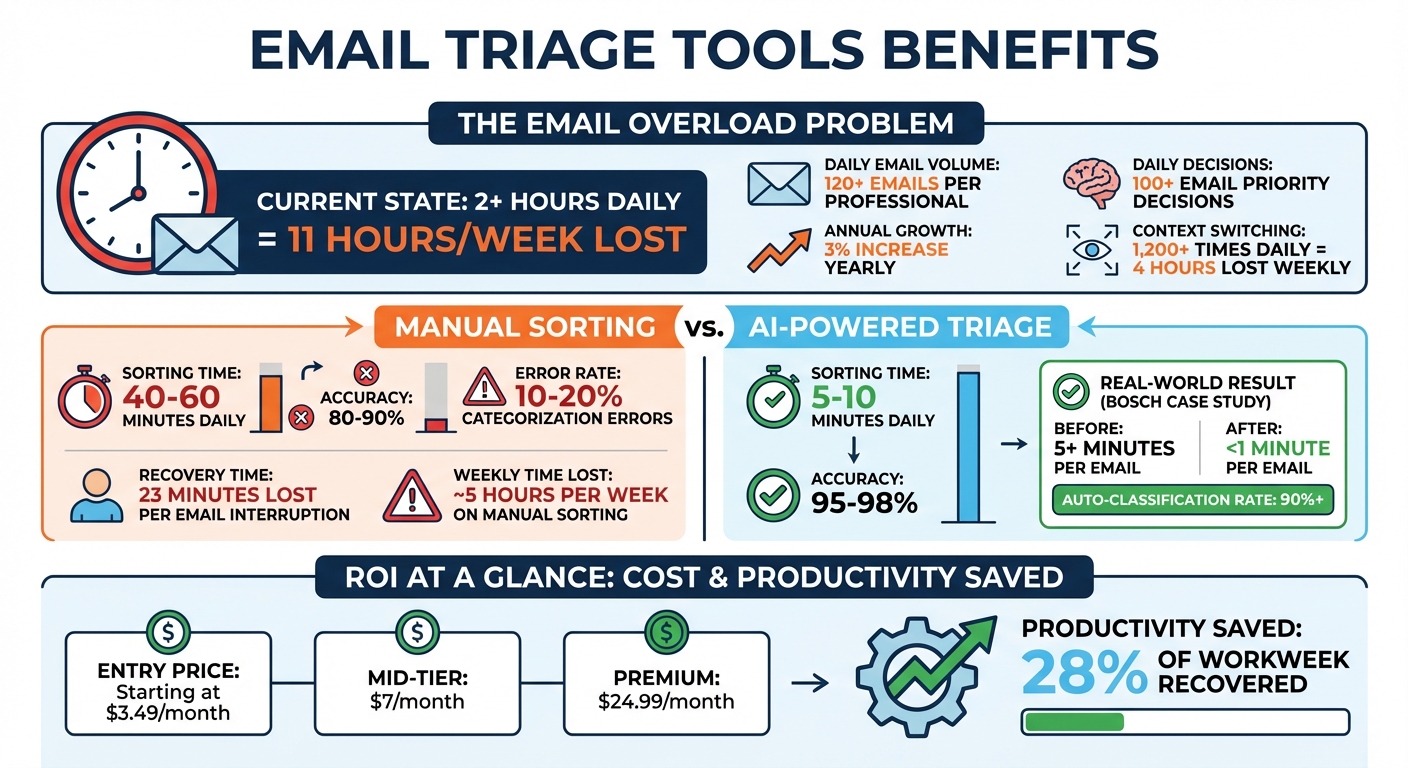
Managing your inbox doesn’t have to drain your time or energy. Small business owners spend over 2 hours daily on email, which adds up to nearly 11 hours a week. Email triage tools can cut this time down to just 5–10 minutes a day by automating sorting, prioritizing urgent messages, and reducing decision fatigue.
Key Takeaways:
- Time Savings: AI tools reduce email sorting time from 40–60 minutes to 5–10 minutes daily.
- Improved Accuracy: AI-powered systems achieve 95–98% sorting accuracy, outperforming manual efforts.
- Affordable Options: Plans start as low as $3.49/month, with advanced features available at higher tiers.
- Better Customer Response: Prioritize urgent emails, prevent duplicate replies, and improve response consistency.
These tools are designed for small teams overwhelmed by high email volumes. They help you focus on what matters - growing your business with efficient tools - while ensuring important opportunities don’t get lost in your inbox.
Email Triage Tools: Time Savings and ROI for Small Businesses
Hiver Review: The Best Email Management Tool for Small Businesses?

sbb-itb-d1a6c90
Email Management Challenges Small Businesses Face
Small businesses often struggle with three major email-related hurdles: overwhelming inbox volumes, disorganized systems, and the time sink of manual sorting. These issues feed into each other, creating a cycle that eats into productivity and damages customer relationships. That’s why tools designed for smarter email management are becoming increasingly important.
High Email Volume
Professionals are now inundated with more than 120 emails daily, and this number is growing by about 3% each year. For small teams, this constant influx leads to what experts call the "triage tax" - the mental strain of deciding what’s urgent and what can wait. The interruptions don’t just slow things down; they fragment focus. Research shows it takes about 23 minutes to regain deep concentration after just one email interruption. On top of that, frequent app-switching - over 1,200 times a day - steals roughly 4 hours of productive time every week.
The consequences go beyond wasted time. Important emails, like partnership offers, investor outreach, or urgent customer requests, can get buried under a pile of newsletters and automated updates. When these opportunities are missed, it can lead to lost revenue and a perception that the business is unorganized.
Disorganized Inboxes
Without a solid system in place, shared inboxes can become chaotic. Team members might accidentally respond to the same email, or worse, leave critical messages unanswered. This lack of organization creates a persistent worry that something important might have been overlooked - a mental distraction that lingers in the background. Even attempts to manually sort emails often fail, with errors in categorization occurring 10–20% of the time.
This disorganization directly impacts customer satisfaction. When response times are inconsistent - some emails answered immediately while others take days - it sends a message that the business is overwhelmed. This perceived lack of professionalism can quickly erode trust and cost valuable contracts. Additionally, the effort to manually manage emails adds to the time drain, pulling focus away from more strategic tasks.
Manual Email Sorting Takes Too Much Time
Sorting emails manually takes anywhere from 40 to 60 minutes daily, adding up to nearly 5 hours per week. Beyond the time lost, this process contributes to decision fatigue. Constantly making small decisions - over 100 a day about email priority and categorization - drains mental energy. As a result, teams are left too exhausted for the high-level problem-solving that drives growth.
| Challenge | Impact on Small Businesses |
|---|---|
| High Volume | Delayed responses to key stakeholders and missed business opportunities |
| Manual Sorting | Loss of ~5 hours of valuable work time weekly |
| Context Switching | 23-minute recovery time per interruption, reducing overall efficiency |
| Disorganization | Important updates buried under low-priority messages |
| Decision Fatigue | Diminished mental energy for critical business tasks |
What Email Triage Tools Do
Email triage tools are designed to automatically organize your inbox, ensuring that urgent messages get your attention while less critical ones are set aside for later. Unlike basic email filters, which use straightforward rules like sorting by sender or moving newsletters to specific folders, these tools dive deeper. They analyze the full content of emails to determine urgency and what action might be necessary. This approach enables a more structured and efficient process.
Here’s how they work: first, they classify emails by type. Next, they identify urgent messages by analyzing cues such as time-sensitive language or the importance of the sender. Finally, they route critical emails into a focused daily brief while auto-labeling the rest for easier management.
Beyond just sorting, these tools offer advanced features like smart summarization, which condenses lengthy email threads into quick, digestible updates. They can even pull actionable tasks directly from emails - like a reminder to "sign the contract by Friday" - so you don’t miss important deadlines. Additionally, many of these systems can draft automatic replies for high-priority emails, helping reduce the time spent responding.
For example, in February 2026, Bosch Service Solutions implemented an AI-powered triage system to handle a high volume of emails. This system cut the time needed to process an email from over 5 minutes to less than 1 minute. Impressively, more than 90% of incoming emails were automatically and accurately pre-classified based on their content. This allowed service experts to focus on complex customer issues instead of spending time manually sorting through their inbox.
When compared to manual sorting - which typically takes 40–60 minutes daily with an accuracy rate of 80–90% - AI-powered triage tools slash the time to just 5–10 minutes while boosting accuracy to 95–98%. This saved time can then be used for tasks that directly contribute to revenue.
Benefits of Email Triage Tools for Small Businesses
Increased Productivity and Time Savings
Did you know professionals lose over 2 hours daily - about 28% of their workweek - just managing emails? For small business owners wearing multiple hats, this is a major drain on time and focus. AI-powered email triage tools can drastically cut this down, reducing inbox sorting from 40–60 minutes a day to just 5–10 minutes. David K., a Sales Director, shared his experience:
Switched from manual sorting to AI triage. My morning inbox processing dropped from 45 minutes to 8 minutes.
Beyond saving time, these tools help protect your focus. Every email interruption costs an average of 23 minutes in lost concentration. By automating over 100 daily decisions about email priorities, triage tools free up mental energy for high-value tasks that actually grow your business. This combination of time and focus savings makes email triage a smart investment for scaling operations efficiently.
Affordable Solutions That Support Growth
Sorting emails manually might seem free, but it hides a big cost: lost productivity. Time spent organizing your inbox could be better spent closing deals, serving clients, or improving your product. Email triage tools offer budget-friendly plans that deliver real value. For instance:
- Basic plans like SaneBox's Snack tier start at $3.49 per month.
- Mid-tier options, such as Shortwave, are available for $7 per month.
- Premium tools like alfred_ cost $24.99 per month and offer advanced features.
These tools achieve an AI classification accuracy of 95–98% within two weeks, far outperforming the 80–90% accuracy of manual sorting. Manual systems also struggle to handle more than 150 emails daily, often requiring extra administrative help. In contrast, AI-powered tools can handle unlimited email volumes without adding overhead costs.
Better Customer Communication
When your focus isn’t constantly interrupted by email clutter, your interactions with customers naturally improve. Email triage tools use Natural Language Processing (NLP) and sentiment analysis to identify urgent or sensitive messages and prioritize them in your inbox. This ensures critical customer needs don’t slip through the cracks.
Features like collision alerts, which prevent multiple team members from responding to the same inquiry, and thread summarization, which provides quick context, help teams respond faster and more effectively. By sorting routine updates into categories and highlighting the most important messages in a daily brief, these tools help small teams maintain fast, consistent response times while building stronger customer relationships.
How Email Triage Tools Work for Small Teams
Email triage tools use natural language processing (NLP) and machine learning to analyze incoming emails and make smart sorting decisions. By examining the text, tone, and sentiment of messages, these tools can identify key phrases like "Action Required" or "Project Deadline" to prioritize emails that need immediate attention. Over time, they adapt to your team’s habits, automatically flagging messages from important or responsive clients.
For small teams, efficient shared inbox management is a game-changer. Features like collision alerts ensure multiple team members don’t accidentally respond to the same email, while automated routing directs messages to the right person for the job. Assigning a clear owner to each conversation promotes accountability, and internal comments or AI-generated summaries allow team members to collaborate without the need to forward emails back and forth. These features streamline communication and lay the groundwork for even more advanced capabilities.
But these tools don’t stop at sorting emails. They can extract actionable tasks - like "sign the contract by Friday" - and convert them into tasks for your project management tool or CRM. Instead of digging through endless email threads, teams get AI-generated summaries that highlight key decisions, blockers, and next steps, saving time and reducing confusion.
Modern triage systems work proactively, processing emails as they arrive - even when you’re not checking your inbox. They can prepare summaries before you open a message and even suggest contextual draft replies based on prior conversations, speeding up response times. Rule-based filtering allows teams to set conditions (like sender, keywords, or file size) to automatically sort, star, archive, or even delete messages. Additional features, like unsubscribing from bulk emails or discarding outdated messages, help keep inboxes clutter-free and organized.
One thing small teams need to watch out for is the difference between header-based sorting and context-based sorting. Header-based systems categorize emails by sender, which can be cheaper but might miss urgent messages from new or unknown contacts. In contrast, context-based systems analyze the actual content of an email for better prioritization. Keep in mind that most AI-driven tools need about one to two weeks to learn your team’s unique communication style and preferences before they can truly operate at full capacity.
Comparison of Email Triage Tools
Managing high email volumes and cluttered inboxes can be overwhelming. Choosing the right email triage tool can make a big difference, so it’s essential to find one that fits your team’s workflow and solves your specific challenges. Some tools integrate seamlessly with Gmail or Outlook, while others may require switching to a new email client. Pricing varies widely, from less than $5 to over $55 per agent per month.
The key is to identify a tool that addresses your pain points. For example, if your team struggles with duplicate responses in a shared inbox, look for a tool with collision detection. If your challenge is handling large volumes of emails, prioritize tools with advanced AI content analysis rather than basic filtering. Below is a table comparing popular options, their features, and their ideal use cases for small businesses.
Comparison Table
| Tool | Key Features | Starting Price (USD/mo) | Best Use Case for Small Businesses |
|---|---|---|---|
| Hiver | Shared inbox in Gmail, AI Copilot, collision detection, internal notes | $15/user | Gmail-based teams wanting collaboration without leaving their inbox |
| Help Scout | Shared inbox, AI drafts, knowledge base, live chat integration | $20/user | Customer support teams needing a simple, collaborative help desk |
| Zoho Desk | Zia AI for tagging, sentiment analysis, ticket management | $14/user | Businesses using the Zoho ecosystem and needing advanced AI triage |
| Zendesk | Omnichannel support, AI bots, intelligent routing, multilingual support | $55/agent | Growing businesses needing scalable, high-volume support infrastructure |
| Mailbird | Unified inbox for multiple accounts, ChatGPT integration, snooze | $2.28/user | Solopreneurs or individuals managing multiple personal and professional accounts |
Most tools offer free trials lasting 7 to 14 days, giving you a chance to test how they fit into your workflow. For those already using Google Workspace, tools like Hiver integrate directly into Gmail, making it easier for teams to adopt without a steep learning curve. This comparison highlights the strengths of each option, helping you choose the one that aligns best with your team’s needs.
Finding Email Triage Tools on BizBot
BizBot makes finding the right email triage tool a breeze. It offers a centralized directory specifically designed to help small businesses explore and compare tools for managing their operations, including email management solutions that can save hours of daily work.
With BizBot's easy-to-navigate platform, you can filter tools based on what matters most to your business. For example, the "Ideal Industry" filter lets you discover tools tailored to your specific field - whether you run an e-commerce store, a SaaS company, or a financial services firm. You can also refine your search by focus area. If executive productivity is your main concern, you can find tools designed for that. Or, if your challenges involve revenue operations or cutting down on internal communication clutter, BizBot has you covered. This targeted approach ensures you find solutions that align with your specific needs.
The platform also highlights tools that integrate smoothly with popular systems like Gmail, Outlook, Microsoft 365, and Google Workspace. This focus on compatibility ensures a hassle-free setup that works with your existing workflow.
BizBot is particularly useful for freelancers, small business owners, and growing companies looking for budget-friendly options. Beyond email tools, you’ll find resources like simple accounting software, digital CFO services, and subscription management tools to help manage expenses. By offering a wide range of solutions in one place, BizBot simplifies the process of building an efficient operational toolkit.
Additionally, BizBot features tools that address attention fragmentation, including server-side options that don’t require installations. With BizBot, streamlining your inbox is just the start of improving your business productivity.
Conclusion
Managing email effectively is a tough challenge for small businesses, with email overload draining both time and productivity. On average, professionals spend more than 11 hours a week on email tasks, with up to 5 of those hours lost to manual sorting. Fortunately, email triage tools offer a solution by automating the sorting process and highlighting the most urgent messages.
These tools not only save time but also help protect revenue by ensuring timely responses to critical client inquiries. They reduce decision fatigue by automating repetitive tasks and improve customer satisfaction with quicker, more precise replies. With AI-driven systems that maintain accuracy and scale as email volumes increase, small businesses gain a dependable way to handle growing inbox demands.
Affordable options are available for businesses of all sizes, with entry-level plans starting at just $3.49 per month. Whether your team is dealing with 50 emails a day or 500, the right tool can transform your inbox from a source of stress into an efficient, organized system - freeing up your team to focus on more meaningful work.
BizBot simplifies this process by offering a curated directory of email marketing and management tools tailored to small business needs. You can filter options based on your industry, required integrations, and specific challenges to find the perfect fit for your budget and workflow. Take the first step toward a more organized inbox today.
FAQs
How do I know if my business needs an email triage tool?
Managing a high volume of emails can be a major time drain - especially if you're spending more than 2 hours a day sifting through your inbox. If your business handles 50+ emails daily, an email triage tool could make a huge difference. These tools automate tasks like sorting, prioritizing, and even responding to emails, saving you time and energy. With features powered by AI, they help streamline organization and improve response times, keeping your workflow smooth and productivity high.
How long does it take an AI triage tool to learn my inbox?
AI triage tools usually take anywhere from a few days to about a week to adjust to your inbox. The exact timeframe can vary based on how complex your email setup is and how the tool has been configured. Most tools are built to adapt quickly after setup, making email management smoother in no time.
Will email triage tools work with Gmail or Outlook?
Yes, many email triage tools work seamlessly with both Gmail and Outlook. These tools, including AI-powered assistants and third-party integrations, are built to simplify email management on these platforms. They can automate repetitive tasks, help prioritize emails, and boost productivity - making them especially useful for small businesses.