Finding the fastest and most efficient cloud storage for your small business in 2026 boils down to three key factors: speed, cost, and scalability. With remote work becoming the norm, choosing the right cloud storage impacts productivity, collaboration, and data security. Here’s what you need to know:
- Speed: Look for services with fast upload/download speeds, block-level sync, and low latency. For example, Dropbox and pCloud excel in speed, uploading a 3GB file in just 20 minutes.
- Cost: Options range from affordable plans like Internxt at $7/user/year to lifetime plans like pCloud’s $399 for 2TB. Object storage like Backblaze B2 is ideal for affordable backups.
- Features: Consider integration with tools like Google Workspace or Microsoft 365, end-to-end encryption for sensitive data, and global server networks for reduced latency.
Quick Comparison Table
| Provider | Upload (3GB File) | Download (3GB File) | Pricing | Best For |
|---|---|---|---|---|
| pCloud | 20 min | 1.5 min | $399 (2TB lifetime) | Media-heavy businesses |
| Dropbox | 20 min | 1.5 min | $15/user/month | Teams needing integrations |
| Internxt | 23 min | 2.3 min | $7/user/year | Privacy-focused teams |
| Sync.com | 53 min | 4 min | $6/user/month | Long-term file versioning |
| Backblaze B2 | N/A | N/A | $0.006/GB/month | Backup and archival storage |
Key Takeaways:
- Choose based on your team’s needs: speed for large files, encryption for sensitive data, or integration with your existing tools.
- Test free trials to evaluate performance before committing.
- Use tools like BizBot to compare solutions, track subscription management software, and ensure compliance with regulations like HIPAA or GDPR.
The right cloud storage can transform how your business operates - improving efficiency, saving costs, and supporting growth.
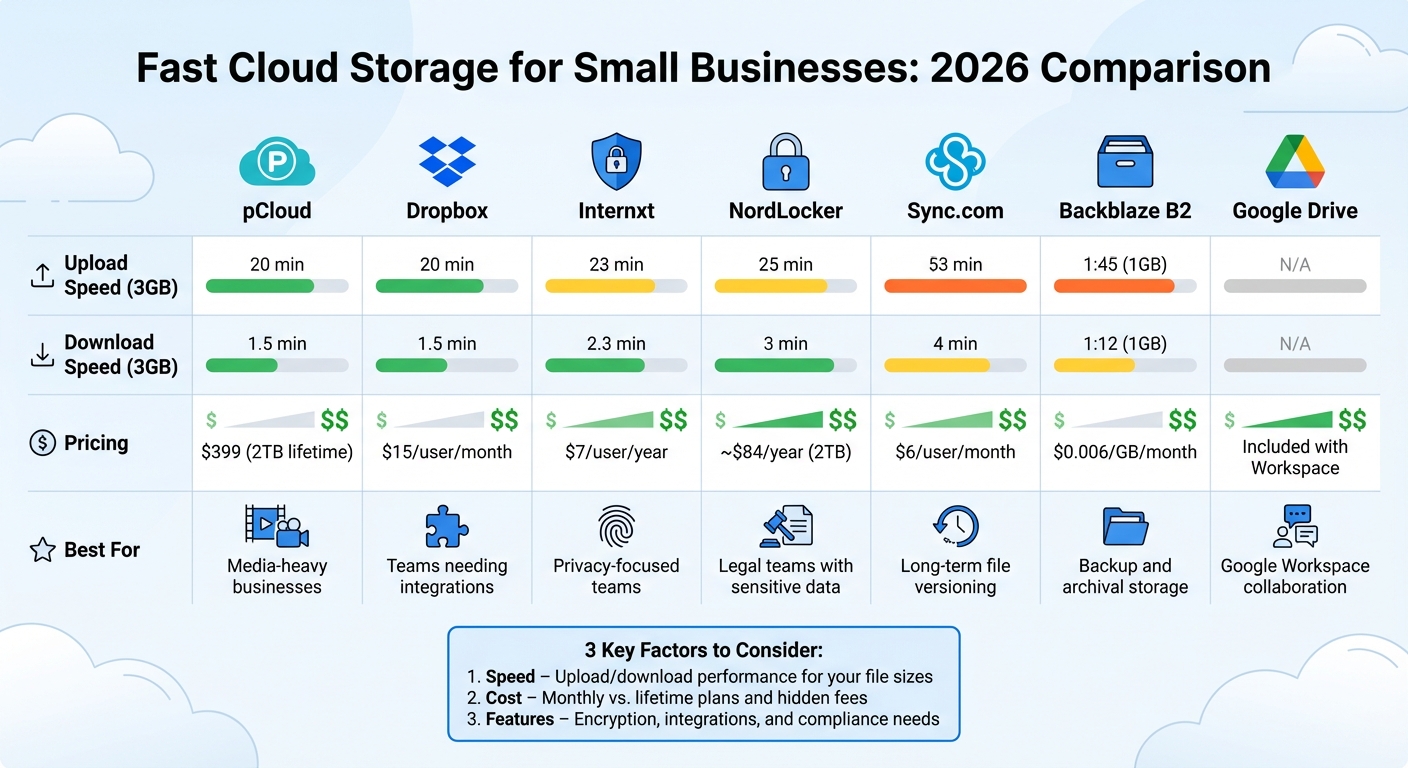
Cloud Storage Speed and Pricing Comparison for Small Businesses 2026
Best Cloud Storage 2026 Tier List - The REAL Winner Isn’t Who You Think
sbb-itb-d1a6c90
What Affects Cloud Storage Speed
The speeds you see advertised for cloud storage often don't tell the whole story. Several technical factors influence how fast files upload, download, and sync, which can significantly impact collaboration and productivity. Understanding these factors can help you avoid slowdowns and choose the right service for your needs.
Upload and Download Speeds
File transfer speeds depend on more than just your internet connection. The protocol used for data transfer plays a huge role. For example, many services like Google Drive and Dropbox rely on TCP (Transmission Control Protocol), which confirms every packet of data sent. While reliable, this process adds overhead, especially over long distances. On the other hand, services like MASV use UDP-based protocols, which skip some of these handshakes, allowing for faster transfers.
Another factor is your internet plan. Many residential plans are asymmetric, meaning upload speeds are much slower than download speeds. A "500 Mbps" plan might only offer 20 Mbps for uploads. That’s a problem when your team spends as much time uploading large files as downloading them. In tests using a 340/20 Mbps connection, services like pCloud and Dropbox uploaded a 3 GB file in 20 minutes and downloaded it in just 1.5 minutes. By contrast, Sync.com, known for its strong security, took 53 minutes to upload the same file.
Some providers use block-level syncing, which only updates the parts of a file that have changed. This can cut update times from minutes to seconds.
Your local setup matters too. A wired Cat6 Ethernet connection ensures stable performance, avoiding the packet loss and jitter common with Wi-Fi. Even with advancements like Wi-Fi 6, a physical cable still offers more consistent speeds. To identify bottlenecks, check your actual upload speeds using tools like fast.com.
Beyond raw transfer speeds, latency plays a big role in how smoothly teams can collaborate.
Latency and Sync Performance
Latency refers to the delay between saving a file and having it updated for others. For remote teams or small businesses, this delay can slow down collaboration. Amrit Singh, Product Marketer at Backblaze, explains:
"Latency, or the time it takes for data to travel from one point to another, affects everything from how snappy or responsive your application may feel to content delivery speeds."
Cold-start sync latency - the time for a file to appear on another device after upload - varies widely between providers. For instance, Dropbox averages 1.7 seconds, much quicker than Microsoft OneDrive’s 4.2 seconds. Faster sync times can save users over two minutes per day, adding up to nearly nine hours of recovered productivity per employee annually. Lower latency also reduces the risk of version conflicts during simultaneous editing, with research showing a 37% drop in conflicts for faster sync services.
In-office teams can benefit from LAN sync, which transfers files directly between devices on the same network, bypassing the internet entirely for near-instant speeds.
Infrastructure and CDN Support
The location of data centers impacts latency. The farther the data has to travel, the longer the delay. Providers with servers in only one region can add 50–200 milliseconds of latency for users in distant locations.
Content Delivery Networks (CDNs) help solve this by caching data on edge servers closer to users. For example, a file stored in a Virginia data center can be delivered to a California user from a nearby Los Angeles server. In 2024–2026, Musify, a music streaming platform, switched from Amazon S3 to Backblaze B2 and integrated with Cloudflare’s CDN. This move allowed 90% of their transfers to occur at the edge, cutting latency and reducing their cloud costs by 70%.
Major providers like Google and Microsoft operate extensive global networks, connecting their data centers directly to avoid the public internet and maintain consistent speeds. Some newer providers take a different approach. Storj, for instance, uses a decentralized network of thousands of nodes, pulling files from the nearest ones simultaneously to maximize speed. For teams working with large media files, services like LucidLink allow users to start editing a 50 GB video almost immediately without waiting for a full download.
| Provider | Infrastructure Type | Primary Speed Benefit |
|---|---|---|
| Google Drive | Global Proprietary Network | Consistent throughput; avoids public internet |
| Dropbox | Block-level Sync / LAN Sync | Only uploads changes; direct local transfers |
| Storj | Decentralized Node Network | Parallel downloads from nearest nodes |
| LucidLink | Streaming Mount | On-demand access without full downloads |
| Egnyte | Hybrid (Cloud + Local NAS) | LAN-speed access for office users |
Before choosing a provider, check if they have data centers in your region. A U.S. company using a provider with servers only in Europe could face slower performance and even compliance issues with data residency rules.
Infrastructure decisions have a direct impact on your team’s workflow and productivity. Faster uploads, seamless syncing, and efficient data delivery systems are essential for keeping small business information systems competitive in 2026.
Best Cloud Storage Options for Small Businesses in 2026
The cloud storage industry has grown past $200 billion in 2026, with companies vying for attention by offering faster speeds, better security, and competitive pricing. For small businesses, the real challenge lies in picking the right option from a crowded market. Here's a breakdown of the top contenders based on speed, cost, and standout features to help your business make an informed choice.
pCloud and Dropbox stand out for their fast file transfer speeds. Tests show both services can upload a 3 GB file in 20 minutes and download it in just 1.5 minutes. For smaller files, Dropbox pulls ahead slightly, syncing a 1 GB folder in 1:23 for upload and 0:58 for download. Internxt is a close competitor, uploading the same 3 GB file in 23 minutes and downloading it in 2.3 minutes, making it a solid pick for budget-conscious, privacy-focused teams.
Some providers prioritize security over speed. NordLocker took 25 minutes to upload and 3 minutes to download a 3 GB file, while Sync.com was slower, requiring 53 minutes for upload and 4 minutes for download. However, Sync.com shines in file versioning, offering the ability to retain file histories for 180 to 365 days, depending on the plan.
When it comes to pricing, providers are leaning toward high-capacity plans or pay-as-you-go models. pCloud offers lifetime plans - $399 for 2 TB or $1,190 for 10 TB - perfect for businesses that want to avoid recurring fees. Internxt is a budget-friendly option, with business plans starting at $7 per user annually, and a lifetime 5 TB plan priced at $585. For businesses focused on storage infrastructure, Backblaze B2 charges just $0.006 per GB per month, making it ideal for backups and archives.
Provider Comparison Table
Here's a quick look at how these providers stack up in terms of speed, pricing, and use cases.
| Provider | Upload (3GB File) | Download (3GB File) | Pricing | Best For |
|---|---|---|---|---|
| pCloud | 20 min | 1.5 min | $399 (2TB lifetime) | Media-heavy businesses avoiding fees |
| Dropbox | 20 min | 1.5 min | $15/user/month (5TB shared) | Teams needing app integrations |
| Internxt | 23 min | 2.3 min | $7/user/year (Business) | Privacy-focused teams on budgets |
| NordLocker | 25 min | 3 min | ~$84/year (2TB) | Legal teams handling sensitive data |
| Sync.com | 53 min | 4 min | $6/user/month (1TB) | Long-term file versioning (365 days) |
| Backblaze B2 | N/A | N/A | $0.006/GB/month | Backup and archival |
| Google Drive | 1:45 (1GB) | 1:12 (1GB) | Included with Workspace | Google Workspace collaboration |
For businesses heavily invested in Microsoft tools, OneDrive for Business is a strong choice. It offers 1 TB per user and integrates seamlessly with Office 365. Meanwhile, teams handling highly sensitive data should consider zero-knowledge encryption providers like Proton Drive, NordLocker, or Tresorit, which ensure that even the provider cannot access your files.
Finding the right balance between speed, cost, and security can make a big difference in improving collaboration and efficiency for small businesses in 2026.
How to Pick the Right Cloud Storage for Your Business
Matching Features to Your Business Needs
When choosing cloud storage, start by evaluating how your team uses files daily. For example, design agencies working with large video files need fast upload speeds and plenty of storage space. Providers like pCloud or Dropbox are great options here. On the other hand, if your business handles sensitive information, look for providers offering end-to-end (zero-knowledge) encryption, such as Tresorit or Proton Drive.
Reliable syncing is another critical feature, especially for teams collaborating on projects, as it prevents version conflicts and data loss. However, if your primary goal is archiving files - like old invoices or tax records - object storage might be a better fit. For instance, Backblaze B2 offers affordable plans at approximately $6 per TB per month, making it ideal for long-term storage without the need for real-time syncing.
Next, think about your current tech stack. If your team already uses Google Workspace, Google Drive is a natural choice because of its seamless integration with Gmail, Docs, and Calendar. Similarly, if you're relying on Microsoft Office, OneDrive for Business is a smart pick, offering 1 TB per user and direct integration with Windows 11 and Office 365. Choosing a solution that aligns with your existing tools can save time and reduce workflow friction.
For businesses in regulated industries, compliance is non-negotiable. Whether you're managing HIPAA regulations in healthcare, SOC 2 requirements in finance, or GDPR for European clients, ensure the provider meets the necessary certifications. Companies like Egnyte and Tresorit specialize in these standards. Confirming certifications upfront can help you avoid costly adjustments later.
To streamline your decision-making process, consider using a weighted decision matrix. For example, you could assign weights like this: Capacity (30%), Price (25%), Security (20%), Speed (15%), and Support (10%). Scoring providers against these criteria makes it easier to compare options and justify your choice to stakeholders with different priorities.
Once you've matched the features to your operational needs, take a close look at costs to ensure the solution fits your budget.
Budget Planning for Small Businesses
After identifying the right features, focus on creating a realistic budget. Many small businesses overestimate their storage needs by around 40%. To avoid overspending, audit your current data with free tools like TreeSize Free or WinDirStat. For example, one business found that 40% of its data was redundant during a migration, leading to significant annual savings. Removing duplicate and outdated files can help reduce costs.
Plan for growth by accounting for a 15–20% annual increase in data volume. If your business currently uses 2 TB, budget for about 2.4 TB next year to avoid unexpected upgrades. Providers like iDrive Business offer affordable plans, such as 5 TB for $99.50 per year, which can deliver strong value for teams of up to 10 users.
You might also explore lifetime plans, like pCloud's 500 GB option for $199, or scalable per-user subscriptions, such as Google Workspace ($6 per user/month) and Microsoft 365 ($6.99 per user/month), to accommodate your business's growth.
Before committing to a plan, take advantage of free trials. Most providers offer 14-day trials - use this time to upload at least 10 GB of actual company data. Testing during peak hours will give you a clearer sense of upload and download speeds. Also, check if mobile apps and permission settings meet your team's needs. A thorough trial can prevent you from being locked into a plan that falls short.
For businesses with large archives, object storage is often the most cost-effective choice. For example, Wasabi charges $6.99 per TB per month with no egress or API fees. Keep in mind that these services typically require S3-compatible tools for access and lack built-in collaboration features. However, they are ideal for storing long-term records or projects that aren't accessed frequently, offering considerable savings over time.
Using BizBot to Find Cloud Storage Tools
Choosing the right cloud storage solution can feel overwhelming with so many providers, pricing structures, and features to sift through. BizBot simplifies this process by offering a curated directory of business administration tools, including cloud storage options. Instead of bouncing between countless websites, you can compare solutions all in one place while focusing on the essentials: speed, security, and cost-efficiency - key priorities for small businesses.
BizBot doesn’t just help you find tools; it makes evaluating them easier too. The platform takes a practical, business-focused approach, emphasizing factors like ROI, ease of use, and scalability rather than drowning you in technical jargon. It also neatly separates collaboration tools from backup solutions, making it easier to zero in on what your business actually needs. With over 94% of small businesses in the U.S. already using at least one cloud service, having a centralized resource like BizBot can help you avoid common mistakes, such as overestimating your storage needs or overlooking future growth.
Beyond discovery, BizBot helps you manage your subscriptions more effectively. Small businesses often accumulate multiple subscriptions without realizing how quickly costs can spiral. By centralizing all your tools on one platform, you can track spending, spot redundant services, and make smarter decisions about renewals or upgrades. This approach can reduce unpredictable expenses by as much as 40% compared to traditional break-fix models. With this streamlined system, you can focus on cloud storage solutions that meet strict security and compliance requirements while delivering the fast performance small businesses need to thrive in 2026.
Another standout feature is BizBot’s ability to simplify compliance checks. The directory allows you to quickly verify if a provider meets important standards like HIPAA BAAs or SOC 2 certifications. This is especially critical for industries with strict regulations. Considering that 43% of cyberattacks in the U.S. target small businesses and that human error accounts for over 80% of breaches, ensuring compliance is non-negotiable.
BizBot also integrates document signing and storage tools, letting you manage contracts and compliance records in one place. This means you can handle everything from contracts to invoices while evaluating cloud storage options, saving time and reducing administrative headaches. It’s a seamless way to keep your workflows efficient and your business running smoothly.
Conclusion
When it comes to choosing fast cloud storage for your small business in 2026, focus on three key factors: speed, cost-efficiency, and scalability. The ideal provider should offer dependable sync performance for your daily operations, fit comfortably within your budget (without surprise fees like hidden egress costs), and grow seamlessly alongside your data, which typically increases by 15–20% each year. With the global cloud storage market now valued at over $200 billion, the sheer number of options can feel overwhelming - but it also means there’s a solution out there tailored to your needs.
To make the right choice, align your priorities with specific features. For example, if handling sensitive client data in industries like healthcare or legal services, providers such as Proton Drive or Tresorit offer the end-to-end encryption you can’t compromise on. If your team relies heavily on tools like Microsoft 365 or Google Workspace, OneDrive or Google Drive will integrate seamlessly into your existing workflow. On the other hand, businesses that need high-speed uploads or reliable archival storage might find Wasabi’s 239 MB/s upload speeds or Backblaze B2’s near-perfect 99.999999999% durability particularly appealing.
Be mindful of common pitfalls, like overestimating your storage needs - 70% of users tend to overestimate by about 40%. At the same time, don’t underestimate future growth, as storage mismatches often stem from failing to account for expansion. Take advantage of free trials to test how well a service performs in your specific environment, and always enable two-factor authentication to keep your data secure.
Tools like BizBot make this process easier by centralizing your search for cloud storage solutions alongside other business tools. Instead of juggling multiple tabs and spreadsheets, you can compare providers, check for compliance with standards like HIPAA or SOC 2, and monitor subscription costs - all in one place. This streamlined approach helps you avoid redundant services and better control your expenses.
Whether you’re a freelancer managing client files or part of a growing team collaborating across locations, finding the right cloud storage solution can revolutionize how you work. Start by assessing your current data usage, predicting future growth, and using BizBot to identify tools that align with your business goals. That way, you can focus on what truly matters: running and growing your business.
FAQs
How can I test cloud storage speed in my real-world setup?
To gauge cloud storage speed, try uploading a large file - something between 2 and 5 GB - and track how long it takes to complete. After that, download the same file and record the time it takes. A stable internet connection is crucial since it can significantly affect the results. By comparing these upload and download times, you'll get a practical sense of the service's performance and whether it aligns with your expectations.
When should a small business use object storage instead of file sync?
Small businesses should turn to object storage when handling large amounts of unstructured data that require flexibility, affordability, and long-term reliability. This makes it perfect for storing multimedia files, IoT-generated data, or backups that need to be kept for extended periods or accessed via APIs.
On the other hand, file sync works better for tasks like real-time collaboration and document sharing. However, when dealing with massive unstructured datasets, object storage stands out with its ability to scale efficiently, reduce costs, and integrate seamlessly with technologies like AI and machine learning.
What features matter most for HIPAA or GDPR compliance?
Meeting HIPAA or GDPR compliance standards involves implementing several critical features to safeguard sensitive information. These include:
- Native data encryption: Ensures that all sensitive data is encrypted, protecting it from unauthorized access.
- Access controls: Limits data access to authorized personnel only, reducing the risk of breaches.
- Audit-ready reporting: Provides detailed logs and reports to demonstrate compliance during audits.
- Automated compliance tools: Helps streamline and simplify ongoing compliance management.
- Data residency options: Allows organizations to store data within specific geographic locations as required by regulations.
- Strict privacy regulation adherence: Ensures all data handling practices align with legal privacy standards.
These features work together to protect sensitive data and help organizations stay compliant with legal requirements.