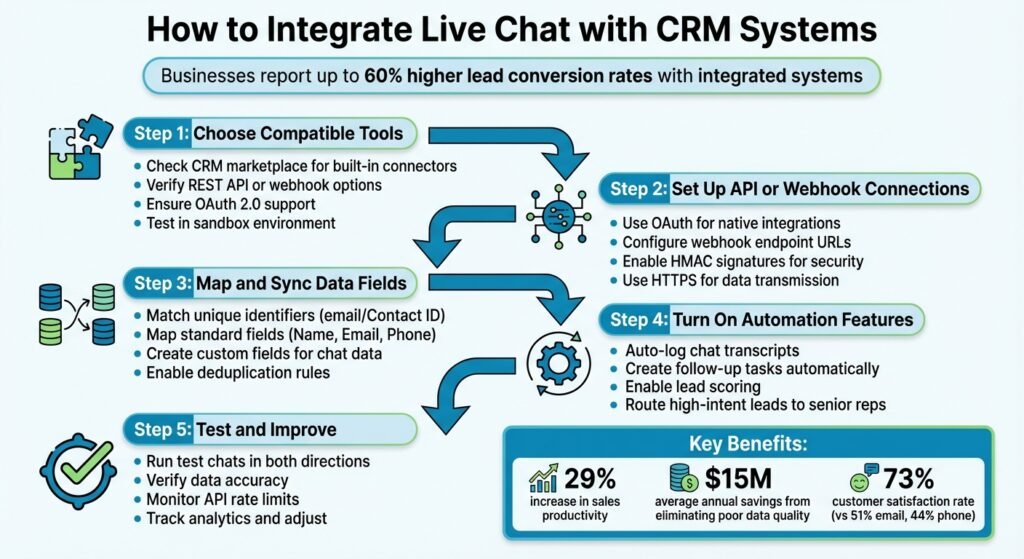
When you connect your live chat tool with your CRM system, you give your team instant access to customer data like purchase history and past conversations – all within the chat window. This makes interactions faster, helps personalize support, and boosts productivity. Businesses that use integrated systems report up to 60% higher lead conversion rates, 29% better sales productivity, and fewer errors caused by manual data entry. Here’s how to make it work:
- Choose compatible tools: Ensure your chat and CRM systems can connect, either through built-in integrations or APIs.
- Set up the connection: Use OAuth, APIs, or webhooks for secure data transfer between systems.
- Map and sync data fields: Match chat details (like email and transcripts) to CRM fields for real-time updates.
- Enable automation: Automate tasks like logging chats, updating records, and assigning follow-ups.
- Test and refine: Run test chats, monitor data flow, and fix errors before going live.
This integration saves time, reduces frustration, and ensures no leads or opportunities are overlooked. Follow these steps to simplify workflows and deliver better customer experiences.
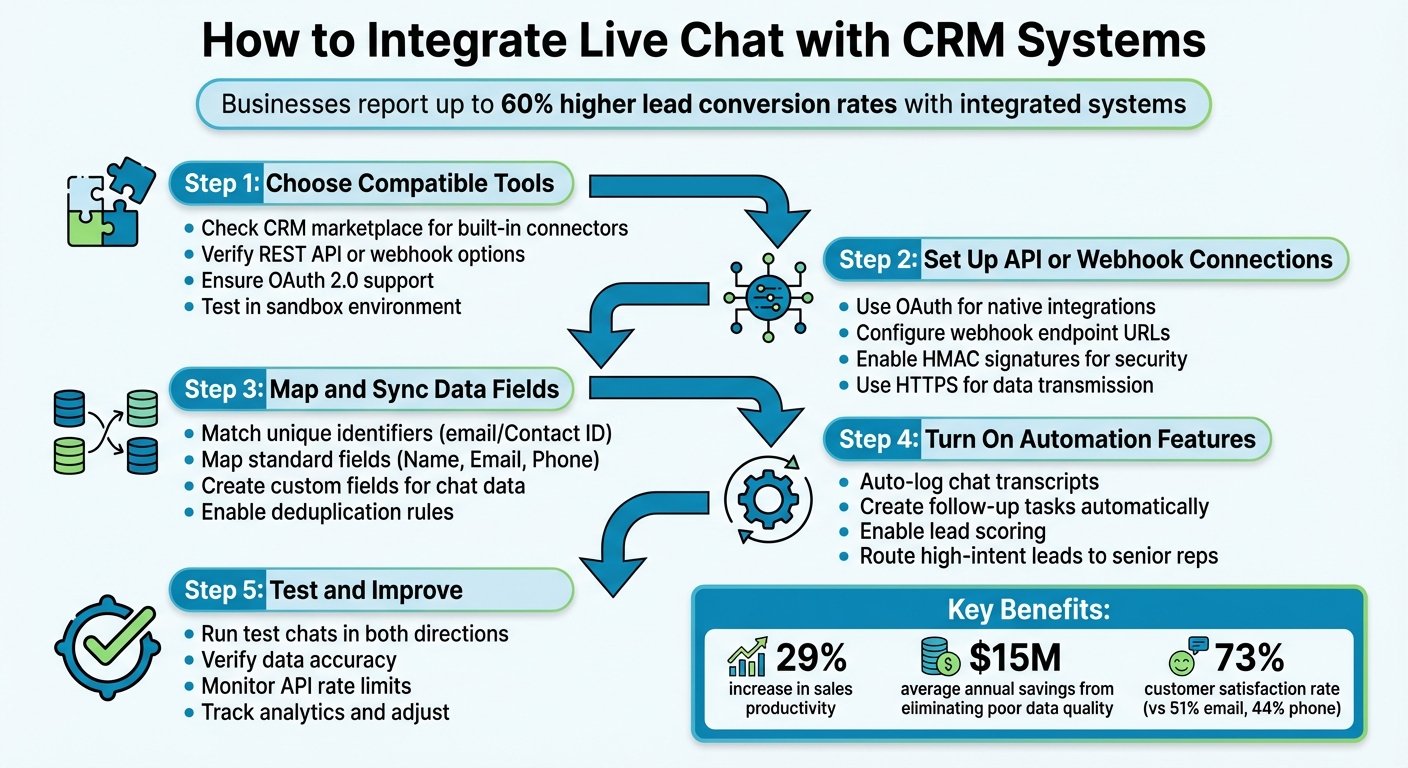
5 Steps to Integrate Live Chat with CRM Systems
Benefits of Connecting Live Chat with CRM Systems
Real-Time Customer Insights
Imagine this: a customer opens a chat, and the agent instantly sees their purchase history, previous support tickets, and past conversations – all without asking a single question. That’s the power of connecting live chat with a CRM system. Agents can skip redundant questions and focus on solving the issue at hand because all the information they need is right in front of them.
It’s no wonder 73% of customers prefer live chat, compared to satisfaction rates of 51% for email and 44% for phone support. This preference largely comes from not having to repeat information. Plus, CRM tools can add valuable context. For instance, tags like “VIP” or “High Intent” can automatically route important chats to senior agents, speeding up resolutions and improving the customer experience. Pre-chat surveys also play a role by collecting details like the customer’s name, email, and issue type, ensuring the right CRM record is pulled up before the chat even begins.
But the benefits don’t stop there. This integration doesn’t just enhance customer interactions – it also simplifies how you handle data.
Simplified Data Management
Manual data entry is a headache – and an expensive one at that. Poor-quality data costs companies an average of $15 million annually. Integrating live chat with your CRM eliminates this issue by automating tasks like creating contact records and syncing chat transcripts. No more copy-pasting, juggling multiple tabs, or dealing with duplicate records.
With bidirectional syncing, customer data stays up-to-date in real time. For example, if an agent updates an email address or adds notes during a chat, those changes are instantly reflected in the CRM. Field mapping ensures that information flows seamlessly – for instance, the “visitor email” from your chat tool automatically populates the “Contact Email” field in the CRM. Automated tagging further organizes chats into categories like “Product Inquiry” or “Billing”, making it easier to generate detailed reports later.
Better Team Collaboration
When systems are disconnected, departments like sales, support, and marketing often work in silos, leading to inefficiencies. But with a live chat-CRM integration, those barriers disappear. Everyone has access to the same customer data, creating smoother workflows across teams.
For instance, if a support agent resolves a billing issue, the system can automatically assign a follow-up task to the account manager. Similarly, if a sales representative identifies a high-intent lead, they can immediately engage with full visibility into the customer’s history. These seamless transitions make interactions faster and more effective.
The productivity boost is real. Companies using integrated systems report a 29% increase in sales productivity. Automation takes care of repetitive tasks like logging chat transcripts, updating lead statuses, and triggering follow-ups, so agents can focus on what matters most: the customer.
| Without Integration | With Integration |
|---|---|
| Agents switch tabs to find customer history | 360-degree view appears in the chat window |
| Manual copy-pasting of transcripts and notes | Automatic syncing of all chat data |
| Leads sit idle waiting for manual handoffs | Instant routing based on CRM data |
| High risk of duplicate records and errors | Automated validation and duplicate merging |
| Teams work in isolated silos | Shared insights across sales, support, and marketing |
Steps to Connect Live Chat with CRM Systems
Step 1: Choose Compatible Tools
Start by ensuring that your live chat platform and CRM can work together. Check your CRM’s marketplace, like Salesforce AppExchange or HubSpot App Marketplace, for a built-in connector. If no native integration is available, look into REST API or webhook options to create a custom connection. Make sure OAuth 2.0 is supported for secure, token-based access, eliminating the need to manage plaintext API keys.
Additionally, confirm that the chat tool can both retrieve information from the CRM (to recognize returning visitors) and send data back (to log chat transcripts or update lead scores). Before going live, it’s wise to test the setup in a CRM sandbox environment to avoid disrupting your live data.
“Without CRM integration, an AI chatbot is a standalone tool – it can answer questions… but it doesn’t know who it’s talking to or what to do with the information it collects.” – Jobix.AI
Once compatibility is confirmed, move on to establishing the connection in Step 2.
Step 2: Set Up API or Webhook Connections
After confirming compatibility, it’s time to establish the connection. If a native integration is available, simply authorize it using OAuth, and you’re good to go. For custom setups, you’ll need authentication credentials like API keys or OAuth tokens.
For webhook-based connections, configure an endpoint URL in your chat platform settings. This URL will receive HTTP POST requests whenever specific events occur, such as a chat being accepted or completed. To ensure security, use HMAC signatures to verify incoming data and HTTPS for secure transmission. Design your endpoint to quickly return a 2xx status code to avoid timeouts, and process data asynchronously in the background.
| Integration Method | Best For | Pros | Cons |
|---|---|---|---|
| Native OAuth | Popular CRMs (e.g., Salesforce, HubSpot) | Easy setup, secure, no need to manage keys | Limited to supported platforms |
| REST API | Custom CRM setups | High flexibility in data mapping | Requires developer input and API credentials |
| Middleware (Zapier) | Quick solutions | No coding needed, connects multiple apps | Limited real-time capabilities and extra costs |
| Webhooks | Real-time updates | Pushes data instantly without polling | Requires endpoint hosting and robust security |
Once the connection is established, proceed to Step 3 to define how data flows between the systems.
Step 3: Map and Sync Data Fields
Now that the connection is ready, map the data fields between your live chat and CRM systems. Start by identifying a unique identifier, such as an email address or Contact ID, to ensure chat visitors are matched with the correct CRM records. This prevents duplicate entries and keeps your data clean.
Standard fields like Name, Email, and Phone should be mapped to their CRM counterparts. For chat-specific data – such as transcripts, tags, or detected intent – create custom fields in the CRM. For instance, you can map “Visitor Email” to the CRM’s “Contact Email” field or assign chat tags (e.g., “urgent” or “billing”) to trigger workflows. Enable deduplication rules in the CRM and consider a pre-chat survey to capture essential details. Testing the mapping with read-only access first can help verify accuracy before enabling write-back permissions.
| Chat Data Field | CRM Target Field | Purpose |
|---|---|---|
| Visitor Email | Contact/Lead Email | Matches chat visitors to existing CRM records |
| Chat Transcript | Activity Notes/Case Description | Provides context for follow-ups |
| Detected Intent | Lead Category/Interest | Helps segment leads for targeted outreach |
| Conversation Tag | Case Priority/Tag | Sets urgency or triggers routing rules |
| Source URL | Lead Source | Tracks the origin of the lead (e.g., campaign or webpage) |
Step 4: Turn On Automation Features
Automation can save time and ensure no opportunities slip through the cracks. For example, you can set up rules to automatically log chat transcripts as CRM activities or create follow-up tasks for team members after a chat ends.
Lead scoring is another powerful feature. If a visitor asks about pricing or requests a demo, their lead score can be increased and routed to a senior sales rep automatically. This kind of automation ensures that every chat interaction is recorded and acted upon, helping businesses achieve higher lead conversion rates – up to 40–60% higher, according to some reports.
Step 5: Test and Improve the Integration
Before going live, run test chats to confirm that data flows correctly in both directions. Check that new contacts are created, chat transcripts are logged, and fields are populated accurately. Use structured logging to track events by conversation ID and status, which can help identify and resolve sync issues quickly.
Keep an eye on analytics to ensure that chat data is correctly linked to CRM records, follow-up tasks are assigned as expected, and duplicate entries are avoided. Since 82% of consumers expect an immediate response when using live chat, even small delays or errors can hurt customer satisfaction. Also, monitor API rate limits – Salesforce Enterprise, for example, allows 15,000 API calls daily, while HubSpot permits up to 500,000. Regular testing and adjustments will ensure your integration stays reliable as your business scales.
Best Practices for Successful Integration
Protect Data Privacy and Stay Compliant
Data security should be a top priority when integrating live chat with your CRM. Mistakes in compliance can be incredibly costly – GDPR violations can lead to fines of up to €20 million or 4% of annual global turnover, while under the CCPA, penalties can reach $7,500 per individual violation. Beyond fines, breaches can have a lasting impact, with over 80% of consumers saying they won’t return to a business after a data breach.
To safeguard your data, implement AES-256 encryption for stored data and TLS for data in transit. Enable multi-factor authentication (MFA) for all CRM users to prevent unauthorized access. Additionally, use field-level security to ensure sensitive information is only accessible to those who need it.
“Customer data is highly sensitive, and integrating multiple systems increases potential vulnerabilities. Strong security measures must be built into integrations to protect data during transfer and storage.”
– Natalia Misiukiewicz, LiveChat
Minimize risks by syncing only the data that’s absolutely necessary for your operations. For instance, if chat support doesn’t require a customer’s full address, don’t include it in the sync. Set up automated workflows to handle deletion requests across integrated systems, making it easier to comply with “right to be forgotten” requests. Ensure your live chat provider and any middleware tools have signed Data Processing Agreements (DPAs) and adhere to high security standards.
Once your data security measures are in place, you can focus on using CRM data to enhance customer interactions.
Maintain Consistent Customer Experience
When live chat is integrated with your CRM, personalized interactions can drive conversions by up to 20%. Live chat also boasts a higher customer satisfaction rate – 73% compared to 51% for email and 44% for phone support. The secret lies in leveraging CRM data to deliver context-aware, seamless conversations.
For example, if a returning customer initiates a chat, use their purchase history and preferences to personalize the conversation – greet them by name and offer relevant assistance. When a chatbot escalates an issue to a human agent, ensure the agent receives the full chat history and customer context so the transition feels smooth and natural. Coca-Cola demonstrated this effectively in July 2025 by integrating its Salesforce CRM with regional bottler systems. This gave sales teams real-time access to order histories and customer data, enabling faster decisions and consistent service across regions.
To ensure a smooth rollout, start with a pilot program. Test data flows and collect internal feedback to identify any issues before scaling the integration company-wide. This approach minimizes service disruptions and prepares your team for success. Training is equally important – equip your team with the knowledge to access and use CRM data effectively during customer interactions.
Once your team is delivering personalized support, the next step is to measure how well the integration is working.
Use Analytics to Track Performance
To determine if your integration is delivering results, monitor key metrics. For example, customer satisfaction (CSAT) hits 84.7% when the first response happens within 5–10 seconds. Aim to keep first response times under 30 seconds. Another important metric is your chat-to-lead conversion rate – 10–20% of engaged chats should convert into qualified leads.
Analyze synced CRM tags on a monthly basis to uncover trends. If tags like “Pricing Question” or “Technical Error” appear frequently, you’ve identified areas for improvement or high-intent sales opportunities. Check if having CRM context during chats accelerates deal velocity; many companies see a 20–30% improvement in moving prospects through sales stages faster.
Other metrics to track include team adoption rates (target over 85% within 60 days) and the reduction in manual data entry hours per representative. Regularly audit your CRM for duplicate records or incomplete fields caused by automated chat synchronization. With clean, high-quality data, CRM tools typically deliver an average return of $3.10 for every $1 invested.
LiveChat integrations: Take your live chat to another level 🔥
Conclusion
Bringing live chat and your CRM together transforms how you manage customer interactions and streamline workflows. By syncing chat transcripts, visitor data, and support tickets into CRM profiles, you eliminate fragmented information and provide your team with a complete view of every customer touchpoint. This holistic approach doesn’t just enhance support – it delivers measurable improvements for your business.
For instance, integrated systems can lead to a 20% increase in lead conversion and a 29% boost in sales productivity. To achieve this, follow these five steps: select business administration tools that work well together, set up API or webhook connections, map your data fields, enable automation, and conduct thorough testing. Along the way, prioritize data security, maintain a consistent customer experience, and track performance effectively.
Industry leaders highlight the importance of integration:
“Every conversation that doesn’t sync to your CRM is a missed follow-up. Every lead that slips through the cracks because an agent had to switch tabs is a lost opportunity.” – Sophie Ricci, Salesso
FAQs
Which CRM fields should I sync from live chat first?
Start by syncing contact details – name, email, and phone number – to enable quick follow-ups and qualify leads effectively. Add chat history and interaction records to preserve customer context, ensuring smooth and consistent support. These essential fields make it easier to track conversations, understand customer needs, and deliver more tailored service. The result? Faster responses and a better overall experience for your customers.
How do I prevent duplicate contacts when chats create new records?
To keep your CRM free from duplicate contacts, set it up to recognize existing records using unique identifiers such as email addresses or phone numbers. This way, updates are applied to the correct contact instead of creating duplicates. Many CRM platforms also include tools for detecting and merging duplicate entries – make sure to activate these features to simplify your data management process. On top of that, configure your live chat integration to search for existing contacts before adding new records.
What should I do if API limits or sync delays impact real-time chat?
To handle API limits or sync delays in real-time chat, there are a few practical adjustments you can make to keep things running smoothly.
First, reduce the number of API calls by consolidating requests or batching data transfers. This not only helps you stay within usage limits but also improves efficiency. Keeping a close eye on your API usage can help you predict when you’re nearing those limits and make adjustments, like tweaking the sync frequency, before any disruptions occur.
If delays happen, you can rely on fallback mechanisms to maintain service quality. For example, queuing messages or implementing retry scheduling ensures that customer interactions aren’t interrupted, even when there’s a hiccup.
By combining these strategies, you can effectively navigate system constraints while delivering a seamless experience for your users.
More on this topic
Browse all 21 articles on Customer Support, or jump straight to our buying guide: Best Customer Support Tools for Small Teams.