Mobile feedback apps are changing the way companies connect with employees. Here's the big takeaway: real-time feedback boosts engagement by 21% and can cut turnover by 43%. These apps replace outdated annual reviews with instant communication, making it easier for employees to share insights and feel heard.
Key Highlights:
- Profit Impact: Engaged teams are 21% more profitable, while disengagement costs $8.9 trillion annually.
- Why It Works: Real-time feedback keeps employees motivated, especially deskless and remote workers.
- Features That Matter: Anonymous surveys, two-way communication, recognition tools, and data dashboards improve participation and trust.
- Proven Results: Companies like Google increased productivity by 15%, and others saw engagement rates climb to 85%.
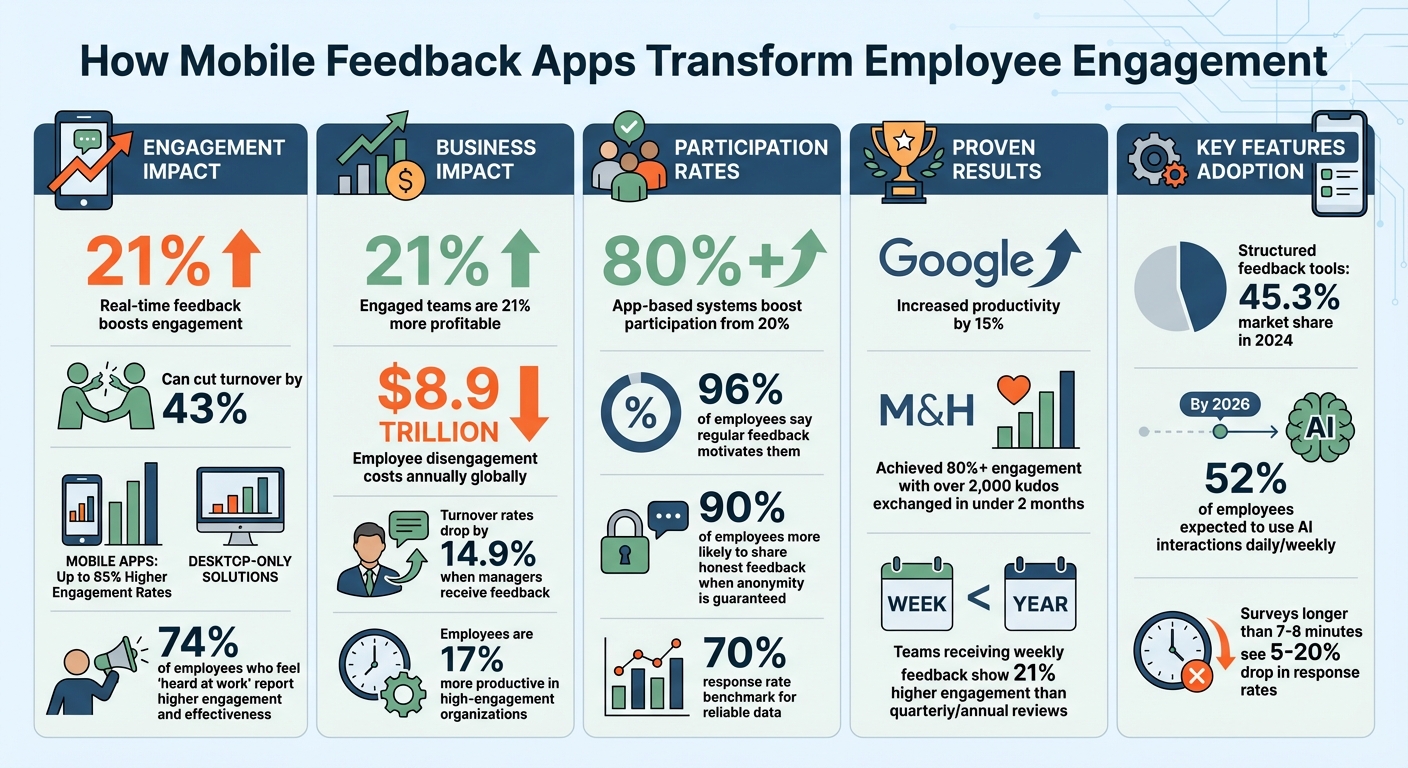
Mobile Feedback Apps Impact on Employee Engagement: Key Statistics and Benefits
10 Must-Have Tools for Employee Feedback (2026)
sbb-itb-d1a6c90
What Are Mobile Feedback Apps?
Mobile feedback apps are changing the way companies engage with their employees by providing constant, actionable insights directly to their smartphones. These tools make it easier for leadership and staff to stay connected, no matter where employees are or what their roles involve. With features like targeted notifications and read receipts, these apps replace outdated annual review systems with a more dynamic approach - one that focuses on ongoing communication and real-time feedback. Instead of waiting months for feedback, employees can share their thoughts instantly through interfaces that feel as simple as texting.
These apps serve as a direct link between management and employees, whether they're working at a desk, on a shop floor, or remotely. For deskless workers - like retail staff, healthcare professionals, and field technicians - mobile feedback apps provide a central hub. They can access everything from schedules and paystubs to company updates and two-way feedback channels all in one place.
Switching from email-based feedback to app-based systems can significantly boost participation rates, jumping from 20% to over 80%. As James Dean, the creator of Pebb, explains:
"Can a teammate see the important thing in 10 seconds, understand it in 30, and act in under a minute - on their phone? If not, the rest is noise".
Key Features of Mobile Feedback Apps
Modern mobile feedback apps come packed with features designed to make employee engagement easier and more effective:
- Real-time Feedback Collection: Employees can quickly respond to pulse surveys or polls, typically just 5–10 questions that take under five minutes to complete.
- Anonymous Surveys: Anonymous options encourage honest feedback, especially on sensitive topics like management or workplace culture. In fact, structured feedback tools accounted for 45.3% of the market share in 2024.
- Two-Way Communication: Tools like suggestion boxes, comments, and direct messaging allow employees to share feedback freely, breaking away from the limitations of top-down systems.
- Data Analytics Dashboards: These dashboards provide leadership with real-time insights on trends, participation rates, and overall sentiment. For instance, some platforms track how many employees acknowledge messages within 24 hours.
- Recognition Features: Built-in tools for public shout-outs and peer acknowledgments help foster a culture of appreciation and improve morale.
- Conversational Design: AI-driven interfaces present one question at a time, reducing mental effort and encouraging authentic responses. By 2026, 52% of employees are expected to use AI in such interactions daily or weekly.
These features address the gaps left by older feedback methods, creating a more engaging and effective system.
Why Mobile Feedback Apps Work Better Than Older Methods
Compared to traditional feedback systems, mobile feedback apps excel in three critical areas: timeliness, accessibility, and user experience. Here’s how they stack up:
- Timeliness: Teams that receive weekly feedback show 21% higher engagement than those relying on quarterly or annual reviews. Feedback loses its impact when delivered too late.
- Accessibility: Traditional surveys often require a desktop and corporate email, leaving out deskless employees. Mobile apps solve this by reaching workers directly on their personal devices.
- User Experience: Long, scrolling forms feel like a chore, and surveys taking more than 7–8 minutes see response rates drop by 5% to 20%. Mobile apps, with their clean, chat-like design, make it easier for employees to provide thoughtful responses.
| Feature | Traditional Methods | Mobile Feedback Apps |
|---|---|---|
| Timing | Annual, semi-annual, or quarterly | Real-time, weekly, or event-triggered |
| User Experience | Long, scrolling forms; feels tedious | Conversational, mobile-friendly |
| Reach | Limited to desk-based employees | Includes remote and frontline workers |
| Feedback Loop | Delayed; "collect and correct" approach | Immediate; "listen and improve" focus |
| Media | Text-heavy documents | Supports video, notifications, and gamification |
By offering real-time dashboards, these apps empower leadership to act on feedback immediately. Unlike traditional methods, where feedback might sit untouched in reports, mobile platforms allow managers to spot trends and take action right away. As Formbot puts it:
"The core idea is moving from a 'collect and correct' mindset to a 'listen and improve' culture".
When employees see their feedback being acknowledged and acted upon, it builds trust and strengthens their connection to the organization.
How Mobile Feedback Apps Improve Employee Engagement
Mobile feedback apps address engagement hurdles by creating a direct line of communication between employees and leadership. These business administration tools replace outdated, lengthy review cycles with ongoing, actionable feedback. This real-time approach fosters trust and keeps employees aligned with company objectives, no matter where they work. The constant flow of insights not only boosts motivation but also enhances overall performance across the board. Implementing these systems is a key way to grow your business with efficient tools that streamline internal operations.
The results speak for themselves. Companies using mobile apps for employee engagement report up to 85% higher engagement rates compared to those relying on desktop-only solutions. These apps meet employees where they are - on their phones. For deskless workers in sectors like retail, healthcare, or field services, mobile apps often serve as their primary connection to leadership, breaking down barriers that traditionally left them feeling isolated. By enabling continuous feedback and real-time communication, these apps are reshaping workplace interactions.
Enabling Real-Time Communication
Real-time communication via mobile apps eliminates the delays and silos often found in traditional feedback systems. Push notifications deliver critical updates instantly, whether it’s performance feedback, company announcements, or recognition. This immediacy reduces uncertainty and creates a sense of psychological safety - employees always know where they stand and feel more confident about their contributions.
Two-way communication features, such as comment sections and direct messaging, make workplace conversations more inclusive. Employees can easily share concerns, ask questions, or offer suggestions through user-friendly interfaces that feel as natural as texting. The key difference lies in timing: feedback delivered in real-time is tied directly to recent work, making it more relevant and actionable.
For frontline workers, this shift is game-changing. A warehouse employee can report a safety issue immediately via their phone. A retail worker can share customer feedback moments after an interaction. These instant connections replace the old, cumbersome process where feedback had to pass through multiple layers of management, often arriving too late to make a difference.
Supporting Recognition and Rewards
These apps go beyond communication by transforming workplace recognition. Features like peer-to-peer kudos, public shoutouts, and digital badges make appreciation a daily practice instead of an occasional event. This consistent acknowledgment matters - 96% of employees say regular feedback motivates them.
Take the example of M&H, a construction-related firm that introduced the Matter app in late 2025 to enhance real-time recognition and feedback. Under the leadership of President Jeff Hagel, the initiative saw over 2,000 kudos exchanged among employees and achieved an engagement rate exceeding 80% within just two months. Hagel reflected:
"Culture and morale changed overnight! In under 2 months, we've had over 2,000 kudos sent and 80%+ engagement across all employees".
Reward systems built into these apps, such as points redeemable for incentives, add tangible value to employee contributions. This approach is particularly effective in high-turnover industries like healthcare, retail, and manufacturing, where feeling valued can significantly impact retention. Organizations with high employee engagement often see turnover rates drop by as much as 43%.
Using Data to Address Employee Concerns
Mobile apps also leverage analytics to turn scattered feedback into actionable insights. Real-time data allows leaders to detect shifts in morale, stress levels, and emerging issues as they arise - long before they show up in exit interviews. By segmenting data by department, role, or location, leadership can pinpoint specific problem areas.
Effective analysis blends quantitative metrics with qualitative feedback. Scaled questions provide measurable trends, while open-ended comments reveal the "why" behind those trends. Keyword analysis helps categorize feedback into themes like "communication gaps", "onboarding challenges", or "meeting overload", enabling leaders to prioritize their responses.
The real value comes from closing the feedback loop. Employees need to see that their input leads to action. This means acknowledging their contributions, sharing overarching themes, and explaining the decisions made in response. Without this transparency, trust erodes quickly. As Formbot highlights:
"When employees see their feedback is not just heard but acted upon, it builds incredible trust and a powerful sense of ownership".
Managers who receive feedback about their strengths experience turnover rates that are 14.9% lower than those who don’t receive feedback. This underscores the importance of using data not just to solve problems but also to reinforce what’s working. By identifying and replicating successful practices, organizations can turn real-time data into meaningful actions, completing the cycle of effective employee engagement.
How to Implement Mobile Feedback Apps in Your Organization
To make the most of mobile feedback apps, it's essential to approach their implementation thoughtfully. A systematic rollout can keep employees engaged and deliver meaningful results.
Assess Your Organization's Needs
Start by assembling a cross-functional team that includes representatives from HR, IT, management, and frontline staff. This diverse group ensures the app meets the needs of the entire organization, not just one department. For example, creative teams may prioritize collaboration tools, while HR might focus on performance review capabilities.
Next, define clear objectives. Are you aiming to improve hybrid work policies or reduce turnover? Without a clear purpose, you risk paying for unnecessary features. Consider this: 74% of employees who feel "heard at work" report higher engagement and effectiveness. But that only happens when the feedback process addresses real workplace issues.
Evaluate potential apps using the 10/30/60 test: Can users see an important update in 10 seconds, understand it in 30, and act on it in under a minute? As James Dean from Pebb explains:
"If not, the rest is noise".
Identify your "Golden Ten" documents - the most critical resources employees use regularly - and ensure they're easily accessible through the app.
Decide whether you need a custom-built app or an off-the-shelf solution. While custom apps offer more flexibility, they often come with higher costs. Off-the-shelf apps, on the other hand, are usually more affordable but may lack some features you need. Also, consider how the app will integrate with existing systems like HR software, payroll, and communication platforms to ensure a smooth user experience.
Once you've clarified your needs, you're ready to plan the rollout and train your team.
Roll Out the App and Train Employees
Begin by training managers first. They need to understand not just how to use the app but also why it matters. Effective feedback should be specific, actionable, and kind. Framing the app as a solution to outdated performance review processes can help managers embrace it - especially since 95% of managers are dissatisfied with traditional reviews.
Start with a 30-day pilot program in select locations before expanding company-wide. This trial phase helps identify issues like low engagement or "unread hotspots" where employees aren't interacting with the app. Use feedback from pilot participants to refine your training and rollout strategy.
Recruit app ambassadors - enthusiastic team members who can provide peer support and encourage adoption. Their enthusiasm can be contagious. Additionally, secure executive sponsorship; leaders who actively use and promote the app can significantly boost adoption rates.
When training employees, use microlearning techniques - short, focused modules instead of lengthy sessions. Introduce the app during onboarding to set expectations early. For instance, include it in new employee questionnaires and initial training.
Set Up Regular Feedback Schedules
Once the app is in use, establish a consistent feedback routine to keep momentum going.
A great strategy is starting a "Feedback Friday" tradition where employees share kudos or constructive input at the end of each week. This makes feedback a regular part of the workweek rather than an occasional event. Use a pulse survey cadence - short, frequent check-ins with one question per day or five questions per week - rather than relying solely on annual surveys.
Teams that receive weekly feedback see 21% higher engagement compared to those with quarterly or annual check-ins. Keep pulse surveys short, ideally 5–10 questions, to ensure they take less than five minutes to complete. Surveys longer than 7–8 minutes often see response rates drop by 5% to 20%.
Finally, close the feedback loop quickly - within 24–48 hours. Even a simple acknowledgment like "We heard you" can prevent employees from feeling ignored. Equip managers with templates and give them the authority to act on team-level data without waiting for corporate approval. Providing an anonymous submission option is also crucial, as 90% of employees are more likely to share honest feedback when anonymity is guaranteed.
Measuring the Impact of Mobile Feedback Apps
Once your mobile feedback app is up and running, it’s crucial to evaluate whether it’s truly making a difference. Are employees engaging with it? Is it helping to improve workplace culture? Measuring the right metrics not only answers these questions but also ensures the app continues to drive performance effectively.
Track Participation and Feedback Trends
Start by keeping an eye on response rates. A response rate of 70% or higher is a good benchmark for reliable data. If participation falls short, consider tweaking the survey’s length or timing to make it more accessible.
Completion rates are another key factor. A noticeable drop might hint at overly lengthy or unclear surveys. Additionally, monitor how long it takes employees to finish the survey. If responses come back too quickly, it could mean people are rushing through without fully engaging.
For open-ended feedback, text mining tools can help you identify recurring themes like "communication", "workload", or "flexibility". These insights can guide targeted improvements.
Analyze Metrics for Engagement Insights
Participation is just the beginning. To truly measure impact, connect feedback data to broader business outcomes. One useful metric is the Employee Net Promoter Score (eNPS), which gauges how likely employees are to recommend your company as a workplace. Comparing current scores to past baselines can reveal whether changes are part of a lasting trend or just temporary fluctuations.
Breaking down the data by department, location, or role can uncover variations in employee experiences. For instance, if one team consistently reports lower engagement, it might signal deeper issues that need attention.
Take it a step further by correlating engagement metrics with tangible outcomes like turnover, absenteeism, and productivity. For example, companies that actively gather employee feedback have seen turnover drop by 14.9%, while teams receiving weekly feedback report 21% higher engagement compared to those with annual check-ins.
Real-time dashboards can be a game-changer here. They allow managers to spot trends as they happen, rather than waiting for quarterly updates. Giving managers access to team-level data empowers them to take quick, meaningful action. This is especially important considering that 74% of employees who feel “heard at work” report being more engaged and effective.
Best Practices for Mobile Feedback Apps
Launching a mobile feedback app is just the beginning. To keep employees engaged and ensure the system delivers ongoing value, you need to focus on practices that build trust, show responsiveness, and maintain enthusiasm.
Build a Culture of Psychological Safety
Mobile feedback apps thrive when employees feel safe sharing their thoughts openly. Psychological safety is key to fostering this candor.
If employees fear retaliation or judgment, they’re less likely to provide honest feedback. Selecting digital HR software that guarantees anonymity - by not linking user IDs to submissions - is an easy yet impactful way to encourage openness. In fact, 90% of employees are more likely to share honest opinions when they know their responses are anonymous.
Leadership plays a pivotal role here. When leaders openly admit mistakes and actively seek feedback, they set the tone for a judgment-free environment. Additionally, framing feedback around behaviors (rather than personal traits) makes it easier for managers to accept and act on constructive criticism without defensiveness.
Managers, in particular, should be trained to handle negative feedback gracefully. Criticism is a sign the system is working - employees trust it enough to be honest. Ignoring this feedback can lead to serious consequences; 37% of employees have left jobs because they felt their input wasn’t taken seriously. Showing employees that their voices matter isn’t just a nice-to-have - it’s essential.
Act on Feedback Quickly
Timeliness is everything when it comes to feedback. Acknowledging input within 24–48 hours shows employees their opinions are valued and keeps the conversation relevant. This quick response builds engagement, with 70% of employees reporting they feel more connected when their feedback is taken seriously.
Transparency also goes a long way. Share aggregated insights with your team to build trust while maintaining anonymity. For example, if multiple employees highlight workload concerns, acknowledge the pattern and explain the steps you’re taking to address it. This shows that the app isn’t just a data collection tool - it’s a driver for actionable change.
And don’t forget to incorporate immediate recognition into your routine. Acknowledging contributions in real time strengthens the feedback loop and keeps employees motivated.
Use Recognition Features Regularly
Recognition is a powerful tool for engagement, and mobile apps make it easier than ever to celebrate contributions instantly.
Don’t wait for annual reviews to recognize your team. Features like peer-to-peer recognition allow employees to celebrate each other’s efforts in real time, fostering collaboration and boosting engagement. Employees are 35% more likely to feel engaged when peer recognition is part of the workplace culture.
To keep the culture positive, aim for a recognition-to-correction ratio of at least 3:1. This ensures feedback remains constructive and supportive, rather than overly critical. By making recognition a daily habit, you can transform the workplace into a space where appreciation feels genuine and consistent.
Conclusion
Mobile feedback apps represent more than just a technological upgrade - they mark a shift from outdated "collect and correct" annual reviews to fostering a culture of continuous feedback and growth. These platforms ensure that every employee, no matter their location or role, has a voice. In doing so, they address one of the most common workplace frustrations: feeling unheard.
The impact of regular feedback is clear. Teams receiving weekly feedback experience 21% higher engagement compared to those relying on quarterly or annual check-ins. Furthermore, organizations with high engagement levels report up to 43% lower turnover rates, and their employees are 17% more productive. On a global scale, disengagement costs the economy a staggering $8.9 trillion annually in lost productivity. These numbers highlight the profound potential of adopting continuous feedback practices:
"The core idea is moving from a 'collect and correct' mindset to a 'listen and improve' culture. When employees see their feedback is not just heard but acted upon, it builds incredible trust and a powerful sense of ownership." – Formbot
This evidence underscores the importance of creating a feedback-driven environment. As discussed, real-time and consistent feedback can transform employee engagement. The key to success lies in fostering a workplace where feedback flows naturally, recognition is frequent, and every voice contributes to meaningful change. By combining real-time communication, peer recognition, data-driven insights, and a commitment to psychological safety, organizations can unlock higher engagement and productivity.
Mobile feedback apps give employees the tools to be heard. Are you ready to take the first step?
FAQs
How do we protect anonymity and privacy in a feedback app?
To maintain anonymity and privacy in a feedback app, it's important to include features that let users share their thoughts without exposing their identities. Additionally, integrating two-way anonymous communication allows for follow-ups, ensuring that concerns can be addressed or clarified while keeping the user's identity protected. This approach fosters a safe space where employees feel comfortable sharing honest and constructive feedback.
What’s the best feedback schedule without causing survey fatigue?
To keep survey fatigue at bay, try setting up a consistent feedback routine, like weekly or bi-weekly check-ins. These shorter, more frequent intervals strike a balance - keeping employees engaged without overwhelming them. Plus, when you actively respond to their feedback, it builds trust and encourages ongoing participation.
Which metrics prove the app is improving engagement and retention?
Key metrics such as Daily Active Users (DAU), retention rates, session length, and overall user engagement provide valuable insights into app performance. These figures reveal how frequently employees use the app, how much time they spend on it, and the ways they interact with its features.