Remote teams rely on business administration tools to stay connected and productive. In 2025, communication breakdowns led 61% of employees to consider quitting their jobs, underscoring the importance of reliable mobile notification apps. This guide reviews eight of the best tools for streamlining communication, reducing missed updates, and keeping teams engaged.
Key Apps and Highlights:
- Slack: Smart notifications, over 2,600 integrations, and flexible pricing starting at $7.25/user/month.
- Microsoft Teams: Ideal for Microsoft 365 users with robust notifications and seamless Office integration from $4/user/month.
- Connecteam: Best for deskless teams, offering GPS-based notifications and scheduling tools, starting at $29/month for 30 users.
- Blink: Built for frontline workers with targeted alerts and team recognition tools at $4.50/user/month.
- WhatsApp Business: Secure, free messaging for small teams with basic automation.
- Flock: Affordable team communication with task reminders and integrations, starting at $4.50/user/month.
- Troop Messenger: Security-focused with unique tools like live location sharing, starting at $2.50/user/month.
- Staffbase: Tailored for large organizations with branded apps and targeted push notifications; custom pricing.
Quick Comparison
| App | Best For | Key Features | Starting Price |
|---|---|---|---|
| Slack | Tech-savvy teams | Smart alerts, 2,600+ integrations | $7.25/user/month |
| Microsoft Teams | Microsoft 365 users | Office integration, priority notifications | $4/user/month |
| Connecteam | Deskless/mobile teams | GPS alerts, shift scheduling | $29/month (30 users) |
| Blink | Frontline workers | Targeted alerts, recognition tools | $4.50/user/month |
| WhatsApp Business | Small teams | Free messaging, automation via Zapier | Free |
| Flock | Small-medium teams | Affordable, task reminders | $4.50/user/month |
| Troop Messenger | Security-focused teams | Live location sharing, encrypted messaging | $2.50/user/month |
| Staffbase | Large organizations | Branded apps, targeted push notifications | Custom pricing |
These apps cater to diverse team needs, from small businesses to large enterprises. Whether you prioritize integrations, affordability, or features tailored to deskless workers, there's an option to fit your team's requirements. Keep reading for a deeper dive into each app's features, pricing, and use cases.
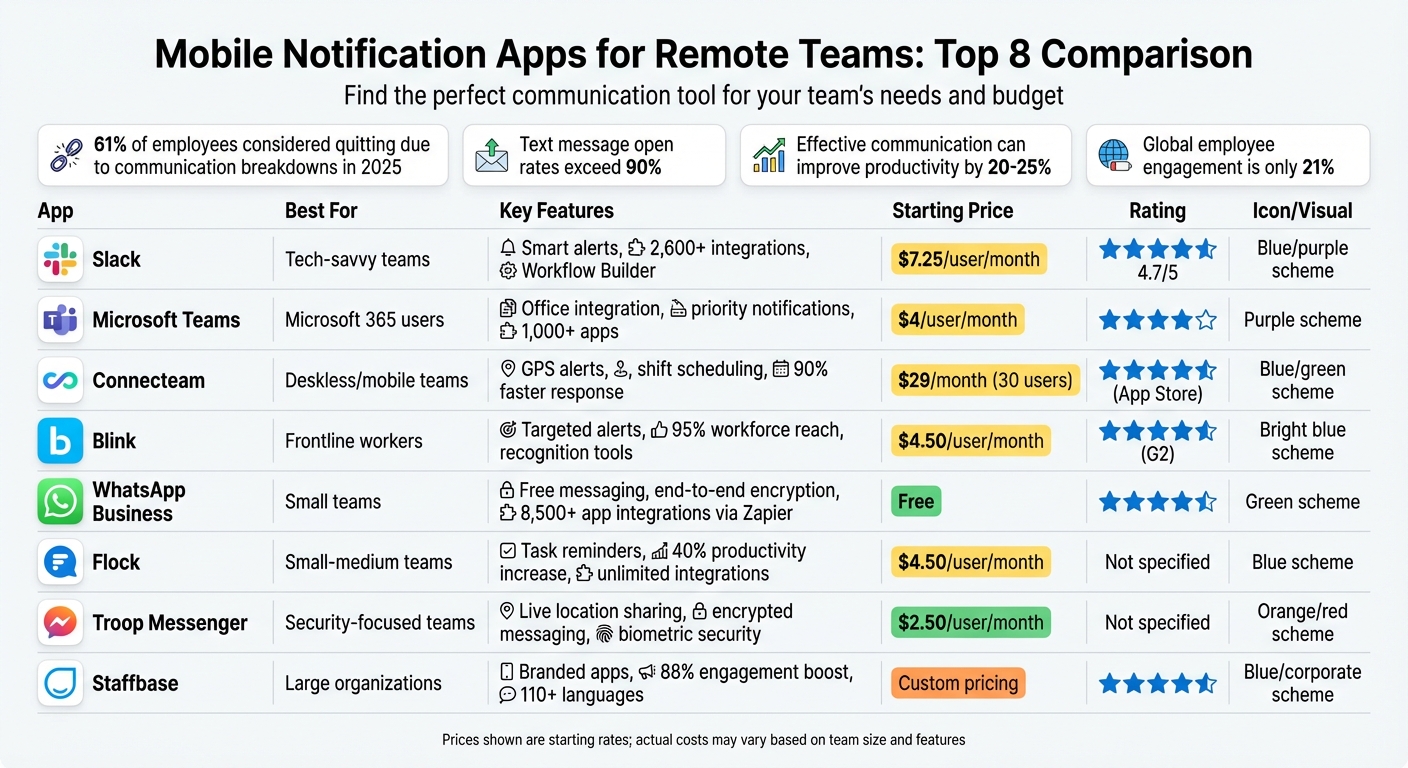
Mobile Notification Apps for Remote Teams: Features and Pricing Comparison Chart
5 Best Employee Communication Software Tools 2025 (Team Communcation Apps)
sbb-itb-d1a6c90
1. Slack
Slack has become a go-to communication hub for remote teams, and its mobile notification system plays a big part in its appeal. The platform uses smart routing to send alerts to your desktop while you're active, then seamlessly switches to mobile or email when you're away. This setup avoids the annoyance of duplicate notifications across devices.
Push Notifications
Slack's notification system gives you fine-tuned control over what demands your attention. By default, it alerts you about direct messages, @mentions, thread replies, and @channel announcements. You can also set custom keyword alerts for specific projects or clients and adjust mobile notification delays to avoid redundant pings.
For urgent matters, Slack offers an emergency override. Even if someone has Do Not Disturb enabled, you can push a notification through when it’s absolutely necessary. This feature strikes a balance between respecting focus time and ensuring critical updates get through.
Mobile Accessibility
Slack's mobile app is designed with accessibility in mind. It supports screen readers, keyboard shortcuts, adjustable zoom, and custom contrast settings. You can even sync your Google or Outlook calendar to automatically update your status, or use the /dnd command to pause notifications during focused work sessions.
Integration Options
Slack shines with its extensive integration ecosystem, offering over 2,600 apps in its marketplace. This allows you to connect tools like Zoom for video calls, Asana or Trello for project management, and Google Drive for file sharing - all without leaving Slack. These integrations made it easier for companies to transition to remote work by centralizing communication.
One standout feature is Slack's Workflow Builder, which automates repetitive tasks and communications. Users have reported a 28% time savings thanks to this tool. Whether it's automating status updates or streamlining approvals, Workflow Builder helps teams work more efficiently.
Pricing Tiers
Slack offers a free tier that covers basic messaging and allows you to accept Slack Connect invitations from external collaborators. Paid plans start at $7.25 per user per month for the Pro tier (with up to 10 app integrations), $12.50 per user per month for Business+ (which includes unlimited integrations), and custom pricing for Enterprise Grid. Slack AI can be added for $10 per user per month.
Best Use Cases for Remote Teams
Slack serves as a digital office, organizing work through channels dedicated to projects or departments. This ensures everyone has access to the same information, no matter where they are. Features like threaded messaging and clips make asynchronous collaboration across time zones seamless. For quick, spontaneous discussions, "Huddles" offer audio or video calls with screen sharing, replicating the feel of in-person desk chats.
With a 4.7 out of 5-star rating on Capterra from 23,825 reviews, users frequently praise Slack's user-friendly design and expansive integration options.
"Unlike email, where messages can quickly get lost, you can grab a specific person's attention with a notification in Slack when you need a rapid response".
2. Microsoft Teams

Microsoft Teams is a powerful tool for organizations that rely on Microsoft products. Its notification system is designed to keep remote workers on track by using three main alert types: the Activity Feed for general updates, @mentions for grabbing direct attention, and desktop or banner notifications for those moments that need immediate action. These features help users prioritize tasks and manage their workflow effectively.
Push Notifications
Microsoft Teams lets you fine-tune mobile notifications to suit your work style. You can choose to receive alerts "Always" or only when you're inactive on your desktop for longer than 3 minutes. For critical updates, Priority notifications can be set to repeat every 2–20 minutes until you acknowledge them. You can also follow specific channels to ensure you never miss high-priority updates. Presence notifications keep you informed when a coworker becomes available, helping you connect at the right time. To prevent overload, you can block notifications during off-hours by setting Quiet Hours in the mobile app or manually changing your status to "Busy" or "Do Not Disturb" when you need to focus. This level of customization ensures that Teams alerts work around your schedule, not against it.
Mobile Accessibility
The Teams mobile app is packed with features that make it accessible and user-friendly. It supports screen readers, keyboard shortcuts, and customizable fonts, making it adaptable for various needs. You can also enjoy high-quality audio modes and custom notification sounds (available on Windows and web versions). For added convenience, the app includes suggested replies for quick, one-click responses and allows you to record voice messages while on the move.
Integration Options
Teams stands out with its seamless integration into the Microsoft 365 suite. You can effortlessly collaborate on Word, Excel, and PowerPoint documents in real-time directly within the Teams interface, avoiding the hassle of switching between apps. It also connects with tools like SharePoint, OneDrive, and Outlook, making it a go-to platform for organizations already using Microsoft products. Beyond Microsoft apps, Teams supports a variety of third-party tools, allowing you to customize notifications for apps like Power BI or Loop.
"Teams is particularly strong for orgs already using Outlook and SharePoint." - HR Cloud
Pricing Tiers
Microsoft Teams offers a free version for users with a standard Microsoft login. Paid plans start at $4.00, $6.00, and $12.50 per user per month, with features scaling based on the plan. Some advanced functionalities, such as certain Copilot AI tools, may require additional fees.
Best Use Cases for Remote Teams
Microsoft Teams is an excellent choice for medium to large organizations (50+ employees) that are deeply embedded in the Microsoft 365 ecosystem. PCMag rated it 4.0 out of 5, praising its high-quality audio, messaging, and video conferencing features. Users also value its seamless Office integration and strong security measures, including data encryption and ISO27001 compliance. However, it’s worth noting that administrative tools can be complex, and the platform may strain older devices due to its resource demands.
| Notification Feature | How It Helps Remote Teams |
|---|---|
| @mentions | Highlights specific people or groups to ensure they see important messages in busy channels |
| Banner Alerts | Pops up instantly for replies, mentions, or meeting reminders |
| Priority Alerts | Sends repeated notifications every 2–20 minutes for urgent matters |
| Adaptive Cards | Enables actionable notifications via Power Automate, letting users respond or vote directly |
| Quiet Hours | Mutes mobile notifications during designated times or days |
3. Connecteam

Connecteam is designed specifically for deskless and field workers, offering reliable mobile notifications without requiring a computer. It’s trusted by over 60,000 companies and connects more than 1.2 million managers and employees worldwide. With an impressive 4.8-star rating on the App Store and 4.7 stars on Google Play from over 41,000 combined reviews, it’s a go-to solution for teams on the move.
Push Notifications
Connecteam ensures critical updates - like safety alerts or urgent announcements - reach remote teams instantly through mobile notifications. Employees respond to these alerts 90% faster. Managers can also schedule automated reminders for employees who haven’t viewed updates, and the Pop-Up Updates feature (available with the Communications Expert Plan) displays full-screen alerts that require user acknowledgment before proceeding.
Targeted notifications are made possible with Smart Groups, which allow messages to be sent to specific teams based on roles, departments, or locations. Real-time read receipts help managers track who has seen each notification, and alerts can be scheduled to go out only during work hours, helping maintain a healthy work-life balance.
Mobile Accessibility
The Connecteam app is available on both iOS and Android, offering a mobile-first design that’s easy to navigate, mirroring the look and feel of popular social messaging apps. This design minimizes the need for extensive training. The app includes accessibility features like screen reader compatibility and an accessibility menu and supports over 10 languages to accommodate a global workforce.
In addition to notifications, the app supports one-on-one and group chats, voice messages, video sharing, and even phone calls. Users can link directly to forms, training modules, or tasks within chat messages, creating a seamless workflow. This mobile experience is further enhanced by strong integrations with other tools.
Integration Options
Connecteam works seamlessly with business applications like Zapier, QuickBooks Online, Gusto, ADP, Paychex, and Xero. These integrations make it easy to sync payroll data, automate tasks, and keep your tech stack connected. The platform also prioritizes security with 256-bit SSL encryption and automatic access revocation for departing employees.
"When we implemented Connecteam, the biggest thing for me as a company owner was actually taking back control of my own company." - Mary-Jane Pettit, CEO and Founder
Pricing Tiers
Connecteam’s pricing is based on a Hub system, covering Operations, Communications, and HR & Skills, so you only pay for the tools you need. The Small Business Plan is free for life for up to 10 users. Paid plans start at $29/month for the first 30 users on the Basic tier, which includes unlimited chat, a company feed, and a directory. The Advanced plan, priced at $49/month, adds features like chat scheduling, anonymous surveys, and smart groups. For $99/month, the Expert plan offers advanced tools like auto-translation, pinned posts, and API access. For teams larger than 30 users, per-user fees range from $0.50 to $3.00 per month. All premium plans include a 14-day free trial.
Best Use Cases for Remote Teams
Connecteam is especially useful for frontline and mobile workers in industries such as construction, healthcare, retail, manufacturing, and field services. It has received an Editor's Score of 9.5/10 from Business.com, and one case study revealed that 98% of employees used the app daily, cutting training completion time by 50%. Additionally, all plans include HIPAA compliance (via BAA), making it a dependable choice for teams handling sensitive data.
"Connecteam allows us to communicate more efficiently than ever before and made the company feel more united." - Cora, Hospitality HR Advisor
4. Blink

Blink is tailored for frontline and deskless workers, often those without company email addresses, making it a go-to solution across various industries. It acts as a single digital hub, combining chat, news feeds, digital forms, and recognition tools, all within a mobile-first app. With a solid 4.8/5 rating on G2 and 4.7/5 on Capterra, Blink has also been recognized as a "Challenger" in the 2025 Gartner Magic Quadrant for Intranet Packaged Solutions.
Push Notifications
Blink's notification system ensures employees stay informed with targeted, timely alerts. Notifications can be segmented by team, role, or location, leading to a 95% reach across the workforce. On average, employees open the app seven times daily, with response rates three times higher than traditional communication methods.
The platform also includes an acknowledgment feature, confirming that critical updates are received and understood. Real-time analytics track engagement, while Blink Assist, an AI-driven tool, helps managers craft clear and effective messages. This notification setup ensures a smooth and user-friendly experience for mobile users.
"Blink has been a game-changer on how we communicate and engage with our employees. By providing a unified platform, we've ensured that every team member, from corporate staff to frontline franchise employees, feels connected and valued." - Traci Wilk, Chief People Officer, The Learning Experience
Mobile Accessibility
Blink is available on iOS and Android, offering a user-friendly, social-media–style interface that requires little to no training. Its BYOD (Bring Your Own Device) readiness allows secure access on personal devices. Users can engage in 1:1 or group messaging, voice and video calls, and share various file types such as images, GIFs, videos, PDFs, and spreadsheets. Between 2024 and 2025, McDonald's transitioned 700,000 employees across 8,400 restaurants in 25 countries to "McD Connect", a digital engagement app powered by Blink.
Integration Options
Blink goes beyond notifications and accessibility by integrating seamlessly with major identity and access management systems like Okta and Active Directory Federation Services. These integrations enable single sign-on, increasing tool adoption by up to five times. The platform also connects with HR systems like Workday, ServiceNow, and UKG, as well as various cloud tools, to centralize company policies and resources.
"It ticked every box - simple, secure, BYOD-ready, and designed around an inclusive employee experience." - David Saada, HRIS Director & DPO, ID Logistics
Pricing Tiers
Blink offers a 30-day free trial for new users. The Business Plan costs $4.50 per user per month for up to 1,000 users. For larger organizations, the Enterprise Plan comes with custom pricing. The platform is designed for quick setup, often within hours, without requiring dedicated IT support.
Best Use Cases for Remote Teams
Blink is ideal for organizations with frontline or mobile-first employees, making it a perfect fit for industries like retail, manufacturing, healthcare, and logistics. For example, Stagecoach used Blink to connect its dispersed workforce, reducing employee turnover by 26%. Similarly, easyJet implemented the platform in late 2025 to streamline communication for its 19,000+ employees. With features like encryption and audit logs, Blink also appeals to organizations in regulated industries that prioritize security.
5. WhatsApp Business
WhatsApp Business provides a straightforward messaging solution, boasting over 1 billion downloads and a 4.5/5 rating. It's free to download and use, making it an excellent option for freelancers and small remote teams seeking efficient, cost-free communication. Let’s explore how WhatsApp Business manages notifications and other features to enhance remote collaboration.
Push Notifications
WhatsApp Business ensures instant communication with real-time notifications, enabling team members to stay connected despite physical distances. The app includes read receipts, which confirm when messages are seen, promoting accountability. Additionally, through third-party tools like Zapier, users can integrate with over 8,500 apps to automate notifications and streamline workflows.
Mobile Accessibility
The app supports dual-account functionality, allowing users to manage both personal and business accounts on a single device. It syncs across five devices, with the option to expand to 10 through Meta Verified. During setup, users can transfer chat history, media, and contacts from personal accounts. Features like mobile-friendly labels help organize conversations, while automation tools such as away messages and quick replies ensure responsiveness, even when team members are unavailable.
Integration Options
While WhatsApp Business is free, its integration capabilities are somewhat limited compared to dedicated business platforms. It can connect to over 8,500 apps via Zapier for automation. However, it lacks direct integration with essential business tools like CRMs (e.g., Salesforce) or productivity suites (e.g., Google Workspace). Advanced features such as message threading, detailed user statuses, or task management within the chat interface are also missing.
Pricing Tiers
The app is free, with standard data charges applying for messaging and calls, particularly for international communication. For those needing additional features, the Meta Verified subscription offers benefits like increased device limits (from 5 to 10) and enhanced authenticity. Pricing for this subscription varies by region. This cost-effective model is ideal for small teams that prioritize simplicity and real-time communication without incurring extra expenses.
Best Use Cases for Remote Teams
WhatsApp Business is a great fit for freelancers and small, distributed teams needing a professional communication tool that’s quick and easy to use. Its end-to-end encryption ensures secure conversations and multimedia sharing, making it a reliable choice for handling sensitive information. Group chats further enhance team collaboration. However, as teams grow, the app’s limited administrative controls and participant capacity - common in consumer-oriented platforms - may pose challenges.
6. Flock
Flock is a cost-effective communication platform relied upon by over 30,000 companies to simplify remote work. Teams using Flock have reported a 40% increase in productivity and a 40% reduction in email usage. For example, CEO Prashant Tandon successfully transitioned his entire team to the platform, resulting in noticeable improvements.
Push Notifications
Flock includes a Reminder Bot that sends automated alerts for tasks, deadlines, and meetings - either to individuals or entire channels. You can easily set reminders using the /remind command. For instance, typing "/remind me in 15 mins to attend the session" triggers a notification. There’s also a snooze feature for postponing alerts.
The platform integrates seamlessly with third-party apps like Asana, Trello, and Jira, pushing real-time updates into team channels. For sales teams, CRM integrations notify users when new leads are qualified. Holly Hanson, President of Drama Kids of North Columbus, shared how Flock transformed her team’s communication. Before adopting the platform, they relied on text and email, leading to missed messages. With Flock, they now ensure critical information is never overlooked.
Flock also guarantees a smooth mobile experience, making it easy to stay connected.
Mobile Accessibility
Flock’s lightweight mobile apps, available for iPhone and Android, are designed to load quickly and efficiently. A standout feature is the "Me Channel", which acts as a private workspace where users can jot down personal reminders or organize thoughts before sharing them with the team. For situations where tone matters, voice notes are available to minimize miscommunication.
The app displays 25 messages per scroll, enabling users to catch up on updates quickly. Mobile-specific features include a Do Not Disturb (DND) mode for managing notifications on the go. You can also invite guest users to specific channels, allowing external collaborators or clients to stay informed about relevant projects alongside your internal team.
Integration Options
Flock connects with popular productivity tools like Trello, Asana, GitHub, Jira, Google Drive, Dropbox, Box, and Microsoft OneDrive, delivering real-time updates on task progress and code commits. For instance, you can create new Asana tasks directly from conversations using the /asana add command or assign GitHub issues without leaving the app.
The Google Calendar integration makes it possible to respond to meeting invites, receive reminders, and view daily schedules all within Flock. Pavan Srinath, Head of Policy Research at The Takshashila Institution, shared that using Flock helped his team cut email usage by 40%, saving 1-2 hours daily. These integrations enhance communication, helping teams work more efficiently.
Pricing Tiers
Flock offers three pricing plans tailored to different team sizes. The Starter plan is free and supports up to 20 members, offering 10,000 searchable messages, 10 public channels, and 5GB of total storage. The Pro plan, priced at $4.50 per user per month (billed annually) or $6.00 per user per month (billed monthly), is ideal for teams of 20-100 members. This plan includes unlimited message history, unlimited private channels, 10GB of storage per user, and group video conferencing. For larger teams, the Enterprise plan is available with custom pricing, offering 20GB of storage per user, SSO, Active Directory Sync, and dedicated 24/7 support.
Guest collaboration is free for the first 90 days. All plans, even the free tier, support unlimited third-party app integrations.
Best Use Cases for Remote Teams
Flock is particularly well-suited for small to medium-sized remote teams that need a blend of communication and productivity tools. The Pro plan is a great choice for teams of 20-100 members requiring unlimited message history and group video calls. Hillan Klein, COO of Namecheap, summed it up perfectly:
"Flock is our virtual office - a central hub where everyone can work together, drive through action and, ultimately, succeed as a team."
With SOC 2 compliance and TLS 1.2 data encryption, Flock is also a secure option for teams handling sensitive information. Ryan Davis, President of Dietitians on Demand, highlighted its impact, stating that "Flock enables us to have the most efficient and fastest communication possible to deliver our service". For teams seeking built-in tools like Polls and To-Dos without relying heavily on external integrations, Flock offers these features directly within the platform.
7. Troop Messenger
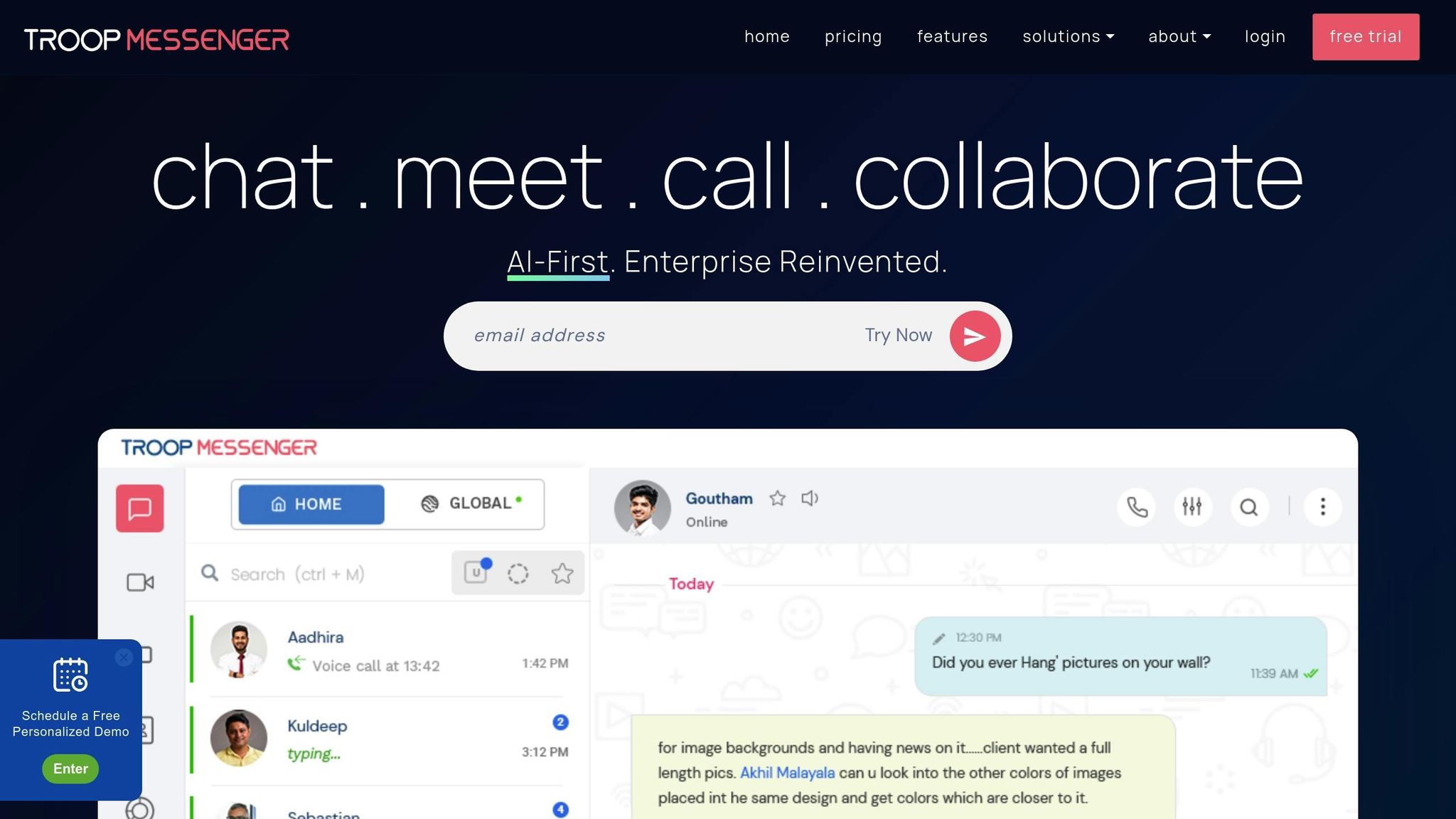
Troop Messenger brings together essential tools for business communication, offering features like file storage, group chats, video calls, live location sharing, to-do lists, read receipts, and screen sharing - all in one place.
Push Notifications
Troop Messenger ensures instant alerts for one-on-one chats, group discussions, and audio/video calls. A standout feature is the "Trumpet" tool, which displays important messages as sticky notes, making sure no critical update slips through.
The Airtime Groups feature allows admins to broadcast one-way announcements to large groups, ensuring important messages remain visible without getting buried in replies. Enhanced read receipts with visual tags help maintain accountability, especially in remote work environments.
The platform also includes an AI Buddy assistant to send automated task reminders and summarize missed conversations, helping team members stay up to date. Additional tools like the Message Recall feature allow users to delete messages within 10 minutes, while the Forkout feature enables bulk messaging to multiple users or groups at once without creating a shared chat. These features make notifications efficient and user-friendly.
Mobile Accessibility
Troop Messenger's mobile apps for iOS and Android come equipped with biometric security options like fingerprint and face recognition. The Call Takeover feature allows users to seamlessly switch between mobile and desktop calls.
For teams working in the field, live location tracking is a game-changer. Members can share their real-time location and even view location history directly from the app. There's also a built-in image editor for marking up and annotating images before sharing them with teammates.
The app supports 13 languages, including English, Hindi, Arabic, Portuguese, Japanese, and Korean, making it accessible to teams around the world. Users can further personalize their experience with options like dark and light modes and customizable chat wallpapers.
For sensitive conversations, the "Burnout" feature provides a private chat window where messages self-destruct after being read, adding an extra layer of security.
Integration Options
Troop Messenger integrates seamlessly with Zapier, opening access to over 8,000 third-party apps and 450+ AI tools, as well as Google Drive and Dropbox for simplified workflow automation and file management.
For teams prioritizing security, the platform supports LDAP and SSO (Active Directory/OpenLDAP) for centralized user access management.
One of its standout features is "Jointly Code", an integrated code editor that allows real-time collaborative coding during audio-video conference calls. As the company explains:
"Developers, you have an exclusive code editor in this collaboration tool. Meet in an audio-video conference call to write and edit code."
Additionally, native integrations with GitHub and Jira are currently in development, promising even more functionality for development teams.
Pricing Tiers
| Plan | Price | Key Features |
|---|---|---|
| Premium | $2.50/user/month | Audio/video calls, guest access, unlimited search history, 150 GB storage |
| Enterprise | $5.00/user/month | Group calls, screen sharing, message editing, LDAP/SSO, 1 TB storage |
| Superior | $9.00/user/month | Remote desktop control, branding logo, "Off Grid" mode, high availability |
All plans feature end-to-end encryption for chats, calls, and conferences, ensuring secure communication.
Best Use Cases for Remote Teams
Troop Messenger is especially suited for regulated industries, offering on-premise and self-hosting options to meet stringent security and compliance requirements. Asloob Alam highlights:
"Troop Messenger is a widely trusted remote collaboration tool by the Military, Governments, and business enterprises for exchanging work conversations in a secure environment."
The platform is also a great fit for remote development teams, thanks to its Jointly Code editor and upcoming GitHub and Jira integrations. For field teams, features like live location sharing and biometric security provide both visibility and protection, making mobile-first communication seamless.
8. Staffbase
Staffbase is a mobile-first communication platform tailored for large organizations with widely distributed, frontline teams. Trusted by over 2,000 companies worldwide, it offers push notifications, mobile accessibility, and extensive integrations to streamline communication across diverse workforces.
Push Notifications
With Staffbase, push notifications are delivered through a custom-branded app that carries your company’s name and icon, creating a sense of trust and familiarity among employees. These notifications are highly effective: they can boost app engagement by 88%, achieve a 65% return rate, and targeted alerts can increase response rates by up to 293%. Most notifications are read within three minutes of being sent, a stark contrast to the 22% read rate of internal emails.
Timing is key. For example, case studies show that sending notifications just before lunch or at the end of the workday can triple reading rates. At Viessmann, a manufacturing company, 75% of employees read push notifications within an hour of delivery.
"Push notifications are really positive for us but we set some rules around them... we are only sending one notification daily, generally every second day." - T-Systems
Don Wooldridge, Vice President of Culture Development and Training at TradeWinds Island Resorts, highlighted the importance of a focused approach to notifications:
"This segment made it clear that they only looked at the app when it got their attention and if we wanted them to see the message we had better push notify."
His team limits notifications to three specific scenarios: app contests, emergency alerts, and messages directly from the company president.
Mobile Accessibility
The Staffbase app is available on both the Apple App Store and Google Play, supporting iOS 16+, iPadOS, and M1 Macs. It allows secure login even without corporate email credentials, offers offline access, supports AI-powered translations in over 110 languages, and includes integrated voice messaging.
Customization options are extensive, enabling organizations to personalize the app with their own branding, such as icons, colors, and fonts.
SAK Construction, a company with a 70% deskless workforce, adopted Staffbase in 2024 to replace bulk mailer blasts with targeted mobile communication:
"The app has been a great success when it comes to streamlining communication across the company. Now, we can easily spread targeted, relevant information instead of using large mailer blasts." - SAK Construction
Integration Options
Staffbase integrates seamlessly with platforms like Microsoft 365, Google Drive, and popular cloud-based HRIS systems such as Workday, SAP, Oracle, and ADP. It offers over 150 pre-built services through its custom API, SDK, and a low-code Integration Builder.
The platform is ISO 27001 certified and GDPR compliant, ensuring high standards of data security. Additionally, its Employee AI feature helps employees quickly access answers to company policy questions through the app.
Pricing Tiers
Staffbase does not publicly disclose its pricing. Interested organizations are encouraged to contact the sales team for a demo and a custom quote. However, it’s worth noting that the platform has high setup costs and requires significant time for customization, making it more suitable for large enterprises.
Best Use Cases for Remote Teams
Staffbase is particularly effective for frontline and deskless workers in sectors like healthcare, retail, manufacturing, and construction - industries where employees often lack access to corporate email. It’s ideal for scenarios such as emergency alerts, reminders about benefits enrollment deadlines or project milestones, and promoting company events.
James Dean, a writer at Pebb.io, emphasizes the platform's strengths:
"Staffbase is built for large, distributed organizations that prioritize internal communication. Its mobile-first approach makes it especially valuable for deskless workers - think healthcare professionals, retail employees, or manufacturing staff."
With a 4.8/5.0 customer rating, Staffbase is recognized for its service quality, responsiveness, and value. The platform goes beyond real-time chat, focusing instead on fostering long-term employee engagement across geographically dispersed teams.
App Comparison Table
Here's a detailed comparison of eight mobile notification apps to help you decide which one fits your remote team's needs. Each app brings something different to the table - from advanced integrations and tailored notification options to pricing plans that cater to various team sizes and workflows.
| App | Push Notification Features | Mobile Access | Key Integrations | Pricing (USD) | Best For |
|---|---|---|---|---|---|
| Slack | Customizable notifications like Do Not Disturb, thread alerts, reminders, and calendar sync | iOS, Android, Desktop | 2,600+ integrations (e.g., Zoom, Asana, Salesforce, Google Drive) | Free; Pro from $7.25/user/mo; Business+ at $15/user/mo | Tech-savvy teams needing extensive integrations and flexibility |
| Microsoft Teams | Organized notifications across teams, channels, and threads, plus video/audio meeting alerts | iOS, Android, Desktop, Web | 1,000+ apps, deeply integrated with Microsoft 365 (Word, Excel, SharePoint) | Included in Microsoft 365 (from $4–$6/user/mo); standalone available | Enterprises already using Microsoft 365 |
| Connecteam | Alerts for GPS-based tasks, shift schedules, and mobile-first workflows | iOS, Android | API support and payroll systems | Free for up to 10 users; $29/mo for the first 30 users, then $0.50/user/mo | Shift-based teams focused on scheduling and time tracking |
| Blink | News feed alerts, secure chat notifications, and "Kudos" recognition tools | iOS, Android | HRIS and single sign-on (SSO) | From $4.50/user/mo | Deskless workers in industries like retail, healthcare, and hospitality |
| WhatsApp Business | Secure instant messaging with broadcast lists and end-to-end encryption | iOS, Android | Limited integration (via Zapier for automation) | Free for standard app; custom pricing for API/Platform | Small teams handling customer communications |
| Flock | Notifications for channels, tasks, and video calls | iOS, Android, Desktop | 50+ app integrations | Free for up to 20 users; Pro from $4.50–$6.00/user/mo | Small to medium businesses looking for cost-effective solutions |
| Troop Messenger | Alerts for group chats, audio/video calls, and screen sharing | iOS, Android, Desktop | Integrates with Dropbox and Jira | Premium from $2.50/user/mo; Enterprise at $5/user/mo | Security-minded SMBs needing encrypted communication tools |
| Staffbase | Custom push notifications with a branded app and targeted alerts | iOS 16+, Android, iPadOS, M1 Macs, offline access | Over 150 pre-built services, Microsoft 365, Google Drive, HRIS (Workday, SAP, Oracle, ADP) | Custom pricing (~$30,000/year for 1,000 users) | Large global enterprises with frontline workforces |
The table highlights each app's core features and pricing, making it easier to pinpoint the best option for your team. With text message open rates exceeding 90% - often read within minutes - choosing efficient tools like an effective notification app is crucial for bridging communication gaps in remote work.
Each app has its niche. For example, Slack's massive integration library makes it a powerhouse for knowledge workers, while Microsoft Teams offers seamless collaboration for enterprises already invested in Microsoft 365. Smaller teams might lean toward Connecteam or Flock for their budget-friendly tiers, while large organizations can benefit from Staffbase's custom solutions tailored for frontline employees. Whatever your team's needs, there's an app designed to keep everyone connected and informed.
Conclusion
Selecting the best mobile notification app for your team boils down to matching your workflow and budget with the features that matter most. For those already using Microsoft 365, Microsoft Teams is a logical choice since it’s included in your subscription.
If your team values user-friendly design and a wide range of integrations, Slack is a standout option - 85% of its users report enhanced team communication after adopting the platform. For teams mindful of costs, take a close look at the pricing and features of the apps mentioned here, or compare banking tools to further optimize your overhead. Many offer free trials and flexible pricing plans to fit teams of different sizes.
Each app caters to specific needs, ensuring there’s an ideal solution for every type of remote team. For frontline and deskless workers, tools like Connecteam, Blink, and Staffbase are designed with mobile-first interfaces and location-based notifications. These platforms capitalize on text message open rates exceeding 90%, with most messages read within minutes. On the other hand, organizations with a focus on security might lean toward Troop Messenger or Microsoft Teams for their robust admin controls and security measures.
Before fully committing, consider piloting the app within one department and setting 30-, 60-, and 90-day goals to track adoption metrics like monthly active users. Most of these apps provide free trials (ranging from 14 to 30 days), allowing you to test mobile accessibility and notification features without requiring heavy IT involvement. With effective communication practices, businesses can see productivity improvements of 20–25%, making the right app a worthwhile investment.
The key to choosing the right tool lies in understanding your team’s needs - whether it’s real-time chat, threaded discussions, or broadcast announcements. With global employee engagement hovering at just 21%, the right mobile notification app can close communication gaps, keeping your remote team informed, connected, and productive. By exploring these top options, you can reduce miscommunication and set your team up for success.
FAQs
How can mobile notification apps improve communication in remote teams?
Mobile notification apps improve communication for remote teams by providing instant updates, reminders, and alerts, ensuring everyone stays in the loop regardless of where they are. By centralizing key messages and announcements, these tools cut down on miscommunication and help maintain steady workflows.
They also enable asynchronous communication, allowing team members to reply when it suits their schedule. This adaptability is especially useful for overcoming time zone differences and varied work hours, making collaboration smoother and more effective for distributed teams.
What features should you look for in a mobile notification app for remote teams?
When choosing a mobile notification app for your remote team, it's important to focus on tools that enhance communication without becoming a distraction. Prioritize apps that provide real-time alerts with customizable settings, like do-not-disturb options or priority channels. These features help team members stay updated while avoiding unnecessary interruptions. Make sure the app works seamlessly across devices - whether it's iOS, Android, or desktop - so everyone stays connected.
Look for advanced capabilities such as integration with essential work tools like project management platforms, calendars, and file-sharing systems. Strong security features, including encryption and role-based access, are a must to protect sensitive information. Apps with smart filtering can help highlight the most important updates, keeping your team focused on what matters most.
Reliable offline support ensures critical messages are accessible even without an internet connection, and analytics tools can provide managers with insights to fine-tune communication strategies. By combining these features, you can create a streamlined communication flow that keeps your team informed and productive - without the risk of notification overwhelm.
How do mobile notification apps enhance productivity and engagement for remote teams?
Mobile notification apps make it easier for remote teams to stay connected by sending real-time alerts, reminders, and updates straight to employees' smartphones. This keeps everyone on the same page, no matter where they’re working. By transforming asynchronous messages into immediate prompts, these apps cut down on delays and enhance teamwork, helping teams get things done faster and more smoothly.
When notifications deliver the right information at the right time - like deadline reminders, task progress updates, or daily schedules - productivity naturally improves. Employees can focus on what matters most without constantly juggling multiple tools. These apps also boost engagement by creating a sense of connection and visibility. Whether it’s recognizing a colleague’s achievement, running quick polls, or celebrating milestones, timely updates keep everyone involved. For businesses looking for customized solutions, BizBot offers a curated directory of apps designed to fit specific workflow requirements.