Managing security across AWS, Azure, and Google Cloud is complex. Multi-cloud security automation simplifies this by centralizing tools and processes to ensure consistent protection and risk management. Here's what you need to know:
- Why Automation Matters: Manual processes are slow and error-prone. Automation reduces audit time by 85% and cuts misconfigurations by 60–80%.
- Key Tools:
- CSPM: Monitors cloud configurations to prevent risks like public storage or unencrypted data.
- CIEM: Manages permissions across clouds, addressing over-privileged accounts.
- CWPP: Protects workloads like containers and VMs with real-time monitoring.
- Centralized Security: Combine native tools with open-source options for unified monitoring, saving up to 80% in costs.
- Policy Enforcement: Use Policy-as-Code to define and automate rules across providers, ensuring compliance with standards like GDPR and HIPAA.
Automation not only strengthens security but also saves time and resources. Start small - focus on encrypting storage or managing permissions - and expand as you go.
Policy as Code Automation for Multi-Cloud Security
sbb-itb-d1a6c90
Core Components of Multi-Cloud Security Automation
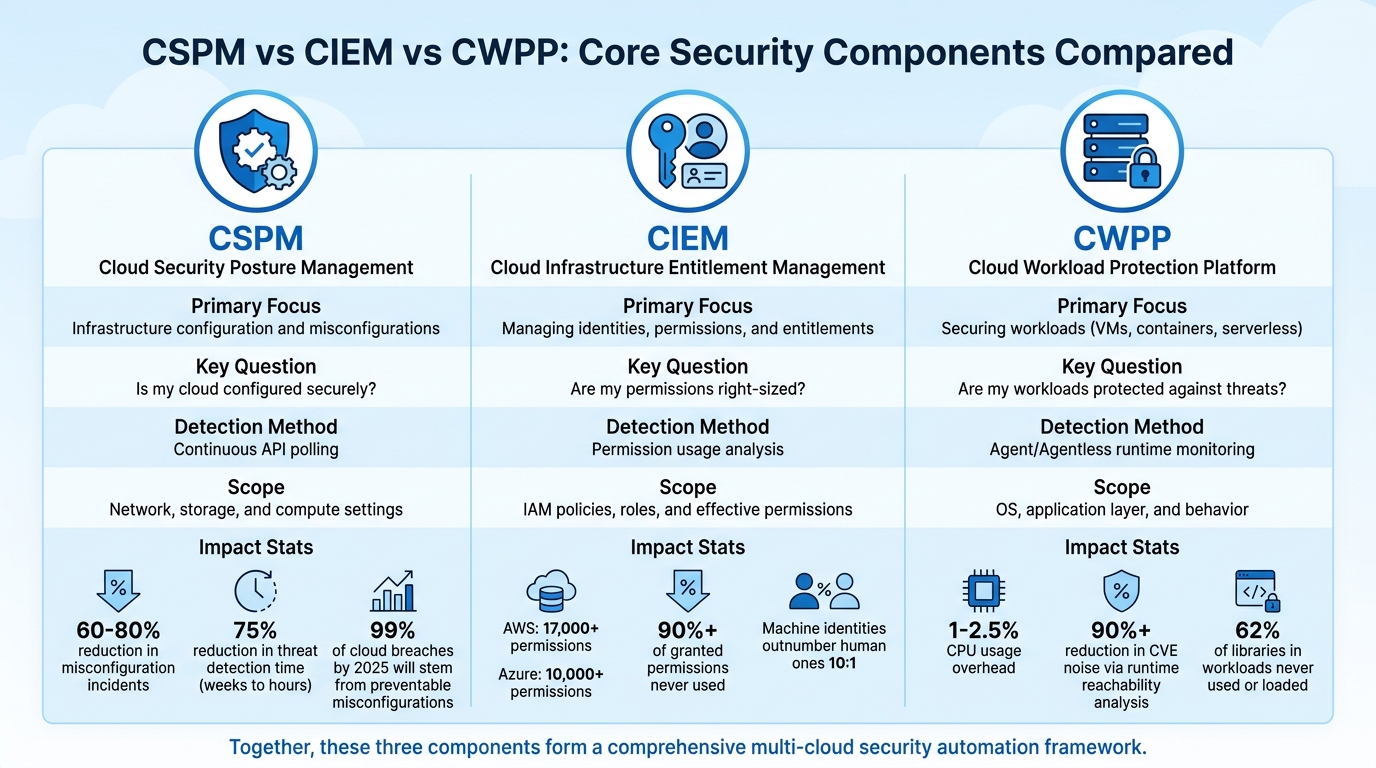
CSPM vs CIEM vs CWPP: Multi-Cloud Security Tools Comparison
A solid multi-cloud automation framework is built on three essential components: configurations, identity permissions, and workloads. Together, these elements form the backbone of a security strategy that minimizes vulnerabilities. By connecting these components with centralized monitoring and vulnerability management, you can achieve a cohesive and effective approach to cloud security.
Cloud Security Posture Management (CSPM)
CSPM serves as your constant watchdog for cloud configurations across environments. It offers real-time visibility into resources like S3 buckets, IAM roles, and Kubernetes clusters, helping eliminate the risks of "shadow IT". The system scans for risky misconfigurations, such as unencrypted databases, publicly accessible storage, or overly permissive IAM roles.
CSPM also maps your cloud setup to compliance standards like CIS, SOC 2, HIPAA, and PCI DSS. Using security graphs, it identifies potential attack vectors - for instance, a publicly exposed VM combined with an over-privileged IAM role could lead to sensitive data exposure.
"A CSPM isn't watching the guards or checking IDs at the gate. Instead, it's constantly examining the castle's very structure." - CloudConsultingFirms
The numbers speak volumes: organizations using CSPM report a 60–80% drop in misconfiguration incidents and a 75% reduction in threat detection time, cutting it down from weeks to just hours. With projections showing that 99% of cloud breaches by 2025 will stem from preventable misconfigurations rather than sophisticated exploits, CSPM is clearly a critical tool.
To get started, use a phased approach: map your attack surface through discovery and baselining, sync with tools like Jira or ServiceNow for ticketing, and automate low-risk remediation tasks. This ensures your cloud environments are consistently aligned with security best practices.
Cloud Infrastructure Entitlement Management (CIEM)
While CSPM addresses configurations, CIEM zeroes in on permissions - essentially, who can do what within your cloud setup. With AWS offering over 17,000 permissions and Azure more than 10,000, managing these effectively is no small feat. Studies reveal that over 90% of granted permissions are never used, creating unnecessary risk.
CIEM consolidates provider-specific formats like AWS JSON policies, Azure RBAC, and GCP IAM bindings into a single view. It resolves complex inheritance chains to determine effective permissions, analyzing data from sources like AWS CloudTrail and Azure Activity Log. This helps pinpoint over-privileged accounts and suggests right-sized policies.
Machine identities, which outnumber human ones by a ratio of 10:1, often carry excessive privileges with little oversight. To address this, let CIEM platforms monitor permission usage for 60–90 days before making changes. This avoids disrupting infrequent but essential processes like quarterly reporting or disaster recovery. Start with a "recommendation-only" mode to build trust, then enable auto-remediation for low-risk scenarios, such as deactivating unused accounts. This approach ensures a unified and secure identity management system across your cloud environments.
Cloud Workload Protection Platforms (CWPP)
CWPP focuses on securing the workloads running in your cloud - whether virtual machines, containers, serverless functions, or bare-metal infrastructure. It continuously monitors system calls, network activity, file access, and process execution in real time.
"Attackers don't care about your CSPM score - they exploit running workloads." - Jonathan Kaftzan, VP Marketing, ARMO
Modern CWPP solutions address security at three levels: pre-deployment analysis of container images and IaC templates, runtime monitoring via agents or eBPF sensors, and centralized telemetry for incident response. Runtime protection identifies and blocks suspicious behavior with minimal performance impact, typically around 1–2.5% CPU usage.
One standout feature is "runtime reachability analysis", which highlights vulnerabilities that are actually loaded into memory and exploitable. This reduces noise from irrelevant CVEs by over 90%. Research shows that 62% of libraries in workloads are never used or loaded, allowing teams to focus on real risks instead of theoretical ones.
When implementing runtime protection, start with a "monitor-only" mode for 14–28 days to establish a baseline before enabling automated blocking. Integrate CWPP image scanning into your DevOps pipeline to catch outdated OS images or known CVEs early in development. Prioritize fixes for vulnerabilities in publicly exposed workloads with excessive permissions. This ensures your workloads remain secure across all cloud platforms.
| Capability | CSPM | CIEM | CWPP |
|---|---|---|---|
| Primary Focus | Infrastructure configuration and misconfigurations | Managing identities, permissions, and entitlements | Securing workloads (VMs, containers, serverless) |
| Key Question | "Is my cloud configured securely?" | "Are my permissions right-sized?" | "Are my workloads protected against threats?" |
| Detection Method | Continuous API polling | Permission usage analysis | Agent/Agentless runtime monitoring |
| Scope | Network, storage, and compute settings | IAM policies, roles, and effective permissions | OS, application layer, and behavior |
Setting Up Centralized Security Management
Managing multi-cloud environments without centralized security management is a recipe for inefficiency and risk. Companies operating across multiple cloud platforms spend 60% more time on security operations, yet still fail to catch 40% of misconfigurations during manual reviews. On average, a multi-cloud setup has 351 exploitable attack paths, making centralization not just helpful but absolutely necessary.
To address this, organizations need a unified approach to monitoring and policy enforcement - what experts call a "correlation plane". This isn’t about replacing native tools like AWS Security Hub, Azure Security Center, or GCP Security Command Center. Instead, it’s about layering a system on top that connects these tools, creating a cohesive view. A solid strategy combines real-time monitoring from native services with tools like Prowler for scheduled validation, all feeding into a centralized SIEM like ELK Stack, Wazuh, or Splunk. This layered approach offers unified visibility while maintaining the benefits of deep integrations from native tools.
"The goal of multi-cloud monitoring is not to eliminate native tooling - it is to add a correlation plane above it. The best architectures are additive, not replacement-focused." - CIOPages Editorial Team
The cost of centralization matters, too. Enterprise CSPM platforms can cost between $425,000 and $1,565,000 over five years for a company with 500 accounts. In contrast, combining native tools with open-source solutions like Prowler and ELK Stack can cost as little as $125,000 to $290,000, saving 70–81%. Avoiding the "double-monitoring trap", where you pay for both native and third-party tools collecting the same data, is key to keeping costs under control.
Unified Monitoring and Observability
Unified monitoring simplifies multi-cloud management by consolidating insights from AWS, Azure, and GCP into a single dashboard. As 93% of organizations are expected to adopt multi-cloud strategies by 2026, using an average of 4.8 clouds, switching between multiple consoles with different query languages and alert systems will become unsustainable.
OpenTelemetry (OTel) is the go-to framework for achieving this. It gathers logs, metrics, and traces from all cloud environments and funnels them into a central backend using the OTLP protocol. Companies using full-stack observability report 79% lower downtime compared to those relying on fragmented monitoring systems.
To get started, standardize your instrumentation. Use OpenTelemetry SDKs with consistent naming conventions and W3C Trace Context to follow requests across services like AWS Lambda, Azure Function, and GCP Cloud Run. For cross-cloud tracing, ensure services pass the traceparent and tracestate headers. If you use asynchronous messaging tools like AWS SQS and GCP Pub/Sub, you might need to manually inject these headers where auto-instrumentation isn't sufficient.
Tagging plays a critical role. Establish a tagging schema that includes details like environment, team, service, and cost-center. Enforce it with tools like AWS Config or Azure Policy. This consistency allows you to query resources across all providers easily. For example, you can quickly identify all unencrypted databases with a single SQL query using tools like CloudQuery.
Observability can be expensive, consuming 15–25% of total cloud spend. To manage costs, implement log filtering and sampling, which can reduce ingestion costs by up to 90%. Use the OpenTelemetry Collector's file_storage extension to buffer data locally in case your central backend becomes temporarily unavailable.
| Monitoring Category | Key Metrics to Track | Business Impact |
|---|---|---|
| Infrastructure | CPU, Memory, Disk I/O | Prevents resource exhaustion |
| Application | Response time, Error rates | Improves user experience |
| Network | Latency, Bandwidth, Packet loss | Ensures seamless connectivity |
| Security | Misconfigurations, Access violations | Safeguards systems and data |
| Cost | Spend by service, Budget tracking | Helps control cloud expenses |
While unified monitoring provides visibility, automated policy enforcement strengthens security across your multi-cloud setup.
Policy-as-Code and Identity Management
Manually managing security policies for each cloud provider is inefficient and error-prone. Policy-as-Code (PaC) simplifies this by letting you define a single set of rules - like "no public storage" - that can be applied across AWS, Azure, and GCP using tools like Open Policy Agent (OPA).
With 54% of organizations citing multi-cloud complexity as their biggest security challenge, automation is essential. Manual reviews can’t keep up with thousands of permissions across hundreds of accounts. By integrating PaC into your CI/CD pipeline, security checks become part of the deployment process, catching misconfigurations before they reach production.
Identity management follows a similar principle. Instead of managing users separately for each cloud, use a single identity provider like Okta or Azure AD across all platforms. Define roles - such as "readonly", "developer", or "admin" - in a cloud-agnostic way, and use tools like Terraform to map these roles to specific implementations. For example, an "admin" role can correspond to an AWS IAM Role, an Azure Managed Identity, or a GCP Service Account - all defined just once.
Workload Identity Federation enhances security by enabling workloads in one cloud to authenticate with another using short-lived tokens instead of static credentials. For instance, an AWS Lambda can securely access GCP resources without relying on long-term API keys. This reduces your attack surface and simplifies credential rotation.
Store all policies as code in version control systems like Git to maintain an audit trail of changes. In the event of a security incident, you can quickly identify and roll back problematic policies. Tools like Conftest can validate Terraform plans against OPA policies during builds, ensuring that violations - like deploying a publicly accessible S3 bucket - are caught before they become issues.
Start small. Use a "recommendation-only" mode where policies flag violations without blocking deployments. This builds trust with development teams and allows you to refine policies. Once you’re confident, enable automated remediation for low-risk scenarios, such as disabling unused accounts. Pair this with periodic runtime scans to catch manual changes made directly in cloud consoles.
| Feature | Traditional Cloud Security | Policy-as-Code (PaC) Security |
|---|---|---|
| Review Process | Manual configuration reviews | Automated, continuous enforcement |
| Assessment | Point-in-time checks | Real-time validation |
| Response | Reactive incident handling | Proactive threat prevention |
| Tooling | Provider-specific tools | Unified, multi-cloud policies |
| Posture | Inconsistent security standards | Consistent security baseline |
Automating Vulnerability and Compliance Management
Manual audits just can't keep up with the speed and complexity of multi-cloud environments. Managing multiple cloud platforms not only eats up 60% more time but also leaves 40% of misconfigurations undetected. These inefficiencies increase risks across cloud setups. The way forward? Automation - specifically, continuous vulnerability scanning and compliance monitoring that works seamlessly across platforms like AWS, Azure, and GCP. This method ties directly into centralized monitoring and policy enforcement strategies discussed earlier.
Here’s a staggering fact: nearly 99% of cloud breaches stem from preventable misconfigurations. Automating compliance workflows can cut configuration errors by 90% and reduce wasted cloud spending by 30%. Continuous scanning and unified policy controls are key to closing this gap.
Automated Vulnerability Scanning
Continuous scanning ensures coverage across both persistent and ephemeral assets, such as VMs, containers, and serverless functions. Traditional agent-based tools often miss more than half of these assets, leaving significant blind spots. Modern agentless scanning fills these gaps by providing a more comprehensive view.
Take tools like Prowler, for example. They offer consistent security checks across major cloud providers, running 576 checks for AWS, 162 for Azure, and 79 for GCP. This ensures a consistent security posture, even with the varying APIs of different providers.
A shift-left approach adds another layer of protection by scanning Infrastructure as Code (IaC) templates, like Terraform or Bicep, during CI/CD builds. This catches misconfigurations before resources are provisioned. When combined with runtime scanning, it also detects configuration drift - those manual changes that deviate from the intended state.
Start with automated fixes for lower-risk issues, like adding missing tags or enabling encryption on new storage buckets. For higher-risk changes, such as modifying security groups or access policies, alerts should be sent for human review instead of auto-correction. This balanced approach addresses vulnerabilities without disrupting developer workflows. Alongside scanning, maintaining compliance monitoring ensures all controls meet regulatory requirements.
Compliance Monitoring Across Cloud Providers
In a multi-cloud setup, compliance requires a unified policy layer to smooth out differences between providers. For instance, enforcing a rule like "no public databases" involves different implementations for AWS RDS, Azure SQL Database, and GCP Cloud SQL. Tools like Open Policy Agent (OPA) can enforce these policies uniformly across platforms.
Start with detective controls in "audit mode" before moving to preventive enforcement. Test new policies in non-production environments for about two weeks. This testing phase helps build trust with development teams and allows for policy refinement before they block deployments. Once validated, enable automatic enforcement for stricter requirements, such as encryption and public access prevention, while keeping softer rules, like tagging, in audit-only mode.
Automating evidence collection can drastically reduce audit prep time - from 80 hours to just 12. Instead of manually gathering logs and screenshots from various cloud consoles, centralize the data into an immutable data lake. Use tools like AWS S3 with Object Lock or Azure Blob Storage with proper retention settings. This creates a single, trustworthy source of data for auditors.
It's also important to map every automated rule to specific regulatory requirements. For example, include comments in your policy code like:
// Enforces PCI DSS Req 3.4
// HIPAA §164.312(a)(2)(iv)
This documentation reassures auditors that your controls address specific compliance needs.
| Compliance Requirement | GDPR | HIPAA | SOC 2 | Automation Tool |
|---|---|---|---|---|
| Encryption at Rest | Article 32 | §164.312(a)(2)(iv) | CC6.6 | Prowler / AWS Config |
| Access Logging | Article 30 | §164.308(a)(1)(ii)(D) | CC6.1, CC7.2 | SIEM / CloudTrail |
| MFA Enforcement | Article 32 | §164.312(a)(2)(i) | CC6.1 | Prowler / IAM Analysis |
| Audit Trails | Article 30 | §164.312(b) | CC7.2 | Immutable S3/Blob |
Cost can be a major factor in choosing compliance solutions. Enterprise Cloud Security Posture Management (CSPM) platforms can cost between $425,000 and $1,565,000 over five years. However, combining native services with open-source tools like Prowler and the ELK Stack can bring costs down to $125,000–$290,000, saving 70–81%. For smaller setups, AWS Security Hub offers 10,000 free findings per month, and OCI Cloud Guard is entirely free, making compliance automation affordable even for teams on a tight budget.
Best Practices for Multi-Cloud Security Automation
Balancing prevention, visibility, and practicality is key to effective multi-cloud security automation. Below, we'll explore strategies to help organizations build robust, automated security frameworks while avoiding common challenges.
Conduct Regular Security Assessments
Manual audits can't keep up with the fast-paced nature of cloud environments. A layered monitoring system solves this by combining three key approaches:
- Real-time native services like AWS Security Hub provide immediate alerts.
- Scheduled validation tools such as Prowler perform in-depth scans.
- Centralized SIEM solutions like the ELK Stack enable cross-cloud event correlation.
This multi-layered approach minimizes blind spots and ensures efficiency. For example, 65% of organizations reported a cloud-related incident last year, but only 9% detected it within the first hour. To maintain a strong security posture, it's essential to continuously collect evidence. Instead of relying on snapshots, create an immutable data lake that captures real-time changes, access logs, and policy violations.
Periodic audits are another must. Tools like Prowler can run 400+ CIS benchmark checks across AWS, Azure, and GCP from a single command-line interface. When prioritizing vulnerabilities, focus on business impact and blast radius - how far an attacker could reach from a compromised asset - rather than just severity scores. Drift detection should flag unauthorized changes to security baselines, especially during rapid deployments.
| Assessment Layer | Tools Example | Primary Function |
|---|---|---|
| Real-Time Native | AWS Security Hub, Azure Defender, GCP SCC | Detect new misconfigurations instantly |
| Scheduled Validation | Prowler, Scout Suite | Perform compliance scans (CIS, GDPR, HIPAA) |
| Unified Inventory | CloudQuery | Track assets across clouds using SQL |
| Centralized SIEM | ELK Stack, Wazuh | Correlate events and analyze trends across clouds |
Once your baseline is secure, the next step is to improve identity controls.
Adopt Zero-Trust Security Models
Traditional perimeter-based security doesn't work in multi-cloud setups. Instead, zero-trust architecture treats identity as the primary security boundary, requiring authentication and authorization for every request - no matter where it originates. This is critical, as 74% of cloud breaches could have been prevented with better identity controls.
"Identity is your control plane across clouds." – Sam Wilson
Start by implementing centralized identity federation using a single Identity Provider like Microsoft Entra ID, Okta, or Google Cloud Identity. This eliminates fragmented identity systems and automates lifecycle management across multiple cloud platforms. Additionally, enforce phishing-resistant multi-factor authentication (e.g., FIDO2, WebAuthn) for all human accounts, and integrate identity management with HR systems to streamline processes like onboarding and offboarding.
For workloads, adopt Workload Identity Federation to enable secure cross-cloud authentication without static credentials. Use tools like AWS IAM roles for EKS or Azure Managed Identities to issue short-lived tokens.
Another key practice is Just-In-Time (JIT) access through Privileged Identity Management (PIM). This grants administrative privileges only when needed, reducing the attack surface. To secure workload-to-workload communication, deploy service meshes like Istio, Linkerd, or Cilium, which automate mutual TLS (mTLS) encryption and identity verification.
A strong identity strategy pairs well with cloud-agnostic tools to simplify cross-cloud security management.
Use Cloud-Agnostic Tools
Cloud-agnostic tools provide consistent security controls across platforms, reducing complexity and manual effort. Without them, security teams often spend 15–20 hours per week gathering data for compliance reports. Tools like Prowler and Cloud Custodian can streamline operations, saving up to 81% in costs.
Prowler, for instance, has been downloaded over 45 million times and boasts more than 13,000 GitHub stars. It offers compliance and security checks across multiple cloud providers. Similarly, Cloud Custodian uses a YAML-based rules engine to enforce "Governance as Code." This allows you to define high-level security policies - like prohibiting public database access - and automatically translate them into provider-specific controls. Meanwhile, CloudQuery extracts cloud infrastructure metadata into a SQL database, making it easy to query resources across platforms.
Combining real-time alerts, scheduled scans, and centralized SIEM tools ensures unified visibility. This approach reduces false negatives by 65% compared to single-cloud tools. Plus, using native services alongside open-source tools costs between $25,000 and $58,000 per year, offering 70–81% savings compared to enterprise CSPM platforms.
| Tool Category | Recommended Tools | Primary Function |
|---|---|---|
| CSPM / Validation | Prowler, Wiz, Kubescape | Audit configurations and ensure compliance |
| Policy-as-Code | Cloud Custodian, OPA Gatekeeper | Automate policy enforcement and remediation |
| Asset Inventory | CloudQuery | Gain visibility into resources across clouds |
| Vulnerability Scanning | Trivy, Clair, Grype | Scan containers and workloads for vulnerabilities |
| Centralized SIEM | ELK Stack, Wazuh | Aggregate logs and correlate events across clouds |
Conclusion
The need for multi-cloud security automation has never been greater. Nearly half of security incidents stem from mismanagement of users and permissions, and with global cybercrime costs expected to skyrocket beyond $23 trillion annually by 2027, organizations must adopt automated solutions that can swiftly identify and neutralize threats.
"Security isn't a layer you add - it's a property of the system you build." – Michael Tuszynski, Former CTO
Tools like CSPM, CIEM, and CWPP work together to provide a cohesive defense strategy. These approaches ensure consistent security enforcement across platforms like AWS, Azure, and Google Cloud. Companies with well-developed multi-cloud governance frameworks not only improve their security but also enhance their operational efficiency, striking the right balance between agility and control.
To get started, consider a phased approach. Begin by evaluating your current cloud environment, choosing tools that work across multiple platforms, and testing automation in less critical areas. Start small with simple tasks - such as encrypting newly created storage buckets - and gradually expand to more complex workflows that protect your entire cloud infrastructure. This step-by-step method helps organizations stay ahead of emerging threats while simplifying and strengthening their security operations.
FAQs
Which should I implement first: CSPM, CIEM, or CWPP?
Begin with CSPM to build a solid foundation for cloud security. CSPM provides essential visibility into your cloud environment, helping you identify risks such as misconfigurations and gaps in compliance. It establishes a clear baseline, serving as the first step toward a secure setup.
Once this baseline is in place, layer on Cloud Infrastructure Entitlement Management (CIEM) to fine-tune access controls. CIEM ensures that permissions are managed with precision, reducing the risk of overprivileged accounts.
Finally, integrate Cloud Workload Protection Platforms (CWPP) to secure workloads effectively. CWPP focuses on protecting applications and data within your cloud environment, addressing vulnerabilities at the workload level.
This step-by-step strategy builds a strong security framework, starting with broad visibility and gradually adding targeted controls.
How can I prevent automation from disrupting production?
To keep things running smoothly, focus on strategies that integrate security and observability directly into your automation pipelines. Use AI-native platforms to strengthen your systems, and make it a habit to monitor and audit processes regularly. It's also crucial to define clear automation criteria, ensure proper orchestration, and commit to continuous updates and refinements. These steps help keep operations stable, minimize mistakes, and ensure automation improves production rather than disrupting it.
How can I centralize alerts without duplicating costs?
To manage alerts effectively in a multi-cloud setup without doubling your costs, consider using unified security platforms. These platforms bring together alerts from different cloud providers into a single, easy-to-manage dashboard. By incorporating automation tools, you can correlate and prioritize alerts, cutting down on false positives and speeding up your response time.
Another smart approach is to rely on vendor-neutral solutions. These tools aggregate data across all your cloud environments, helping you avoid redundancies while keeping alert management efficient and cost-effective.