Legal software simplifies case management for small law firms by combining tools like document organization, billing, time tracking, and client communication into one platform. It helps attorneys save time, reduce administrative burdens, and improve compliance with regulations like trust accounting rules. With cloud-based options starting at $39/month per user, even small firms can afford these tools, which can reclaim hundreds of hours annually.
Key Benefits for Small Firms:
- Time Savings: Automating tasks like billing, scheduling, and document management saves up to 528 hours per year.
- Improved Compliance: Built-in tools ensure adherence to IOLTA trust accounting rules and secure client data with encryption.
- Better Client Communication: Features like client portals and automated updates enhance transparency and reduce missed appointments.
- Affordable Pricing: Entry-level plans start at $39/month, making it accessible for firms with tight budgets.
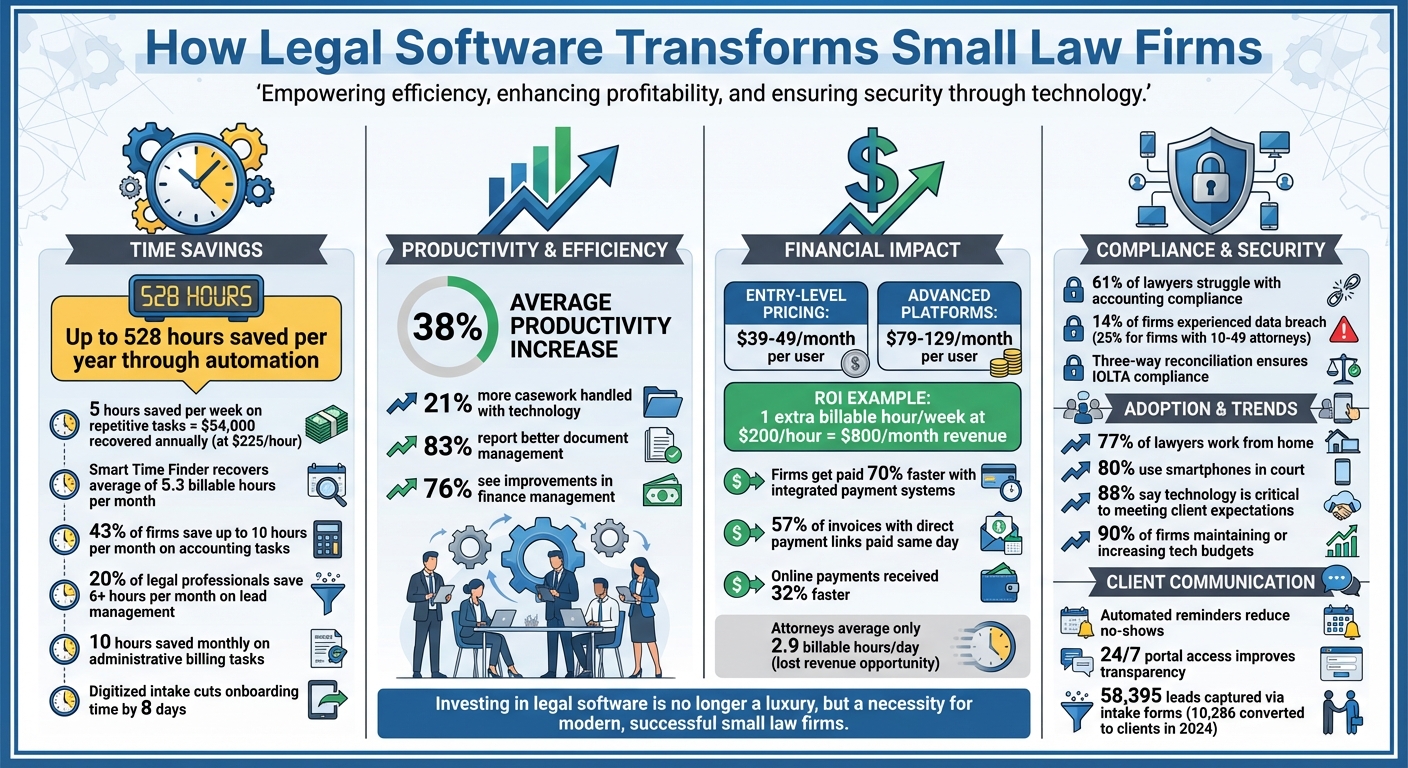
Legal Software Benefits for Small Law Firms: Time Savings, Cost & ROI Statistics
Assess Your Firm's Case Management Needs
Identify Workflow Problems
Take a close look at where your current system falls short. Are files getting misplaced? Is tracking deadlines a manual headache? Or are you drowning in endless email threads? These are clear signs that legal software could make a difference. Pinpoint specific trouble spots - are you spending time copying data between systems or struggling to access important files while at court or working remotely? If your team is losing hours reconciling case details across spreadsheets, it's time to rethink your process.
Don’t overlook how inefficiencies can chip away at your revenue. Small firms often lose anywhere from 10% to 50% of their billable hours due to outdated manual time-tracking methods. Frequent no-shows or delays in payments are also red flags. Features like automated text reminders can cut down on missed appointments, while online payment portals help speed up collections. Firms that adopt these tools often get paid more than twice as fast compared to those sticking with manual methods. Addressing these challenges can help you prioritize the features you need most.
Define Key Features for Small Firms
Focus on tools that solve your specific workflow problems. A centralized system that organizes documents, contacts, and case details in one place can significantly cut down on non-billable tasks. Automated client intake forms that sync directly with your CRM can also save time and reduce errors.
Integrated billing and payment systems are a must to avoid juggling multiple platforms, and they ensure compliance with trust accounting rules. Document automation tools that auto-fill case details - like names, dates, and case numbers - can save hours of manual work each day. With 77% of lawyers working from home and 80% using smartphones in court, having cloud-based mobile access isn’t just convenient - it’s essential. For secure communication, client portals with encryption provide a safer way to share sensitive files compared to standard email.
Set a Realistic Budget
On average, law firms dedicate 5–7% of their revenue to legal technology, which includes software, training, and support. Entry-level platforms usually cost between $39 and $49 per user per month, while more advanced, all-in-one options range from $79 to $129 per user per month. Think about the return on investment: capturing just one extra billable hour per week at $200 per hour could add $800 to your monthly revenue - more than enough to offset the software costs.
Don’t forget to account for the total cost of ownership. Beyond subscription fees, consider expenses like implementation, data migration, third-party integrations, and training. Cloud-based solutions often come with predictable monthly costs and automatic updates, while on-premise systems may require pricey IT support, hardware upgrades, and steep upfront licensing fees. To keep costs manageable, start with the basic features you need and expand as your practice grows. This approach ensures scalability without overwhelming your budget.
Configure Legal Software for Better Efficiency
Standardize Case Templates and Data Fields
Using custom matter templates can significantly speed up case creation while keeping data consistent across the board. Start by defining essential fields like Case ID, Start Date, Case Owner, and Description. Then, include fields tailored to your practice area - such as medical liens for personal injury cases or custody details for family law matters. Organizing templates into key sections can also help. For example:
- Cases: ID, owner, description
- Contacts: Witnesses, opposing counsel, judges
- Clients: Linked contacts
- Accounts: Billing status
- Tasks: Assignees, deadlines
By mapping digital intake forms directly to these fields, client responses automatically populate case profiles, cutting out duplicate data entry. The result? Law firms leveraging technology like this can handle up to 21% more casework. These templates not only streamline processes but also set the stage for smoother document management and scheduling automation.
Organize Document Management Systems
A centralized, cloud-based document system can eliminate versioning issues and make retrieving files much faster. To keep everything organized, adopt a clear naming convention. For instance:
"2025-12-20_Smith_MotionToDismiss_v2"
This format includes the date (YYYY-MM-DD), client name or case ID, document type, and version number.
Nicole Black, Principle Legal Insight Strategist at MyCase and LawPay, emphasizes the importance of consistency:
"A consistent, uniform document-naming approach makes documents easier to locate and harder to misplace. This step may seem basic, but without it, the most advanced document system becomes useless."
To protect document integrity, set up role-based permissions. For example, allow intake teams to upload files, paralegals to edit and tag documents, and reserve deletion or archiving rights for partners. Incorporating tools like searchable PDFs with OCR and Bates numbering can also make it easier to find specific clauses or sections. Additionally, maintaining a library of templates for frequently used motions or clauses saves drafting time and ensures uniformity across documents.
Set Up Calendars and Task Automation
Integrated calendars can consolidate all case-related events, meetings, and deadlines into one view. Automating deadline calculations based on local court rules is another game-changer. Tools like LawToolBox can populate critical dates automatically, reducing the risk of missed deadlines. To stay on top of tasks, set up multi-stage reminders - such as notifications 30 days, 7 days, and 24 hours before a deadline.
Automated task lists tied to matter templates can further simplify workflows. For instance, automating repetitive tasks could save an attorney five hours per week. At a billing rate of $225 per hour, that adds up to approximately $54,000 in recovered time annually. Syncing your legal software with platforms like Outlook or Google Calendar ensures real-time updates and automatic time zone adjustments for remote teams. These integrations complement the broader goal of streamlined case management, making it easier to stay organized and efficient.
Automate Routine Tasks to Save Time
Simplify Client Intake
Online intake forms equipped with conditional logic can cut down on the time spent entering data. These forms adapt based on a client’s responses - asking only the necessary follow-up questions. For instance, if a client selects "Divorce", the form might then request spouse details. This keeps forms concise and relevant. In 2024, MyCase users employing embedded, customized intake forms captured 58,395 leads, converting 10,286 of them into clients. Plus, direct integration with case management systems ensures that data flows seamlessly into case profiles. Catherine Brock, Content Writer at MyCase, highlights the benefit:
"Integrating the intake process into the practice management application allows client information to stay in the same place throughout the client's lifecycle with the firm."
Adding AI chatbots to your website can further enhance lead capture. These bots work around the clock, qualifying potential clients, answering basic questions, and even scheduling consultations. Built-in e-signature capabilities allow engagement letters and fee agreements to be signed instantly. Research indicates that 20% of legal professionals using lead management software save at least six hours per month. Additionally, firms that respond to leads within one business day are much more likely to secure those clients. This streamlined approach to intake also sets the stage for smoother billing processes.
Automate Billing and Payments
Tracking billable hours manually can lead to lost revenue, as U.S. attorneys, on average, log only 2.9 billable hours per day. Time-tracking tools integrated into legal software allow attorneys to record hours effortlessly - whether on a mobile app or desktop. Once the hours are logged, automated billing features generate invoices on a consistent schedule, whether weekly, bi-weekly, or monthly. Including direct payment links in digital invoices makes it easier for clients to pay. In fact, 57% of invoices with direct payment options are paid on the same day, and overall payments are received 32% faster when processed online.
Automated reminders help with fee collection, addressing a common challenge for 68% of law firms. These reminders can save up to 10 hours each month on administrative billing tasks. By improving billing accuracy and efficiency, legal professionals can focus more on their cases. Similarly, automating document workflows can further streamline operations.
Use Templates for Common Documents
Reusable templates are a game-changer for reducing repetitive drafting. Frequently used documents like client correspondence, fee agreements, and court-specific motions are ideal starting points. Legal software makes it simple to create templates with variable fields and conditional logic, automatically populating them with client and case data collected during intake. The results speak for themselves: over half of law firms report gaining additional billable hours thanks to document automation, with 9% noting at least 15 extra hours billed per month.
For specialized practices, templates can be tailored to specific needs. Examples include medical lien tracking and demand letters for personal injury cases, court date scheduling for criminal defense, or LEDES-coded invoices for insurance defense. Karine E. Sokpoh, Managing Attorney at 402 Legal, underscores the value of automation:
"I could not imagine running this firm without Clio. I would be spending half of my day on administrative tasks. It would not be productive."
Templates not only standardize language and formatting but also reduce errors, speeding up case processing and improving overall efficiency.
Basic Tech for Your Solo or Small Firm
sbb-itb-d1a6c90
Improve Compliance, Security, and Client Service
Legal software does more than just streamline your daily operations - it also strengthens compliance, boosts security, and enhances how you interact with clients.
Ensure Trust Accounting Compliance
Managing client trust accounts can be a tricky task. In fact, 61% of lawyers say accounting is one of their biggest challenges. Legal software simplifies this by automatically tracking transactions and keeping trust and operating accounts separate, ensuring there's no commingling of funds. A key feature is three-way reconciliation, which aligns trust, client, and bank records to meet IOLTA requirements. This automation not only keeps firms audit-ready but also saves up to 10 hours each month on compliance-related tasks.
Another helpful safeguard is low-balance alerts, which prevent overdrafts that could violate state bar rules. Lance Kennedy, Founding Attorney at Lance Kennedy Law, highlights the benefits:
"Having both financials and case data in one place has been really helpful".
By integrating trust accounting into case management software, small firms can cut down on ethical risks and simplify bookkeeping. In fact, 43% of law firms report saving up to 10 hours per month with legal-specific accounting tools. But compliance isn’t just about financials - protecting client data is just as important.
Improve Data Security
Keeping client information secure is a fundamental responsibility for law firms. Yet, 14% of firms have experienced a data breach, and that number jumps to 25% for firms with 10 to 49 attorneys. Legal software addresses these concerns with bank-grade encryption that protects data both at rest and in transit. Role-based permissions ensure staff only access what they’re authorized to see, while audit logs track all changes for accountability.
Cloud-based platforms add another layer of protection by storing data redundantly across secure locations. Clio emphasizes the advantages:
"Storing information in a cloud-based practice management software can also be more secure than an on-premise solution, which if not kept up-to-date with the most current security requirements, may be subject to malicious hacking or virus attacks".
The American Bar Association echoes this sentiment:
"In the world of cybersecurity, you often get what you pay for".
Encrypted client portals take security a step further, ensuring sensitive communications remain confidential while reducing risks. With these robust measures in place, firms can then focus on improving how they communicate with clients.
Improve Client Communication
Secure client portals provide 24/7 access to case updates, documents, and invoices. This level of transparency builds trust, as clients can monitor their cases in real time. Two-way business texting is another game-changer, allowing attorneys to communicate through a dedicated business number, keeping personal contact details private while meeting client expectations for quick responses. Brandon Osterbind of Osterbind Law PLLC shares his success:
"For better follow through with appointments, we send MyCase text reminders to both current and prospective clients. I rarely have a no-show".
Automated reminders for court dates, meetings, and unpaid invoices also help reduce no-shows and ensure faster payments. Firms using integrated payment systems, for example, get paid 70% faster than the industry average. Additionally, centralized and encrypted logs of all client interactions not only protect attorney-client privilege but also boost efficiency. In fact, 83% of firms report better document management, and 76% see improvements in finance management.
Use Curated Directories to Choose Legal Tools
Once you've streamlined your internal processes, the next step is finding the right legal software to support your operations. This can feel overwhelming with so many options available. That's where curated directories come in - they simplify the decision-making process by organizing tools into easy-to-navigate categories, making it simpler to compare features side by side.
Explore Business Tool Directories
Platforms like BizBot categorize business tools into sections such as legal, accounting, HR, and management. This structure makes it easier to evaluate tools and find ones that align with your needs. For small firms managing multiple tools - like email platforms, document management systems, and bookkeeping software - these directories are a lifesaver. They also highlight integrations that eliminate repetitive tasks, such as manual data entry. For example, Clio integrates with over 200 legal software tools, allowing you to create a seamless tech ecosystem from the start. By showcasing these integrations upfront, directories help you choose tools that work together effortlessly.
Focus on Small-Firm Needs
When building your tech stack, it's crucial to focus on tools designed for small firms. Not every legal software solution is a good fit for solo practitioners or small teams. Use filters to find software tailored to your firm's size, and prioritize options with modern, user-friendly interfaces. Cloud-based solutions are especially valuable - they provide remote access and automatic updates, which are critical since 77% of lawyers regularly work from home. Directories that emphasize these features can help you avoid the upfront costs of on-premise systems while ensuring security and convenience.
Manage Software Expenses
Running multiple tools can quickly add up in subscription costs. BizBot, for instance, offers subscription management features to help you track spending and avoid paying for underused tools. Directories also flag software with unclear or high pricing, helping you make informed decisions. Look for all-in-one platforms that combine case management, billing, and document services to reduce the need for multiple subscriptions. Features like e-signatures and payment processing, included at no extra cost, can further stretch your budget. Since cloud-based tools often use predictable monthly or annual subscription models, directories make it easy to compare costs and choose solutions that grow with your firm - without requiring expensive overhauls. By keeping expenses in check, small firms can build a tech stack that improves case management without breaking the bank.
Conclusion
Legal software streamlines operations, automates time-consuming tasks, and boosts client satisfaction. By consolidating case files, calendars, billing, and contact details into one accessible dashboard, firms create a centralized system that simplifies daily workflows and ensures critical information is always within reach.
This centralization translates into real efficiency. Firms using legal case management software report productivity increases of around 38%. Tools like MyCase's "Smart Time Finder" even help attorneys recover an average of 5.3 additional billable hours each month.
To get started, evaluate your firm's specific needs. Pinpoint workflow bottlenecks - whether it's missed deadlines, delayed invoicing, or disorganized client intake - and focus on software that directly addresses these challenges. Standardize case templates, organize document management systems, and automate calendars and task assignments. This setup allows you to spend more time practicing law instead of managing administrative tasks.
Tackling workflow inefficiencies also opens the door to greater automation benefits. For example, digitized client intake forms can cut onboarding time by as much as eight days. Automated billing and document templates save hours typically lost to repetitive tasks. With 88% of legal professionals acknowledging that technology is critical to meeting client expectations, adopting these tools gives firms a competitive advantage.
Security and compliance should be top priorities when selecting a platform. Look for features like bank-grade encryption, role-based access controls, and built-in trust accounting safeguards. These measures are essential for maintaining client trust and meeting professional standards.
When upgrading your tech stack, consider using resources like BizBot to compare legal tools tailored for small firms. These directories help you evaluate features, manage costs, and find solutions that integrate smoothly with your existing systems. With 90% of law firms planning to maintain or increase their technology budgets, investing in the right software positions your firm for long-term success. By improving efficiency, small firms can remain competitive while continuing to deliver high-quality service.
FAQs
How does legal software help small law firms comply with trust accounting rules?
Legal software takes the headache out of trust accounting compliance by automating key tasks like tracking client funds, logging transactions, and producing precise reports. These tools create separate trust ledgers for every case, ensuring that every deposit, withdrawal, or transfer is accurately recorded and balanced. This not only minimizes the chances of errors but also helps law firms stay in line with state bar regulations.
Many of these platforms also come with built-in safeguards, such as alerts to flag policy violations (like mixing client funds with operating funds) and workflow rules to ensure proper fund management. On top of that, the software can produce audit-ready reports, streamlining external reviews and saving valuable time. For small law firms, adopting these tools can mean fewer costly mistakes, more time saved, and more energy to focus on what matters most - serving their clients.
What costs should small law firms consider when adopting legal software?
Small law firms need to keep a few key expenses in mind when adopting legal software. Subscription fees are usually charged per user or per attorney, with basic tools like time tracking and billing costing around $30 to $100 per month. If you're looking for more advanced features - such as case management, document storage, or client communication - expect to pay between $50 and $200 per user each month. Many providers offer tiered plans, allowing firms to start with a simpler option and upgrade later. Opting for annual payments can often result in savings.
Beyond subscription costs, it's smart to budget for training, integration with existing tools, and optional add-ons like payment processing or advanced reporting. Cloud-based solutions typically include updates and security in their fees, which means you won’t need to worry about separate maintenance costs. To simplify the process of comparing pricing and features, BizBot’s legal-software directory is a helpful resource for estimating total costs and exploring free trials.
How can legal software improve client communication and protect sensitive data?
Legal software offers small law firms a way to streamline and secure client communication. With features like built-in client portals, clients can easily access updates, download documents, and exchange messages in a protected environment. This eliminates the risks associated with unencrypted emails or casual messaging apps. Additionally, automated reminders for invoices, meetings, and important deadlines improve efficiency and demonstrate professionalism, which helps establish trust with clients.
When it comes to security, modern legal tools are designed to protect sensitive case information. They utilize encryption, firewalls, and secure cloud storage to keep data safe. Many platforms also include role-based access controls and continuous monitoring to prevent unauthorized access. These measures not only help firms comply with privacy laws like GDPR and CCPA but also fulfill ethical obligations. By automating these safeguards, small firms can minimize risks, save valuable time, and maintain the confidentiality their clients expect.